
With the latest update SuperDepth3D shader for Reshade supports Frame Packing 3D format and thus full 1080p frame per eye is possible now.
I created a 1920x2205 60Hz resolution in CRU and it works fine in Windows desktop:
https://i.imgur.com/PvXSTV9.png
and my projector work fine with it and the ...
Search found 31 matches
- 07 Jul 2025, 11:32
- Forum: General — Displays, Graphics & More
- Topic: Any way to force 16:9 AR to non standard resolution?
- Replies: 1
- Views: 7629
- 26 Jun 2025, 20:27
- Forum: General — Displays, Graphics & More
- Topic: How to get perfect smooth video playback using SVP with RIFE?
- Replies: 14
- Views: 15000
Re: How to get perfect smooth video playback using SVP with RIFE?
Thanks for the detailed explanation. SVP currently allows to choose different scaling methods: Bilinear, Bicubic, Lanczos, Spline36 and Spline64.
As I understand, your solution works launching a custom configured version of MPV?
Can it work with other video players? I'm not a fan of MPV and use a ...
As I understand, your solution works launching a custom configured version of MPV?
Can it work with other video players? I'm not a fan of MPV and use a ...
- 16 Jun 2025, 17:52
- Forum: General — Displays, Graphics & More
- Topic: How to get perfect smooth video playback using SVP with RIFE?
- Replies: 14
- Views: 15000
Re: How to get perfect smooth video playback using SVP with RIFE?
This is a super odd issue. I haven't run into it as far as I can tell using RIFE in my Vint software.
Didn't know your software even existed. If it's using the same RIFE models, how are its results different than SVP RIFE? I mean in terms of smoothness / artifacts quality, not the ...
- 16 Jun 2025, 05:36
- Forum: General — Displays, Graphics & More
- Topic: How to get perfect smooth video playback using SVP with RIFE?
- Replies: 14
- Views: 15000
Re: How to get perfect smooth video playback using SVP with RIFE?
Yes, I was able to fix the weird stuttering using a secondary GPU just for video output. Something seems to be wrong with Nvidia GPUs in this regard, no matter the drivers version, etc.
Other people fixed it using their integrated gpu, as my CPU doesn't have one I had to buy a cheap AMD card.
Other people fixed it using their integrated gpu, as my CPU doesn't have one I had to buy a cheap AMD card.
- 25 Oct 2024, 06:34
- Forum: General — Displays, Graphics & More
- Topic: How to get perfect smooth video playback using SVP with RIFE?
- Replies: 14
- Views: 15000
Re: How to get perfect smooth video playback using SVP with RIFE?
Ok, I found out the thing that was maxing out one core is RTSS frame limiting when using async active:
https://i.postimg.cc/DZzkMCfr/image.png
Using passive or Front Sync, Back Sync or Nvidia Reflex does not max one core... but has a lot of stuttering.
So, the only thing that fixes the ...
https://i.postimg.cc/DZzkMCfr/image.png
Using passive or Front Sync, Back Sync or Nvidia Reflex does not max one core... but has a lot of stuttering.
So, the only thing that fixes the ...
- 24 Oct 2024, 00:17
- Forum: General — Displays, Graphics & More
- Topic: How to get perfect smooth video playback using SVP with RIFE?
- Replies: 14
- Views: 15000
Re: How to get perfect smooth video playback using SVP with RIFE?
So, best detection so far is using RTSS. Here the framegraph limits are min 16.5 and max 17ms, so any minor stutter can be clearly seen.
But even frame limiting a bit under the refresh rate and with a perfectly flat framegraph... there are still visible microstutters.
https://i.postimg.cc ...
But even frame limiting a bit under the refresh rate and with a perfectly flat framegraph... there are still visible microstutters.
https://i.postimg.cc ...
- 21 Oct 2024, 09:08
- Forum: General — Displays, Graphics & More
- Topic: How to get perfect smooth video playback using SVP with RIFE?
- Replies: 14
- Views: 15000
Re: How to get perfect smooth video playback using SVP with RIFE?
Did more tests and although not perfect, PotPlayer runs smoother for me than MPV (SMPlayer) with either EVR Custom Present and these settings:
https://i.postimg.cc/50RCLcZG/image.png
or MPCVR with these settings:
https://i.postimg.cc/Dzf6cTMy/image.png
Besides the 30 seconds long dolly from ...
https://i.postimg.cc/50RCLcZG/image.png
or MPCVR with these settings:
https://i.postimg.cc/Dzf6cTMy/image.png
Besides the 30 seconds long dolly from ...
- 21 Oct 2024, 09:07
- Forum: General — Displays, Graphics & More
- Topic: How to get perfect smooth video playback using SVP with RIFE?
- Replies: 14
- Views: 15000
Re: How to get perfect smooth video playback using SVP with RIFE?
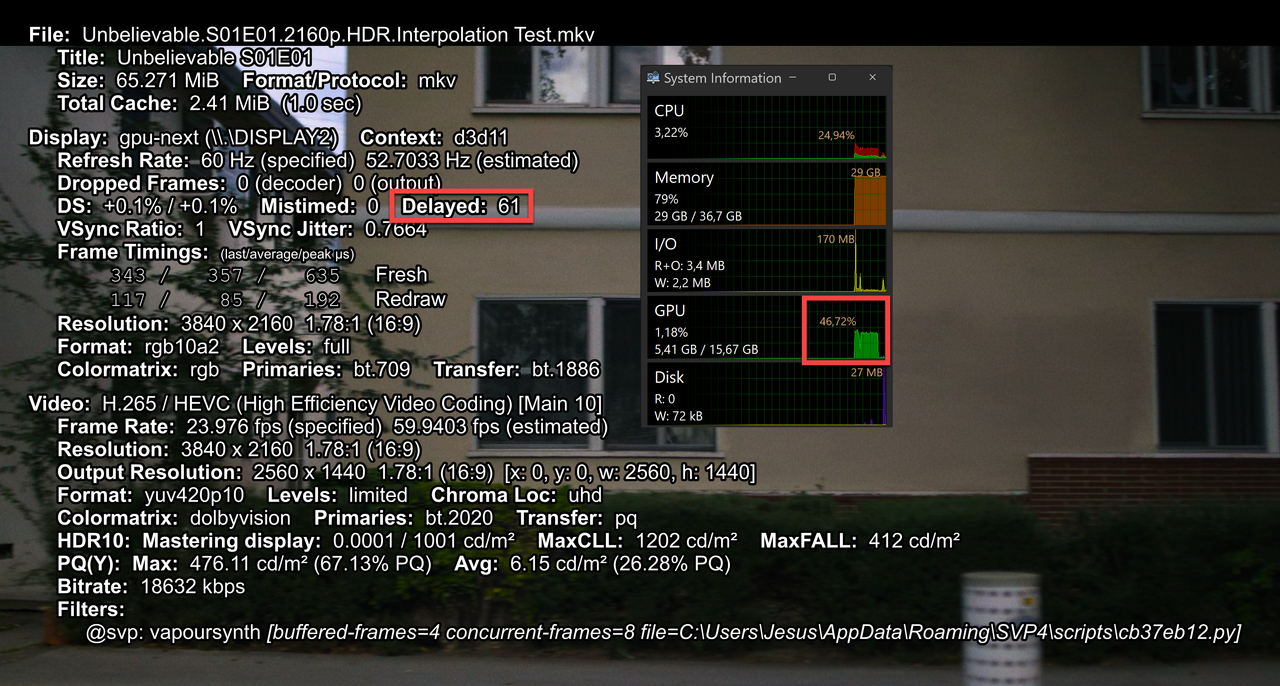
Same happens with lower models like 4.0 or 4.6 with a GPU usage well below 50%...
- 21 Oct 2024, 09:06
- Forum: General — Displays, Graphics & More
- Topic: How to get perfect smooth video playback using SVP with RIFE?
- Replies: 14
- Views: 15000
Re: How to get perfect smooth video playback using SVP with RIFE?
My main video player is PotPlayer, but same happens in MPV (SMPlayer), with this source (65MB): https://drive.google.com/open?id=1SWNDEi67h43yxRn_DZYz82d45po7DBGO&usp=drive_fs
using these settings --hr-seek-framedrop=no --framedrop=no --video-sync=display-tempo
with 'Decrease to FHD/1080p ...
using these settings --hr-seek-framedrop=no --framedrop=no --video-sync=display-tempo
with 'Decrease to FHD/1080p ...
- 21 Oct 2024, 09:04
- Forum: General — Displays, Graphics & More
- Topic: How to get perfect smooth video playback using SVP with RIFE?
- Replies: 14
- Views: 15000
Re: How to get perfect smooth video playback using SVP with RIFE?
And even more tests.
Tried with a different model, 4.22 lite v2:
https://i.imgur.com/ebUs08M.png
and a 1080p source ( https://drive.google.com/file/d/1DJc1U9tTB3LSZMM_lMnX7_c9AT-6k16A/view?usp=sharing )
Using 'Decrease to FHD/1080p' there are no skipped frames:
https://i.imgur.com/eiG5dMD.png ...
Tried with a different model, 4.22 lite v2:
https://i.imgur.com/ebUs08M.png
and a 1080p source ( https://drive.google.com/file/d/1DJc1U9tTB3LSZMM_lMnX7_c9AT-6k16A/view?usp=sharing )
Using 'Decrease to FHD/1080p' there are no skipped frames:
https://i.imgur.com/eiG5dMD.png ...