
Gsync vsync lag with dolphin
Gsync vsync lag with dolphin
Not sure if this is the correct place to ask this, but I was wondering why I feel considerable more input lag when playing Melee on dolphin emulator with gsync and vsync enabled on nvcp, compared to gsync with vsync off. I use a 360hz alienware, and the game is capped at 60fps, so vsync shouldn’t be adding any additional lag correct? Is it just vsync not behaving well with dolphin/melee? Sorry if this post is redundant/already been answered before.

Re: Gsync vsync lag with dolphin
Are you sure the display is actually running at 360Hz when running Dolphin? Check the monitor's OSD for what the current display mode is.
Steam • GitHub • Stack Overflow
The views and opinions expressed in my posts are my own and do not necessarily reflect the official policy or position of Blur Busters.
The views and opinions expressed in my posts are my own and do not necessarily reflect the official policy or position of Blur Busters.
Re: Gsync vsync lag with dolphin
Yeah to my knowledge it should be running g-sync @ 360hz, the osd shows 60hz because 60fps on dolphin though.
Re: Gsync vsync lag with dolphin
yes but dolphin is at 60fps, he will see 60hz with gsync in the osd.
Nope ?
Nope ?

Re: Gsync vsync lag with dolphin
Most monitor OSDs have a readout separate of the real-time VRR frame/refresh rate meter that shows the actual current max physical refresh rate. Mine does.
For instance, my monitor's G-SYNC meter will show as "60" in a 60 FPS game:
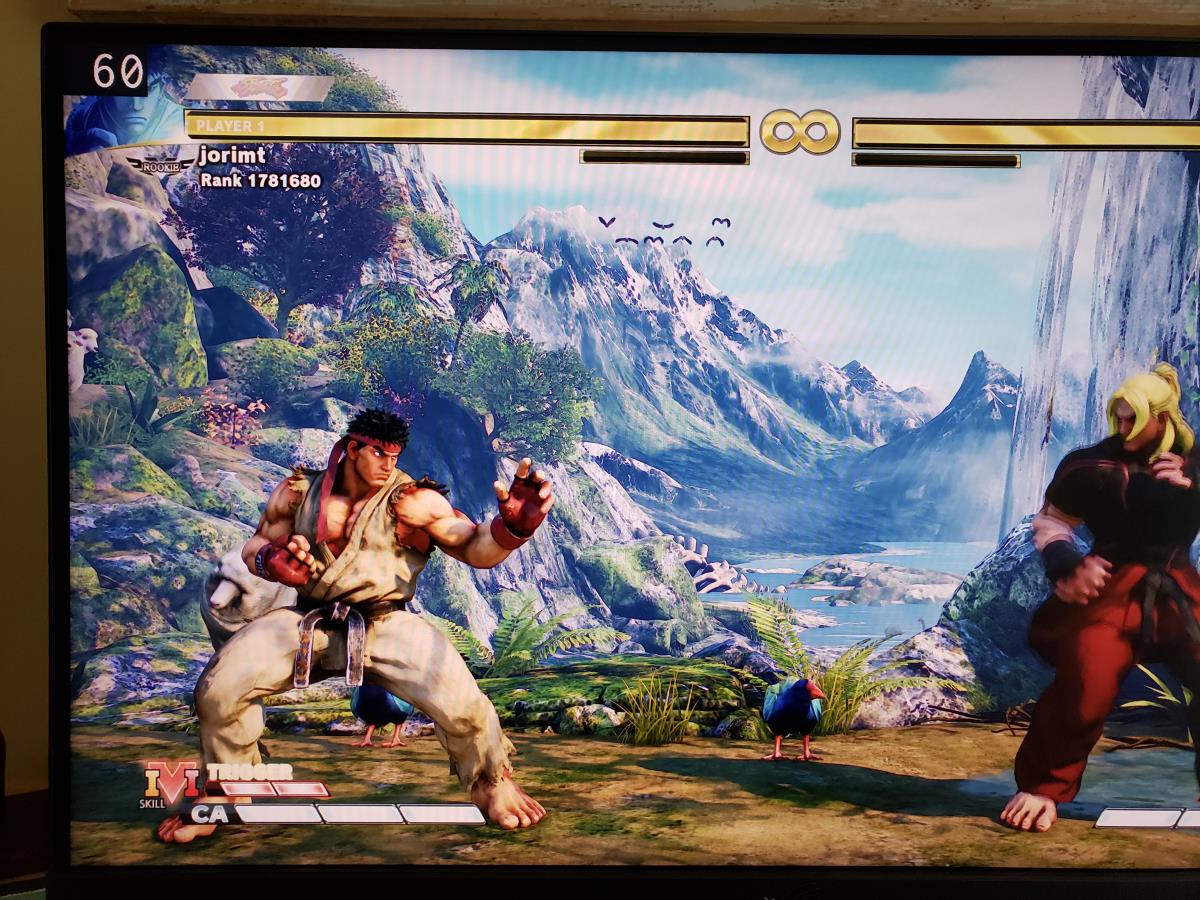
But the overlay will show 2560x1440@240 Hz:
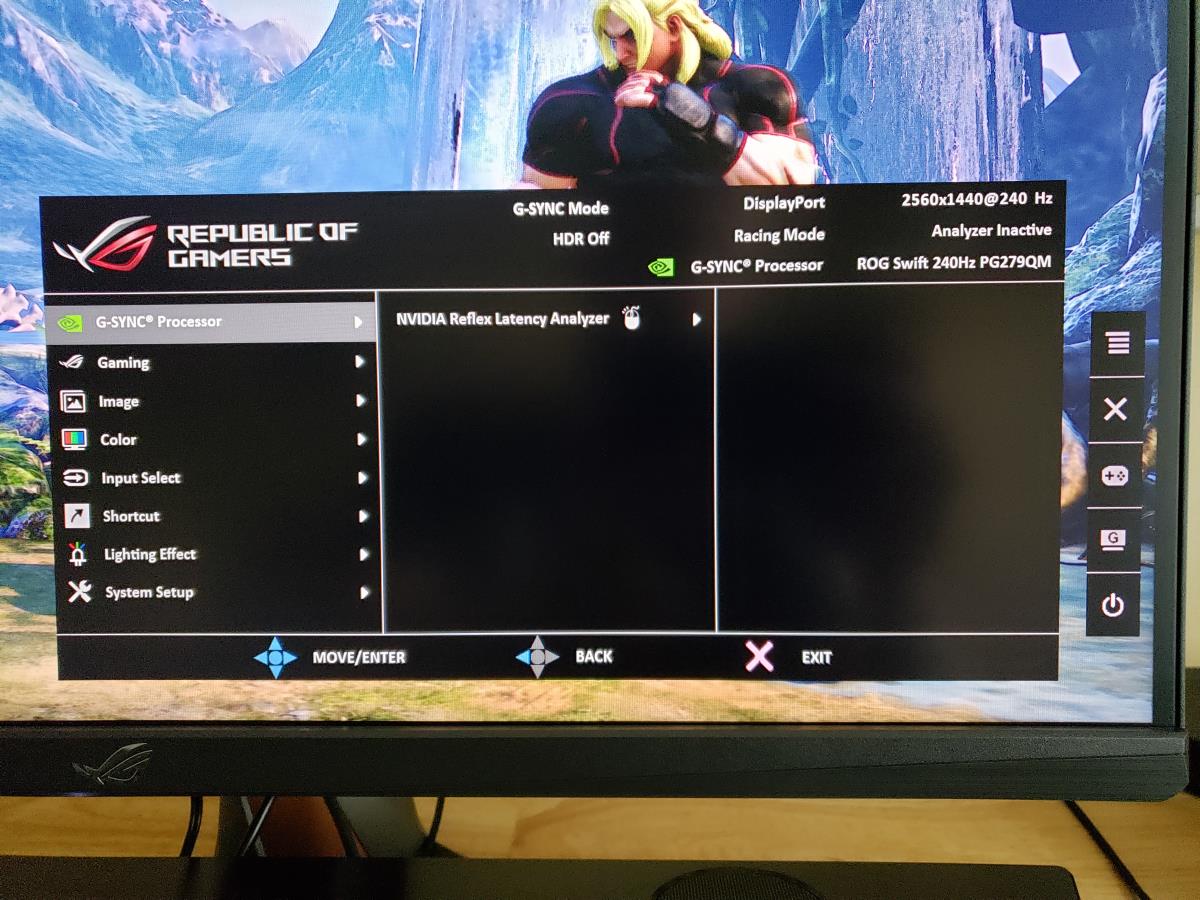
If I have it improperly configured and/or the game or app is also forcing my physical refresh rate to 60Hz in G-SYNC mode for whatever reason, then I will instead see 2560x1440@60 Hz, which is what you don't want.
(jorimt: /jor-uhm-tee/)
Author: Blur Busters "G-SYNC 101" Series
Displays: ASUS PG27AQN, LG 48C4 Scaler: RetroTINK 4k Consoles: Dreamcast, PS2, PS3, PS5, Switch 2, Wii, Xbox, Analogue Pocket + Dock VR: Beyond 2, Quest 3, Reverb G2, Index OS: Windows 11 Pro Case: Fractal Design Torrent PSU: Seasonic PRIME TX-1000 MB: ASUS Z790 Hero CPU: Intel i9-13900k w/Noctua NH-U12A GPU: GIGABYTE RTX 4090 GAMING OC RAM: 32GB G.SKILL Trident Z5 DDR5 6400MHz CL32 SSDs: 2TB WD_BLACK SN850 (OS), 4TB WD_BLACK SN850X (Games) Keyboards: Wooting 60HE, Logitech G915 TKL Mice: Razer Viper Mini SE, Razer Viper 8kHz Sound: Creative Sound Blaster Katana V2 (speakers/amp/DAC), AFUL Performer 8 (IEMs)
Author: Blur Busters "G-SYNC 101" Series
Displays: ASUS PG27AQN, LG 48C4 Scaler: RetroTINK 4k Consoles: Dreamcast, PS2, PS3, PS5, Switch 2, Wii, Xbox, Analogue Pocket + Dock VR: Beyond 2, Quest 3, Reverb G2, Index OS: Windows 11 Pro Case: Fractal Design Torrent PSU: Seasonic PRIME TX-1000 MB: ASUS Z790 Hero CPU: Intel i9-13900k w/Noctua NH-U12A GPU: GIGABYTE RTX 4090 GAMING OC RAM: 32GB G.SKILL Trident Z5 DDR5 6400MHz CL32 SSDs: 2TB WD_BLACK SN850 (OS), 4TB WD_BLACK SN850X (Games) Keyboards: Wooting 60HE, Logitech G915 TKL Mice: Razer Viper Mini SE, Razer Viper 8kHz Sound: Creative Sound Blaster Katana V2 (speakers/amp/DAC), AFUL Performer 8 (IEMs)
Re: Gsync vsync lag with dolphin
I have the Alienware aw2521h, it doesn’t seem to have that option just the current hz. I don’t think dolphin is forcing 60hz g sync either because it feels fine when all settings are the same except vsync off.
Re: Gsync vsync lag with dolphin
I looked up your monitor's manual. From what I can tell:
1. AW2521H OSD > Others > Display Info > Current shows the current maximum physical refresh rate.
2. AW2521H OSD > Game > Game Enhance Mode > On shows the current real-time refresh/framerate in G-SYNC mode.
In G-SYNC mode, you want #1 at 360Hz, and you want #2 at ~60 FPS (or whatever the current Dolphin game's native framerate is).
As for G-SYNC on + V-SYNC on vs. G-SYNC on + V-SYNC off, the only latency differences within the refresh rate (where 60 FPS is already 300 frames within the G-SYNC range at 360Hz) is tearing.
I.E. visible tearing is only latency reduction between the two, so if you think you're experiencing any other form of latency with G-SYNC on + V-SYNC on vs G-SYNC on + V-SYNC off, it's likely either placebo, or G-SYNC isn't actually engaged in Dolphin and you're toggling standalone V-SYNC, which can feel notably laggier than off.
Make sure G-SYNC is actually active. Also verify that you are running Dolphin in fullscreen and not borderless mode.
(jorimt: /jor-uhm-tee/)
Author: Blur Busters "G-SYNC 101" Series
Displays: ASUS PG27AQN, LG 48C4 Scaler: RetroTINK 4k Consoles: Dreamcast, PS2, PS3, PS5, Switch 2, Wii, Xbox, Analogue Pocket + Dock VR: Beyond 2, Quest 3, Reverb G2, Index OS: Windows 11 Pro Case: Fractal Design Torrent PSU: Seasonic PRIME TX-1000 MB: ASUS Z790 Hero CPU: Intel i9-13900k w/Noctua NH-U12A GPU: GIGABYTE RTX 4090 GAMING OC RAM: 32GB G.SKILL Trident Z5 DDR5 6400MHz CL32 SSDs: 2TB WD_BLACK SN850 (OS), 4TB WD_BLACK SN850X (Games) Keyboards: Wooting 60HE, Logitech G915 TKL Mice: Razer Viper Mini SE, Razer Viper 8kHz Sound: Creative Sound Blaster Katana V2 (speakers/amp/DAC), AFUL Performer 8 (IEMs)
Author: Blur Busters "G-SYNC 101" Series
Displays: ASUS PG27AQN, LG 48C4 Scaler: RetroTINK 4k Consoles: Dreamcast, PS2, PS3, PS5, Switch 2, Wii, Xbox, Analogue Pocket + Dock VR: Beyond 2, Quest 3, Reverb G2, Index OS: Windows 11 Pro Case: Fractal Design Torrent PSU: Seasonic PRIME TX-1000 MB: ASUS Z790 Hero CPU: Intel i9-13900k w/Noctua NH-U12A GPU: GIGABYTE RTX 4090 GAMING OC RAM: 32GB G.SKILL Trident Z5 DDR5 6400MHz CL32 SSDs: 2TB WD_BLACK SN850 (OS), 4TB WD_BLACK SN850X (Games) Keyboards: Wooting 60HE, Logitech G915 TKL Mice: Razer Viper Mini SE, Razer Viper 8kHz Sound: Creative Sound Blaster Katana V2 (speakers/amp/DAC), AFUL Performer 8 (IEMs)
Re: Gsync vsync lag with dolphin
Hmm okay yeah the current shows 360hz and the game enhance shows 60hz, so gsync is enabled and it’s checked for just fullscreen, same with dolphin, fullscreen with no vsync, just nvcp vsync. It definitely isn’t placebo I can feel a difference in my inputs, I can’t hit tech that I can with it off.
Re: Gsync vsync lag with dolphin
Then with that all ruled out, and assuming G-SYNC is indeed engaged, the issue may be specific to SSBM. I don't even remember if it was synced on the original console. If you're using netplay that could also be a factor.hexism wrote: ↑18 Sep 2022, 09:53Hmm okay yeah the current shows 360hz and the game enhance shows 60hz, so gsync is enabled and it’s checked for just fullscreen, same with dolphin, fullscreen with no vsync, just nvcp vsync. It definitely isn’t placebo I can feel a difference in my inputs, I can’t hit tech that I can with it off.
Basically, Dolphin emulation of a twitch game like SSBM with or without netplay is a fringe scenario for G-SYNC, and for all we know additional buffering issues could be triggered when the V-SYNC flag is enabled for that game in certain situations, regardless if G-SYNC is enabled.
As such, feel free to play with G-SYNC on + V-SYNC off or G-SYNC off + V-SYNC off in that particular game if it feels better for you.
(jorimt: /jor-uhm-tee/)
Author: Blur Busters "G-SYNC 101" Series
Displays: ASUS PG27AQN, LG 48C4 Scaler: RetroTINK 4k Consoles: Dreamcast, PS2, PS3, PS5, Switch 2, Wii, Xbox, Analogue Pocket + Dock VR: Beyond 2, Quest 3, Reverb G2, Index OS: Windows 11 Pro Case: Fractal Design Torrent PSU: Seasonic PRIME TX-1000 MB: ASUS Z790 Hero CPU: Intel i9-13900k w/Noctua NH-U12A GPU: GIGABYTE RTX 4090 GAMING OC RAM: 32GB G.SKILL Trident Z5 DDR5 6400MHz CL32 SSDs: 2TB WD_BLACK SN850 (OS), 4TB WD_BLACK SN850X (Games) Keyboards: Wooting 60HE, Logitech G915 TKL Mice: Razer Viper Mini SE, Razer Viper 8kHz Sound: Creative Sound Blaster Katana V2 (speakers/amp/DAC), AFUL Performer 8 (IEMs)
Author: Blur Busters "G-SYNC 101" Series
Displays: ASUS PG27AQN, LG 48C4 Scaler: RetroTINK 4k Consoles: Dreamcast, PS2, PS3, PS5, Switch 2, Wii, Xbox, Analogue Pocket + Dock VR: Beyond 2, Quest 3, Reverb G2, Index OS: Windows 11 Pro Case: Fractal Design Torrent PSU: Seasonic PRIME TX-1000 MB: ASUS Z790 Hero CPU: Intel i9-13900k w/Noctua NH-U12A GPU: GIGABYTE RTX 4090 GAMING OC RAM: 32GB G.SKILL Trident Z5 DDR5 6400MHz CL32 SSDs: 2TB WD_BLACK SN850 (OS), 4TB WD_BLACK SN850X (Games) Keyboards: Wooting 60HE, Logitech G915 TKL Mice: Razer Viper Mini SE, Razer Viper 8kHz Sound: Creative Sound Blaster Katana V2 (speakers/amp/DAC), AFUL Performer 8 (IEMs)
Re: Gsync vsync lag with dolphin
I've been stumped as to why it feels different for a while now, I've asked on the slippi/dolphin discord too, I imagine it's as you say, something must be funky with its implementation. Thank you for the help!