120Hz reduces input lag of 30fps and 60fps!

All newer XBOX consoles supports 120Hz+ & FreeSync. Getting help with getting "Better Than 60Hz" on the XBOX ONE, XBOX Series S, and XBOX Series X, as well as the PlayStation 5.
User avatar
RealNC
Site Admin
Posts: 4432
Joined: 24 Dec 2013, 18:32
Contact:

Re: 120Hz reduces input lag of 30fps and 60fps!

Post by RealNC » 10 Mar 2025, 13:18

Enigma wrote:
10 Mar 2025, 11:04
So VRR doesn't change the display's inherent scanout Hz, but only changes the display's refreshing Hz? I thought the two were connected.
Scanout speed and refresh rate are two separate things. You can even accelerate scanout speed at low fixed refresh rates by using QFT (Quick Frame Transport.)

viewtopic.php?t=4064

VRR does that automatically for you, when you use the highest Hz the monitor supports. It doesn't depend on HDMI 2.1. QFT was used by VRR years before HDMI came up with a name for it.
SteamGitHubStack Overflow
The views and opinions expressed in my posts are my own and do not necessarily reflect the official policy or position of Blur Busters.

User avatar
Enigma
Posts: 23
Joined: 09 Mar 2025, 08:21

Re: 120Hz reduces input lag of 30fps and 60fps!

Post by Enigma » 10 Mar 2025, 15:58

RealNC wrote:
10 Mar 2025, 13:18
Enigma wrote:
10 Mar 2025, 11:04
So VRR doesn't change the display's inherent scanout Hz, but only changes the display's refreshing Hz? I thought the two were connected.
Scanout speed and refresh rate are two separate things. You can even accelerate scanout speed at low fixed refresh rates by using QFT (Quick Frame Transport.)

viewtopic.php?t=4064

VRR does that automatically for you, when you use the highest Hz the monitor supports. It doesn't depend on HDMI 2.1. QFT was used by VRR years before HDMI came up with a name for it.
Oh, I see! Now this starts to make sense.

So when Chief says - "60fps at 240Hz is much lower latency than a 60hz monitor, because of the ultrafast 1/240sec scanout already automatically included with all 60fps material on all VRR monitors! The magic of delivering AND refreshing a "60Hz" refresh cycle in only 4.2 milliseconds (both cable and panel), means ultra-low latency for capped VRR This is why VRR is is the world's lowest latency "Non-VSYNC-OFF" sync technology."

When he says 'lower latency', does he mean lower input lag for the user, or lower sync lag for the monitor (to avoid tearing or so, I suppose) ?

User avatar
RealNC
Site Admin
Posts: 4432
Joined: 24 Dec 2013, 18:32
Contact:

Re: 120Hz reduces input lag of 30fps and 60fps!

Post by RealNC » 11 Mar 2025, 00:54

Enigma wrote:
10 Mar 2025, 15:58
When he says 'lower latency', does he mean lower input lag for the user, or lower sync lag for the monitor (to avoid tearing or so, I suppose) ?
Lower input lag.
SteamGitHubStack Overflow
The views and opinions expressed in my posts are my own and do not necessarily reflect the official policy or position of Blur Busters.

User avatar
Enigma
Posts: 23
Joined: 09 Mar 2025, 08:21

Re: 120Hz reduces input lag of 30fps and 60fps!

Post by Enigma » 11 Mar 2025, 03:06

RealNC wrote:
11 Mar 2025, 00:54
Enigma wrote:
10 Mar 2025, 15:58
When he says 'lower latency', does he mean lower input lag for the user, or lower sync lag for the monitor (to avoid tearing or so, I suppose) ?
Lower input lag.
I'm a little confused, because on another thread I opened, someone responded that VRR's effect on input lag is neutral at best:

"Nothing involving VRR latency has changed since then; simplest answer is VRR prevents sync latency, but does not add to or reduce any other form of latency. I.E. it's essentially neutral. Further, any "latency" that can be attributed to VRR when compared directly to no sync is its lack of tearing, but that obviously doesn't count, since tearing prevention is the entire purpose of VRR in the first place. Now, since VRR is limited to functioning within the refresh rate, the lowest frametimes that can be achieved with it is the maximum physical refresh rate of the display, whereas no sync can achieve even lower frametimes due to the framerate being able to exceed the refresh rate (by multiple times in many cases), but then, of course, there's tearing and more potential for unmitigated frametime jitter due to the uncapped framerate. That, and lowest achievable frametime isn't traditionally consider a reduction in latency, but, instead, an increase in average framerate, and however low or high frametime is does not itself determine whether the appearance of user input is further delayed."

Thanks, man. I appreciate all the help.

User avatar
RealNC
Site Admin
Posts: 4432
Joined: 24 Dec 2013, 18:32
Contact:

Re: 120Hz reduces input lag of 30fps and 60fps!

Post by RealNC » 11 Mar 2025, 04:37

Enigma wrote:
11 Mar 2025, 03:06
I'm a little confused, because on another thread I opened, someone responded that VRR's effect on input lag is neutral at best:
240Hz VRR has less input lag than 60Hz VRR, for the reasons explained above.
SteamGitHubStack Overflow
The views and opinions expressed in my posts are my own and do not necessarily reflect the official policy or position of Blur Busters.

User avatar
Enigma
Posts: 23
Joined: 09 Mar 2025, 08:21

Re: 120Hz reduces input lag of 30fps and 60fps!

Post by Enigma » 11 Mar 2025, 05:27

RealNC wrote:
11 Mar 2025, 04:37
Enigma wrote:
11 Mar 2025, 03:06
I'm a little confused, because on another thread I opened, someone responded that VRR's effect on input lag is neutral at best:
240Hz VRR has less input lag than 60Hz VRR, for the reasons explained above.
But 240Hz VRR versus 240Hz No VRR? (given a game runs on much lower than 240FPS)

User avatar
RealNC
Site Admin
Posts: 4432
Joined: 24 Dec 2013, 18:32
Contact:

Re: 120Hz reduces input lag of 30fps and 60fps!

Post by RealNC » 11 Mar 2025, 06:22

Enigma wrote:
11 Mar 2025, 05:27
But 240Hz VRR versus 240Hz No VRR? (given a game runs on much lower than 240FPS)
VRR is going to have slightly less lag compared to vsync without VRR because the display is going to start displaying the frame immediately rather than having to wait for the next refresh cycle.
SteamGitHubStack Overflow
The views and opinions expressed in my posts are my own and do not necessarily reflect the official policy or position of Blur Busters.

User avatar
Enigma
Posts: 23
Joined: 09 Mar 2025, 08:21

Re: 120Hz reduces input lag of 30fps and 60fps!

Post by Enigma » 11 Mar 2025, 09:21

RealNC wrote:
11 Mar 2025, 06:22
Enigma wrote:
11 Mar 2025, 05:27
But 240Hz VRR versus 240Hz No VRR? (given a game runs on much lower than 240FPS)
VRR is going to have slightly less lag compared to vsync without VRR because the display is going to start displaying the frame immediately rather than having to wait for the next refresh cycle.
I meant 240Hz VRR vs 240Hz No Sync At all (No VRR, No V-Sync, etc)

User avatar
jorimt
Posts: 2634
Joined: 04 Nov 2016, 10:44
Location: USA

Re: 120Hz reduces input lag of 30fps and 60fps!

Post by jorimt » 11 Mar 2025, 10:14

Enigma wrote:
11 Mar 2025, 09:21
I meant 240Hz VRR vs 240Hz No Sync At all (No VRR, No V-Sync, etc)
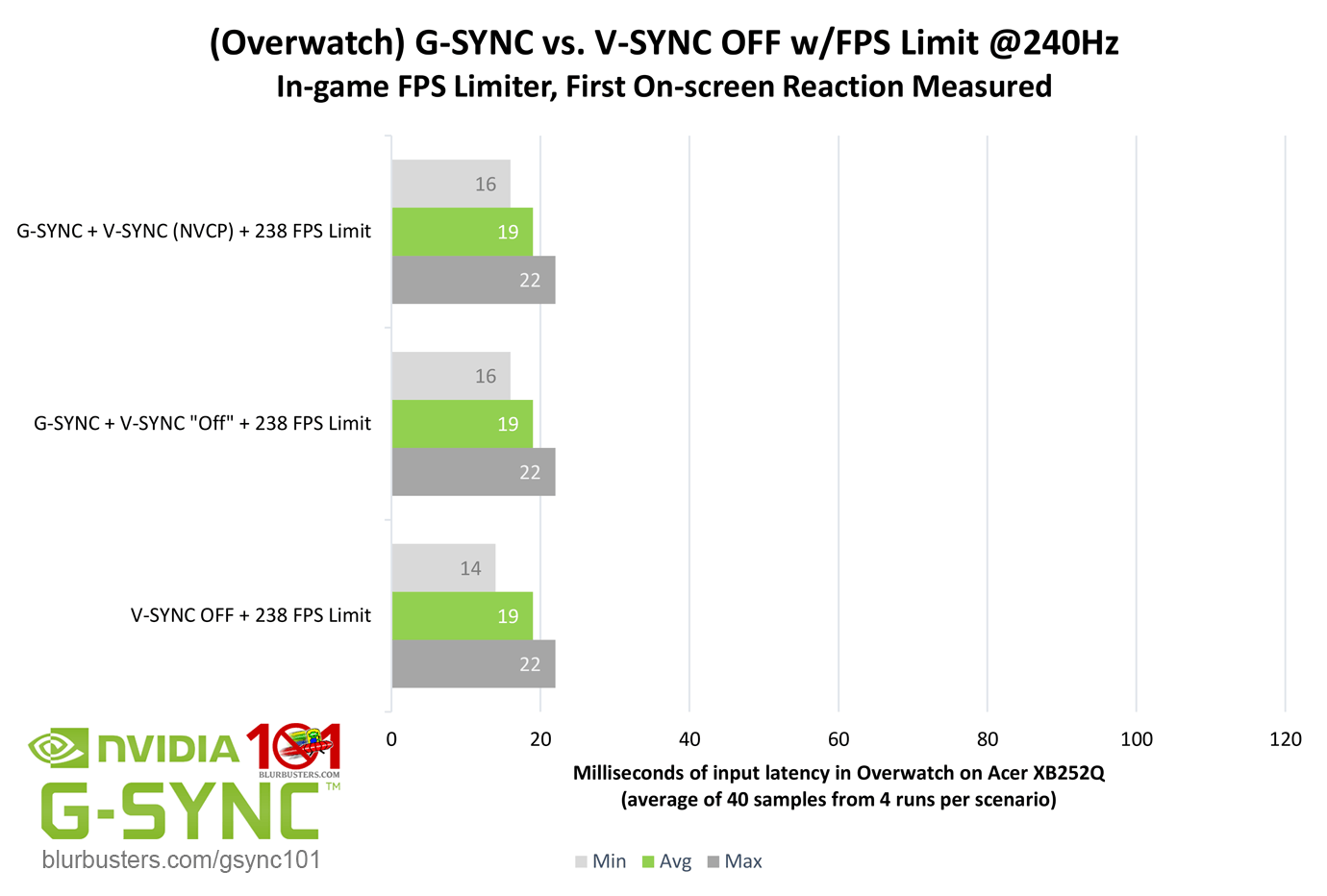
Do you mean VRR on + V-SYNC option on vs. VRR off + V-SYNC option off at x framerate within 240Hz refresh rate?

If so, this has already been tested:
https://blurbusters.com/gsync/gsync101- ... ettings/6/
Image

That 14ms minimum in the "V-SYNC OFF + 238 FPS Limit" result (aka your VRR off + V-SYNC option off scenario) above means there was a single sample that registered as 14ms, but it wasn't enough to change the average latency over the course of 40 samples.

I.E. that extra 2ms reduction for that single sample was achieved by a tearline (a portion of the previous and next frame scan appearing simultaneously in a single scanout).

In other words, any latency difference between your two scenarios is determined by whether tearing is present, nothing more.

Tearing in and of itself is a latency reducer, but of course the latency reduction is the tearlines themselves, which the average gamer tends to dislikes the look of, hence the use case for syncing methods, VRR included.

As I noted to you in the other thread, VRR has the lowest tear-free latency possible. Any lower latency requires tearing. No way around that.

(jorimt: /jor-uhm-tee/)
Author: Blur Busters "G-SYNC 101" Series

Displays: ASUS PG27AQN, LG 48C4 Scaler: RetroTINK 4k Consoles: Dreamcast, PS2, PS3, PS5, Switch 2, Wii, Xbox, Analogue Pocket + Dock VR: Beyond, Quest 3, Reverb G2, Index OS: Windows 11 Pro Case: Fractal Design Torrent PSU: Seasonic PRIME TX-1000 MB: ASUS Z790 Hero CPU: Intel i9-13900k w/Noctua NH-U12A GPU: GIGABYTE RTX 4090 GAMING OC RAM: 32GB G.SKILL Trident Z5 DDR5 6400MHz CL32 SSDs: 2TB WD_BLACK SN850 (OS), 4TB WD_BLACK SN850X (Games) Keyboards: Wooting 60HE, Logitech G915 TKL Mice: Razer Viper Mini SE, Razer Viper 8kHz Sound: Creative Sound Blaster Katana V2 (speakers/amp/DAC), AFUL Performer 8 (IEMs)

User avatar
Enigma
Posts: 23
Joined: 09 Mar 2025, 08:21

Re: 120Hz reduces input lag of 30fps and 60fps!

Post by Enigma » 11 Mar 2025, 10:54

jorimt wrote:
11 Mar 2025, 10:14
Enigma wrote:
11 Mar 2025, 09:21
I meant 240Hz VRR vs 240Hz No Sync At all (No VRR, No V-Sync, etc)
Do you mean VRR on + V-SYNC option on vs. VRR off + V-SYNC option off at x framerate within 240Hz refresh rate?

If so, this has already been tested:
https://blurbusters.com/gsync/gsync101- ... ettings/6/

Image

That 14ms minimum in the "V-SYNC OFF + 238 FPS Limit" result (aka your VRR off + V-SYNC option off scenario) above means there was a single sample that registered as 14ms, but it wasn't enough to change the average latency over the course of 40 samples.

I.E. that extra 2ms reduction for that single sample was achieved by a tearline (a portion of the previous and next frame scan appearing simultaneously in a single scanout).

In other words, any latency difference between your two scenarios is determined by whether tearing is present, nothing more.

Tearing in and of itself is a latency reducer, but of course the latency reduction is the tearlines themselves, which the average gamer tends to dislikes the look of, hence the use case for syncing methods, VRR included.

As I noted to you in the other thread, VRR has the lowest tear-free latency possible. Any lower latency requires tearing. No way around that.

I see, makes perfect sense. Initially I thought the VRR algorithm adds some sort of latency due to the extra code, for example on this video he found that by cancelling VRR on PS5 Pro he gets significantly less input lag:

https://www.youtube.com/watch?v=Yzg69-yb_Sw

How could this be?

Post Reply