
Hello,
I have tried everything so I decided to cry for help in these forums since I've found a lot of valuable information here.
My setup:
7800X3D. No OC
4070 Super.
32GB 6000mhz 30CL RAM EXPO.
Lenovo Legion 1080p 360hz
Edit:
Mouse 8k hz OP1. I also tested with an old logitech 502.
Screen Lenovo Legion y25g-30 360hz gsync
redragon keyboard
Quadcast HyperX Microphone
DT770 headset
My problem:
Low 1% and 0.1% using capframeX on Ancient map
What I have tried:
On the GPU :
Overclock
Undervolt
Stock
On the RAM:
EXPO
DEFAULT
On Nvidia and CS2:
(nvidia screenshots)
-noreflex + low
reflex +gsync +vsync
gsync + low latency
fps cap on nvidia or cs2
On RTSS:
Framerate limit: 440
Framerate limit: 360
Scanline sync: 0
Scanline sync: Various values
On Monitor:
ULMB + 240hz
Extra information:
I have upgraded from a 6800XT. The average frames on that GPU were lower but the lows were better.
The 4070 super is running comfortably, not hitting 100% usage. If i force it to hit 100% with uncapped FPS it will have similar if not worse results. The CPU is nowhere near 100% usage either.
The GPU is scoring great on 3dmark scores and is stable on furmark.
I have run DDU twice.
I have not reinstalled windows yet.
Any ideas and suggestions will be greatly appreciated.
CS2 0.1% 1% Lows
-
fullmetalcsg
- Posts: 6
- Joined: 16 May 2025, 11:37
CS2 0.1% 1% Lows
- Attachments
-
- Screenshot 2025-05-16 193653.png (13.28 KiB) Viewed 13879 times
-
- Screenshot 2025-05-16 193701.png (13.21 KiB) Viewed 13879 times
-
- Screenshot 2025-05-16 193708.png (9.69 KiB) Viewed 13879 times
Last edited by fullmetalcsg on 21 May 2025, 03:09, edited 1 time in total.
-
Bloods
- Posts: 18
- Joined: 08 Nov 2020, 14:02
Re: CS2 0.1% 1% Lows
Can you post your CS2 settings on 1080p and CapframeX screenshot from frame and which testing scenario, I can try compare to my own PC (which is much worse than yours but runs OK on higher res 1920x1440p.
And this problem only occurs on Ancient, I assume you have ran the ingame Dust2 benchmark is your frames good there ?
And this problem only occurs on Ancient, I assume you have ran the ingame Dust2 benchmark is your frames good there ?
Asus PG27AQDP(480HZ)
Acer Nitro XV252QF (390HZ) VRB Off, Overdrive: Normal) Max Brightness ON.
Asus VG248QE (144HZ)
Acer Nitro XV252QF (390HZ) VRB Off, Overdrive: Normal) Max Brightness ON.
Asus VG248QE (144HZ)
-
joseph_from_pilsen
- Posts: 252
- Joined: 01 Apr 2022, 23:51
Re: CS2 0.1% 1% Lows
post jitter graph results (ingame with telemetry on), networking does most of the lag usually. And yes, the game has bad netcode and even worse engine (networking affects render).
i have the same setup and its atrocious (dust2 offline with bots vs online at half empty server, -noreflex, fps driver lock to 391fps (390hz monitor)).
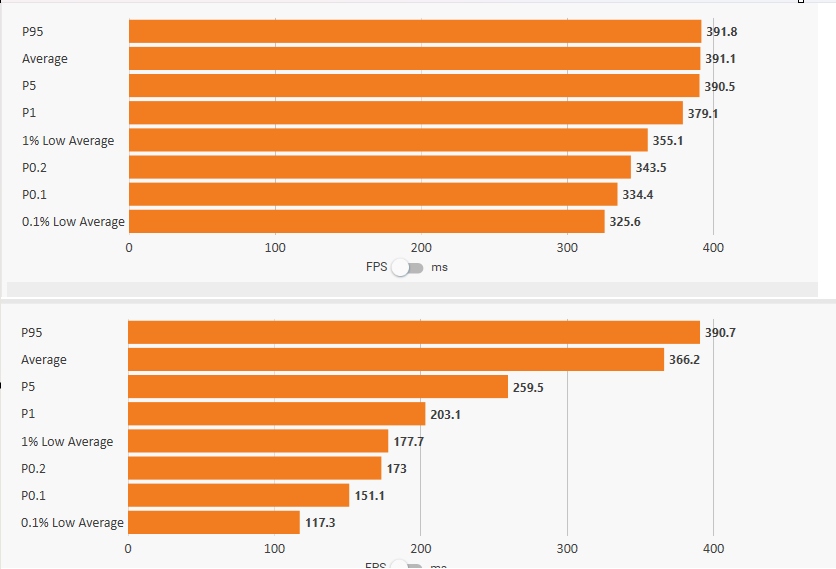
i have the same setup and its atrocious (dust2 offline with bots vs online at half empty server, -noreflex, fps driver lock to 391fps (390hz monitor)).
-
kyube

- Posts: 931
- Joined: 29 Jan 2018, 12:03
Re: CS2 0.1% 1% Lows
Could you also mention your motherboard, PSU, SSD, mouse, keyboard & other USB peripherals?fullmetalcsg wrote: ↑16 May 2025, 13:03I have tried everything so I decided to cry for help in these forums since I've found a lot of valuable information here.
My setup:
7800X3D. No OC | 4070 Super. | 32GB 6000mhz 30CL RAM EXPO. | Lenovo Legion 1080p 360hz
My problem:
Low 1% and 0.1% using CapframeX on Ancient map
What I have tried: On the GPU — Overclock | Undervolt | Stock
On the RAM: EXPO | DEFAULT
On Nvidia and CS2:
(nvidia screenshots)
-noreflex + low | reflex +gsync +vsync | gsync + low latency | fps cap on nvidia or cs2
On RTSS:
Framerate limit: 440
Framerate limit: 360
On Monitor:
ULMB + 240hz
Extra information:
I have upgraded from a 6800XT. The average frames on that GPU were lower but the lows were better.
The 4070 super is running comfortably, not hitting 100% usage. If i force it to hit 100% with uncapped FPS it will have similar if not worse results. The CPU is nowhere near 100% usage either.
The GPU is scoring great on 3dmark scores and is stable on furmark.
I have run DDU twice.
I have not reinstalled windows yet.
Any ideas and suggestions will be greatly appreciated.
What Nvidia GPU driver are you using? Take a look at a few similar threads where a similarly titled topics have sprung up.
What WIndows version are you on? Run winver command
Could you take a ZenTimings screenshot of your current RAM timings profile?
I'm curious how you've assessed that your "1% & 0,1% lows are suboptimal on Ancient"
CapFrameX should tell you whether you were GPU or CPU limited during the recording.
I would advise you to run the CS2 benchmark map (either Dust2 or Ancient version) and use CapFrameX there.
Set up the "Statistic Parameter settings" like so:

In terms of CS2 in-game settings, I would stick to fps_max 360 and enable Nvidia Reflex.
The only other alternative which you could use is enable VRR (G-sync) & enable Reflex in-game with fps_max 325 (or 320) FPS cap
The larger cap away from the max refresh rate is to avoid the probability to jump out of G-sync range.
Hope this helps.
evaluating xhci controller performance | audio latency discussion thread | "Why is LatencyMon not desirable to objectively measure DPC/ISR driver performance" | AM4 / AM5 system tuning considerations | latency-oriented HW considerations | “xhci hand-off” setting considerations | #1 tip for electricity-related topics | ESPORTS: Latency Perception, Temporal Ventriloquism & Horizon of Simultaneity | good lcd backlight strobing implementation list | display vs gpu scaling
-
gideonmontes
- Posts: 51
- Joined: 25 Jun 2023, 07:59
Re: CS2 0.1% 1% Lows
Hello. Try setting the power plan to "Balanced", reset the BIOS, install XPM/EXPO. Just in case, try manually installing the chipset driver from the folder "C:\Program Files (x86)\AMD\Chipset_Software" run the shortcut "AMD_Chipset_Drivers", after running the shortcut select Modify. Reboot and check the PC.
I had stutters due to disabling power saving functions in the BIOS, as strange as it may be, to enable them it is enough to reset the BIOS settings.
I had stutters due to disabling power saving functions in the BIOS, as strange as it may be, to enable them it is enough to reset the BIOS settings.
-
fullmetalcsg
- Posts: 6
- Joined: 16 May 2025, 11:37
Re: CS2 0.1% 1% Lows
My test is simply walk mid ancient and shoot at the big door for 20 settings while strafing and looking around. The results and settings are on the screenshotBloods wrote: ↑20 May 2025, 07:32Can you post your CS2 settings on 1080p and CapframeX screenshot from frame and which testing scenario, I can try compare to my own PC (which is much worse than yours but runs OK on higher res 1920x1440p.
And this problem only occurs on Ancient, I assume you have ran the ingame Dust2 benchmark is your frames good there ?
- Attachments
-
- Ancient results
- Screenshot 2025-05-21 103755.png (192 KiB) Viewed 13484 times
-
- D2 benchmark results
- Screenshot 2025-05-21 103440.png (60.01 KiB) Viewed 13484 times
-
- Cs2 settings
- Screenshot 2025-05-21 103459.png (44.46 KiB) Viewed 13484 times
-
fullmetalcsg
- Posts: 6
- Joined: 16 May 2025, 11:37
Re: CS2 0.1% 1% Lows
Mobo is Seasonic Focus 750 goldkyube wrote: ↑20 May 2025, 14:46Could you also mention your motherboard, PSU, SSD, mouse, keyboard & other USB peripherals?fullmetalcsg wrote: ↑16 May 2025, 13:03I have tried everything so I decided to cry for help in these forums since I've found a lot of valuable information here.
My setup:
7800X3D. No OC | 4070 Super. | 32GB 6000mhz 30CL RAM EXPO. | Lenovo Legion 1080p 360hz
My problem:
Low 1% and 0.1% using CapframeX on Ancient map
What I have tried: On the GPU — Overclock | Undervolt | Stock
On the RAM: EXPO | DEFAULT
On Nvidia and CS2:
(nvidia screenshots)
-noreflex + low | reflex +gsync +vsync | gsync + low latency | fps cap on nvidia or cs2
On RTSS:
Framerate limit: 440
Framerate limit: 360
On Monitor:
ULMB + 240hz
Extra information:
I have upgraded from a 6800XT. The average frames on that GPU were lower but the lows were better.
The 4070 super is running comfortably, not hitting 100% usage. If i force it to hit 100% with uncapped FPS it will have similar if not worse results. The CPU is nowhere near 100% usage either.
The GPU is scoring great on 3dmark scores and is stable on furmark.
I have run DDU twice.
I have not reinstalled windows yet.
Any ideas and suggestions will be greatly appreciated.
What Nvidia GPU driver are you using? Take a look at a few similar threads where a similarly titled topics have sprung up.
What WIndows version are you on? Run winver command
Could you take a ZenTimings screenshot of your current RAM timings profile?
I'm curious how you've assessed that your "1% & 0,1% lows are suboptimal on Ancient"
CapFrameX should tell you whether you were GPU or CPU limited during the recording.
I would advise you to run the CS2 benchmark map (either Dust2 or Ancient version) and use CapFrameX there.
Set up the "Statistic Parameter settings" like so:
In terms of CS2 in-game settings, I would stick to fps_max 360 and enable Nvidia Reflex.
The only other alternative which you could use is enable VRR (G-sync) & enable Reflex in-game with fps_max 325 (or 320) FPS cap
The larger cap away from the max refresh rate is to avoid the probability to jump out of G-sync range.
Hope this helps.
8k hz op1 mouse, also tried with old g502 mouse
Lenovo Legion y25g-30 gsync 360hz
HyperX quadcast microphone
DT770 pro headset
Latest GPU and windows version.
I am running with gsync vsync fast, reflex + boost and cap of 440 fps in game. I have tried a lot of combinations as well as cap of below 360 but my averages were just lower.
Zen timings screenshot along with d2 benchmark map run
- Attachments
-
- Ram timings
- Screenshot 2025-05-21 101934.png (42.66 KiB) Viewed 13483 times
-
- Capframe D2 bench
- Screenshot 2025-05-21 103350.png (201.14 KiB) Viewed 13483 times
-
kyube
- Posts: 931
- Joined: 29 Jan 2018, 12:03
Re: CS2 0.1% 1% Lows
Thank you for including a CapframeX screenshot of the CS2 D2 benchmark map.fullmetalcsg wrote: ↑21 May 2025, 03:44Mobo is Seasonic Focus 750 gold
8k hz op1 mouse, also tried with old g502 mouse
Lenovo Legion y25g-30 gsync 360hz
HyperX quadcast microphone
DT770 pro headset
Latest GPU and windows version.
I am running with gsync vsync fast, reflex + boost and cap of 440 fps in game. I have tried a lot of combinations as well as cap of below 360 but my averages were just lower.
Zen timings screenshot along with d2 benchmark map run
You seem to have cropped the voltages section of the ZenTimings screenshot you've provided, could you include those?
By latest drivers & Windows, do you mean R575 (such as 576.52) and 24H2?
The newest Windows version & Nvidia GPU drivers are report to cause severe stuttering & performance regression in a few games.
I strongly advise that you swap to pre-R570 branch (566.36 & older) and to Windows 11 23H2.
Your kit seems to be included in the motherboard's QVL list, but it's always best to verify this with a stress-testing app sw such as RamTestPro, HCI Memtest, Ycruncher, OCCT etc.
If you don't have the time / want to put in the effort — running EXPO disabled is the safest & easiest method for troubleshooting purposes since it isn't time-consuming.
As for the syncing technologies dilemma:
There's no need to use FastSync + Gsync, they cannot work at the same time. Only one can be utilised at the time.
You can only run Gsync + Vsync + fps cap below native refresh rate (they are both technologies which work <360fps)
Fast-Sync is only necessary when your frame rate is >360fps.
However, Vsync still adds a latency penalty even if you're on the surface <360fps. I would avoid using it, unless you are sensitive to tearing & want to avoid having it.
I don't think one should even consider using Fast-Sync at all. I've never found it to work adequately..
Try one of the following:
a.) Set display to native refresh rate (360Hz), fps_max 320, Gsync enabled, Reflex in-game enabled, LLM disabled in NVCP, Vsync to auto or disabled in NVCP
b.) Set display to native refresh rate (360Hz), fps_max 360, don't use any syncing technology (no vsync, gsync or LLM)
These should be a few good steps to troubleshoot your issue.
evaluating xhci controller performance | audio latency discussion thread | "Why is LatencyMon not desirable to objectively measure DPC/ISR driver performance" | AM4 / AM5 system tuning considerations | latency-oriented HW considerations | “xhci hand-off” setting considerations | #1 tip for electricity-related topics | ESPORTS: Latency Perception, Temporal Ventriloquism & Horizon of Simultaneity | good lcd backlight strobing implementation list | display vs gpu scaling
-
fullmetalcsg
- Posts: 6
- Joined: 16 May 2025, 11:37
Re: CS2 0.1% 1% Lows
Thanks for the information. I downgraded my Nvidia drivers, can't say i noticed any difference other than higher power consumption. I go around 140 when before i was about 120W.kyube wrote: ↑21 May 2025, 13:54Thank you for including a CapframeX screenshot of the CS2 D2 benchmark map.fullmetalcsg wrote: ↑21 May 2025, 03:44Mobo is Seasonic Focus 750 gold
8k hz op1 mouse, also tried with old g502 mouse
Lenovo Legion y25g-30 gsync 360hz
HyperX quadcast microphone
DT770 pro headset
Latest GPU and windows version.
I am running with gsync vsync fast, reflex + boost and cap of 440 fps in game. I have tried a lot of combinations as well as cap of below 360 but my averages were just lower.
Zen timings screenshot along with d2 benchmark map run
You seem to have cropped the voltages section of the ZenTimings screenshot you've provided, could you include those?
By latest drivers & Windows, do you mean R575 (such as 576.52) and 24H2?
The newest Windows version & Nvidia GPU drivers are report to cause severe stuttering & performance regression in a few games.
I strongly advise that you swap to pre-R570 branch (566.36 & older) and to Windows 11 23H2.
Your kit seems to be included in the motherboard's QVL list, but it's always best to verify this with a stress-testing app sw such as RamTestPro, HCI Memtest, Ycruncher, OCCT etc.
If you don't have the time / want to put in the effort — running EXPO disabled is the safest & easiest method for troubleshooting purposes since it isn't time-consuming.
As for the syncing technologies dilemma:
There's no need to use FastSync + Gsync, they cannot work at the same time. Only one can be utilised at the time.
You can only run Gsync + Vsync + fps cap below native refresh rate (they are both technologies which work <360fps)
Fast-Sync is only necessary when your frame rate is >360fps.
However, Vsync still adds a latency penalty even if you're on the surface <360fps. I would avoid using it, unless you are sensitive to tearing & want to avoid having it.
I don't think one should even consider using Fast-Sync at all. I've never found it to work adequately..
Try one of the following:
a.) Set display to native refresh rate (360Hz), fps_max 320, Gsync enabled, Reflex in-game enabled, LLM disabled in NVCP, Vsync to auto or disabled in NVCP
b.) Set display to native refresh rate (360Hz), fps_max 360, don't use any syncing technology (no vsync, gsync or LLM)
These should be a few good steps to troubleshoot your issue.
I also run some CS2 benchmarks without EXPO and it was the same results.
I attached a lot of tests. All off is no gsync vync or reflex. All on is gsync + vsync fast or on, i didn't notice any difference.
The highest 0.1% I can achieve is with everything on, and uncapped fps as you can see on the last screenshot. Even on that high demand scenario, my power consumption is 140W and the GPU usage is not above 90%.
In general results with no gsync/vsync stutter a lot , even on 360 cap and very low GPU usage. It seems like the GPU is chilling and then suddenly stutters for no reason.
My 3Dmark benchmarks are really good so I am pretty sure it is not a problem with the GPU. I am also running a mild overclock on the GPU, i have benchmarked without it as well.
- Attachments
-
- Screenshot 2025-05-24 120958.png (182.72 KiB) Viewed 13288 times
-
- Screenshot 2025-05-24 121006.png (181.3 KiB) Viewed 13288 times
-
- Screenshot 2025-05-24 121020.png (67.79 KiB) Viewed 13288 times
-
fullmetalcsg
- Posts: 6
- Joined: 16 May 2025, 11:37
Re: CS2 0.1% 1% Lows
fullmetalcsg wrote: ↑24 May 2025, 05:16Thanks for the information. I downgraded my Nvidia drivers, can't say i noticed any difference other than higher power consumption. I go around 140 when before i was about 120W.kyube wrote: ↑21 May 2025, 13:54Thank you for including a CapframeX screenshot of the CS2 D2 benchmark map.fullmetalcsg wrote: ↑21 May 2025, 03:44Mobo is Seasonic Focus 750 gold
8k hz op1 mouse, also tried with old g502 mouse
Lenovo Legion y25g-30 gsync 360hz
HyperX quadcast microphone
DT770 pro headset
Latest GPU and windows version.
I am running with gsync vsync fast, reflex + boost and cap of 440 fps in game. I have tried a lot of combinations as well as cap of below 360 but my averages were just lower.
Zen timings screenshot along with d2 benchmark map run
You seem to have cropped the voltages section of the ZenTimings screenshot you've provided, could you include those?
By latest drivers & Windows, do you mean R575 (such as 576.52) and 24H2?
The newest Windows version & Nvidia GPU drivers are report to cause severe stuttering & performance regression in a few games.
I strongly advise that you swap to pre-R570 branch (566.36 & older) and to Windows 11 23H2.
Your kit seems to be included in the motherboard's QVL list, but it's always best to verify this with a stress-testing app sw such as RamTestPro, HCI Memtest, Ycruncher, OCCT etc.
If you don't have the time / want to put in the effort — running EXPO disabled is the safest & easiest method for troubleshooting purposes since it isn't time-consuming.
As for the syncing technologies dilemma:
There's no need to use FastSync + Gsync, they cannot work at the same time. Only one can be utilised at the time.
You can only run Gsync + Vsync + fps cap below native refresh rate (they are both technologies which work <360fps)
Fast-Sync is only necessary when your frame rate is >360fps.
However, Vsync still adds a latency penalty even if you're on the surface <360fps. I would avoid using it, unless you are sensitive to tearing & want to avoid having it.
I don't think one should even consider using Fast-Sync at all. I've never found it to work adequately..
Try one of the following:
a.) Set display to native refresh rate (360Hz), fps_max 320, Gsync enabled, Reflex in-game enabled, LLM disabled in NVCP, Vsync to auto or disabled in NVCP
b.) Set display to native refresh rate (360Hz), fps_max 360, don't use any syncing technology (no vsync, gsync or LLM)
These should be a few good steps to troubleshoot your issue.
I also run some CS2 benchmarks without EXPO and it was the same results.
I attached a lot of tests. All off is no gsync vync or reflex. All on is gsync + vsync fast or on, i didn't notice any difference.
The highest 0.1% I can achieve is with everything on, and uncapped fps as you can see on the last screenshot. Even on that high demand scenario, my power consumption is 140W and the GPU usage is not above 90%.
In general results with no gsync/vsync stutter a lot , even on 360 cap and very low GPU usage. It seems like the GPU is chilling and then suddenly stutters for no reason.
My 3Dmark benchmarks are really good so I am pretty sure it is not a problem with the GPU. I am also running a mild overclock on the GPU, i have benchmarked without it as well.
- Attachments
-
- Screenshot 2025-05-24 120244.png (173.63 KiB) Viewed 13280 times
-
- Screenshot 2025-05-24 120251.png (170.14 KiB) Viewed 13280 times
-
- Screenshot 2025-05-24 120322.png (175.29 KiB) Viewed 13284 times
Last edited by fullmetalcsg on 24 May 2025, 05:30, edited 1 time in total.