
I am more interested in scanning BFI though.Chief Blur Buster wrote: ↑13 Dec 2025, 19:55However, you can fix crosstalk completely if you use the refresh rate headroom trick:
Viewsonic XG2431 Settings Help
-
betonKruglosuTotchno
- Posts: 27
- Joined: 22 Feb 2023, 13:48
Re: Viewsonic XG2431 Settings Help
-
Chief Blur Buster

- Site Admin
- Posts: 12165
- Joined: 05 Dec 2013, 15:44
- Location: Toronto / Hamilton, Ontario, Canada
- Contact:
Re: Viewsonic XG2431 Settings Help
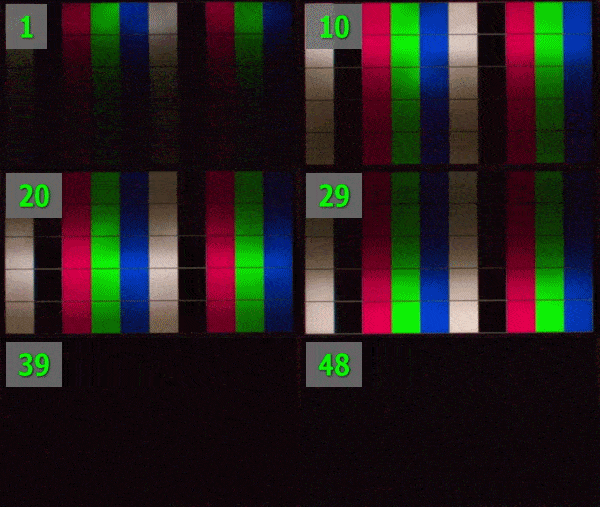
Yes, rolling can be better! But it's hard to get it in a product, and sometimes the scanning method still creates strobe crosstalk from the internal light diffusion (illuminated bar leaking into the unilluminated parts of the screen)betonKruglosuTotchno wrote: ↑16 Dec 2025, 18:28I am more interested in scanning BFI though.Chief Blur Buster wrote: ↑13 Dec 2025, 19:55However, you can fix crosstalk completely if you use the refresh rate headroom trick:
It can also be done via software-based means if you have brute refresh rate, e.g. low motion blur 60-120fps on a 240-480Hz OLED.
See it within TestUFO (turn off strobing/PureXP before using software-based motion blur reduction):
www.testufo.com/crt
You can also run CRT simulator in the new ShaderGlass CRT alpha. It tends to perform best on 240-480Hz OLEDs.
Head of Blur Busters - BlurBusters.com | TestUFO.com | Follow @BlurBusters on: BlueSky | Twitter | Facebook

Forum Rules wrote: 1. Rule #1: Be Nice. This is published forum rule #1. Even To Newbies & People You Disagree With!
2. Please report rule violations If you see a post that violates forum rules, then report the post.
3. ALWAYS respect indie testers here. See how indies are bootstrapping Blur Busters research!
Re: Viewsonic XG2431 Settings Help
Has anyone considered hardware modification of the strobed LED display? Replacing LED diodes and driver with more powerful ones?
LG C1 55"