High refresh rate monitors at 60hz?

Talk about NVIDIA G-SYNC, a variable refresh rate (VRR) technology. G-SYNC eliminates stutters, tearing, and reduces input lag. List of G-SYNC Monitors.
User avatar
RealNC
Site Admin
Posts: 4474
Joined: 24 Dec 2013, 18:32
Contact:

Re: High refresh rate monitors at 60hz?

Post by RealNC » 25 Jan 2026, 09:27

kyube wrote:
24 Jan 2026, 16:34
Note: For the sake of my arguement, assume that each transition of the LCD is <4,16777ms (e.g. 3ms at all times, regardless of transition chosen or the precision range of the heatmap)
This means that for 3ms, you're seeing a ghost of the previous frame in the new frame. The sample-and-hold motion blur is one thing. The pixel response blur is another which is additive to it.

If all you needed is the G2G RT to be faster than the refresh rate, then if you switch from 60Hz sample-and-hold to 60Hz backlight strobing, there would be no cross-talk. But there is. The amount of cross-talk you get during strobing directly translates to added motion blur with sample-and-hold.

When I tried to match the motion blur of a TN LCD to that of the OLED, the LCD required a higher refreshrate. 60FPS on the OLED looked about the same as ~70-75FPS on the LCD (it's hard to put an exact number on it.) 90FPS on the OLED was about the same as ~100-110FPS on the LCD, etc. The only way I can interpret this result is that there's an extra amount of motion blur due to pixel transition which then needs to be offset by lowering sample-and-hold blur though a higher refresh rate/frame rate.

With an OLED, you're left with virtually only the sample-and-hold motion blur. With an LCD, you get a little extra motion blur on top, which is of a different kind, but still visible as extra blur.
SteamGitHubStack Overflow
The views and opinions expressed in my posts are my own and do not necessarily reflect the official policy or position of Blur Busters.

User avatar
kyube
Posts: 666
Joined: 29 Jan 2018, 12:03

Re: High refresh rate monitors at 60hz?

Post by kyube » 25 Jan 2026, 11:14

RealNC wrote:
25 Jan 2026, 09:27
This means that for 3ms, you're seeing a ghost of the previous frame in the new frame.
The sample-and-hold motion blur is one thing.
The pixel response blur is another which is additive to it.
Analytical equation for the motion picture response time of display devices
I assume a formula which can describe said behavior (which I assume you mean with pixel response blur) would be akin to the one described in this document?
What determines the intensity of this ”pixel response blur”? Namely, is there a value for which the pixel response blur is invisible? What is the threshold?
RealNC wrote:
25 Jan 2026, 09:27
If all you needed is the G2G RT to be faster than the refresh rate, then if you switch from 60Hz sample-and-hold to 60Hz backlight strobing, there would be no cross-talk. But there is.
The biggest confusion I see with this is explanation is that this doesn't hold up in practice. Namely, the XG2431 when set to 60Hz with PureXP
We know that the XG2431 is crosstalk-free at f=60 Hz from anecdotal phone-shot pursuit photographs, which would imply that the G2G RT heatmap behavior of that model, when setting the refresh rate to 60Hz, is a optimal time-domain difference.
This raises a question — Is there a particular time interval (I have seen Chief mention the term “idle time” when talking about this particular topic IIRC) for which one wouldn't experience the phenomena referred to as “crosstalk” for a particular vertical frequency target (refresh rate)?
For example — f=60 Hz (t=16,667 ms)
RealNC wrote:
25 Jan 2026, 09:27
When I tried to match the motion blur of a TN LCD to that of the OLED, the LCD required a higher refreshrate. 60FPS on the OLED looked about the same as ~70-75FPS on the LCD (it's hard to put an exact number on it.) 90FPS on the OLED was about the same as ~100-110FPS on the LCD, etc.
The only way I can interpret this result is that there's an extra amount of motion blur due to pixel transition which then needs to be offset by lowering sample-and-hold blur though a higher refresh rate/frame rate.
With an OLED, you're left with virtually only the sample-and-hold motion blur.
With an LCD, you get a little extra motion blur on top, which is of a different kind, but still visible as extra blur.
I did see Chief mentioning a similar “OLED is 1.5x 'clearer' than LCD of equivalent refresh rate” statement, which MonitorsUnboxed later took as a 'rule of thumb'.
The biggest issue I see with judging implementation details of a particular LCD or OLED model & such claims is that we don't have a precise-enough / granular-enough G2G RT heatmap of particular models to claim with absolute certainty that G2G_RT<RR (across all possible combinations of G2G values) will still lead to some type of motion degradation (G2G RT measured with a fixed RGB offset, not the VESA style 10-90%-based approach)
My current interpretation is that the dynamic content degradation / motion degradation comes from G2G_RT > RR in a particular G2G combination, which is visible to the end-user.
Hence why such statements have arose.

Is there a particular term which one could use for such “extra blur” you're referring to? Perhaps Chief can also chime in.

User avatar
Chief Blur Buster
Site Admin
Posts: 12178
Joined: 05 Dec 2013, 15:44
Location: Toronto / Hamilton, Ontario, Canada
Contact:

Re: High refresh rate monitors at 60hz?

Post by Chief Blur Buster » 25 Jan 2026, 16:44

kyube wrote:
25 Jan 2026, 11:14
What determines the intensity of this ”pixel response blur”? Namely, is there a value for which the pixel response blur is invisible? What is the threshold?
It's easy to see the pixel response motion blur differences when you have a 240Hz+ LCD alongside a 240Hz+ OLED.

Pixel response motion blur is also called "ghosting", you can check out famous old article LCD Motion Artifacts 101

Pixel response motion blur is often used under the classic LCD ghosting terminology, since it is often highly asymmetric (more at leading or trailing edge, or certain colors are more blurred/smeared than others). Stare at images and weep!

Image

Image

You can clearly see the ghosting (pixel response motion blur), as it's additive to the refreshtime's own motion blur.

So 240Hz LCD is often (1/240sec + approximately GtGtime motion blur).

One confusion is that the motionblur is not linear -- "ghosting" is a form of nonlinear motion blur from an LCD GtG curve as the speed of the "pixel fading from one color to another" will vary over your eye pursuit (=equals camera pursuit) over the refreshtime.

RTINGS video is educational

phpBB [video]


Refresh cycles are stationary while your eyes are analog (continuously moving). The refreshtime (the sample and hold effect) and the slow-crossfade between refresh cycles (high speed video: www.blurbusters.com/scanout ...) stacks motion blur on top of each other. And they have different linearities/symmetries that are simply superimposed on top of each other to create more motion blurs.
Head of Blur Busters - BlurBusters.com | TestUFO.com | Follow @BlurBusters on: BlueSky | Twitter | Facebook

Image
Forum Rules wrote:  1. Rule #1: Be Nice. This is published forum rule #1. Even To Newbies & People You Disagree With!
  2. Please report rule violations If you see a post that violates forum rules, then report the post.
  3. ALWAYS respect indie testers here. See how indies are bootstrapping Blur Busters research!

User avatar
Chief Blur Buster
Site Admin
Posts: 12178
Joined: 05 Dec 2013, 15:44
Location: Toronto / Hamilton, Ontario, Canada
Contact:

Re: High refresh rate monitors at 60hz?

Post by Chief Blur Buster » 25 Jan 2026, 16:52

kyube wrote:
25 Jan 2026, 11:14
Is there a particular term which one could use for such “extra blur” you're referring to? Perhaps Chief can also chime in.
It's often called "LCD ghosting". It used to be much worse 20 years ago but still exists at the millisecond scale.

Even 1ms GtG = can approximately double or triple motion blur of 1000Hz LCD. You don't want 1ms GtG before/after your 1ms refreshtime.

Remember 1ms at 4000 pixels/sec = 4 pixels of ghost = 1ms is junk = you want 0ms = LCD 1000Hz worse than 500Hz OLED = worse motionblur eyestrains for people super-sensitive to motion blur (some of us is more sensitive to it than flicker, I am called BLUR BUSTERS. Remember. BLUR BUSTERS. That's my site name.)
kyube wrote:
25 Jan 2026, 11:14
What determines the intensity of this ”pixel response blur”? Namely, is there a value for which the pixel response blur is invisible? What is the threshold?
There is no meaningful threshold from a human vision POV. The curves are different on different LCDs.

If you're asking about /measurement/ POV, which is a compromise, that diverges from human vision, then....

You're probably thinking you're asking a question you think is as simple "2+2" and I'm telling you the question you asked is algebra/calculus/graphing stuff.

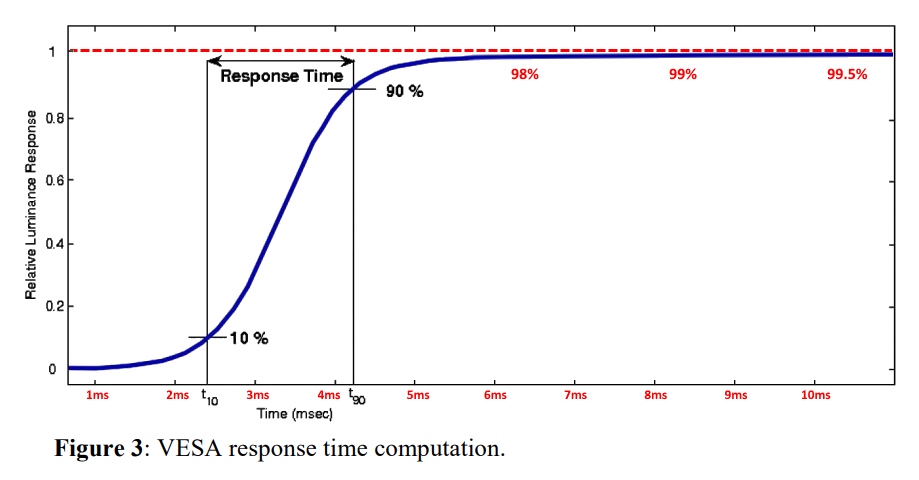
VESA GtG measurements attempts to simplify it to 10%-90% thresholds because of electronic equipment measuring margins.

And ghosting can last for a long time -- which is why you see a long smear. Do you want to threshold at 90%? 95? 99%? Tough luck, roll a dice. All visible, all different thresholds, you can't assign a differet number.

Image

Remember...
You can see above/below 10%/90%

Image

This is only a small introduction of the big rabbit hole covered by the articles at www.blurbusters.com/area51 which is textbook Coles Notes reading of the display science.

Anybody who borrows a 480Hz LCD-vs-OLED and compare the motionblurs on the two on TestUFO tests, and it's pretty easy to see how 480-vs-480 is MUCH worse than 120-vs-120.... Higher the Hz, the more LCD falls behind in ergonomic Hz ability, for apples-vs-apples Hz...

Mind you, LCD is superior in some line items, but the "cons list vs pros list" balance changes when you compare higher Hz-for-Hz, and it's easy to see why: nonzero GtG.

That's also why I wrote the article at www.blurbusters.com/120vs480 too...

Some highlights of LCD ghosting (pixel response motion blur) below:

Screenshot 2026-01-25 at 3.57.33 PM.png
Screenshot 2026-01-25 at 3.57.33 PM.png (20.6 KiB) Viewed 688 times
Screenshot 2026-01-25 at 3.57.23 PM.png
Screenshot 2026-01-25 at 3.57.23 PM.png (13.92 KiB) Viewed 688 times
Screenshot 2026-01-25 at 3.57.19 PM.png
Screenshot 2026-01-25 at 3.57.19 PM.png (9.81 KiB) Viewed 688 times
It's hard to assign a number to it, because you can still see a 5% faint transparent ghost (below VESA cutoff). Some human vision will easily see it down to ~1-2% and others down to <0.5%, it varies from human to human how well they can see the final faint ghost. When a website writes a benchmark number, they have to standardize a cutoff (e.g. 10%), and that's where it becomes ambigious. There's no hard threshold cutoff in these images, as you can clearly see.

A cheap cheat shortcut is to add MPRT+GtG numbers together, or even MPRT+(GtG x 2) to get an approximate "mud factor" benchmark. So your 1000Hz LCD is a "mud factor" of approximately 3. (1ms GtG + 1ms refreshtime + 1ms GtG), since you've got the leading and trailing edge blurs to worry about too. Refreshtime is equal to MPRT when GtG is 0.

And guess what?

Look at the GtG heatmaps. And start crying.
heatmap-max-total-small.jpg
heatmap-max-total-small.jpg (48.31 KiB) Viewed 671 times
That means some GtG numbers of certain colors on LCD is more than 10x slower than other GtG numbers. You can try to use overdrive to fix it a bit, but even the world's best overdrive on some LCDs (e.g. VA LCDs) still produce gigantic differences in pixel response.

Woe is us, we can never have a single number for a single color because everyone can see a faint ghost (to varying extent) -- one person can see a 5% ghost easily, another sees 1% ghost easily, etc.

But ouch? Every color is different?

___

And even in the best case, even full "Refresh Cycle Compliance" = still not perfect. You can still see sub-refresh LCD GtG ghosting on a "fully refresh cycle compliant LCD". That's because they chose to have a cutoff of a refresh cycle, not a cutoff of 0ms like Blur Busters recommends to eliminate ghosting.

Every vision is different, so the odd curves have no specific cutoff that is one size-fits-all-humans, even LCD pixels can still ghost for almost a full second imperceptibly (e.g. colors that are 99.999% of the way, you can't tell) despite being rated 1ms. Usually 99% is good enough (1% ghost) for most, but eventually the ghost becomes invisible --

Also... Remember everyone sees differently (12% colorblind, some wear stronger eyeglasses, others less so, yet others are more sensitive to flicker, or more sensitive to motionblurs, or more sensitive to stutters/tearing, etc, etc, etc. Some only mildly, some only bothered, some medically eyestrained, it runs the whole continuum. Ghosting is one of those things that are hard to have a threshold for, because thresholds for different humans is different, and displays often never stop ghosting. It's a continuum -- some sees longer ghosts, others sees shorter ghosts. You have your own "threshold" (whether dictated by preference, or dictated by your headaches/medical).

Some people are even so bothered by ghosting that they get more eyestrain on a PWM-free 480Hz LCD than a PWM-free 120Hz LCD (with, say, gsync certified quality overdrive). Ghosting can become more distracting at excessively tight "refresh time:GtG time" ratio for framerate=Hz motion (e.g. 2D scrolling, like just using Windows applications). Refreshing asymmetries can feel odd to certain people, so it's often a "try displays out and see how it works for you" type of a situation.

Tooting a number on a forum is all good and well, but it betrays pictures & my human vision experience manually visiting hundreds high-refresh-rate displays exhibited at a convention such as CES 2026. Expectations, numbers, and experiences don't align!

___

Sorry to be the bearer of "a Calculus/Algebra style answer" for what you probably thought was a "2+2" question.

At least you now better understand how it is painful to some of our eyes of some of our blur-sensitive audience.
Head of Blur Busters - BlurBusters.com | TestUFO.com | Follow @BlurBusters on: BlueSky | Twitter | Facebook

Image
Forum Rules wrote:  1. Rule #1: Be Nice. This is published forum rule #1. Even To Newbies & People You Disagree With!
  2. Please report rule violations If you see a post that violates forum rules, then report the post.
  3. ALWAYS respect indie testers here. See how indies are bootstrapping Blur Busters research!

User avatar
kyube
Posts: 666
Joined: 29 Jan 2018, 12:03

Re: High refresh rate monitors at 60hz?

Post by kyube » 26 Jan 2026, 07:48

Just to clear up any possible misunderstanding, here's how I understood the terms you've used:
“Refreshtime” — time-domain equivalent of the refresh rate (e.g. 200 Hz = 5 ms; 5 ms being the 'Refreshtime')
GtG — gray-to-gray response times (the time it takes from a pixel to transition from one shade of gray to another)
MPRT — motion picture response time (which is defined in the document above as the being roughly equal to the SQRT of GtG^2 + [0,8*tᵥ]^2; tᵥ — frame visibility time; which would be equivalent to the term 'Refreshtime', I believe.)

Chief Blur Buster wrote:
25 Jan 2026, 16:52
Sorry to be the bearer of "a Calculus/Algebra style answer" for what you probably thought was a "2+2" question.
I was precisely looking for a more in-depth answer.
However, I believe my original intent got lost somewhere.
Chief Blur Buster wrote:
25 Jan 2026, 16:52
A cheap cheat shortcut is to add MPRT+GtG numbers together, or even MPRT+(GtG x 2) to get an approximate "mud factor" benchmark.
So your 1000Hz LCD is a "mud factor" of approximately 3. (1ms GtG + 1ms refreshtime + 1ms GtG), since you've got the leading and trailing edge blurs to worry about too.
Refreshtime is equal to MPRT when GtG is 0.
How is the “mud factor” defined in literature/studies? Surely, there must be a more exact term used?
The “GtG=0” portion is also a bit confusing to me, as that can range from microseconds to nanosecond levels.
If we were to talk about >1000Hz displays, the ”GtG=0” is even more ambiguous.
2000 Hz is already a "refreshtime" (time-domain equivalent of refresh rate / vertical frequency) of 0.5 ms (500µs).
Surely, there is a exact value for each specific refresh rate target, which would be 'ideal' or 'close to ideal'?

This begs the question:
Is there a value / G2G RT threshold, under which one could deem a particular refresh rate as “truthful representation”?
I personally think of OLED as a “truthful 480–540Hz refresh rate representation” due to all 0-255 values being well below the required vertical frequency / refresh rate.

But, by reading this write-up of yours, I'm starting to doubt my intrepretation tremendously...

Let's take a step back:
What GtG RT value would one need to have to achieve “Refreshtime = MPRT” on a much lower refresh rate target?
Let's say — 80 Hz (12.5ms), 100 Hz (10 ms), 200 Hz (5 ms)...

That's where, I believe, my intent got lost, as my question was more in line of:
How would a LCD with GtG_RT=~3ms (across all possible 0-255 RGB combinations) be visually different compared to a OLED (usually GtG_RT=~0.5 ms = ~500 µs) of equivalent refresh rate?
Let's say 3 different refresh rate scenarios, where the GtG RT values are constant across all of them:
f=80, 100, 200 (12.5; 10; 5 ms)

Are you suggesting that OLED will look visually different when such a scenario is at hand?
I haven't found this to be the case from anecdotal pursuit photographs, though TestUFO pursuit photographs are a small portion of possible transitions.
Chief Blur Buster wrote:
25 Jan 2026, 16:52
There is no meaningful threshold from a human vision POV. The curves are different on different LCDs.
Even 1ms GtG = can approximately double or triple motion blur of 1000Hz LCD. You don't want 1ms GtG before/after your 1ms refreshtime.
Yes, which is why I've suggested a fixed RGB 5 offset & assumed G2G_RT=~3ms across all possible combinations within the 0-255 RGB range (yes, even red-to-red, blue-to-blue, or green-to-green) on a f=240 Hz; t=4,1667ms; display, which is well below the threshold of the refresh rate

With your explanation, I'm starting to think that this metric (RefreshTime?) is range-based...
Namely, that refresh rate isn't constantly “1000 Hz” & that one is essentially 'dancing around' a particular target.
For example:
1 – 3ms (1000 Hz – 333 Hz; if GtG=1 ms = 1000 µs)
1 – 1,200ms (1000 Hz – 833,3333333 Hz; if GtG=0,1 ms = 100 µs)
1 – 1,020ms (1000 Hz – 980,3921568 Hz; if GtG=0,01 ms = 10 µs)
1 – 1,002ms (1000 Hz – 998,0039920 Hz; if GtG=0,001 ms = 1 µs)
NOTE: This above assumes that GtG is of a uniform distribution (constant across all possible GtG combinations)

Practically speaking, this would imply that, when using a fixed RGB 5 offset:
480Hz (2,08333ms) OLED is actually
~0,5ms + 2,08333ms + ~0,5ms = 3,083333ms

A range of 480 – 324,32436 Hz...

Which confuses me to no end :P

That does not hold up in practice whatsoever (anecdotally speaking, from review data of hundreds of pursuit photographs I've seen), at least when looking at UFOs of the same pixel/s.
Chief Blur Buster wrote:
25 Jan 2026, 16:52
You're probably thinking you're asking a question you think is as simple "2+2" and I'm telling you the question you asked is algebra/calculus/graphing stuff.
Not at all, I'm looking for the in-depth engineering aspects of it.

Chief Blur Buster wrote:
25 Jan 2026, 16:52
And even in the best case, even full "Refresh Cycle Compliance" = still not perfect.
[color=]You can still see sub-refresh LCD GtG ghosting on a "fully refresh cycle compliant LCD".[/color]
That's because they chose to have a cutoff of a refresh cycle, not a cutoff of 0ms like Blur Busters recommends to eliminate ghosting.

Every vision is different, so the odd curves have no specific cutoff that is one size-fits-all-humans, even LCD pixels can still ghost for almost a full second imperceptibly (e.g. colors that are 99.999% of the way, you can't tell) despite being rated 1ms. Usually 99% is good enough (1% ghost) for most, but eventually the ghost becomes invisible --
I'm interested in the “sub-refresh GtG” aspect.
How does one decide on a cutoff? How would one refer to that cutoff from a engineering perspective?
What is “0ms” in practice? What exact amount of microseconds or nanoseconds?
Does that value hold up across all possible refresh rate targets (60, 80, 100, 120, 144, 165, 180, 200, 240, 360, 480,...)

This might also tie in with this mention of 250µs “idle time” necessary @ 360Hz (2,7778ms)
How is this idle time calculated? What is it derived from?
Chief Blur Buster wrote:
25 Jan 2026, 16:52
Also... Remember everyone sees differently (12% colorblind, some wear stronger eyeglasses, others less so, yet others are more sensitive to flicker, or more sensitive to motionblurs, or more sensitive to stutters/tearing, etc, etc, etc. Some only mildly, some only bothered, some medically eyestrained, it runs the whole continuum. Ghosting is one of those things that are hard to have a threshold for, because thresholds for different humans is different, and displays often never stop ghosting. It's a continuum -- some sees longer ghosts, others sees shorter ghosts. You have your own "threshold" (whether dictated by preference, or dictated by your headaches/medical).
Definitely a great reminder.


User avatar
Chief Blur Buster
Site Admin
Posts: 12178
Joined: 05 Dec 2013, 15:44
Location: Toronto / Hamilton, Ontario, Canada
Contact:

Re: High refresh rate monitors at 60hz?

Post by Chief Blur Buster » 27 Jan 2026, 12:52

<NotVisibleStuff>

EDITS MADE
I will reply the ontopic stuff later, but for the non-visible stuff:
kyube wrote:
26 Jan 2026, 07:48
This might also tie in with this mention of 250µs “idle time” necessary @ 360Hz (2,7778ms)
How is this idle time calculated? What is it derived from?
It is not the screen pixels, but the video signal pause between refresh cycles.

Remember, video cables can't transmit a whole refresh cycle at the same time. Cables transmit one scanline at a time, at the horizontal scan rate. So a 1080p 240Hz display often has approximately "270KHz Scan Rate" which will typically transmit 270,000 pixel rows per second taking 1/270000sec to transmit one pixel row.

And not all pixel rows are visible. There's the blanking interval.

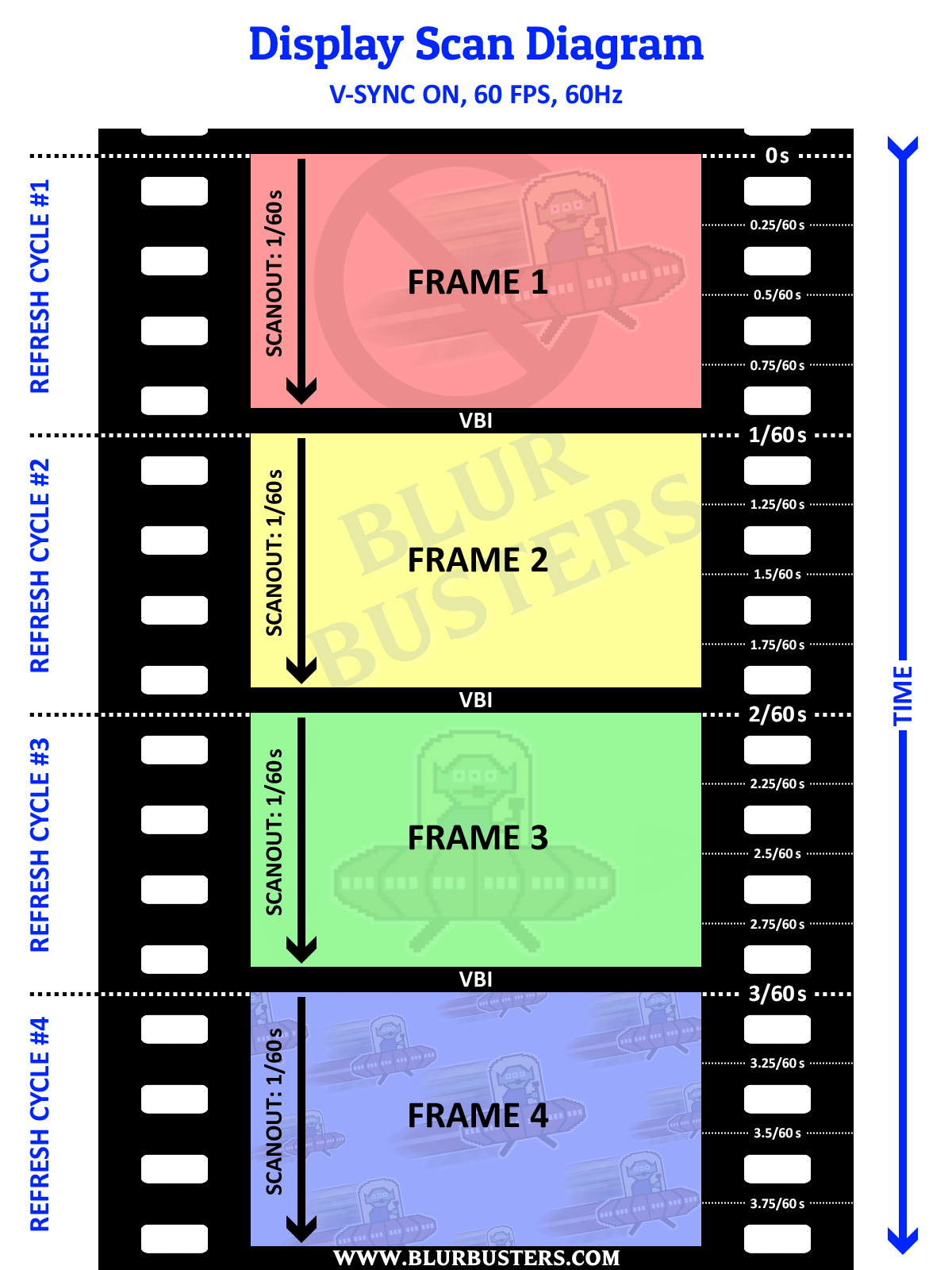
Remember the VBI (Vertical Blanking Interval), from the diagrams at bottom of https://blurbusters.com/scanout/

Image

So a video cable spends roughly 95% of the time transmitting pixels (unless using Large Vertical Total tricks), and 5% pausing between refresh cycles.

A video cable spends this relative ratio time transmitting:

Code: Select all

(Resolution) / (Vertical Total)
So a Vertical Total of 1125 for a 1080p signal means:

Code: Select all

1080 / 1125 = 0.96
- That's 96% of the time transmitting visible pixel rows (uploading new refresh cycles from GPU to monitor)
- That's 4% of the time transmitting offscreen pixel rows as refresh cycle spacers (pausing between refresh cycles)

So 4% of 1/360sec = approximately 0.11 milliseconds = 110 microseconds VBI

The refresh cycle spacing was used as a guard delay to wait for CRT tubes to move the electron beam back to the top. In digital displays, these are mostly-vestigal delays to allow digital display firmwares to have enough time to finalize the previous refresh cycle (e.g. final processing tasks) as well as enough time to initialize the beginning of a new refresh cycle. That's why there's 4% dummy pixels doing nothing on the video cable while the display is between refresh cycles.

This concludes the invisible/offtopic parts of my answer.

The visible/ontopic parts of my answer will follow another day or week (too many questions, too little time).

It has nothing to do with GtG*
It has nothing to do with MPRT
It has nothing to do with visible pixels
It is simply a GPU/DisplayPort/HDMI cable "pausing between spending time uploading new refresh cycles from GPU to the monitor"

</NotVisibleStuff>

*Special exception For Strobing And Lag: Large Vertical Totals forces faster cable transmission of refresh cycles. This can reduce latency, but without image effects. Now, also longer pauses between refresh cycles can be useful for strobe backlights to keep the display turned off longer before the next strobe flash. This can allow LCD GtG to finish in total darkness before strobe flash. This can LCD make motion clearer with Large Vertical Totals; but is simply a domino effect of allowing the monitor to keep the backlight turned off longer while refreshing the pixels, in order to have clearer and better LCD strobing. See old high speed video of lightboost, and xg2431 large vertical total tweak for more context on the rare exceptions of visible user benefits of custom tweaking of vertical totals.
Head of Blur Busters - BlurBusters.com | TestUFO.com | Follow @BlurBusters on: BlueSky | Twitter | Facebook

Image
Forum Rules wrote:  1. Rule #1: Be Nice. This is published forum rule #1. Even To Newbies & People You Disagree With!
  2. Please report rule violations If you see a post that violates forum rules, then report the post.
  3. ALWAYS respect indie testers here. See how indies are bootstrapping Blur Busters research!

User avatar
Chief Blur Buster
Site Admin
Posts: 12178
Joined: 05 Dec 2013, 15:44
Location: Toronto / Hamilton, Ontario, Canada
Contact:

Re: High refresh rate monitors at 60hz?

Post by Chief Blur Buster » 27 Jan 2026, 13:14

Quick answer, Part 2/2
kyube wrote:
26 Jan 2026, 07:48
Just to clear up any possible misunderstanding, here's how I understood the terms you've used:
“Refreshtime” — time-domain equivalent of the refresh rate (e.g. 200 Hz = 5 ms; 5 ms being the 'Refreshtime')
GtG — gray-to-gray response times (the time it takes from a pixel to transition from one shade of gray to another)
MPRT — motion picture response time
That's correct
kyube wrote:
26 Jan 2026, 07:48
(which is defined in the document above as the being roughly equal to the SQRT of GtG^2 + [0,8*tᵥ]^2; tᵥ — frame visibility time; which would be equivalent to the term 'Refreshtime', I believe.)
The formula needs looking more into.

Also, some OLEDs have MPRT(10->90%) slightly less than refreshtime so that's indeed 0.8 times refresh time. Because of the 10% and 90% cutoffs (designed for oscilloscope noise margins) because GtG is so fast. I also describe the 10% 90% problem at www.blurbusters.com/gtg-vs-mprt

- With slow GtG taking a long time, slow GtG actually increases MPRT(10%-90%) far beyond refreshtime.
- With zero GtG and 10%-90% cutoffs, instant GtG actually decreases MPRT(10%-90%) "faster" than refreshtime.

At 0ms GtG, MPRT(0%-100%) is exactly equal and perfectly identical to refresh time.

Image

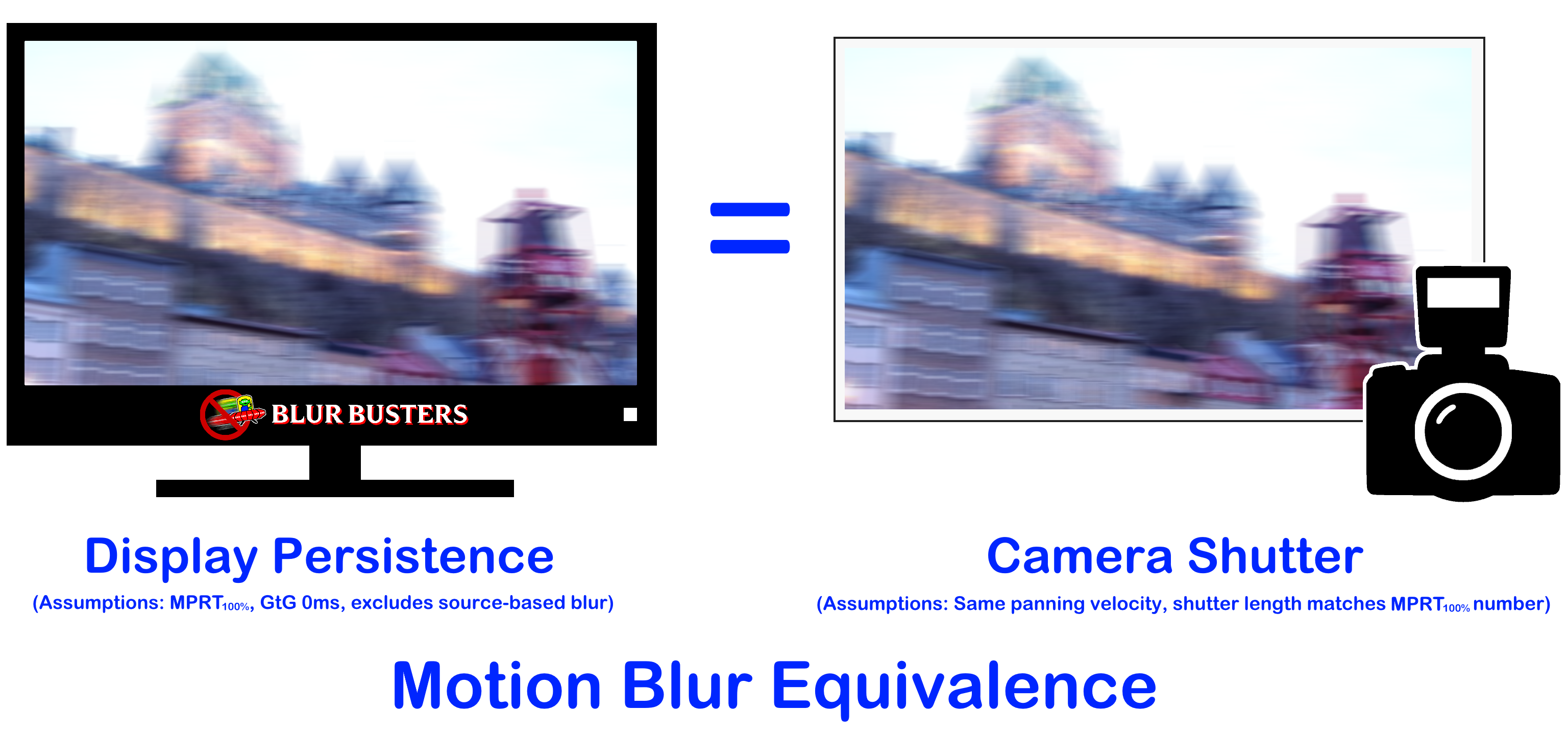
- That's why 120fps on 120Hz OLED has identical eye-tracked motion blur to a photo taken with 1/120sec camera shutter.
- That's why 480fps on 480Hz OLED has identical eye-tracked motion blur to a photo taken with 1/480sec camera shutter.

That's why I say MPRT(100%) to disambiguate from the VESA standard MPRT(10-90%) because MPRT100% is sometimes hard to measure because of oscilloscope noise margins and the infinite GtG effect (that damned "trying to get close to speed of light but not quite reaching it" type of effect)

Thusly, for perfect zero GtG which is generally impossible (even DLP micromirrors takes microseconds to flip, and lasers take nanoseconds to toggle):

if (GtG == 0.00000̅) and (framerate == Hz) then MPRT(100%) perfectly equals refreshtime.

Mind you: Even OLED doesn't have perfect instant GtG, but its sufficiently close to 0ms GtG that the blur differentials of OLED vs photograph now falls way below noise floor (e.g. probably less than 1% overall blur differential). I bet you cannot tell apart a photograph taken with a 1/120sec shutter and a 1/120.5sec shutter. This means OLED is now the gold standard of refresh rate compliance today for triple-digit frame rates since GtG of OLED doesn't come close to refreshtime.

(Rest of answers to follow. Optionally, you may wish to edit your post with revisions if my current answers sufficiently indirectly answers the other parts of your questions, or modifies the questions)
Head of Blur Busters - BlurBusters.com | TestUFO.com | Follow @BlurBusters on: BlueSky | Twitter | Facebook

Image
Forum Rules wrote:  1. Rule #1: Be Nice. This is published forum rule #1. Even To Newbies & People You Disagree With!
  2. Please report rule violations If you see a post that violates forum rules, then report the post.
  3. ALWAYS respect indie testers here. See how indies are bootstrapping Blur Busters research!

Post Reply