
well i updated the google doc with some measurements of the input lag of the system in response to a flashing led.
https://docs.google.com/spreadsheets/d/ ... =919709196
for a dimmer LED, the times go up by 60% or so... but regardless i think my claim to 10us precision + accuracy is well justified already.
i don't quite remember the numbers i got, but you should be able to get well under a millisecond though...
flood's input lag measurements
-
spacediver
- Posts: 505
- Joined: 18 Dec 2013, 23:51
Re: flood's input lag measurements
that's ridiculous (in a good way)... even including the very occasional outlier, you're getting a standard deviation of under a cycle. Your effective precision for each measurement is probably limited by only by the sampling time (i.e.+- a cycle).
-
flood
- Posts: 929
- Joined: 21 Dec 2013, 01:25
Re: flood's input lag measurements
hacked together a bunch of example code to make a white frame program using d3d9 and winapi
http://pastebin.com/mtBu9MDX
i think it's about as minimal as i can reasonably make it. it runs at around 9000fps fullscreen
and here are the measurements
https://docs.google.com/spreadsheets/d/ ... =489061249
as you can see, the inclusion of a delayMicroseconds, to make each measurement have no correlation to the next, results in a ~1ms spread in the measurements. perhaps this seems trivial after the fact, but originally i was under the impression that mouse.move simply blocks until the actual usb message is sent. regardless i'm not sure whats going on and i've decided that i'm too much of a control freak to use the arduino mouse libraries.. they're just too much of a black box.
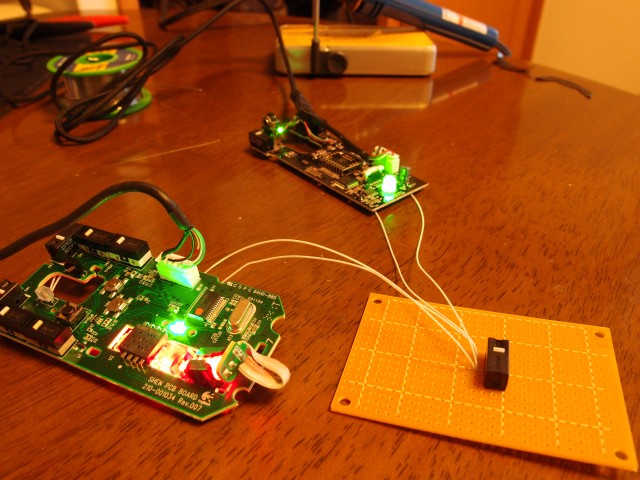
so... now i'm attempting to make my own usb mouse by connecting the arduino pins to a usb cable.
http://pastebin.com/mtBu9MDX
i think it's about as minimal as i can reasonably make it. it runs at around 9000fps fullscreen
and here are the measurements
https://docs.google.com/spreadsheets/d/ ... =489061249
as you can see, the inclusion of a delayMicroseconds, to make each measurement have no correlation to the next, results in a ~1ms spread in the measurements. perhaps this seems trivial after the fact, but originally i was under the impression that mouse.move simply blocks until the actual usb message is sent. regardless i'm not sure whats going on and i've decided that i'm too much of a control freak to use the arduino mouse libraries.. they're just too much of a black box.
so... now i'm attempting to make my own usb mouse by connecting the arduino pins to a usb cable.
Last edited by flood on 10 Dec 2014, 01:28, edited 1 time in total.
-
spacediver
- Posts: 505
- Joined: 18 Dec 2013, 23:51
Re: flood's input lag measurements
eh, I'll wait for you to figure it all out before you mount a layman-readable explanation. I've no idea what you just said, or what those two sets of measurements represent :pflood wrote:
as you can see, the inclusion of a delayMicroseconds to make each measurement have no correlation to the next results in a ~1ms spread in the measurements. perhaps this seems trivial after the fact, but originally i was under the impression that mouse.move simply blocks until the actual usb message is sent. regardless i'm not sure whats going on and i've decided that i'm too much of a control freak to use the arduino mouse libraries.. they're just too much of a black box.
so... now i'm attempting to make my own usb mouse by connecting the arduino pins to a usb cable.
-
flood
- Posts: 929
- Joined: 21 Dec 2013, 01:25
-
m1croe
- Posts: 1
- Joined: 10 Dec 2014, 07:16
Re: flood's input lag measurements
I was doing something similar to this about a year ago using the following hardware and some C programming.
Atmel XMEGA-A3BU Xplained evaluation kit (Digikey $36)
Atmel JTAG Ice programmer and Atmel Studio (Digikey $115, Studio is free)
The eval. kit comes equipped with some buttons, a display, a USB port, and an ambient light sensor. I wrote some firmware which enumerated the device as a 1ms polling interval USB mouse with some counting. Upon button press the micro sent a mouse movement packet to the host PC (on the next USB poll) and then counted the number of USB polling packets received until the ambient light sensor crossed a predetermined threshold value (dark to light transition). The sensor is connected to an ADC so the level is adjustable. The delay result (# polls ~= time in ms) was shown on the board's display. Another button clears the result and reverses the mouse movement so it is ready for the next measurement.
The PC was running Quake Live (pretty low latency and consistent OpenGL engine, for DirectX use CSGO maybe?) and a space map to get a nice dark/light transition. Start a practice session, set the in-game mouse sensitivity so you get a 90 degree viewpoint rotation from the button press and move your player to a good spot that rotates between dark (sky) and light (light source). Helps to turn off the sky so it is black and raise the gamma.
I didn't break down how accurate this setup was, but the results that I got were comparable to other sources using high speed cameras. I was only after roughly millisecond level timing accuracy but you could also use an on-chip timer if you desire better than that. The variability in the measurement was on the order of 10's of ms IIRC so I wasn't concerned with obtaining sub-ms accuracy.
Atmel XMEGA-A3BU Xplained evaluation kit (Digikey $36)
Atmel JTAG Ice programmer and Atmel Studio (Digikey $115, Studio is free)
The eval. kit comes equipped with some buttons, a display, a USB port, and an ambient light sensor. I wrote some firmware which enumerated the device as a 1ms polling interval USB mouse with some counting. Upon button press the micro sent a mouse movement packet to the host PC (on the next USB poll) and then counted the number of USB polling packets received until the ambient light sensor crossed a predetermined threshold value (dark to light transition). The sensor is connected to an ADC so the level is adjustable. The delay result (# polls ~= time in ms) was shown on the board's display. Another button clears the result and reverses the mouse movement so it is ready for the next measurement.
The PC was running Quake Live (pretty low latency and consistent OpenGL engine, for DirectX use CSGO maybe?) and a space map to get a nice dark/light transition. Start a practice session, set the in-game mouse sensitivity so you get a 90 degree viewpoint rotation from the button press and move your player to a good spot that rotates between dark (sky) and light (light source). Helps to turn off the sky so it is black and raise the gamma.
I didn't break down how accurate this setup was, but the results that I got were comparable to other sources using high speed cameras. I was only after roughly millisecond level timing accuracy but you could also use an on-chip timer if you desire better than that. The variability in the measurement was on the order of 10's of ms IIRC so I wasn't concerned with obtaining sub-ms accuracy.
-
flood
- Posts: 929
- Joined: 21 Dec 2013, 01:25
Re: flood's input lag measurements
nvm nope. way too much workflood wrote: so... now i'm attempting to make my own usb mouse by connecting the arduino pins to a usb cable.
good to see that i'm not the first to try this stuff ;dm1croe wrote:I was doing something similar to this about a year ago using the following hardware and some C programming.
Atmel XMEGA-A3BU Xplained evaluation kit (Digikey $36)
Atmel JTAG Ice programmer and Atmel Studio (Digikey $115, Studio is free)
The eval. kit comes equipped with some buttons, a display, a USB port, and an ambient light sensor. I wrote some firmware which enumerated the device as a 1ms polling interval USB mouse with some counting. Upon button press the micro sent a mouse movement packet to the host PC (on the next USB poll) and then counted the number of USB polling packets received until the ambient light sensor crossed a predetermined threshold value (dark to light transition). The sensor is connected to an ADC so the level is adjustable. The delay result (# polls ~= time in ms) was shown on the board's display. Another button clears the result and reverses the mouse movement so it is ready for the next measurement.
The PC was running Quake Live (pretty low latency and consistent OpenGL engine, for DirectX use CSGO maybe?) and a space map to get a nice dark/light transition. Start a practice session, set the in-game mouse sensitivity so you get a 90 degree viewpoint rotation from the button press and move your player to a good spot that rotates between dark (sky) and light (light source). Helps to turn off the sky so it is black and raise the gamma.
I didn't break down how accurate this setup was, but the results that I got were comparable to other sources using high speed cameras. I was only after roughly millisecond level timing accuracy but you could also use an on-chip timer if you desire better than that. The variability in the measurement was on the order of 10's of ms IIRC so I wasn't concerned with obtaining sub-ms accuracy.
the reason for the large spread in the data from other high-speed cam measurements is that (i think) most of them only looked at a small area of the screen. if you look at a small area, that area is only updated during a small fraction of the entire refresh cycle so the spread of the measurements will be limited by the length of the refresh period
-
lexlazootin

- Posts: 1251
- Joined: 16 Dec 2014, 02:57
Re: flood's input lag measurements
Flood, i found a post on Japanese forum/blog showing different mouse CLICK delay on different mice.
http://utmalesoldiers.blogspot.com.au/2013/02/114.html
Is this source reliable and/or do some click testing of your g100 mouse to see if it corresponds with their testing please
http://4.bp.blogspot.com/-IfSoCcHsPBc/V ... 141207.png
http://cdn.overclock.net/6/63/6317907b_1070rk7.gif
http://blog-imgs-48.fc2.com/r/a/f/rafau ... ment01.jpg
I currently have a kinzu v2 and it's one of the worst contenders so I'm curious if i need to go get a logitech asap
love yoooooou
http://utmalesoldiers.blogspot.com.au/2013/02/114.html
Is this source reliable and/or do some click testing of your g100 mouse to see if it corresponds with their testing please
http://4.bp.blogspot.com/-IfSoCcHsPBc/V ... 141207.png

http://cdn.overclock.net/6/63/6317907b_1070rk7.gif

http://blog-imgs-48.fc2.com/r/a/f/rafau ... ment01.jpg
I currently have a kinzu v2 and it's one of the worst contenders so I'm curious if i need to go get a logitech asap
love yoooooou
-
flood
- Posts: 929
- Joined: 21 Dec 2013, 01:25
Re: flood's input lag measurements
it should be reliable... afaik he designed his stuff pretty carefully and does several measurements for each mice.lexlazootin wrote:Flood, i found a post on Japanese forum/blog showing different mouse CLICK delay on different mice.
http://utmalesoldiers.blogspot.com.au/2013/02/114.html
Is this source reliable and/or do some click testing of your g100 mouse to see if it corresponds with their testing please
http://4.bp.blogspot.com/-IfSoCcHsPBc/V ... 141207.png
http://cdn.overclock.net/6/63/6317907b_1070rk7.gif
http://blog-imgs-48.fc2.com/r/a/f/rafau ... ment01.jpg
I currently have a kinzu v2 and it's one of the worst contenders so I'm curious if i need to go get a logitech asap
love yoooooou
ill take apart my g100s and compare it's button click latency against the arduino sometime far in the future
also my g100s' left button is half dead so it will be interesting to compare against the right button
-
flood
- Posts: 929
- Joined: 21 Dec 2013, 01:25
Re: flood's input lag measurements
did some camera comparisons. data in google doc
first i tried my minimal program but it was pretty boring because the lag was always so low that i would only count either 0 or 1 frame difference in the 1000fps video.
so i capped my program to 50fps so that the input lag would vary randomly between 0 and 20ms.
1000fps video: https://www.youtube.com/watch?v=wWo5PNXnJeU


the camera consistently underestimates the input lag. this is exactly the expected behavior due to rolling shutter and the position of the indicator LED in the camera's field of view.
explanation: (this is really confusing/difficult to understand. just don't read this part)
===
suppose the actual input lag is a uniformly distributed random variable between 1ms and 2ms. it is obvious that the expected distribution of differences does not change if the actual lag is uniformly distributed between 2ms and 3ms, or n ms and (n+1) ms, except for n = 0.
let T_i be the actual time the indicator LED lights up, which is less than 10us from when the mouse.move() command is completed.
let T_s be the actual time the screen first responds.
let L be the actual input lag. L := T_s - T_i
our restriction above is saying that L is uniformly distributed between 1ms and 2ms
suppose that each pixel of the video corresponds to light collected over an entire millisecond (from looking at videos of my crt's scanning, it's a very good approximation).
let time difference between the pixels at the top and bottom of the video be A
so for instance, if A=0.6ms, if the pixels at the top of the frame collect light between t=1.2ms and 2.2ms, the pixels at the bottom collect light between 1.8ms and 2.8ms.
let the time difference between the pixels at the top and the pixels that show the LED indicator be B. for instance, if the LED is placed near the top of the video, then B is close to 0. if it's placed near the bottom, then B is close to A
consider the frame where the indicator LED first lights up. define t=0 so that the top pixel in the current frame collected light from between t = 0ms and 1ms.
thus the LED indicator pixels collected light from between t=B and t=B + 1ms.
given that the pixels show the indicator lit up this frame and not the previous frame, it must be that B < T_i < (B+1ms). as the timing of the mouse.move() events are completely separate from timing of the video frames, T_i must be uniformly distributed between B and B+1ms. (the uniform distribution of L is independent as the computer's timing is separate from the camera's.)
if this frame is numbered 0, then the frame # of the first frame showing a screen response is floor(T_s - A). e.g. the screen response first appears on frame 1 iff A < T_s < A+1ms.
let D be the discrepancy between the actual lag and the lag measured by camera frame counting
D = L - floor(T_s - A) = L - floor(L + T_i - A) = X - floor(X+Y + B-A), where X := L - 1ms and Y := T_i - B so that X and Y are independent uniform(0,1ms) random variables.
it's possible to show that this is a symmetric triangular distribution between (A-B)-1ms and (A-B)+1ms
if you look at the histogram in the google doc, that's pretty much what is seen, and you can roughly estimate (A-B) to be 0.6ms. that's more or less inline with what i can estimate by looking at the slope of the crt's traces in each video frame
===
first i tried my minimal program but it was pretty boring because the lag was always so low that i would only count either 0 or 1 frame difference in the 1000fps video.
so i capped my program to 50fps so that the input lag would vary randomly between 0 and 20ms.
1000fps video: https://www.youtube.com/watch?v=wWo5PNXnJeU
the camera consistently underestimates the input lag. this is exactly the expected behavior due to rolling shutter and the position of the indicator LED in the camera's field of view.
explanation: (this is really confusing/difficult to understand. just don't read this part)
===
suppose the actual input lag is a uniformly distributed random variable between 1ms and 2ms. it is obvious that the expected distribution of differences does not change if the actual lag is uniformly distributed between 2ms and 3ms, or n ms and (n+1) ms, except for n = 0.
let T_i be the actual time the indicator LED lights up, which is less than 10us from when the mouse.move() command is completed.
let T_s be the actual time the screen first responds.
let L be the actual input lag. L := T_s - T_i
our restriction above is saying that L is uniformly distributed between 1ms and 2ms
suppose that each pixel of the video corresponds to light collected over an entire millisecond (from looking at videos of my crt's scanning, it's a very good approximation).
let time difference between the pixels at the top and bottom of the video be A
so for instance, if A=0.6ms, if the pixels at the top of the frame collect light between t=1.2ms and 2.2ms, the pixels at the bottom collect light between 1.8ms and 2.8ms.
let the time difference between the pixels at the top and the pixels that show the LED indicator be B. for instance, if the LED is placed near the top of the video, then B is close to 0. if it's placed near the bottom, then B is close to A
consider the frame where the indicator LED first lights up. define t=0 so that the top pixel in the current frame collected light from between t = 0ms and 1ms.
thus the LED indicator pixels collected light from between t=B and t=B + 1ms.
given that the pixels show the indicator lit up this frame and not the previous frame, it must be that B < T_i < (B+1ms). as the timing of the mouse.move() events are completely separate from timing of the video frames, T_i must be uniformly distributed between B and B+1ms. (the uniform distribution of L is independent as the computer's timing is separate from the camera's.)
if this frame is numbered 0, then the frame # of the first frame showing a screen response is floor(T_s - A). e.g. the screen response first appears on frame 1 iff A < T_s < A+1ms.
let D be the discrepancy between the actual lag and the lag measured by camera frame counting
D = L - floor(T_s - A) = L - floor(L + T_i - A) = X - floor(X+Y + B-A), where X := L - 1ms and Y := T_i - B so that X and Y are independent uniform(0,1ms) random variables.
it's possible to show that this is a symmetric triangular distribution between (A-B)-1ms and (A-B)+1ms
if you look at the histogram in the google doc, that's pretty much what is seen, and you can roughly estimate (A-B) to be 0.6ms. that's more or less inline with what i can estimate by looking at the slope of the crt's traces in each video frame
===