NVIDIA G-Sync Pulsar monitor - Asus ROG Strix XG27AQNGV

Ask about motion blur reduction in gaming monitors. Includes ULMB (Ultra Low Motion Blur), NVIDIA LightBoost, ASUS ELMB, BenQ/Zowie DyAc, ToastyX, black frame insertion (BFI), and now framerate-based motion blur reduction (framegen / LSS / etc).
Post Reply
brownvim
Posts: 197
Joined: 22 Jun 2020, 04:15

Re: NVIDIA G-Sync Pulsar monitor - Asus ROG Strix XG27AQNGV

Post by brownvim » 06 Feb 2026, 17:18

kyube wrote:
06 Feb 2026, 13:43
brownvim wrote:
06 Feb 2026, 01:39
I’m surprised about all the mixed takes on the monitor. Maybe it’s because of different use cases, not sure.

I have the pulsar, been gaming on it the past week (Black Myth Wukong from my backlog I’m trying to get through). I went back to my OLED and it looks horrible in motion now.

I should state the oled is only 175hz but this is a heavy game to run and that’s around the same frame rate I’m running it on the Pulsar. I find the OLED irritating/jarring/off putting to look at because of the blur now.
The point is that these models don't have a clear-cut use-case they solve.
There are models which cost 1/4 the asking price of these models without their detriments (TMDS standard "HDMI 2.1" port, locked down PW adjustments in ULMB2 mode, DP1.4 only for Pulsar, Nvidia GPU vendor lock-in, added processing latency)
Fixed refresh rate strobing (Dyac1/+/2, ULMB 1, PureXP), when being limited by the game's frame rate for chasing eye-tracked motion performance, is a far better clarity target than variable refresh rate strobing (Pulsar).
Even the older single-strobe BenQ models (e.g.: XL2411P) or others listed here do a far better job for a “retro” (<100FPS) use-case. Even a CRT with an adapter is a much better option.
VSYNC exists for fixed refresh rate as well. SK's Latent-Sync exists. RTSS' Scanline-Sync exists.
700€ gets you a 610Hz TN (e.g.: AOC CS24A / AG246FK6) or +360Hz OLED (e.g.: Philips 27M2N8500), both of which come with HDMI 2.1. as of Q1 2026
250€ gets you a AOC Q25G4SR (24.5" QHD 300Hz KSF/PFS IPS LCD)

Clear cost cutting.
The Mediatek MT9810 (scaler IC) found in these Pulsar models is able to do HDMI 2.1 FRL6.
If they've launched it <500€ with HDMI 2.1 FRL6, I could somewhat understand it's appeal in today's market.
But now?
OLED exists within the same price range, making it's sample & hold performance irrelevant.
Better backlight strobing exists within the same price range, making it's impulsed performance irrelevant.
What use-case does it have?
There are pros and cons to every monitor, but my experience with the Pulsar is that I genuinely can't go back to my OLED now – games in motion just look so much sharper and clearer.

I don't play many competitive FPS titles chasing 500+ FPS; I prefer single-player games where frame rates fluctuate a lot. That's why I'm not willing to lock FPS just to hit a "sweet spot" on older strobing tech.

Your suggestions all have trade-offs for my type of gaming:

A 500+ Hz OLED would still give me sample-and-hold blur across the wide range of frame rates I actually play at – I can't run everything at 500+ FPS just to make it "better" than Pulsar.

The 610 Hz TN panels are probably great for esports, but they're 1080p only, no true VRR strobing, poor colours/angles, and locking FPS is a hassle.

I had an FW900 CRT back in the day and loved it – amazing at 60 FPS for PC and Consoles – but it wasn't perfect (geometry/convergence/focus tweaks, 980 Ti limit, no VRR, limited inputs).

Other strobing monitors all have their sweet spots and nasty crosstalk outside them.

Let's see how Pulsar handles 48–110 Hz once the firmware is released – that's its main weak spot for me right now (sharp overall, but the faint double-image I can't stand). Could be brilliant for retro games too. I played Shinobi and it looked great.

I do wish it worked properly on consoles though, a PS5 Pro connected to it would be so good.

Bottom line: my use-case is effortless plug-and-play clarity on PC, especially with variable frame rates in single-player titles. Pulsar nails that for me. no monitor is perfect, maybe one day.
5800X3D, RTX 5080 FE, OLED AW3423DW + Acer Pulsar XB273U F5

brownvim
Posts: 197
Joined: 22 Jun 2020, 04:15

Re: NVIDIA G-Sync Pulsar monitor - Asus ROG Strix XG27AQNGV

Post by brownvim » 06 Feb 2026, 17:37

Discorz wrote:
06 Feb 2026, 17:14
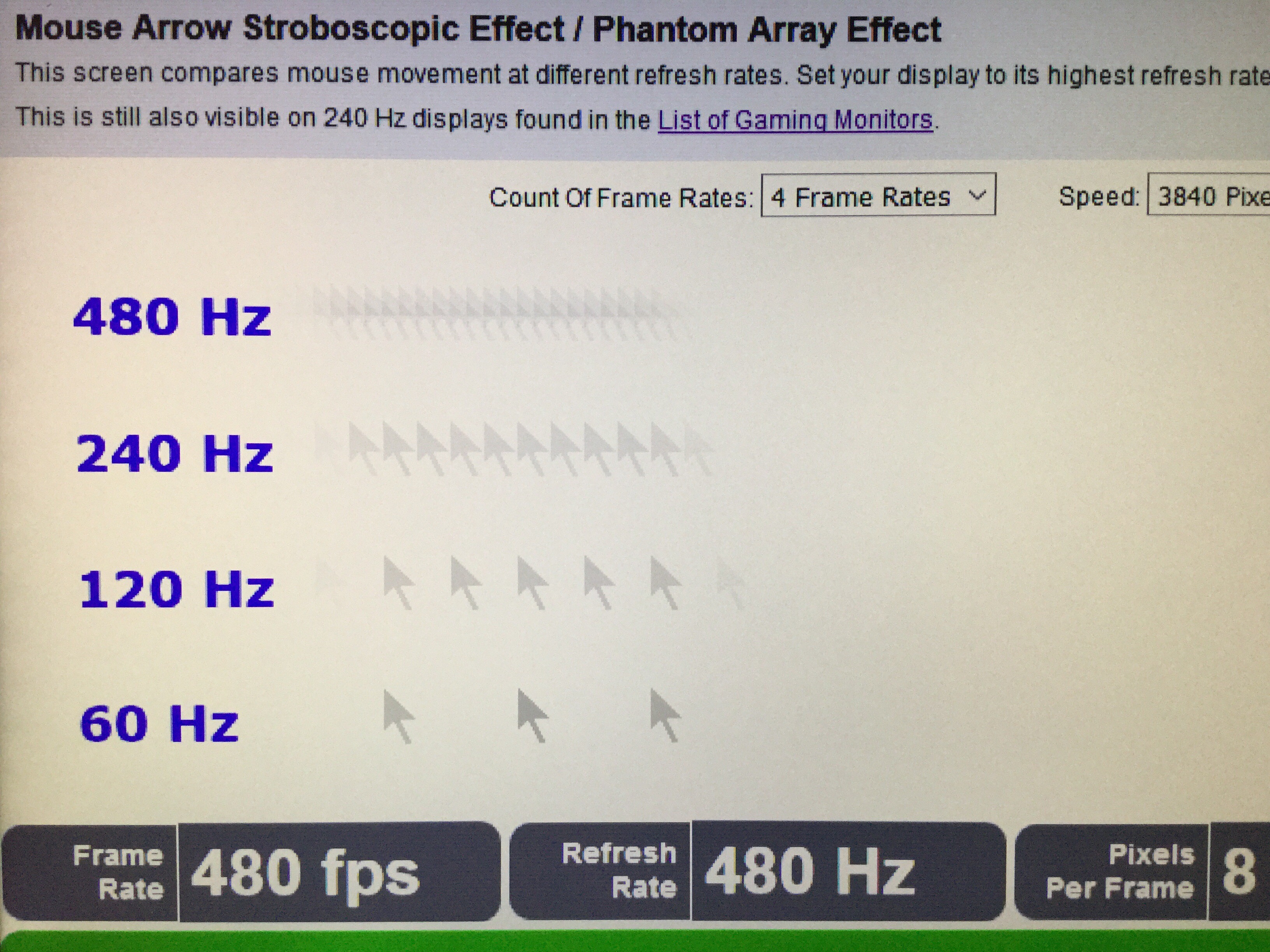
Can anyone test this claim with their Pulsar monitor? Is pulse width ~25% (~0.7 ms) as advertised or ~40% (~1.1 ms)?

I recommend this test for quick approximate MPRT measurements. I adjusted the parameters for this test specifically (~3840 px/sec speed, 4 indicators, decimal), but feel free to test other speeds too, preferably 2880 px/sec or faster.
https://testufo.com/mprt#pps=3840&count ... er=decimal

One must eye track the moving pattern and look for following: display's approximate persistence will be shown as perfectly joined lines/bands with no horizontal overlapping or separation. Imperfect convergence means persistence is somewhere in-between the embedded values. What does it lean more towards to? 0.7 or 1.1 ms? You'll probably want to pixel peep for this test.

Image

Testing it only at 360 Hz 360 fps (testufo scenario) should be enough to confirm since that's where it supposedly deviates the most. Normally testufo doesn't work with VRR, and should not be used for testing VRR range. But for max refresh and frame rate, like in this case it is fine.
You can see all the vertical white lines all separated by black space, but there's also a faint grey line just before them like a ghosting effect.

3840 too fast to track for me, 2880 I can track it.

the first set of lines look the closest together but still clearly seperated. not sure what im looking for. it literally looks like the paused image with a slight grey to the left.
5800X3D, RTX 5080 FE, OLED AW3423DW + Acer Pulsar XB273U F5

User avatar
Chief Blur Buster
Site Admin
Posts: 12265
Joined: 05 Dec 2013, 15:44
Location: Toronto / Hamilton, Ontario, Canada
Contact:

Re: NVIDIA G-Sync Pulsar monitor - Asus ROG Strix XG27AQNGV

Post by Chief Blur Buster » 06 Feb 2026, 21:08

Baron of Sun wrote:
01 Feb 2026, 13:04
Why is eliminating the stroboscopic effect necessary? Wouldn't it be enough that it strobes so fast that you don't see it flickering? (besides the brightness loss of course)
It varies.

Many aren't bothered by it.

Others are some of us are slightly bothered by it.

A very few are really bothered by it -- sometimes it triggers headaches/migraines because it is a disconnect from real life.

Image
Head of Blur Busters - BlurBusters.com | TestUFO.com | Follow @BlurBusters on: BlueSky | Twitter | Facebook

Image
Forum Rules wrote:  1. Rule #1: Be Nice. This is published forum rule #1. Even To Newbies & People You Disagree With!
  2. Please report rule violations If you see a post that violates forum rules, then report the post.
  3. ALWAYS respect indie testers here. See how indies are bootstrapping Blur Busters research!

User avatar
Chief Blur Buster
Site Admin
Posts: 12265
Joined: 05 Dec 2013, 15:44
Location: Toronto / Hamilton, Ontario, Canada
Contact:

Re: NVIDIA G-Sync Pulsar monitor - Asus ROG Strix XG27AQNGV

Post by Chief Blur Buster » 06 Feb 2026, 21:10

RealNC wrote:
01 Feb 2026, 13:19
No idea what this is about, but we're talking about things that can lower motion blur on displays. You can do that at 60Hz even, no need for 20kHz.
FYI -- some people confuse "stroboscopic effect" with "motion blur".

I don't know if that happened here, but I've seen people post often enough about mouse trails + stroboscopic effect in games, that I've had to explain/disambiguate it (versus classic laptop mouse cursor trails for slow LCDs -- there's no mouse trails anymore yet people keep using "mouse trails" or "motion blur" to describe the stroboscopic effect).
Discorz wrote:
30 Jan 2026, 03:04
I just noticed something! Based on the oscillographs MUB provided, the main pulse width is unproportionally narrower at the bottom end and wider at the top end of the range. That means pulse width is not a fixed 25%. I measured them manually, then transferred the findings to one of my MPRT charts to see how it scales over the range. It's a less steep straight line that intersects with advertised 25% line at 120 fps. So it still scales linearly, just not in a way we are used to. After some rounding up this is what I got:
  • 100 fps * 23.8% = ~2.4 ms
  • 120 fps * 25% = ~2.1 ms
  • 144 fps * 26.5% = ~1.8 ms
  • 170 fps * 28.1% = ~1.7 ms
  • 240 fps * 32.5% = ~1.4 ms
  • 330 fps * 38.1% = ~1.2 ms
  • 360 fps * 40% = ~1.1 ms
Interesting behavior! Not sure if this is intentional or some limitations are at question. Also, my findings don't fully correspond with their "Over 1000 Hz Effective Motion Clarity" claim. However it does go beyond "quadruple motion clarity" below 120 fps.
It's possible that it's internal backlight diffusion that's creating a "pulse lengthening" style effect.

I wrote about this in year 2012 at http://www.scanningbacklight.com/ before we got renamed to Blur Busters in 2013.
Head of Blur Busters - BlurBusters.com | TestUFO.com | Follow @BlurBusters on: BlueSky | Twitter | Facebook

Image
Forum Rules wrote:  1. Rule #1: Be Nice. This is published forum rule #1. Even To Newbies & People You Disagree With!
  2. Please report rule violations If you see a post that violates forum rules, then report the post.
  3. ALWAYS respect indie testers here. See how indies are bootstrapping Blur Busters research!

brownvim
Posts: 197
Joined: 22 Jun 2020, 04:15

Re: NVIDIA G-Sync Pulsar monitor - Asus ROG Strix XG27AQNGV

Post by brownvim » 07 Feb 2026, 00:36

Chief do you know if anyone is using the new firmware update yet? Will you get early access to it to test too?
5800X3D, RTX 5080 FE, OLED AW3423DW + Acer Pulsar XB273U F5

bbuser
Posts: 9
Joined: 25 Jan 2026, 14:18

Re: NVIDIA G-Sync Pulsar monitor - Asus ROG Strix XG27AQNGV

Post by bbuser » 07 Feb 2026, 09:38

kyube wrote:
06 Feb 2026, 13:43
brownvim wrote:
06 Feb 2026, 01:39
I’m surprised about all the mixed takes on the monitor. Maybe it’s because of different use cases, not sure.

I have the pulsar, been gaming on it the past week (Black Myth Wukong from my backlog I’m trying to get through). I went back to my OLED and it looks horrible in motion now.

I should state the oled is only 175hz but this is a heavy game to run and that’s around the same frame rate I’m running it on the Pulsar. I find the OLED irritating/jarring/off putting to look at because of the blur now.
The point is that these models don't have a clear-cut use-case they solve.
There are models which cost 1/4 the asking price of these models without their detriments (TMDS standard "HDMI 2.1" port, locked down PW adjustments in ULMB2 mode, DP1.4 only for Pulsar, Nvidia GPU vendor lock-in, added processing latency)
Fixed refresh rate strobing (Dyac1/+/2, ULMB 1, PureXP), when being limited by the game's frame rate for chasing eye-tracked motion performance, is a far better clarity target than variable refresh rate strobing (Pulsar).
Even the older single-strobe BenQ models (e.g.: XL2411P) or others listed here do a far better job for a “retro” (<100FPS) use-case. Even a CRT with an adapter is a much better option.
VSYNC exists for fixed refresh rate as well. SK's Latent-Sync exists. RTSS' Scanline-Sync exists.
700€ gets you a 610Hz TN (e.g.: AOC CS24A / AG246FK6) or +360Hz OLED (e.g.: Philips 27M2N8500), both of which come with HDMI 2.1. as of Q1 2026
250€ gets you a AOC Q25G4SR (24.5" QHD 300Hz KSF/PFS IPS LCD)

Clear cost cutting.
The Mediatek MT9810 (scaler IC) found in these Pulsar models is able to do HDMI 2.1 FRL6.
If they've launched it <500€ with HDMI 2.1 FRL6, I could somewhat understand it's appeal in today's market.
But now?
OLED exists within the same price range, making it's sample & hold performance irrelevant.
Better backlight strobing exists within the same price range, making it's impulsed performance irrelevant.
What use-case does it have?
You've owned/tried the pulsar monitor? or just from what you've read not happy with it.

User avatar
kyube
Posts: 896
Joined: 29 Jan 2018, 12:03

Re: NVIDIA G-Sync Pulsar monitor - Asus ROG Strix XG27AQNGV

Post by kyube » 07 Feb 2026, 10:53

bbuser wrote:
07 Feb 2026, 09:38
You've owned/tried the pulsar monitor? or just from what you've read not happy with it.
I haven't tried one of the Pulsar models on-hand, my opinion is based on purely reading reviews & manuals.
The Pulsar portion (VRR+strobe; multi-strobe PWM) wasn't interesting to me in the slightest due to the potential eye-strain concerns it may harbour.
The fixed refresh rate portion without red fringing (due to QD backlight) was the most appealing part to me, especially after Chief confirmed the use of QD... until I've watched the reviews & read the manuals.
A HDMI 2.0 display, without the abilty to adjust PW in it's fixed refresh rate mode (ULMB2), which forces you to use DP1.4 (mandatory DSC) at a price point of 700€ killed any enthusiasm I had for these models.

I'm personally waiting on the new 24.5" QHD 360Hz IPS LCDs releasing this year (e.g.: Titan Army P245MS Pro or AOC's implementation of the panel)
They're very likely going to be <350€, akin to the Q25G4SR.

User avatar
rexbinary
Posts: 9
Joined: 21 Jan 2026, 00:55

Re: NVIDIA G-Sync Pulsar monitor - Asus ROG Strix XG27AQNGV

Post by rexbinary » 07 Feb 2026, 23:47

Hi all. I'm new here and this seems to be the best place where I could drop some notes on my experience with my Asus ROG Strix XG27AQNGV I purchased 1/7/26. I was previously using an Alienware AW2721D. (240Hz IPS 1440p G-SYNC Ultimate, HDR 600)

1. It runs very hot to the touch. Mostly noticeable near the controls on the monitor. I believe the power supply is right in that area as well. My old 240Hz monitor only got very slightly warm after long periods of gaming. I removed the cable shroud from the back of the monitor and that seemed to help lower the temp a bit. I haven't had any black outs from overheating as some folks have reported, so it's not truly an issue for me currently.

2. The monitor 'joystick' control seems to be broken on mine. When you push it left it sometimes travels father than you would expect and makes a loud clack sound rather than a normal click. So far this has not become an issue.

3. G-SYNC can easily become disabled, and it sometimes becomes tricky to get it working again especially when gaming with the 25" Default aspect enabled. For instance, if I change resolutions while playing a game, G-SYNC will become disabled. I can verify this as the monitor's built in framerate display will stick to 360 and not change. Also, I have the G-SYNC indicator enabled in the drivers and that indicator will no longer be displayed. Oddly, in the monitor controls menu it will still display G-SYNC Pulsar is enabled. Sometimes changing from fullscreen to borderless window and back to fullscreen in the game will re-enabled G-SYNC. Other times not and you have to just keep trying different things such as quitting and relaunching the game, changing resolutions, and restarting the computer. If you don't mess with your settings at all then G-SYNC will be fine.

4. You can't use 1440p for desktop and 1080p for games with 25" Default aspect ratio enabled without having to swap the aspect ratio and change resolutions each time. The reason for this is 25" Default aspect ratio limits you to a maximum resolution of 2368 x 1332. So, you have to change it back to 27" Default aspect ratio to get to 1440p. This is more of a pain because of #3 above. I don't think this is a flaw. I don't know how it could be implemented in a better way. It's something I didn't think about before purchasing this monitor, my first dual mode. It would be nice if there was a way to implement this differently.

5. HDR mode is unusable for me coming from HDR600 (673 actual nits). It is just far too dim. In SDR mode the monitor is much brighter and has a very nice bright picture. I don't know why HDR would be so dim compared to SDR, but it is. I verified 500 nits setting in both HDR and SDR. No auto brightness, etc. enabled. It's best to just forget about HDR on this monitor for me.

6. The latest issue is after the monitor wakes from sleep, and you launch a game set for fullscreen display, the game will not display. You will instead see a black screen, and the bottom most light strip will blink once. It will repeat this slowly as if it's trying to go into full screen repeatedly. I have to ALT-F4 the game, and then power off the monitor and power it back on. Then full screen games will launch with no issues until the monitor sleeps again.

Basically, in every way this monitor is a downgrade from my Alienware AW2721D....except for Pulsar which is glorious. It's the only reason I have kept this monitor. I am so hoping for some firmware fixes soon. If you are considering a Pulsar monitor, you might want to consider avoiding being an early adopter like me.
Last edited by rexbinary on 07 Feb 2026, 23:57, edited 1 time in total.
EDIT: I seldom post without an edit.

radeko
Posts: 58
Joined: 04 Apr 2024, 19:04

Re: NVIDIA G-Sync Pulsar monitor - Asus ROG Strix XG27AQNGV

Post by radeko » 08 Feb 2026, 09:38

phpBB [video]
LG C1 55"

t2na
Posts: 24
Joined: 18 Aug 2022, 13:48

Re: NVIDIA G-Sync Pulsar monitor - Asus ROG Strix XG27AQNGV

Post by t2na » 08 Feb 2026, 10:14

rexbinary wrote:
07 Feb 2026, 23:47
6. The latest issue is after the monitor wakes from sleep, and you launch a game set for fullscreen display, the game will not display. You will instead see a black screen, and the bottom most light strip will blink once. It will repeat this slowly as if it's trying to go into full screen repeatedly. I have to ALT-F4 the game, and then power off the monitor and power it back on. Then full screen games will launch with no issues until the monitor sleeps again.
This one is interesting to me, what GPU do you have?

I also have this same Asus monitor and regulary launch games in fullscreen after the monitor is in 'sleep' and haven't noticed any of this particular issue at at all. Does the same occur for you in fullscreen borderless or is it exclusively a fullscreen issue?

I'm a few days into owning it now (previously had the Asus 500hz 1440p OLED) so want a bit more time with it before making any firm decisions. So far the majority of my experience has been really solid.

Post Reply