When will CRT simulation be available for Consoles?

High Hz on OLED produce excellent strobeless motion blur reduction with fast GtG pixel response. It is easier to tell apart 60Hz vs 120Hz vs 240Hz on OLED than LCD, and more visible to mainstream. Includes WOLED and QD-OLED displays.
User avatar
Chief Blur Buster
Site Admin
Posts: 12266
Joined: 05 Dec 2013, 15:44
Location: Toronto / Hamilton, Ontario, Canada
Contact:

Re: When will CRT simulation be available for Consoles?

Post by Chief Blur Buster » 07 Aug 2025, 13:05

derekchan wrote:
18 Jul 2025, 06:52
chef may i ask a off topic question?
does dlp projector handle 30fps game smoother than oled with bfi enabled?
some 30fps 3d ps4 game running at 120hz oled with bfi is still very choppy.

2.any comsumer oled display feature rolling scan that i can buy ? does lg oled c1 feature global bfi?
thank you
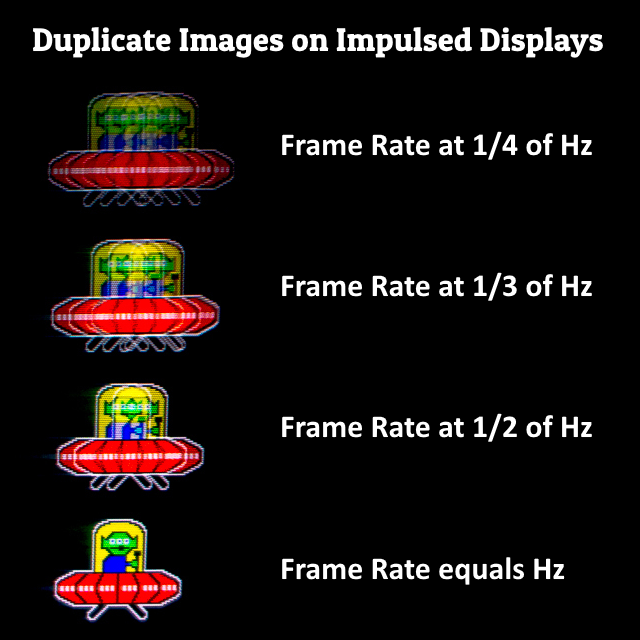
Choppy is because of 30fps.

Image

You'd need 30Hz to eliminate this, and 30Hz is too low (flickery) with BFI.

You can play with BFI settings at www.testufo.com/blackframes and add extra black frames or even multiple-strobing.

This display science unfortunately is independent of LCD, OLED, DLP. Slower GtG can soften this sometimes, as does CRT simulation (See https://beta.testufo.com/crt ) which is a feature available in RetroArch emulator and external boxes such as Retrotink.
Head of Blur Busters - BlurBusters.com | TestUFO.com | Follow @BlurBusters on: BlueSky | Twitter | Facebook

Image
Forum Rules wrote:  1. Rule #1: Be Nice. This is published forum rule #1. Even To Newbies & People You Disagree With!
  2. Please report rule violations If you see a post that violates forum rules, then report the post.
  3. ALWAYS respect indie testers here. See how indies are bootstrapping Blur Busters research!

User avatar
NeonPizza
Posts: 93
Joined: 20 Oct 2021, 03:01

Re: When will CRT simulation be available for Consoles?

Post by NeonPizza » 19 Aug 2025, 19:15

I think TINK4K will be more worth while for modern consoles like Switch 2 & PS5, once 180hz QD-OLED's drop in Spring 2026, IF your content maxing out at 1080p. 180hz = 66% motion blur reduction, than just the current 50% @120hz, and there should be a little less latency with TINK4K's 180hz BFI as a result.

Input lag applied >

2ms - Just by using TINK4K.
5.56ms - TINK4K '180hz BFI/CRT' Simulation.
10ms? - OLED/QD-OLED 60fps Game mode.

What really puts me off from TINK4K, even though it has nothing to do with the device itself, is that you have to pile on 10ms of lag coming from your OLED TV's 60fps game mode...Hopefully that isn't the case. I keep getting mixed answers on this online. If another 5.56ms of lag was tacked on from a QD-OLED TV recognizing the signal as 180hz, even if the game is running at 60fps with TINK4K's 180hz BFI being applied, you would get 5.56 instead of 10ms. So around 5 1/2ms less latency, which would bring the total amount to around 13ms. If not, and the 10ms from Game Mode is applied, than we're back to almost 18ms. Bummer. :P

BFI
Posts: 29
Joined: 23 Nov 2021, 01:25

Re: When will CRT simulation be available for Consoles?

Post by BFI » 03 Oct 2025, 15:13

You do get the reduced lag of whatever your display's latency is at the RT4K's output Hz. I've just recently tested this with my DLP projector, which has a 120Hz lag of 8.4ms in game mode (Enhanced as Optoma call it), and with the Tink outputting 120Hz BFI from a 60Hz input this rises to 17.2ms. So in my application the Tink adds 8.8, but since my PJ's lag is almost 17 at 60Hz, there's actually less than a 1ms penalty for 60fps games.

I believe the fastest OLED TVs are slightly over 5ms at 120Hz, so you could expect to fall right around 14 with the Tink's 50% BFI. I don't know much about HDR but can say that enabling it adds an appreciable brightness boost. I'm outputting HDR10 with Rec 2100 from my Tink and I'm happy with the colors, but note I'm way less demanding in this area than motion blur!

33% persistence at 180Hz doesn't seem to be available without dropping the input from 1080p to 720, sadly. I'd like to ask Chief about this but my posts in the Tink's thread are hitting 403s at the minute.

Diane
Posts: 2
Joined: 18 Dec 2025, 04:14

Re: When will CRT simulation be available for Consoles?

Post by Diane » 19 Dec 2025, 03:42

It would be such a stupid miss of great opportunity.

derekchan
Posts: 45
Joined: 02 Jul 2025, 06:02

Re: When will CRT simulation be available for Consoles?

Post by derekchan » 02 Jan 2026, 02:04

Chief Blur Buster wrote:
07 Aug 2025, 13:05
derekchan wrote:
18 Jul 2025, 06:52
chef may i ask a off topic question?
does dlp projector handle 30fps game smoother than oled with bfi enabled?
some 30fps 3d ps4 game running at 120hz oled with bfi is still very choppy.

2.any comsumer oled display feature rolling scan that i can buy ? does lg oled c1 feature global bfi?
thank you
Choppy is because of 30fps.

Image

You'd need 30Hz to eliminate this, and 30Hz is too low (flickery) with BFI.

You can play with BFI settings at www.testufo.com/blackframes and add extra black frames or even multiple-strobing.

This display science unfortunately is independent of LCD, OLED, DLP. Slower GtG can soften this sometimes, as does CRT simulation (See https://beta.testufo.com/crt ) which is a feature available in RetroArch emulator and external boxes such as Retrotink.
thank you
Does play 30fps>60hz game on 10ms gtg lcd suffer less presistance blur?
but this lcd has slower 18ms black to white response time

2.can i extend the gtg of oled to reduce presistance blur like 10ms gtg lcd?

3.can i ask how 60hz display playback 24p and 50p video? bcause they can't fit in 60
Does this display switch from 60hz to 48hz or 50hz ?

supprted hz
1080p 24hz 25hz 30hz 50hz 60hz
Frame synchronization mode supported (23.75 – 30.5 Hz, 47.5 – 61.0 Hz)

User avatar
NeonPizza
Posts: 93
Joined: 20 Oct 2021, 03:01

Re: When will CRT simulation be available for Consoles?

Post by NeonPizza » 07 Jan 2026, 15:01

BFI wrote:
03 Oct 2025, 15:13
You do get the reduced lag of whatever your display's latency is at the RT4K's output Hz. I've just recently tested this with my DLP projector, which has a 120Hz lag of 8.4ms in game mode (Enhanced as Optoma call it), and with the Tink outputting 120Hz BFI from a 60Hz input this rises to 17.2ms. So in my application the Tink adds 8.8, but since my PJ's lag is almost 17 at 60Hz, there's actually less than a 1ms penalty for 60fps games.

I believe the fastest OLED TVs are slightly over 5ms at 120Hz, so you could expect to fall right around 14 with the Tink's 50% BFI. I don't know much about HDR but can say that enabling it adds an appreciable brightness boost. I'm outputting HDR10 with Rec 2100 from my Tink and I'm happy with the colors, but note I'm way less demanding in this area than motion blur!

33% persistence at 180Hz doesn't seem to be available without dropping the input from 1080p to 720, sadly. I'd like to ask Chief about this but my posts in the Tink's thread are hitting 403s at the minute.

Ya, latency is around 5.3ms at 120fps on modern oled tvs. But if what you're saying is true and tink4k does in fact go by the latency thats present in 120fps game mode when running games at 60fps using tink4ks 120hz bfi, than that shaves off nearly half the lag compare to what you get in 60fps game mode which is 10ms.

2ms just by using tink4k, 8.3ms from 120hz bfi for 60fps games and around 5.3ms from an oled tvs 120fps game mode would be just under 16ms of lag total. Hopefully thats the case! even though i'm actually more interested in using tink4k's triple strobe 144hz bfi for movies and tv/24 and 30fps content.

and bummer! no 180hz or 240hz qd-oled tv's were presented at this years CES. Back to 120hz bfi for gaming, and either 144 or 165hz(I think?) triple strobe bfi for 24 and 30fps content. Such a shame that both the Samsung S90H and S95H will have a matte finish. I'll be getting last years glossy S90F instead 😁

Clear Motion Seeker
Posts: 38
Joined: 29 Apr 2023, 12:47

Re: When will CRT simulation be available for Consoles?

Post by Clear Motion Seeker » 11 Jan 2026, 04:41

NeonPizza wrote:
07 Jan 2026, 15:01

and bummer! no 180hz or 240hz qd-oled tv's were presented at this years CES. Back to 120hz bfi for gaming, and either 144 or 165hz(I think?) triple strobe bfi for 24 and 30fps content. Such a shame that both the Samsung S90H and S95H will have a matte finish. I'll be getting last years glossy S90F instead 😁
The new LG line up can handle 1080p at 330hz through game booster. It could work well with retrotink.

BFI
Posts: 29
Joined: 23 Nov 2021, 01:25

Re: When will CRT simulation be available for Consoles?

Post by BFI » 11 Feb 2026, 22:32

NeonPizza wrote:
07 Jan 2026, 15:01
But if what you're saying is true and tink4k does in fact go by the latency thats present in 120fps game mode when running games at 60fps using tink4ks 120hz bfi, than that shaves off nearly half the lag compare to what you get in 60fps game mode
Yeah, but the Tink has to add its minimum latency (varies based on processing load, viewable in menu) back onto that. I've had time to test my 55C1's lag with a Leo Bodnar 4K, all recorded midscreen.

Code: Select all

Motion Pro on

4K60 low and medium (double images), high - 20.9, 29.3
1440p120 - 22.2
1080p100 - 17.9
1080p120 - 14.8
RT4K 1080p60 in, 1080p120 out - 21.5


Motion Pro off

4K60  - 12.4
1440p120 - 11.0
1080p100 - 7.8
1080p120 - 6.2
RT4K 1080p60 in, 1080p120 out - 13.2
See how I can halve my C1's MPRT for a lag increase of just 0.8ms (under MP off), albeit at 1080p instead of 4K?

I couldn't test Bodnar 1440p60 to Tink 1440p120 because it resulted in a corrupted image for some reason, but given the above I'd predict several additional milliseconds over the 1080p figures (1080 being exactly half of 2160 for ease of scaling, versus 1440's two-thirds). Motion Pro level seems to have no effect re: lag above 60Hz*, where as noted, low and medium are only useful for extra brightness at 120Hz due to double images with 60fps content.

Of particular interest is the difference between 60fps BFI implementations, where the Tink beats the C1's Motion Pro by 16.1ms! Of course the LG has a subrefresh implementation for a lower MPRT, so in games that aren't reaction intensive it is the better option if you can tolerate its increased flicker. Or you can run the Tink's 120Hz BFI in tandem with the C1's for 21.5ms, but again - at the cost of resolution.

I'd love to see a new Tink without the RT4K's memory bottleneck, ideally supporting a 1440p60 input to 1440p240 BFI output. 4ms MPRT with around 8ms lag on the right display.

*In theory the lag should increase in concert with black duration, but as the Leo Bodnar only has to detect white on black I suspect it's highly sensitive. Its accuracy would be a question for Chief.


Post Reply