
phpBB [video]
✅ [Chief Blur Buster - ACCURATE] The human eye can see 39,620 Hz ✅
-
kyube

- Posts: 973
- Joined: 29 Jan 2018, 12:03
✅ [Chief Blur Buster - ACCURATE] The human eye can see 39,620 Hz ✅
evaluating xhci controller performance | audio latency discussion thread | "Why is LatencyMon not desirable to objectively measure DPC/ISR driver performance" | AM4 / AM5 system tuning considerations | latency-oriented HW considerations | “xhci hand-off” setting considerations | #1 tip for electricity-related topics | ESPORTS: Latency Perception, Temporal Ventriloquism & Horizon of Simultaneity | good lcd backlight strobing implementation list | display vs gpu scaling
-
Haste
- Posts: 327
- Joined: 22 Dec 2013, 09:03
✅ [Chief Blur Buster - ACCURATE] The human eye can see 39,620 Hz ✅
Amazing video!
The best one on motion portrayal available as of today on Youtube.
The best one on motion portrayal available as of today on Youtube.
Monitor: Gigabyte M27Q X
-
Chief Blur Buster

- Site Admin
- Posts: 12284
- Joined: 05 Dec 2013, 15:44
- Location: Toronto / Hamilton, Ontario, Canada
- Contact:
✅ [Chief Blur Buster - ACCURATE] The human eye can see 39,620 Hz ✅
This number is definitely in the correct "order-of-magnitude" ballpark.
The Four Thresholds
The TL;DR is there's 4 thresholds to worry about;
Not exact numbers, but approx orders of magnitude:
10 - slideshows turns into motion;
100 - flicker ceases to be visible (Talbot Plateau Theorem)
1000 - motion blur ceases to be visible for small-FOV 1080p screens (slightly smaller than a gaming monitor)
10000 - stroboscopics cease to be visible for wide-FOV retina resolution screens.
Some educational stuff:
- Eye tracking vs stationary gaze causes screen to behave differently - Animation at www.testufo.com/eyetracking
- Non-zero GtG throttles things. 500Hz OLED has clearer motion than 1000Hz LCD. See 120vs480 OLED more visible than 60vs120 LCD for some of the explanations.
- Stroboscopic Effect of Finite Frame Rates
- The pescient seminnal 2017 classic: Blur Busters Law: The Amazing Journey To 1000 Hz Monitors
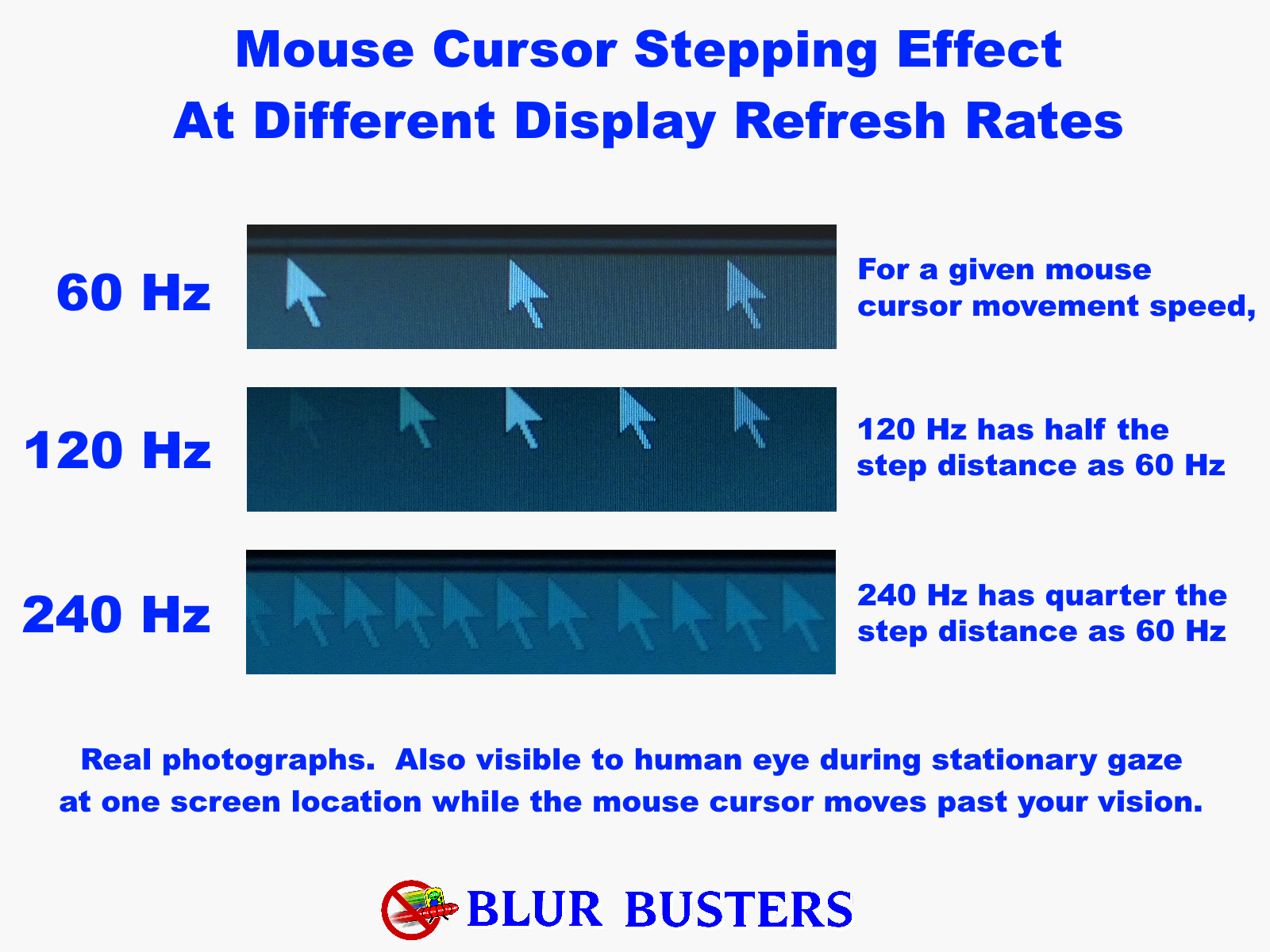
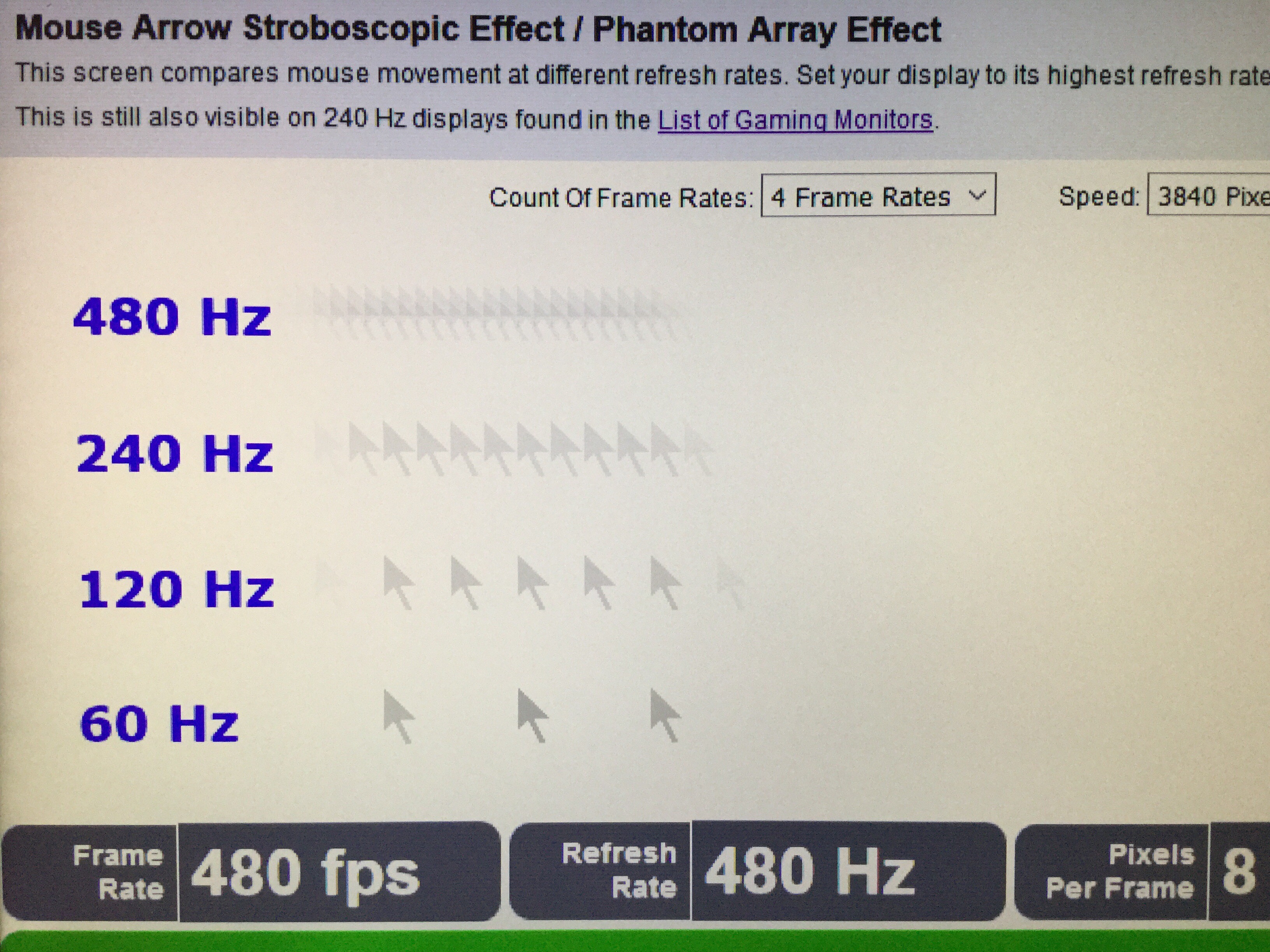
The Four Thresholds
The TL;DR is there's 4 thresholds to worry about;
Not exact numbers, but approx orders of magnitude:
10 - slideshows turns into motion;
100 - flicker ceases to be visible (Talbot Plateau Theorem)
1000 - motion blur ceases to be visible for small-FOV 1080p screens (slightly smaller than a gaming monitor)
10000 - stroboscopics cease to be visible for wide-FOV retina resolution screens.
Some educational stuff:
- Eye tracking vs stationary gaze causes screen to behave differently - Animation at www.testufo.com/eyetracking
- Non-zero GtG throttles things. 500Hz OLED has clearer motion than 1000Hz LCD. See 120vs480 OLED more visible than 60vs120 LCD for some of the explanations.
- Stroboscopic Effect of Finite Frame Rates
- The pescient seminnal 2017 classic: Blur Busters Law: The Amazing Journey To 1000 Hz Monitors
Head of Blur Busters - BlurBusters.com | TestUFO.com | Follow @BlurBusters on: BlueSky | Twitter | Facebook

Forum Rules wrote: 1. Rule #1: Be Nice. This is published forum rule #1. Even To Newbies & People You Disagree With!
2. Please report rule violations If you see a post that violates forum rules, then report the post.
3. ALWAYS respect indie testers here. See how indies are bootstrapping Blur Busters research!
-
Chief Blur Buster
- Site Admin
- Posts: 12284
- Joined: 05 Dec 2013, 15:44
- Location: Toronto / Hamilton, Ontario, Canada
- Contact:
✅ [Chief Blur Buster - ACCURATE] The human eye can see 39,620 Hz ✅
Posts on BlueSky and X.com
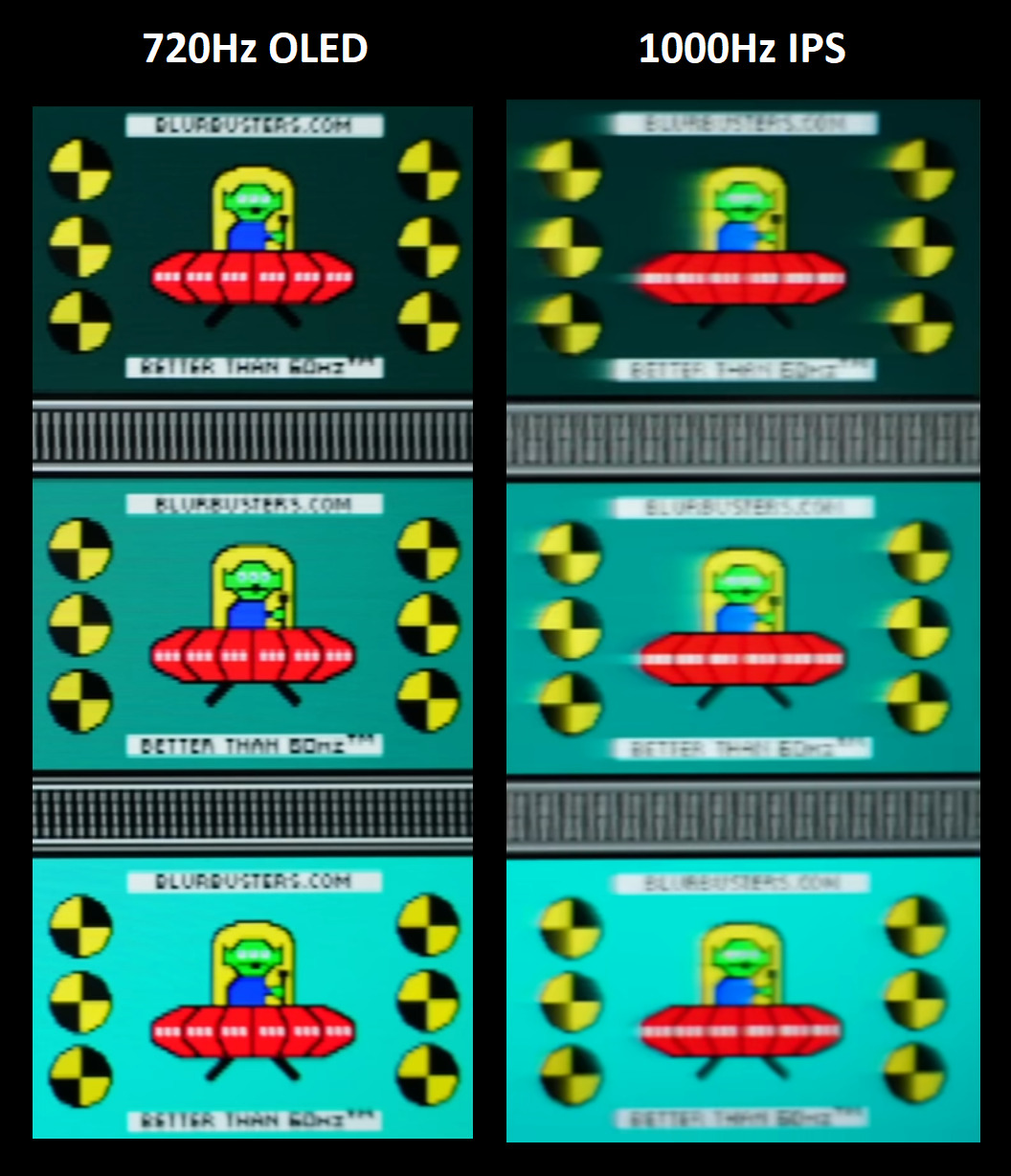
Posts on BlueSky and X.com
Pesky GtG throttle on Hz differences. Higher Hz will require GtG getting closer to 0.00000Chief Blur Buster wrote: Retina refresh rate is extremely high! 5-digit Hz.
Kudos to techless for fantastic video (39,620 Hz, though estimated ~20,000 Hz a few years ago).
There are 4 main visibility thresholds. Expand this tweet/post to dive into rabbit hole for a momentִֶָ
Approximate orders of magnitude for framerate=Hz:
- 10 = slideshows turns into motion;
- 100 = flicker ceases to be visible (Talbot Plateau)
- 1000 = (at GtG=0.0) motion blur ceases to be visible for tiny 1080p screens
- 10000 = motion blur and stroboscopics cease to be visible for wide-FOV retina resolution screens.
This is assuming you zero out all 1000+ hardware & software weak links. Tiny list of examples: no jitter, no stutter, no GtG. GtG makes 500Hz OLED have clearer motion than 1000Hz LCD: You don't want 1ms GtG before/after your 1ms frametimes.
Now, let's go extreme, for the 5-digit number.
Let's imagine a giant 2000Hz 8K TV on your desktop. It's a sample-and-hold display at retina resolution, so no flicker-based motion blur reduction. You have a 90-degree FOV of that TV on your desk.
It's retina resolution for static images, but motion blur puts pixels below retina resolution. Panning motion at 8000 pixels per second, one screen width per second. Still easy to eye-track.
For framerate=Hz:
- 2000 Hz, 8000pps = 4 pixel motion blur
- 4000 Hz, 8000pps = 2 pixel motion blur
- 8000 Hz, 8000pps = 1 pixel motion blur
That's for eye tracked gazes. For fixed gaze, that's stroboscopic effects (phantom array) at that pixel step. So to fix that, we can add GPU motion blur to fix that. That doubles retina Hz.
Add GPU motion blur to fix stroboscopics:
- 2000 Hz, 8000pps = 8 pixel motion blur
- 4000 Hz, 8000pps = 4 pixel motion blur
- 8000 Hz, 8000pps = 2 pixel motion blur
- 16000 Hz, 8000pps = 1 pixel motion blur
And that's for a 90-degree FOV desktop 8K display. Move to a 16K 180-degree VR display with even faster motionspeeds, and you start getting numbers much closer to 40,000 fps=Hz like the techless video.
So techless nailed the ballpark retina Hz for a strobeless sample-and-hold display. A display where you want to simultaneously eliminate both motion blur AND stroboscopics AND flicker.
Obviously, our work is cut in front of us, to fix 100 layers of the "weak links onion" of many system and hardware stutters/blurs. It's why motion on 500Hz OLEDs currently outperform 1000 Hz LCD.
Blur Busters Law dictates:
- Motion blur = pulsetime for strobing
- Motion blur = frametime for sample & hold
Strobing is a fantastic solution for lower frame rates (Hello DyAc and BFI and GSYNC Pulsar and XG2431) but not everyone can handle it, too many of us get eyestrain.
TL;DR: Lots of display progress still coming. We currently predict 2000 Hz consumer displays arriving by 2030, and 4000 Hz consumer displays arriving by 2035.
(Image: Comparision from content creator in China, merged into one image by Discorz)

 ִֶָ
ִֶָPosts on BlueSky and X.com
Head of Blur Busters - BlurBusters.com | TestUFO.com | Follow @BlurBusters on: BlueSky | Twitter | Facebook
Forum Rules wrote: 1. Rule #1: Be Nice. This is published forum rule #1. Even To Newbies & People You Disagree With!
2. Please report rule violations If you see a post that violates forum rules, then report the post.
3. ALWAYS respect indie testers here. See how indies are bootstrapping Blur Busters research!
-
Discorz

- VIP Member
- Posts: 1151
- Joined: 06 Sep 2019, 02:39
- Location: Europe, Croatia
- Contact:
Re: ✅ [Chief Blur Buster - ACCURATE] The human eye can see 39,620 Hz ✅
Yep, retina frame rates are incredibly high, and the retina doesn’t flicker. A large portion of people still aren’t aware. Right now, those kinds of numbers feel impossible to grasp, but eventually they’ll be taken for granted.
The image below helps illustrate why so high. Although it shows a single example: 960 px/sec motion at 120 Hz fps. To understand how persistence errors scale, imagine the same scenarios at 30-240-2000-15000 px/sec paired with 30-240-2000-15000 Hz fps. Then factor in different viewing distances, pixel densities, and fields of view. Once you translate everything across those variables, the reasoning becomes more clear.
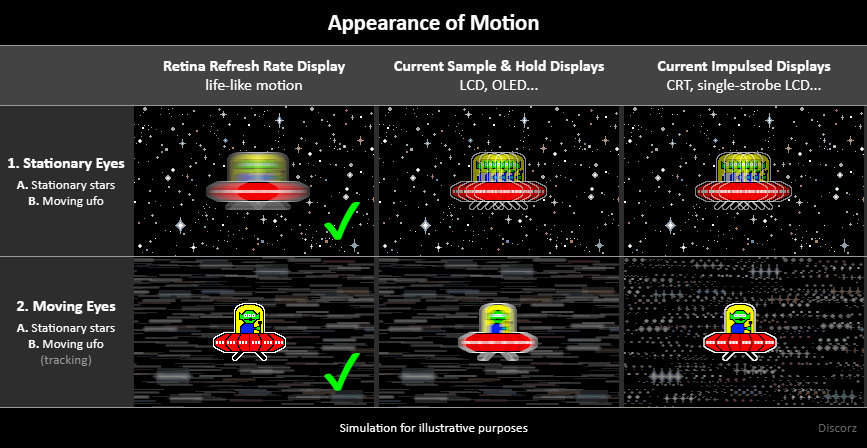
If we ever get a good flexible persistence simulator I might update the image to multiple speeds.
The image below helps illustrate why so high. Although it shows a single example: 960 px/sec motion at 120 Hz fps. To understand how persistence errors scale, imagine the same scenarios at 30-240-2000-15000 px/sec paired with 30-240-2000-15000 Hz fps. Then factor in different viewing distances, pixel densities, and fields of view. Once you translate everything across those variables, the reasoning becomes more clear.
If we ever get a good flexible persistence simulator I might update the image to multiple speeds.
-
Chief Blur Buster
- Site Admin
- Posts: 12284
- Joined: 05 Dec 2013, 15:44
- Location: Toronto / Hamilton, Ontario, Canada
- Contact:
Re: ✅ [Chief Blur Buster - ACCURATE] The human eye can see 39,620 Hz ✅
For blind study of retina refresh rate by researchers, they need to cover multiple situations:
1. stationary image, stationary eye
2. stationary image, MOVING eye
3. MOVING image, stationary eye
4. MOVING image, MOVING eye
4a. Same motion speed (e.g. eyetracking a pan)
5b. Different motion speeds (e.g. Eyetracking a slow moving object on a fast-moving background)
For some situations, Hz differences do not become visible (e.g. item 1) and Hz differences can disappear early with band-aids like GPU motion blur (e.g. item 3), but for others, Hz differences remain visible.
1. stationary image, stationary eye
2. stationary image, MOVING eye
3. MOVING image, stationary eye
4. MOVING image, MOVING eye
4a. Same motion speed (e.g. eyetracking a pan)
5b. Different motion speeds (e.g. Eyetracking a slow moving object on a fast-moving background)
For some situations, Hz differences do not become visible (e.g. item 1) and Hz differences can disappear early with band-aids like GPU motion blur (e.g. item 3), but for others, Hz differences remain visible.
Head of Blur Busters - BlurBusters.com | TestUFO.com | Follow @BlurBusters on: BlueSky | Twitter | Facebook
Forum Rules wrote: 1. Rule #1: Be Nice. This is published forum rule #1. Even To Newbies & People You Disagree With!
2. Please report rule violations If you see a post that violates forum rules, then report the post.
3. ALWAYS respect indie testers here. See how indies are bootstrapping Blur Busters research!