NVIDIA G-Sync Pulsar monitor - Asus ROG Strix XG27AQNGV

Ask about motion blur reduction in gaming monitors. Includes ULMB (Ultra Low Motion Blur), NVIDIA LightBoost, ASUS ELMB, BenQ/Zowie DyAc, ToastyX, black frame insertion (BFI), and now framerate-based motion blur reduction (framegen / LSS / etc).
Post Reply
mawi
Posts: 66
Joined: 03 Jan 2026, 08:10
Location: Palatine, Germany

Re: NVIDIA G-Sync Pulsar monitor - Asus ROG Strix XG27AQNGV

Post by mawi » 25 Feb 2026, 17:30

mawi wrote:
25 Feb 2026, 03:39
But all I am trying to do is game without reflex and staying away from the boundaries where vsync becomes important while gsync does the rest on all the framerates below. Vsync is adding latency when its turned on even if you are below the max refresh rate so it would be nice to be able to stay away from this border without destroying the 1% lows.

CS internal frame cap is even worse btw.

I will stick with yesterdays settings as they still look and feel the best but I still think there is room for optimization.

Anyone any more ideas? :)
Ok one final CS2 update from my side and then I will be quiet.

RivaTuner is the solution for my quoted problem. I keep everything as mentioned before but instead of using vsync, i cap my framerate using RivaTuner (RTSS) outside of CS2 to 340 fps as all other framecap methods introduce similar problems as reflex.
It is absolutely gorgeous now with vsync off and has 9ms latency in areas where it was 8ms using reflex and 14ms without reflex+vsync.

Now it looks perfectly clear and has the best possible latency.

To be honest, it felt pretty perfect to me also with 14ms. But knowing its 50% more than without kept bugging me.
And RivaTuner is such an amazing tool. I can lower the fps down to 120 fps... and it remains perfectly smooth and sharp, as I excpect it with pulsar. This does NOT work using fps_max 120 ingame or nvidia frame cap. This always looks kind of odd.

And now also the frametimes and 1% lows on workshop maps with many bots and entities run perfect with pulsar clarity without any hickups. It is just wonderful.

Summary for CS2:

Ingame:
Reflex: off
Vsync: off
All ingame Frame Limits set to -1

Nvidia Control Panel:
Nvidia frame limit: off
Nvidia Low Latency mode: "on"
Monitor Tech: GSYNC
Vertical sync: off

CS2 needs steam launch option "-allow_third_party_software" for using RivaTuner (RTSS)
In RivaTuner:
Custom Direct3D Support: ON
Framerate Limit: 340
everything else remains default
7800X3D, RTX 4070, XG27AQNGV Pulsar

User avatar
Chief Blur Buster
Site Admin
Posts: 12265
Joined: 05 Dec 2013, 15:44
Location: Toronto / Hamilton, Ontario, Canada
Contact:

Re: NVIDIA G-Sync Pulsar monitor - Asus ROG Strix XG27AQNGV

Post by Chief Blur Buster » 25 Feb 2026, 22:10

liquidshadowfox wrote:
25 Feb 2026, 14:00
In hunt showdown my 1% lows are easily above 165 fps with 9800X3D + 5090 but the motion clarity is actually LESS as you go up in refresh rate. I tried 144 and the scratches seemed less defined than 120 fps and my riva showed my 1% lows were matching the 144 but my 0.1% lows weren't at 144 fps (I think they dipped as low as 98) so it could be either A) nvidia Gsync module is VERY picky about the frame times being close to the 0.1% lows otherwise it'll do the compensation pulse B) my nvidia driver that doesn't support pulsar is affecting the pulse timings at higher refresh rates (but no option to update without giving up Vsync + Gsync + reflex + framegen and in some games the Vsync + Gsync is required to get good frame pacing) C) This is a firmware bug they might address in the future

Either way, I'll probably play more with this as time goes on and see if I find any "gotchas" to getting this to work perfectly. I think nvidia is supposed to be releasing a new driver this friday so hopefully they will fix the Vsync + frame gen issue.
Thinking... is it possible it's framepacing-error persistence?

This is a brand new next-generation problem that has been emerging recently.

1. Jitter/stutter reduces motion clarity, so if you have a 3ms frametime volatility -- depending on nuances -- you're getting as much as 3 pixels of extra motion blur per 1000 pixels/sec.
2. 100 extra microstutters per second at 360fps = extra motion blur.
3. Like a fast-vibrating music string that vibrates so fast, it's blurry.

For a see-for-yourself animation demo of stutter-to-blur continuum, watch the 2nd UFO for 20 seconds at www.testufo.com/eyetracking#speed=-1

Reduce your jitters. Including mouse jitter. So, try refining your mouse DPI to at least 1600dpi, at least 2000Hz, and adjust sensitivity downwards to match your prior edpi. Adjust Windows Mouse Sensitivity proportionally to keep Windows pointer the same speed as before. [assumes all games you play use rawinput and bypasses Windows setting]

IMPORTANT: Using less than 1600dpi will degrade Pulsar-quality mouselooks

A lot of GSYNC Pulsar benefits disappear with 400/800dpi mice settings, common in CS2 for handshake-filter, but hurts Pulsar blur busting.

For 1000Hz+ or for strobe backlights, Blur Busters currently recommends 1600-3200dpi + 2000Hz pollrate (don't go too high without RawInputBuffer-supported games or you'll lag your CPU-driven mouse loop).

If you're aggressively using quadruple-digit refresh rates _OR_ aggressive motion blur reduction.

Many professional esports players on prosettings.net website now have begun using 1600dpi in Valorant, although CS2 benefits more from the handshake filtering of 400/800dpi, but it's time to train yourself past this if you're needing to use gaming tactics that benefits from display motion blur reduction. So if you search prosettings you will see a boom of 1600dpi users in the professional venues.

Make sure you use an good fine-textured mousepads and clean mouse feet, to minimize handshake error margins with 1600dpi if you're playing professionally to earn money. This is not as popular in CS2 as it is in other games like Valorant (especially its RawInputBuffer optimization which helps 1600dpi + 2000Hz).

YMMV. Preferences apply; but the common 400dpi habit (CSGO and now CS2), while somewhat useful for handshake filtering, can accidentally sabotage strobe backlights and sabotages 1000Hz, so consider your mouse settings carefully.

Chief Blur Buster says: Your Pulsar is sabotaged by your 400dpi mouse setting.

Another problem is 400dpi = only 100 mouselook frames per second if moving mouse slowly at 0.25 inches per second. (400dpi * 0.25" = 100 mouselook frames per second). Despite running at 360fps 360Hz = multiple image effects during Pulsar during slow mouselooks at low DPI. Caveat emptor.

Your fast flicks are unaffected, but your 0.25"/sec to 0.5"/sec slow mouselooks will have a lot more motion blur with 100 mouse jitters per second, and you won't see Pulsar benefits as much during slowpans/slow mouselooks (like aiming at an overhead plane, or looking around in Rocket League, or anything that forces slower than aimtrainer-style fast flicks).

Even 800dpi still doesn't fully properly milk 1000Hz nor strobe backlights very well. Up your mouse to at least 1600dpi or better to milk your 1ms-or-less MPRT better during your slowtrack operations.

If you play only CS2, and only do fast aimtrainer flicks, and you only play at 400dpi, then GSYNC Pulsar might not be for you for these reasons. Pulsar really shines with competitive advantages at higher DPI for your slow/medium speed mouse movements. Fantastically.

But the Pulsar slow-mouselook beauty is fully sabotaged by 400dpi. The grainy slow mouselooks at 400dpi as you explore scenery as a sniper, Pulsar stops being smooth anymore, it's often ugly jittering at slow movements at under an inch per second (the kind that camping snipers do, or RTS scrolls, or Rocket League, or surgical slow mouselooks, etc.)

800dpi is a good compromise for CS2 if you _really_ need the handshake filtering of low DPI, but try to use 1600dpi or 3200dpi in other games like RTS, Rocket League, or even Valorant. Do you want to get your money's worth out of Pulsar competitive advantages?
Head of Blur Busters - BlurBusters.com | TestUFO.com | Follow @BlurBusters on: BlueSky | Twitter | Facebook

Image
Forum Rules wrote:  1. Rule #1: Be Nice. This is published forum rule #1. Even To Newbies & People You Disagree With!
  2. Please report rule violations If you see a post that violates forum rules, then report the post.
  3. ALWAYS respect indie testers here. See how indies are bootstrapping Blur Busters research!

User avatar
Chief Blur Buster
Site Admin
Posts: 12265
Joined: 05 Dec 2013, 15:44
Location: Toronto / Hamilton, Ontario, Canada
Contact:

Re: NVIDIA G-Sync Pulsar monitor - Asus ROG Strix XG27AQNGV

Post by Chief Blur Buster » 25 Feb 2026, 22:29

The Two Cap Technique

While it is not recommended to depend on a cap in esports if possible at all (700fps is lower lag than 360fps) the fact remains is that framerates will try to go above refresh rate, and we have to deal with that if we're milking "Pulsar VRR Beauty".
mawi wrote:
25 Feb 2026, 03:39
CS internal frame cap is even worse btw.
While it does not work in all games, test out the two cap method.

1. External stutter-reducing framerate cap (RTSS cap about ~0.1fps above CS2 cap)
2. Internal lag-reducing frame rate cap (e.g. in-game cap if it's less lag)
3. For VRR use, both caps need to be at least 3% below MaxHz.

Don't make caps identical. You want the lag reducing cap to be lower than the stutter-reducing cap. The delta will be your newly max stutter error margin. For a flat-out framerate, it means frametime jitter is tightened to only 0.1ms, without being as laggy.

GOAL: Near-perfect framepacing at low latency that makes Pulsar shine.

Ideally, the nice tearfree fluidity of VSYNC ON, but without the lag. This is what can happen with certain games. No guarantees though, some games really glitch with the dual-cap method.

The purpose is that the lag-reducing cap wins most of the time, but when a frame slips through, it's caught by the external cap before it results in a visible stutter. This technique is more reliable with offline games -OR- to make framegen perform with less latency. But this technique may solve a "fluidity + jitter + lag" compromise problem.

Note: The VRR advice used to be 3fps-below, but that's too tight margin at higher Hz. So use 3% below
IMPORTANT: Incorrect tweaks will make things worse. Follow 1/2/3 carefully exactly perfectly to a tee, though you can adjust the difference tighter if it performs well. Undo this tweak if the specific game does not co-operate properly.

IMPORTANT - DUAL CAP SUCCESSFULLY TESTED IN SOLO GAMES
NOT TESTED BY ME IN COMPETITIVE SITUATIONS - YMMV


This is only a "try something" idea.
Head of Blur Busters - BlurBusters.com | TestUFO.com | Follow @BlurBusters on: BlueSky | Twitter | Facebook

Image
Forum Rules wrote:  1. Rule #1: Be Nice. This is published forum rule #1. Even To Newbies & People You Disagree With!
  2. Please report rule violations If you see a post that violates forum rules, then report the post.
  3. ALWAYS respect indie testers here. See how indies are bootstrapping Blur Busters research!

liquidshadowfox
Posts: 249
Joined: 05 Nov 2020, 14:03

Re: NVIDIA G-Sync Pulsar monitor - Asus ROG Strix XG27AQNGV

Post by liquidshadowfox » 25 Feb 2026, 22:47

Chief Blur Buster wrote:
25 Feb 2026, 22:10
Chief Blur Buster says: Your Pulsar is sabotaged by your 400dpi mouse setting.
Well mouse wise I've been using my trustyl Razer naga v2 pro at 1000 hz polling with a DPI of 1800, I normally use around 2100 DPI depending on the game but I never use DPI lower than 1600, I tried 3000 DPI + lower sense but the results were less than ideal for hunt since the low sens doesn't affect the mouse when I'm in menus lol only when I'm out of menus. I'm still experimenting around and I'm hoping the next nvidia driver update will fix Vsync + frame gen in their next deploy (and possibly other issues cause fps is inconsistent lately in drivers). I'll report back

User avatar
Chief Blur Buster
Site Admin
Posts: 12265
Joined: 05 Dec 2013, 15:44
Location: Toronto / Hamilton, Ontario, Canada
Contact:

Re: NVIDIA G-Sync Pulsar monitor - Asus ROG Strix XG27AQNGV

Post by Chief Blur Buster » 25 Feb 2026, 22:51

liquidshadowfox wrote:
25 Feb 2026, 22:47
Well mouse wise I've been using my trustyl Razer naga v2 pro at 1000 hz polling with a DPI of 1800, I normally use around 2100 DPI depending on the game but I never use DPI lower than 1600, I tried 3000 DPI + lower sense but the results were less than ideal for hunt since the low sens doesn't affect the mouse when I'm in menus lol only when I'm out of menus. I'm still experimenting around and I'm hoping the next nvidia driver update will fix Vsync + frame gen in their next deploy (and possibly other issues cause fps is inconsistent lately in drivers). I'll report back
Formerly, it used to be not recommended to touch Control Panel's Mouse Sensitivity setting.

But it's 2026, and it's acceptable to adjust that for slower mouse pointer while using menus.

Old games (pre-rawinput) such as World of Warcraft is affected, but all modern esports games ignore the Windows mouse sensitivity setting except during mouse pointer operation (menus, etc).

Only problem is that the 11-notch setting is very granular, and you need to use a mouse-sensitivity calculator to figure out what notch to land on. The move from 1600dpi->3200dpi is more easily proportionally scaled than odd numbers like 1800 or 3000. (e.g. Using notch #4 from left rather than middle notch #6 in Mouse Sensitivity setting in Control Panel). So if your goal is to try to make pointer speed identical before/after DPI changes, odd numbers like 1800 and 3000 creates some issues with the Windows mouse pointer sensitivity divisors, as you retrain your muscle memory to the new mouse pointer speed = not good.

I always disable "Enhance Pointer Sensitivity" checkbox. It makes mouse pointer go at different speeds at different poll rates, so disabling that checkbox makes mouse behave more consistently across all mouse settings.
Head of Blur Busters - BlurBusters.com | TestUFO.com | Follow @BlurBusters on: BlueSky | Twitter | Facebook

Image
Forum Rules wrote:  1. Rule #1: Be Nice. This is published forum rule #1. Even To Newbies & People You Disagree With!
  2. Please report rule violations If you see a post that violates forum rules, then report the post.
  3. ALWAYS respect indie testers here. See how indies are bootstrapping Blur Busters research!

User avatar
kyube
Posts: 896
Joined: 29 Jan 2018, 12:03

Re: NVIDIA G-Sync Pulsar monitor - Asus ROG Strix XG27AQNGV

Post by kyube » 26 Feb 2026, 01:02

Chief Blur Buster wrote:
25 Feb 2026, 22:29
While it does not work in all games, test out the two cap method.

1. External stutter-reducing framerate cap (RTSS cap about ~0.1fps above CS2 cap)
2. Internal lag-reducing frame rate cap (e.g. in-game cap if it's less lag)
3. For VRR use, both caps need to be at least 3% below MaxHz.

Don't make caps identical. You want the lag reducing cap to be lower than the stutter-reducing cap. The delta will be your newly max stutter error margin. For a flat-out framerate, it means frametime jitter is tightened to only 0.1ms, without being as laggy.
Pulsar is VRR+Strobing, the first two methods you've mentoned don't apply to it at all.
Neither do they apply to the vast majority of eSports games, where the frame pacing is very erratic.
Sadly, due to game developers unwilling to optimise theirs games, total system latency & frame pacing are (relatively) inversely proportional in esports games.
Meaning, you either chase 'perfectly smooth' pacing or the lowest total system latency.
The 3rd point I've addressed below.
Chief Blur Buster wrote:
25 Feb 2026, 22:29
GOAL: Near-perfect framepacing at low latency that makes Pulsar shine.
That's the goal of every 2D/3D content, regardless of Pulsar (VRR+Strobing) or fixed refresh rate (impulsed / S&H)
I don't see how this is something special to Pulsar?...
Chief Blur Buster wrote:
25 Feb 2026, 22:29
Ideally, the nice tearfree fluidity of VSYNC ON, but without the lag. This is what can happen with certain games. No guarantees though, some games really glitch with the dual-cap method.

The purpose is that the lag-reducing cap wins most of the time, but when a frame slips through, it's caught by the external cap before it results in a visible stutter. This technique is more reliable with offline games -OR- to make framegen perform with less latency. But this technique may solve a "fluidity + jitter + lag" compromise problem.
All the "dual cap method" would do is introduce 1-2 frames of additional delay to Sim-To-Render latency and unnecessary CPU overhead from the external frame rate limiter software.
For 360Hz (2,7778ms), that's either 1x or 2x the refreshtime.
Though, with Special-K in solo-games, there's likely more nuance to the discussion. It's one of the most advanced solutions on the market, after all.
Note: The VRR advice used to be 3fps-below, but that's too tight margin at higher Hz. So use 3% below
IMPORTANT: Incorrect tweaks will make things worse. Follow 1/2/3 carefully exactly perfectly to a tee, though you can adjust the difference tighter if it performs well. Undo this tweak if the specific game does not co-operate properly.
The -3FPS was never feasible to begin with. Even the 3% margin isn't good for the vast majority of games on the market.
For 360hz, that's 350FPS @ 360Hz.
Nvidia, when using GSYNC+VSYNC+Reflex, targets a much larger margin. The automatic frame rate limiter goes down to 324FPS @ 360Hz to be well within the GSYNC window.
10% margin at minimum

Something is extremely wrong on Nvidia's end if they haven't optimised their flagship technology (Pulsar) for GSYNC+VSYNC+Reflex use.
Either that, the users in this thread are doing something wrong... or something else entirely is happening.
Though, considering that Pulsar is variable PW, I wouldn't be surprised if users just aren't satisfied with the short-duration bursts of "vaseline effect" (too high of a 'on' period) :D
A shame that they decided to merge the ULMB2 & Pulsar setting, something no other implementation has done thus far (Aim Stabilizer, ELMB-Sync etc.) :)

User avatar
Chief Blur Buster
Site Admin
Posts: 12265
Joined: 05 Dec 2013, 15:44
Location: Toronto / Hamilton, Ontario, Canada
Contact:

Re: NVIDIA G-Sync Pulsar monitor - Asus ROG Strix XG27AQNGV

Post by Chief Blur Buster » 26 Feb 2026, 05:32

kyube wrote:
26 Feb 2026, 01:02
All the "dual cap method" would do is introduce 1-2 frames of additional delay to Sim-To-Render latency and unnecessary CPU overhead from the external frame rate limiter software.
It's a goldilocks. Dual cap method is only slightly more lag than the internal cap but much less lag than the external cap.

I've talked about it for YEARS in other non-esports threads.
Historically, in most other games
1. Internal cap is less laggy for VRR, but more stuttery Fact.
2. External cap is more laggy for VRR, but less stuttery. Fact.
3. Uncapped is most laggy for VRR + VSYNC ON

A properly calibrated dual cap approach puts it between 1 & 2
- Less stutter than method #1
- Less lag than method #2
- Stutter = bad for Pulsar.
- Strobing amplifies stutters (including framepace-error that deviates gametime:photontime relativity = stutter punches through VRR)

As a general rule of thumb for stutters:
- Historically, internal game caps are less precise = more stutters
- Historically, extneral utility/driver caps are more precise = less stutters

As a general rule of thumb for lag:
- Historically, internal game caps are less laggy
- Historically, external utility/driver caps are more laggy

There are exceptions to the rule, but that's what usually happens. External caps tend to be more laggy than in-game caps, although it's possible for a superlative external cap (Reflex Latency Analyzer) to be less laggy than a very badly implemented internal cap (that cascades to a frame queue). External utility/driver caps includes RTSS, SpecialK, NVIDIA drivers, VSYNC ON, and anything that externally limits frame rates.

That's why the two-cap approach exists to try to re-balance latency and stutters roughly squarely in the middle (assuming the cap algorithms don't create new race conditions)

See? Right Tool for Right Job.

Two caps can definitely be less laggy than the one laggiest cap, and less stuttery than the one stutteriest cap, IF PROPERLY CALIBRATED + cap algorithms don't race-condition each other.

There were games that stubbornly stuttered or stubbornly lagged, until the two-cap algorithm partially compensated for the developer crap & actually made certain games playable. The trick is not compatible in all games, I was merely advising to test two-cap method because it can become less lag than using RTSS/SpecialK alone (both laggier than an in-game cap).

I think you now see the precise exact point I was trying to make.
kyube wrote:
26 Feb 2026, 01:02
The -3FPS was never feasible to begin with.
BINGO - Exactly. If you remember history. Do you remember how old that advice was? 12 years ago. Twelve years. Back in the 144 Hz days. I've been trying to re-educate the public ever since.

Do you know why Blur Busters Forums started? It started because of a GSYNC Giveaway in year 2013.

.
See "2013" in this screenshot:
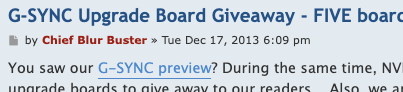
Screenshot 2026-02-26 at 4.29.46 AM.png
Screenshot 2026-02-26 at 4.29.46 AM.png (22.12 KiB) Viewed 1920 times
.

Back in 2013, I created Blur Busters Forums specifically for the GSYNC giveaway. This forum was originally created because NVIDIA gave me 5 GSYNC boards to give away to the public.

We were the world's first website to measure the input lag of GSYNC in January 2014, you remember. Nobody else measured input lag of GSYNC before us. We were the first.
kyube wrote:
26 Feb 2026, 01:02
Even the 3% margin isn't good for the vast majority of games on the market.
For 360hz, that's 350FPS @ 360Hz.
Nvidia, when using GSYNC+VSYNC+Reflex, targets a much larger margin. The automatic frame rate limiter goes down to 324FPS @ 360Hz to be well within the GSYNC window.
10% margin at minimum
Much more reasonable.

But do you know how many people are STILL capping at 3fps below, with outdated advice that's still being parroted? ;)

Even 3% is light years better than 3fps below. There are some content that will suddenly reduce lag with just only 0.5%-below cap, but you are right -- several competitive games perform better at a 10%-below cap. It's a function of how volatile the frametimes are at the cap. Some caps tame the frametimes pretty glassfloor (cap tiny %) while extreme volatility requires more %. A 135fps cap that sometimes does 1/120sec frametimes followed by 1/150sec frametimes -- one of the two is faster than a 144Hz monitor and will backpressure against VSYNC.

On this note -- If you use the two-cap method and a microsecond-precise framerate capper like RTSS, you can tighten the cap closer to MaxHz due to the backup cap catching the stutters that the main cap caught. Mind you, the two cap method is useless if the in-game cap is pretty accurate and not volatile.

If you're not using SpecialK/RTSS to cap your esports, and are happy with the ingame cap, then don't bother with two-cap method.

But...

The fact that frametimes are still volatile with an in-game framerate cap, is precisely why the two-cap method is a goldilocks in many non-esports games, but if certain people are capping esports with RTSS/SpecialK anyway, why not test-out the two-cap method to see if that's less lag?

It's probably not going to help esports, because ideally, people should be buying VRR ranges bigger than uncapped framerate ranges.

But Pulsar is limited to 360Hz, and many esports game blast past 360fps, so we are circling back to "caps are necessary for Pulsar" discussion, and the "two-cap as a lag-fix compromise" is a fair game discussion. It's still way less laggy than letting the VSYNC ON part of GSYNC+VSYNC be the cap.

That's my admonish not to make assumptions that two caps are laggier than one -- it is not always. When calibrated properly, it's less lag than the laggier of the two caps, and less stutter than the stutterier of the two caps.

(Obviously, it assumes the game doesn't create a race condition in two-cap situations. That can happen. But a properly surgically complex-calibrated two-cap method is spectacularly successful at fixing "lag+stutter" problems in some other non-esports games.)

Head of Blur Busters - BlurBusters.com | TestUFO.com | Follow @BlurBusters on: BlueSky | Twitter | Facebook

Image
Forum Rules wrote:  1. Rule #1: Be Nice. This is published forum rule #1. Even To Newbies & People You Disagree With!
  2. Please report rule violations If you see a post that violates forum rules, then report the post.
  3. ALWAYS respect indie testers here. See how indies are bootstrapping Blur Busters research!

brownvim
Posts: 197
Joined: 22 Jun 2020, 04:15

Re: NVIDIA G-Sync Pulsar monitor - Asus ROG Strix XG27AQNGV

Post by brownvim » 26 Feb 2026, 06:30

Chief Blur Buster wrote:
26 Feb 2026, 05:32
But Pulsar is limited to 360Hz, and many esports game blast past 360fps, so we are circling back to "caps are necessary for Pulsar" discussion, and the "two-cap as a lag-fix compromise" is a fair game discussion.
I was playing Indiana Jones yesterday and the frame rate was 400+ FPS, Pulsar stayed on and the game was really smooth... Is this not normal behaviour or I may be wrong and missed something.

I cranked Ray Tracing all the way up to lower the frames to around 200 after so only saw this briefly.

Why are esports players capping frame rates if its going well over the 360hz, surely that helps with latency and Pulsar stays on?
5800X3D, RTX 5080 FE, OLED AW3423DW + Acer Pulsar XB273U F5

User avatar
Chief Blur Buster
Site Admin
Posts: 12265
Joined: 05 Dec 2013, 15:44
Location: Toronto / Hamilton, Ontario, Canada
Contact:

Re: NVIDIA G-Sync Pulsar monitor - Asus ROG Strix XG27AQNGV

Post by Chief Blur Buster » 26 Feb 2026, 06:32

brownvim wrote:
26 Feb 2026, 06:30
I was playing Indiana Jones yesterday and the frame rate was 400+ FPS, Pulsar stayed on and the game was really smooth... Is this not normal behaviour or I may be wrong and missed something.

I cranked Ray Tracing all the way up to lower the frames to around 200 after so only saw this briefly.

Why are esports players capping frame rates if its going well over the 360hz, surely that helps with latency and Pulsar stays on?
If you're using something else other than plain VSYNC ON as the fallback sync technology. Such as VSYNC OFF or Fast Sync.

When frame rates are above 360fps on GSYNC, you're not in VRR mode, but using the fallback sync technology. It might be a triple buffered VSYNC, which is lower lag than normal VSYNC.

- GSYNC + VSYNC ON (laggy when hit hits 360fps)
- GSYNC + Fast Sync (low lag triple buffer)
- GSYNC + VSYNC OFF

You're probably in GSYNC + Fast Sync if you don't see tearing at 400fps. Might be a smidge of jittering (jitter error margin: halftime of 1/360sec = about 0.5/360sec jitter) but you don't see tearing.

The problem in esports is the sudden lagfeel change during <360fps and >360fps. Latency is not identical between GSYNC, Fast Sync, VSYNC ON and VSYNC OFF. When frame rates exit above VRR range, you have a new latency.

Latency yo-yo effect of doing VRR range enter/exits is annoying. It has been part of why a lot of competitive players dislike using VRR, and why I often now recommend purchasing more VRR range than framerate range (if you weren't buying Pulsar).

Capping historically tended to keep lagfeel more consistent, by prevening framerate ranges from exiting VRR ranges.
Head of Blur Busters - BlurBusters.com | TestUFO.com | Follow @BlurBusters on: BlueSky | Twitter | Facebook

Image
Forum Rules wrote:  1. Rule #1: Be Nice. This is published forum rule #1. Even To Newbies & People You Disagree With!
  2. Please report rule violations If you see a post that violates forum rules, then report the post.
  3. ALWAYS respect indie testers here. See how indies are bootstrapping Blur Busters research!

brownvim
Posts: 197
Joined: 22 Jun 2020, 04:15

Re: NVIDIA G-Sync Pulsar monitor - Asus ROG Strix XG27AQNGV

Post by brownvim » 26 Feb 2026, 06:40

Thanks, yeah, I didn't see any tearing and it looked great.

Guess it was the - GSYNC + Fast Sync (low lag triple buffer) I was seeing.

But then it looked even better with Path Tracing at 200, obviously with frame gen.
5800X3D, RTX 5080 FE, OLED AW3423DW + Acer Pulsar XB273U F5

Post Reply


