
and do u have grounding in homeHubcio wrote: ↑24 Feb 2026, 18:14So the best idea is to remove old wiring entirely and make a new installation? And that’s it? I have to do it then but I live in big ass old house, but with mom I will be able to save money for it. It will cost probably 10k$ but cmon… this is almost the cost of new high end pc, so it’s worthy1NAMICU wrote: ↑12 Nov 2021, 18:57Hi guys! i don't wanna make this post too long so i start with:
"Symptoms":
1.INPUT LAG - this is the main problem MOUSE/KEYBOARD
2.MONITOR - feeling of 40 hz on a 60/120/144/240hz monitor
3.INTERNET - Bad hit registration with good ping /0 loss, wifi connection lost at different times and distances.
4.SOUND - Bad sound quality, lower than normal
5.DESYNC - in competitive games you get beat behind the walls and no time to react at enemy moves
FIX: First of all this is a problem in [my] house and not power company, transformers or pc bios/windows settings.!
My problem was a broken electrical wiring burnt in the wall that acted like an antenna and spread EMI in all my electrical installation.
This is what my electrician said:
A broken cable wire will result in 0 mA current flow, which makes it easy to detect a cable error. If voltage signals are used, the broken wiring act like an antenna. EMI can easily induce a voltage onto the wires, making cable break detection unreliable when voltage signals are used.
After i rewire my house my pc was perfect! moving fast and no more input lag/bad hitreg, 101% better sound.
What didn't change was the monitor with same feeling 40 hz that i replace it with new one witch working good now... same 144hz model.
To fix this issue you need to find from where it comes. For me it was the wire from my second room that is connected to an outlet but it can be from light or any electrical installation in your home.
You need to test.. first turn down all circuit breakers and turn up only the circuit breaker that is for your outlet/outlets in your room/s if you don't see any improvement on the issue then the problem is in that circuit.If you have any outlets on different circuit breaker turn it up and rest down and see any improvements.If it works really better you have EMI from another circuit.
ELECTRICITY INPUT LAG.. HOW I FIXED IT?!
Forum rules
IMPORTANT:
This subforum is for advanced users only. This separate area is for niche or unexpected lag issues such as electromagnetic interference (EMI, EMF, electrical, radiofrequency, etc). Interference of all kinds (wired, wireless, external, internal, environment, bad component) can cause error-correction (ECC) latencies like a bad modem connection, except internally in a circuit. ECC = retransmits = lag. Troubleshooting may require university degree. Your lag issue is likely not EMI.
🠚 You Must Read This First Before Submit Post or Submit Reply
IMPORTANT:
This subforum is for advanced users only. This separate area is for niche or unexpected lag issues such as electromagnetic interference (EMI, EMF, electrical, radiofrequency, etc). Interference of all kinds (wired, wireless, external, internal, environment, bad component) can cause error-correction (ECC) latencies like a bad modem connection, except internally in a circuit. ECC = retransmits = lag. Troubleshooting may require university degree. Your lag issue is likely not EMI.
🠚 You Must Read This First Before Submit Post or Submit Reply
-
adelsa123
- Posts: 30
- Joined: 04 Jan 2023, 07:56
Re: ELECTRICITY INPUT LAG.. HOW I FIXED IT?!
-
Hubcio
- Posts: 42
- Joined: 20 Nov 2025, 16:44
Re: ELECTRICITY INPUT LAG.. HOW I FIXED IT?!
Nope, 2-wire cables, old installation and only 6kW power for 2 fridges, dishwasher, 2 washing machines, 3 tvs. I wonder if some wire got burnt and it’s causing it. Of course I have to rewire whole house. I have also white cable covered by floor strip- I think it is stationary telephone cable we used to have, maybe this shit is causing it?adelsa123 wrote: ↑25 Feb 2026, 20:37and do u have grounding in homeHubcio wrote: ↑24 Feb 2026, 18:14So the best idea is to remove old wiring entirely and make a new installation? And that’s it? I have to do it then but I live in big ass old house, but with mom I will be able to save money for it. It will cost probably 10k$ but cmon… this is almost the cost of new high end pc, so it’s worthy1NAMICU wrote: ↑12 Nov 2021, 18:57Hi guys! i don't wanna make this post too long so i start with:
"Symptoms":
1.INPUT LAG - this is the main problem MOUSE/KEYBOARD
2.MONITOR - feeling of 40 hz on a 60/120/144/240hz monitor
3.INTERNET - Bad hit registration with good ping /0 loss, wifi connection lost at different times and distances.
4.SOUND - Bad sound quality, lower than normal
5.DESYNC - in competitive games you get beat behind the walls and no time to react at enemy moves
FIX: First of all this is a problem in [my] house and not power company, transformers or pc bios/windows settings.!
My problem was a broken electrical wiring burnt in the wall that acted like an antenna and spread EMI in all my electrical installation.
This is what my electrician said:
A broken cable wire will result in 0 mA current flow, which makes it easy to detect a cable error. If voltage signals are used, the broken wiring act like an antenna. EMI can easily induce a voltage onto the wires, making cable break detection unreliable when voltage signals are used.
After i rewire my house my pc was perfect! moving fast and no more input lag/bad hitreg, 101% better sound.
What didn't change was the monitor with same feeling 40 hz that i replace it with new one witch working good now... same 144hz model.
To fix this issue you need to find from where it comes. For me it was the wire from my second room that is connected to an outlet but it can be from light or any electrical installation in your home.
You need to test.. first turn down all circuit breakers and turn up only the circuit breaker that is for your outlet/outlets in your room/s if you don't see any improvement on the issue then the problem is in that circuit.If you have any outlets on different circuit breaker turn it up and rest down and see any improvements.If it works really better you have EMI from another circuit.
-
zeasty09

- Posts: 18
- Joined: 20 Oct 2023, 20:27
Re: ELECTRICITY INPUT LAG.. HOW I FIXED IT?!
does any one knows if its still fixed?1NAMICU wrote: ↑12 Nov 2021, 18:57Hi guys! i don't wanna make this post too long so i start with:
"Symptoms":
1.INPUT LAG - this is the main problem MOUSE/KEYBOARD
2.MONITOR - feeling of 40 hz on a 60/120/144/240hz monitor
3.INTERNET - Bad hit registration with good ping /0 loss, wifi connection lost at different times and distances.
4.SOUND - Bad sound quality, lower than normal
5.DESYNC - in competitive games you get beat behind the walls and no time to react at enemy moves
FIX: First of all this is a problem in [my] house and not power company, transformers or pc bios/windows settings.!
My problem was a broken electrical wiring burnt in the wall that acted like an antenna and spread EMI in all my electrical installation.
This is what my electrician said:
A broken cable wire will result in 0 mA current flow, which makes it easy to detect a cable error. If voltage signals are used, the broken wiring act like an antenna. EMI can easily induce a voltage onto the wires, making cable break detection unreliable when voltage signals are used.
After i rewire my house my pc was perfect! moving fast and no more input lag/bad hitreg, 101% better sound.
What didn't change was the monitor with same feeling 40 hz that i replace it with new one witch working good now... same 144hz model.
To fix this issue you need to find from where it comes. For me it was the wire from my second room that is connected to an outlet but it can be from light or any electrical installation in your home.
You need to test.. first turn down all circuit breakers and turn up only the circuit breaker that is for your outlet/outlets in your room/s if you don't see any improvement on the issue then the problem is in that circuit.If you have any outlets on different circuit breaker turn it up and rest down and see any improvements.If it works really better you have EMI from another circuit.
i assume that last active 2021 and never came back is a good sign?
-
amorou
- Posts: 248
- Joined: 29 Aug 2022, 18:46
Re: ELECTRICITY INPUT LAG.. HOW I FIXED IT?!
Broken cable will have zero effect on circut , it became good because he introduced new wires altering hf field equilibrium ,effect will be temporaryzeasty09 wrote: ↑04 Mar 2026, 02:27does any one knows if its still fixed?1NAMICU wrote: ↑12 Nov 2021, 18:57Hi guys! i don't wanna make this post too long so i start with:
"Symptoms":
1.INPUT LAG - this is the main problem MOUSE/KEYBOARD
2.MONITOR - feeling of 40 hz on a 60/120/144/240hz monitor
3.INTERNET - Bad hit registration with good ping /0 loss, wifi connection lost at different times and distances.
4.SOUND - Bad sound quality, lower than normal
5.DESYNC - in competitive games you get beat behind the walls and no time to react at enemy moves
FIX: First of all this is a problem in [my] house and not power company, transformers or pc bios/windows settings.!
My problem was a broken electrical wiring burnt in the wall that acted like an antenna and spread EMI in all my electrical installation.
This is what my electrician said:
A broken cable wire will result in 0 mA current flow, which makes it easy to detect a cable error. If voltage signals are used, the broken wiring act like an antenna. EMI can easily induce a voltage onto the wires, making cable break detection unreliable when voltage signals are used.
After i rewire my house my pc was perfect! moving fast and no more input lag/bad hitreg, 101% better sound.
What didn't change was the monitor with same feeling 40 hz that i replace it with new one witch working good now... same 144hz model.
To fix this issue you need to find from where it comes. For me it was the wire from my second room that is connected to an outlet but it can be from light or any electrical installation in your home.
You need to test.. first turn down all circuit breakers and turn up only the circuit breaker that is for your outlet/outlets in your room/s if you don't see any improvement on the issue then the problem is in that circuit.If you have any outlets on different circuit breaker turn it up and rest down and see any improvements.If it works really better you have EMI from another circuit.
i assume that last active 2021 and never came back is a good sign?
-
astroasis
- Posts: 70
- Joined: 25 Jul 2025, 18:11
Re: ELECTRICITY INPUT LAG.. HOW I FIXED IT?!
xhci hand-off disable in bios is another good one
-
MK92
- Posts: 154
- Joined: 06 Oct 2025, 15:11
Re: ELECTRICITY INPUT LAG.. HOW I FIXED IT?!
No its not, its another bullshit placebo "tweak", if the problem is power quality you CANNOT "fix" this by changing random bullshit stuff in bios or windows.
-
Suodo
- Posts: 1
- Joined: 09 Mar 2026, 07:03
Re: ELECTRICITY INPUT LAG.. HOW I FIXED IT?!
Do you mind explaining what you told the electrician in order to diagnose an fix it
-
Chief Blur Buster

- Site Admin
- Posts: 12274
- Joined: 05 Dec 2013, 15:44
- Location: Toronto / Hamilton, Ontario, Canada
- Contact:
Re: ELECTRICITY INPUT LAG.. HOW I FIXED IT?!
When multiple forum members "Report Post" as they did, I pay attention, so I'll reply:
Flame baiting is not allowed in these forums.
It's best to write a non-flamebait rebuttal in a neutral more scientific way, without being mean, by following the Forum Rule.
It's fine to write about the unlikely/longshot nature obviously though.
1. You didn't quote the post you're replying to, so I don't see context.
2. If you meant to reply to the original post at the beginning of the thread, then I'm going to repeat a broken record.
Reminder Item #1
The symptoms in the original post is already a known confirmation, even if it's something like ~1% chance. Just because it's low odds, doesn't mean it's always a placebo.
BIOS settings such as "Spread Spectrum" was invented to try to sort of "frequency hop" away from strong interference. This won't help when your electricity is very dirty but certain BIOS settings (infrequently) can help with certain kinds of dirty electricity. The problem is that the oscilloscope graph of dirty electricity varies infinitely from one person to the next person, location to location, grid to grid, house behaviors to house behaviors, and more.
Super dumbed-down metaphor: In other words, dirty electricity might metaphorically turn a 5-bar signal into a 1-bar signal, but using Spread Spectrum may recover it to a 2-bar signal. (0-bar = computer crash, 1-bar = large amounts of lag/throttling from error correction behaviors, 2-bar = smaller amounts of lag/throttling from error correction behavior, ...etc..., 5-bars = zero performance loss).
Just like thermal throttling, computers will also sometimes randomly erratically throttle/lag doing error correction (Retroactive error correction, forward error correction, Red-Solomon, Low Density Parity Check, Parity bits, etc) on dirty electricity to prevent itself from crashing. Remember... PCI buses now have error correction. USB now have error correction. GPUs now have error correction (retries), GDDR6 will automatically/erratically slow down in some dirty electricity situations, etc.
It's very very hard to track down all of this, just like trying to track down all the noise problems between you and the phone switch office. There's orders of magnitude more miles/kilometers of of electric circuit paths in a modern gaming rig (all wire distances on a chip, on a circuit board, in a RAM chip, etc) than the average distance of a DSL phone line between switch office and a modem, and any interference will degrade signals. Obviously, distances are shorter, but clocks are higher (e.g. terabits per second being thrown around internally), and are subject to the same laws of physics of interference on electricals.
So yes, it FEELS like placebo trying to fiddle. It's not fun to open the car hood if you don't have the troubleshooting equipment that TSMC, NVIDIA, Intel, AMD has. Or heck, a datacenter builder like MicroStrategy or Amazon or Google, all of whom is experienced in clean-electricity systems and low-noise component selection (etc).
Anyway...
The name "Spread Spectrum" found in BIOS, was invented because of electrical noise. It will not always fix things. But it sometimes does. It's a lottery, a jackpot, a gamble. But sometimes you win. So it's not placebo.
Reminder Item #2
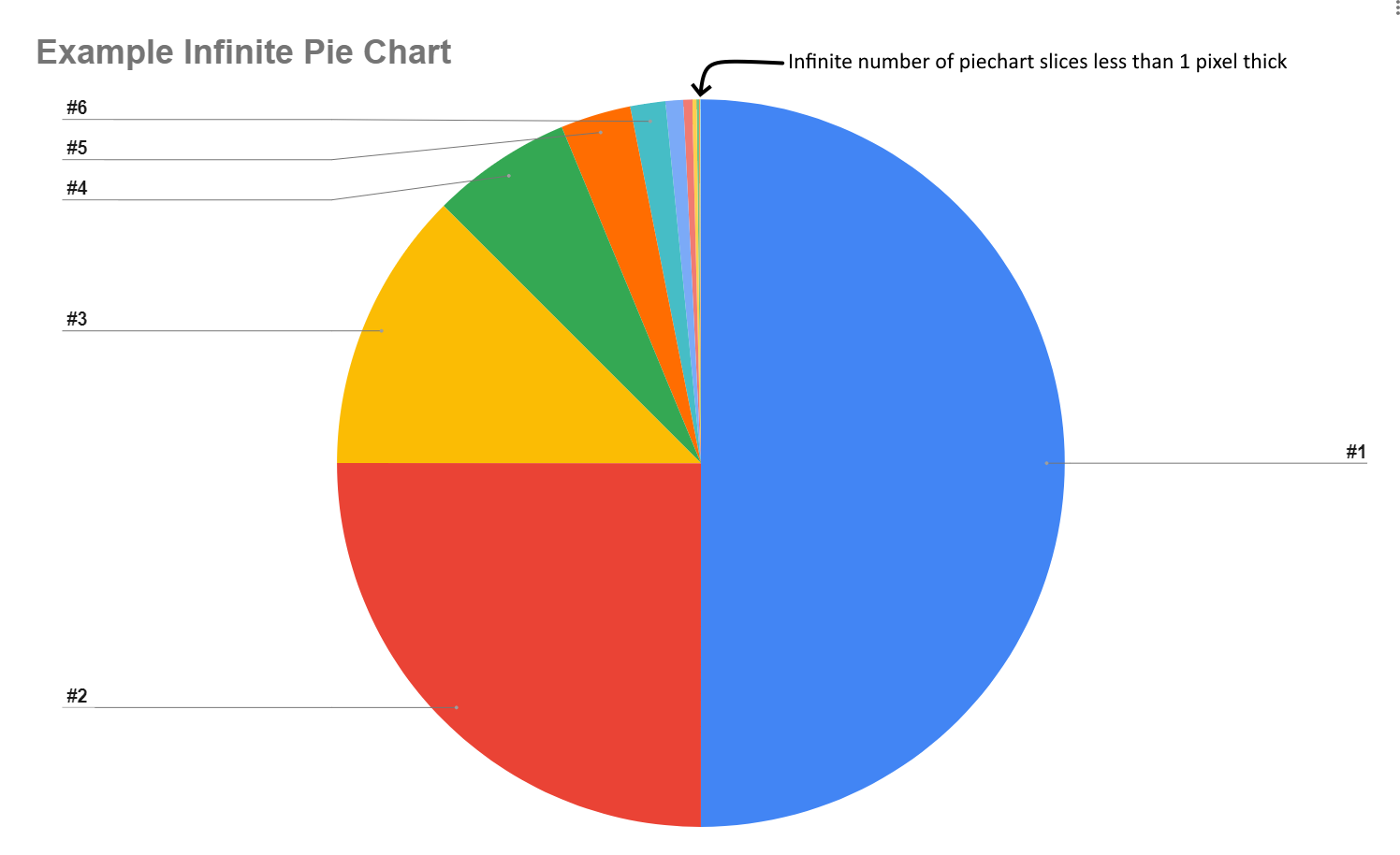
It may be one of the tinier slices in the Famous Infinite Pie Chart, but it's in the chart.
Reminder Item #3
Reminder Item #4Chief Blur Buster wrote: ↑12 Nov 2021, 22:51The ‘turn off all circuit breakers except computer” is a useful blunt diagnostic tool, yes.
(Not all EMI is caused by broken wires acting as antennas, but turning off electricity to everything except computer can help determine if it’s a more in-house bad-electricity problem)
Chief Blur Buster wrote: ↑14 Nov 2021, 13:33Kudos.
This is a scientifically known “bad electricity” problem. I can personally confirm that EMI has been solved this way before.
This is one of the few EMI problems troubleshootable by testing your circuit breakers (turning off the WHOLE house *except* for the power outlets connected to your computer)
Unfortunately it does not solve all possible kinds of EMI, because some people’s EMI problem is caused by interference coming elsewhere.
But, this is something easy enough for users to do. As long as you don’t mind the disruption of turning off your house’s power temporarily by removing or turning off all-but-1 fuses/breakers in your power panel. It’s one of the most useful blunt-force diagnostic tools for people without electrical knowledge.
Head of Blur Busters - BlurBusters.com | TestUFO.com | Follow @BlurBusters on: BlueSky | Twitter | Facebook

Forum Rules wrote: 1. Rule #1: Be Nice. This is published forum rule #1. Even To Newbies & People You Disagree With!
2. Please report rule violations If you see a post that violates forum rules, then report the post.
3. ALWAYS respect indie testers here. See how indies are bootstrapping Blur Busters research!
-
nickchraj
- Posts: 26
- Joined: 29 Mar 2026, 11:37
Re: ELECTRICITY INPUT LAG.. HOW I FIXED IT?!
Hey bro, congrats on finding the cause of your lag. have the fixed lasted? were you able to constantly reproduce it by switching the other brakers on?omeGa wrote: ↑13 Nov 2021, 19:22Oh my God I love you brother !!!!!
thanks to you I managed to locate my problem and it's electrical :'(
It's been more than 2 years that I have a problem in Counter Strike with a floating mouse feeling and my hits registering very very very badly and space preshots
I'm one step ahead of your post because I had proceeded by elimination:
My hardware : ok
my network : ok
I only had the electrical network at home, I have a very good grounding so no problem on that side.
So I proceeded as you have specified to cut all the circuit breakers and leave the one for the power outlets and it is INCREDIBLE !!!!!!! my game is a speed, precision that I do not recognizeo
In the Mousetester software my smile is smooth, a perfectly straight line while before it was a roller coaster, look at this screenshot.
I am in a state of euphoria to have finally detected the problem.
I've already contacted some friends who know electricians and I hope the bill won't be too high.
Thanks again brother, your report is a gift.

 o
o-
Yazeedtt
- Posts: 23
- Joined: 10 Mar 2026, 18:57
Re: ELECTRICITY INPUT LAG.. HOW I FIXED IT?!
https://imgur.com/a/r9WsQiU
Is it possible that this damaged outlet attached to the electricity meter is the cause of the problem? I don’t even know why it is there in the first place like this.
Is it possible that this damaged outlet attached to the electricity meter is the cause of the problem? I don’t even know why it is there in the first place like this.