
Strobe Crosstalk Issue on XL2586k+

Adjusting BENQ Blur Reduction and DyAc (Dynamic Acceleration) including Blur Busters Strobe Utility. Supports most BenQ/Zowie Z-Series monitors (XL2411, XL2420, XL2720, XL2735, XL2540, XL2546)
tchomes
Posts: 6
Joined: 10 Mar 2026, 09:36

Strobe Crosstalk Issue on XL2586k+

Post by tchomes » 10 Mar 2026, 09:58

Hello,

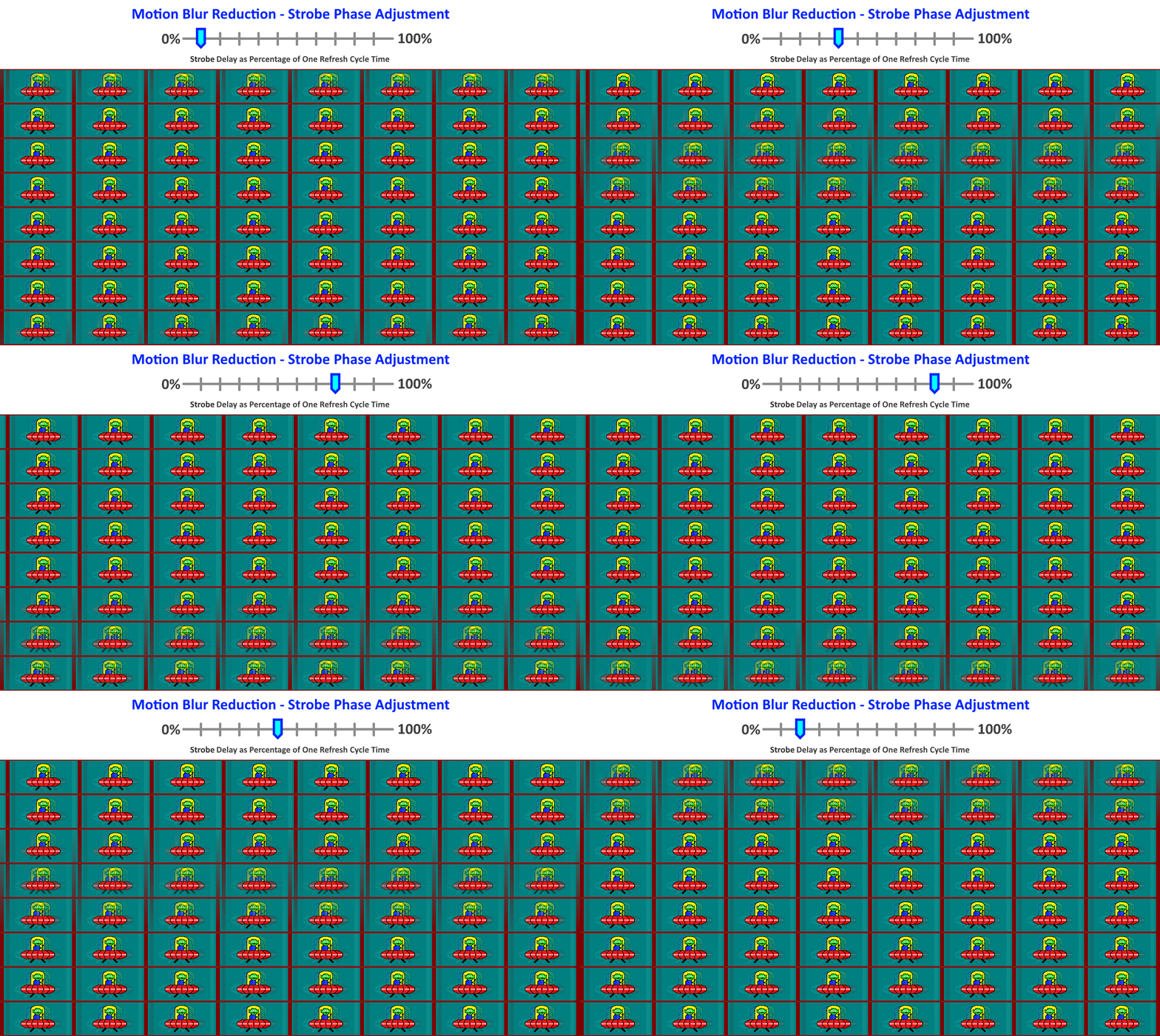
Currently noticing an issue while using 600hz on this monitor. I notice that there is strobe crosstalk creating a double image on ufo tests at 600hz :(
After some other tests I lowered the refresh rate to 500hz and seems to have no crosstalk whatsoever with the alien looking close to reference.
I did find that increasing the sharpness made it much worse on 600hz. One weird interesting thing I found when running at 600hz is that when the OSD is up and I have the alien going through that, theres no crosstalk whatsoever and looks wildly clear.

Ingame on CS2, motion clarity is also much better on 500hz compared to 600hz

My setup right now is a EVGA 3070ti FTW3 on latest 595.71 drivers. Monitor is connected via DisplayPort 1.4 and DYAC set to Premium and AMA set to High.

My question is, are the pixels updating so quick that the panel can't update quickly enough at 600hz to provide little to no crosstalk like it can at 500hz?
Anything to help would be greatly appreciated and thanks in advance for taking the time to respond if you do.


tchomes
Posts: 6
Joined: 10 Mar 2026, 09:36

Re: Refresh Rate leading to Crosstalk Issue on XL2586k+

Post by tchomes » 11 Mar 2026, 21:05

Thanks for the reply. After work today I got some leeway into finding out why 600hz had the alien lose its rightmost eye in the ghosting test.

At 1920x1080 at 599.94 I get a result like below. I can't change from 599.94
600hz.PNG
600hz.PNG (26.53 KiB) Viewed 4339 times

HOWEVER, experimenting with lower resolutions that aren't 1920x1080 like 1290x960, windows starts showing 3 different options for refresh rate.

599.91, 599.94, 599.95 hz
Screenshot 2026-03-11 000350.png
Screenshot 2026-03-11 000350.png (112.32 KiB) Viewed 4339 times
I tried the ghosting test on all of these and at 599.91 theres little to no crosstalk at all and looks as what I expected out of this monitor. Rough example below
600hzgood.PNG
600hzgood.PNG (23.59 KiB) Viewed 4339 times
Going to 599.94 at 1290x960 also produces the same result as the test done at FHD with bad crosstalk.

I've tried CRU to create a custom res for 1080p at 599.91 but won't display the resolution even at different EDID settings so I'm kinda stumped here.

Do I have to adjust any of the front/back porch settings?

Any help on where to go from here would be much appreciated.

User avatar
kyube
Posts: 887
Joined: 29 Jan 2018, 12:03

Re: Refresh Rate leading to Crosstalk Issue on XL2586k+

Post by kyube » 11 Mar 2026, 21:52

tchomes wrote:
11 Mar 2026, 21:05
Thanks for the reply. After work today I got some leeway into finding out why 600hz had the alien lose its rightmost eye in the ghosting test.

At 1920x1080 at 599.94 I get a result like below. I can't change from 599.94

HOWEVER, experimenting with lower resolutions that aren't 1920x1080 like 1290x960, windows starts showing 3 different options for refresh rate.

599.91, 599.94, 599.95 hz

I tried the ghosting test on all of these and at 599.91 theres little to no crosstalk at all and looks as what I expected out of this monitor. Rough example below

Going to 599.94 at 1290x960 also produces the same result as the test done at FHD with bad crosstalk.

I've tried CRU to create a custom res for 1080p at 599.91 but won't display the resolution even at different EDID settings so I'm kinda stumped here.

Do I have to adjust any of the front/back porch settings?

Any help on where to go from here would be much appreciated.
That's such a interesting find!
Does this happen on the DP or HDMI port of the display?
Can you take a screenshot of what EDIDs your 86X+ has and whether you can find a 599.91 Hz EDID somewhere?
HDMI 2.1 FRL4 (what your 86X+ supposedly has) should be higher bandwidth and enable you to push those refresh rates
Could you take a video using a smartphone & in the https://testufo.com/crosstalk test?

User avatar
Chief Blur Buster
Site Admin
Posts: 12265
Joined: 05 Dec 2013, 15:44
Location: Toronto / Hamilton, Ontario, Canada
Contact:

Re: Strobe Crosstalk Issue on XL2586k+

Post by Chief Blur Buster » 11 Mar 2026, 22:36

I have talked for years about the "refresh rate headroom" trick for crosstalk reductions. It's common with XG2431 users, but it also affects BenQ ZOWIE displays too.

But a very tiny Hz change -- 600Hz down to 599.94 creating major changes is rather interesting.

What does top/center/bottom look like at all refresh rates at www.testufo.com/crosstalk -- the TestUFO specially designed for strobe crosstalk tests, not the ghosting test. You might have shifted the top/center/bottom upwards/downwards, so that the screen center has more/less crosstalk at tiny Hz differences -- e.g. bad crosstalk band may have moved somewhere else.

Image

(Blur Busters Strobe Utility may be able to help you re-center your preferred crosstalk band too)
Head of Blur Busters - BlurBusters.com | TestUFO.com | Follow @BlurBusters on: BlueSky | Twitter | Facebook

Image
Forum Rules wrote:  1. Rule #1: Be Nice. This is published forum rule #1. Even To Newbies & People You Disagree With!
  2. Please report rule violations If you see a post that violates forum rules, then report the post.
  3. ALWAYS respect indie testers here. See how indies are bootstrapping Blur Busters research!

tchomes
Posts: 6
Joined: 10 Mar 2026, 09:36

Re: Strobe Crosstalk Issue on XL2586k+

Post by tchomes » 12 Mar 2026, 01:21

Chief Blur Buster wrote:
11 Mar 2026, 22:36
I have talked for years about the "refresh rate headroom" trick for crosstalk reductions. It's common with XG2431 users, but it also affects BenQ ZOWIE displays too.

But a very tiny Hz change -- 600Hz down to 599.94 creating major changes is rather interesting.

What does top/center/bottom look like at all refresh rates at -- the TestUFO specially designed for strobe crosstalk tests, not the ghosting test. You might have shifted the top/center/bottom upwards/downwards, so that the screen center has more/less crosstalk at tiny Hz differences -- e.g. bad crosstalk band may have moved somewhere else.


(Blur Busters Strobe Utility may be able to help you re-center your preferred crosstalk band too)
Hi Chief

Yea I did read that and 500hz works great! But I wanted the extra smoothness because I've been truly spoiled.

I'm unable to select pure 600hz unfortunately, I only have the options between 599.91, 599.94, and 599.95 on 1280x960 and only 599.94 on 1920x1080

Below are stills from the crosstalk test video I took just now and the images below consistently represent top/center/bottom characteristics as I have Dyac 2 turned on (High or Premium has no effect):

-1290x960 at 599.91hz
599_91.png
599_91.png (3.69 MiB) Viewed 4303 times
No problems here

-1920x1080 at 599.94hz
599_94.png
599_94.png (4.62 MiB) Viewed 4303 times
Note the black outline of the previous' frame alien head cutting into the eyeball of the current frame alien here ^ :(

I've tried to align crosstalk with the 2.0.9 utlilty but it didnt seem to have any effect on this monitor. Even trying random values in softMCCS had no effect either.

tchomes
Posts: 6
Joined: 10 Mar 2026, 09:36

Re: Refresh Rate leading to Crosstalk Issue on XL2586k+

Post by tchomes » 12 Mar 2026, 01:47

kyube wrote:
11 Mar 2026, 21:52
tchomes wrote:
11 Mar 2026, 21:05
Thanks for the reply. After work today I got some leeway into finding out why 600hz had the alien lose its rightmost eye in the ghosting test.

At 1920x1080 at 599.94 I get a result like below. I can't change from 599.94

HOWEVER, experimenting with lower resolutions that aren't 1920x1080 like 1290x960, windows starts showing 3 different options for refresh rate.

599.91, 599.94, 599.95 hz

I tried the ghosting test on all of these and at 599.91 theres little to no crosstalk at all and looks as what I expected out of this monitor. Rough example below

Going to 599.94 at 1290x960 also produces the same result as the test done at FHD with bad crosstalk.

I've tried CRU to create a custom res for 1080p at 599.91 but won't display the resolution even at different EDID settings so I'm kinda stumped here.

Do I have to adjust any of the front/back porch settings?

Any help on where to go from here would be much appreciated.
That's such a interesting find!
Does this happen on the DP or HDMI port of the display?
Can you take a screenshot of what EDIDs your 86X+ has and whether you can find a 599.91 Hz EDID somewhere?
HDMI 2.1 FRL4 (what your 86X+ supposedly has) should be higher bandwidth and enable you to push those refresh rates
Could you take a video using a smartphone & in the crosstalk test?
Hi Kyube

I can only find 599.91hz at the lower 1280x960 resolution. Any attempts to get 1080p to take 599.91 in CRU, whether in Display 1.3 or 2.0, results in it only allowing for 599.94hz
Screenshot 2026-03-12 024104.png
Screenshot 2026-03-12 024104.png (62.11 KiB) Viewed 4300 times

Please see the reply I made to Chief on still images of the video I took of the crosstalk test. I've tried altering the same settings on both HDMI 2.1 and DP 1.4 cables

User avatar
kyube
Posts: 887
Joined: 29 Jan 2018, 12:03

Re: Strobe Crosstalk Issue on XL2586k+

Post by kyube » 12 Mar 2026, 08:58

tchomes wrote:
12 Mar 2026, 01:21
Yea I did read that and 500hz works great! But I wanted the extra smoothness because I've been truly spoiled.
Are you able to sustain +600FPS in the games you play?
I believe going to a lower refresh rate value for the less crosstalk benefit & easier frame rate value to run is a "hit two birds with one stone" situation.
tchomes wrote:
12 Mar 2026, 01:21
I've tried to align crosstalk with the 2.0.9 utlilty but it didnt seem to have any effect on this monitor. Even trying random values in softMCCS had no effect either.
Yep, Dyac2 is not functional with the Blurbusters utility anymore... They've seemingly removed the VCP commands..
tchomes wrote:
12 Mar 2026, 01:21
Hi Kyube
I can only find 599.91hz at the lower 1280x960 resolution. Any attempts to get 1080p to take 599.91 in CRU, whether in Display 1.3 or 2.0, results in it only allowing for 599.94hz
--snip--
Please see the reply I made to Chief on still images of the video I took of the crosstalk test. I've tried altering the same settings on both HDMI 2.1 and DP 1.4 cables
Try playing around with the Front/Back Porch, Blanking.
Perhaps fixing the refresh rate to 599.91 in CRU would help? But I don't think the actual value is what drivers the lower crosstalk behavior

User avatar
Chief Blur Buster
Site Admin
Posts: 12265
Joined: 05 Dec 2013, 15:44
Location: Toronto / Hamilton, Ontario, Canada
Contact:

Re: Strobe Crosstalk Issue on XL2586k+

Post by Chief Blur Buster » 12 Mar 2026, 19:29

tchomes wrote:
12 Mar 2026, 01:21
-1290x960 at 599.91hz
599_91.png

No problems here

-1920x1080 at 599.94hz
599_94.png
For non-pursuit photos of strobe backlights, did you keep shutter speed faster than refresh cycle?

E.g. 1/600sec or faster for 600Hz?

Otherwise, it captures additional duplicate images from exposing multiple refresh cycles -- instead of just strobe crosstalk

If you prefer a slower shutter speed, you MUST pursuit the camera (pursuit camera). However, for strobe crosstalk analysis, static photography is easier, but the shutter speed has to be fast enough to capture only one strobe flash.
Head of Blur Busters - BlurBusters.com | TestUFO.com | Follow @BlurBusters on: BlueSky | Twitter | Facebook

Image
Forum Rules wrote:  1. Rule #1: Be Nice. This is published forum rule #1. Even To Newbies & People You Disagree With!
  2. Please report rule violations If you see a post that violates forum rules, then report the post.
  3. ALWAYS respect indie testers here. See how indies are bootstrapping Blur Busters research!

tchomes
Posts: 6
Joined: 10 Mar 2026, 09:36

Re: Strobe Crosstalk Issue on XL2586k+

Post by tchomes » 12 Mar 2026, 22:20

Chief Blur Buster wrote:
12 Mar 2026, 19:29
tchomes wrote:
12 Mar 2026, 01:21
-1290x960 at 599.91hz
599_91.png

No problems here

-1920x1080 at 599.94hz
599_94.png
For non-pursuit photos of strobe backlights, did you keep shutter speed faster than refresh cycle?

E.g. 1/600sec or faster for 600Hz?

Otherwise, it captures additional duplicate images from exposing multiple refresh cycles -- instead of just strobe crosstalk

If you prefer a slower shutter speed, you MUST pursuit the camera (pursuit camera). However, for strobe crosstalk analysis, static photography is easier, but the shutter speed has to be fast enough to capture only one strobe flash.
I took a pursuit video until it looked exactly how it looked irl and took the stills from there. I figured it out just now for a stupid reason despite all the complaining. Basically, followed what witega wrote @ viewtopic.php?t=14300 about using "Exact Reduced" timings and I was finally able to set my refresh rate to whatever and resolved the issue I was seeing. :lol:
Last edited by tchomes on 12 Mar 2026, 22:24, edited 1 time in total.

Post Reply
