
phantom array effect/stroboscopic
-
dani022
- Posts: 1
- Joined: 02 May 2026, 17:42
 phantom array effect/stroboscopic
I've been looking into the Acer Predator X27U F8 OLED (540Hz native / 720Hz in dual-mode) and I'm curious whether its can help mitigate the phantom array / stroboscopic effect I'm planning to pick one up soon as it's expected to release would love to hear thoughts from anyone who's tested it does the 540Hz OLED experience noticeably reduce phantom array compared to lower-refresh panels?
-
RealNC

- Site Admin
- Posts: 4617
- Joined: 24 Dec 2013, 18:32
- Contact:
Re: phantom array effect/stroboscopic
The distance between each image in the array gets smaller. So yes, the higher the frame rate and refresh rate, the less visible the effect becomes. I can't see it in games at 240Hz/240FPS, unless I do very fast mouse swipes.
Steam • GitHub • Stack Overflow
The views and opinions expressed in my posts are my own and do not necessarily reflect the official policy or position of Blur Busters.
The views and opinions expressed in my posts are my own and do not necessarily reflect the official policy or position of Blur Busters.
-
Discorz

- VIP Member
- Posts: 1142
- Joined: 06 Sep 2019, 02:39
- Location: Europe, Croatia
- Contact:
Re: phantom array effect/stroboscopic
As long as both frame rate and refresh rate is up there, it will help, yes. The higher the better. To what degree depends on what you're upgrading from, because diminishing retuns is real. In my experience, the jump from 240 to 480 Hz fps isn’t striking, whereas going from 60 to 120 is very noticeable. From 240, one would need at least 1000+ Hz fps for more impact.
It’s worth mentioning that the effect is present regardless of GtG speed. Doesn't really matter if it's a slow LCD or fast OLED. The effect is just delayed by GtG amount. But I’d still recommend OLED, since it handles motion better in other ways, such as tracking objects with eyes.
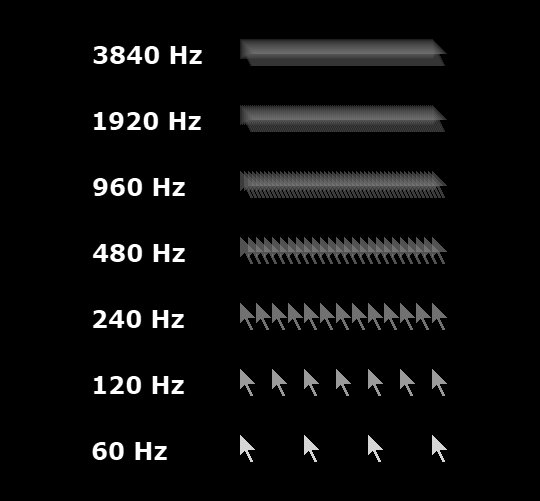
Image above is simulation of stationary eye/camera staring at a moving mouse cursor at 3840 px/sec speed, GtG = 0 ms (small object ona a high contrast background - great way to accentuate the effect)
It’s worth mentioning that the effect is present regardless of GtG speed. Doesn't really matter if it's a slow LCD or fast OLED. The effect is just delayed by GtG amount. But I’d still recommend OLED, since it handles motion better in other ways, such as tracking objects with eyes.
Image above is simulation of stationary eye/camera staring at a moving mouse cursor at 3840 px/sec speed, GtG = 0 ms (small object ona a high contrast background - great way to accentuate the effect)