

Since I had to do a fresh Windows install last week, I took the time to dial everything back in for optimal input latency and frametime consistency.
Most of this is fairly common knowledge, but I'm sharing it just in case someone finds a useful missing link.
As for reference, I'm 2k+ elo and this is my setup:
Monitor: PG27AQDP (1440p @ 480Hz)
GPU: RTX 5090 FE
CPU: Ryzen 9 9950X3D (iGPU disabled)
RAM: Hynix A-die 2x16GB @ 6400MT/s CL30 (custom OC)
Motherboard: ASRock X870 Riptide
PSU: Seasonic FOCUS GX-1000
Storage: SK Hynix Platinum P41 1TB (OS) / SK Hynix Platinum P41 2TB (Games & Data)
Peripherals: Wooting Two HE @ 1000Hz, Zeromouse Blade @ 2000Hz, HyperX Cloud III (all audio enhancements/spatial audio disabled, format set to 2 channels / 24-bit / 48000Hz)
USB Topology: Mouse and keyboard connected directly to CPU-routed USB 3.2 ports; headset plugged into chipset USB 3.2
OS: Windows 11 Pro 25H2 (Build 26200.9168, fully updated)
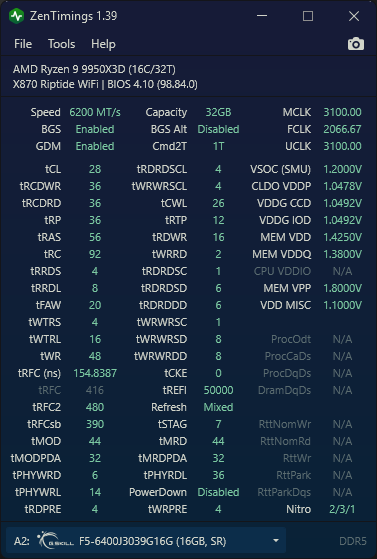
Key tweaks based on my testing:
- MPO Disabled - Can cause minor issues in a few DX12 titles; I just re-enable it whenever needed.
- CPPC set to "Driver" in BIOS (essential for dual-CCD X3D setups).
- Always keep AMD chipset drivers up to date (crucial for the 3D V-Cache optimizer and scheduler to handle thread parking and CCD prioritization properly).
- Power Plan: Balanced (required for dual-CCD core parking to work as intended).
- NVIDIA Scaling: Set to GPU (for some reason, this only works reliably when running a single active display).
I know I’m not reinventing the wheel here, but hopefully this helps someone setting up a clean install or troubleshooting latency!
