Adjusting BENQ Blur Reduction and DyAc (Dynamic Acceleration) including
Blur Busters Strobe Utility. Supports most BenQ/Zowie Z-Series monitors (XL2411, XL2420, XL2720, XL2735, XL2540, XL2546)
-
Chief Blur Buster
- Site Admin
- Posts: 12284
- Joined: 05 Dec 2013, 15:44
- Location: Toronto / Hamilton, Ontario, Canada
-
Contact:
Post
by Chief Blur Buster » 29 Apr 2017, 14:44
Finally got our updated Comodo executable digital signing certificate.
NOTE: New 2018 Version 2.0 Beta 2.0 Download -- Go To This Thread
STROBE UTILITY 1.4: April 29th, 2017
Now Zowie compatible!
Here you go, download Version 1.4 of Blur Busters Strobe Utility:
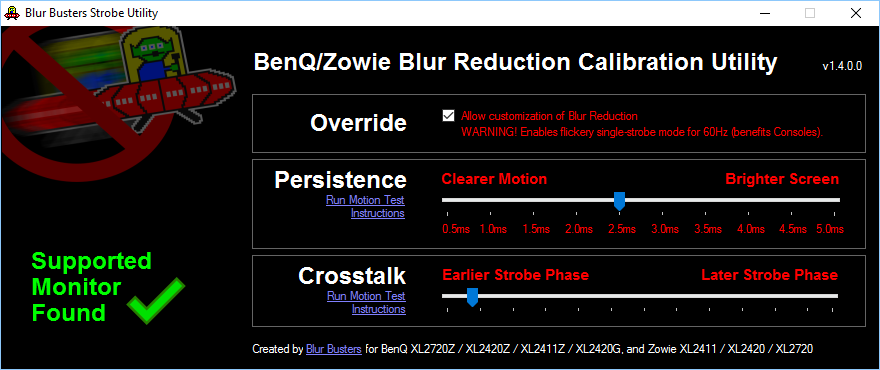
 NOTE: If Windows SmartScreen pops up, click "See More" and Run Anyway.
Supports BenQ: XL2411Z, XL2420Z, XL2720Z, XL2420G
NOTE: If Windows SmartScreen pops up, click "See More" and Run Anyway.
Supports BenQ: XL2411Z, XL2420Z, XL2720Z, XL2420G
Supports Zowie: XL2411, XL2420, XL2720
Unsupported: XL2430, XL2435, XL2730, XL2735, XL2540, XL2546 (use Service Menu instead)
Webpage has also been updated at
http://www.blurbusters.com/benq/strobe-utility/
Share:
Webpage |
Facebook |
Twitter
-
Chief Blur Buster
- Site Admin
- Posts: 12284
- Joined: 05 Dec 2013, 15:44
- Location: Toronto / Hamilton, Ontario, Canada
-
Contact:
Post
by Chief Blur Buster » 29 Apr 2017, 17:00
NOTE: If Windows SmartScreen pops up, click "See More" and Run Anyway.
SmartScreen doesn't remember me anymore; it's been a few years since Blur Busters last released an executable.
-
NutieNastya
- Posts: 1
- Joined: 05 May 2017, 00:03
Post
by NutieNastya » 05 May 2017, 00:04
I just registered to say
thank you when I've seen that you updated it, loving it

-
Chief Blur Buster
- Site Admin
- Posts: 12284
- Joined: 05 Dec 2013, 15:44
- Location: Toronto / Hamilton, Ontario, Canada
-
Contact:
Post
by Chief Blur Buster » 05 May 2017, 08:49
NutieNastya wrote:I just registered to say
thank you when I've seen that you updated it, loving it
You are very welcome!
Keep visiting us, follow
Facebook &
Twitter and our website -- we will have new stuff to announce later this year other than Strobe Utility!
-
whitestar
- Posts: 117
- Joined: 12 May 2014, 06:11
Post
by whitestar » 30 May 2017, 08:28
Hi, many thanks for the update!
Just curious, will the utility now work in Windows 10 for all monitors?
-
Chief Blur Buster
- Site Admin
- Posts: 12284
- Joined: 05 Dec 2013, 15:44
- Location: Toronto / Hamilton, Ontario, Canada
-
Contact:
Post
by Chief Blur Buster » 30 May 2017, 10:09
Yes!
It has always worked in Windows 10 in Administrator Mode, but I found a way to remove that requirement.
This rebuild doesn't require Administrator Mode (like previous versions needed) under Windows 10.
So much easier to use.
-
whitestar
- Posts: 117
- Joined: 12 May 2014, 06:11
Post
by whitestar » 31 May 2017, 16:29
Awesome! Thanks a mill, chief!
-
Bishi
- Posts: 78
- Joined: 20 Feb 2014, 17:23
Post
by Bishi » 13 Jun 2017, 08:56
Any news on 1.6 beta testing for XL2730?
-
Chief Blur Buster
- Site Admin
- Posts: 12284
- Joined: 05 Dec 2013, 15:44
- Location: Toronto / Hamilton, Ontario, Canada
-
Contact:
Post
by Chief Blur Buster » 13 Jun 2017, 11:53
Bishi wrote:Any news on 1.6 beta testing for XL2730?
Still in progress!
I'm multitasking several projects.
-
Bishi
- Posts: 78
- Joined: 20 Feb 2014, 17:23
Post
by Bishi » 14 Jun 2017, 05:24
Chief Blur Buster wrote:Bishi wrote:Any news on 1.6 beta testing for XL2730?
Still in progress!
I'm multitasking several projects.
Ok, thank you.
No pressure, just excited



