
Creating a software overdrive driver (for slow panels)
-
GammaTron
- Posts: 4
- Joined: 02 Nov 2018, 02:26
Creating a software overdrive driver (for slow panels)
Like many laptop panels, there isnt much in the way of firmware or driver utilities, so how then would I over drive my panel? It has a latency of 16ms, making for some definite ghosting, so Any recommendations to lower the response time, and lower ghosting? Here is the panel NV156FHM-N4B
-
Chief Blur Buster

- Site Admin
- Posts: 12295
- Joined: 05 Dec 2013, 15:44
- Location: Toronto / Hamilton, Ontario, Canada
- Contact:
Re: How do I do laptop panel overdrive?
Adding overdrive to a panel without overdrive can only be done via software-based overdrive techniques.
There was a graphics driver technique more than ten years ago called "ATI Radeon Overdrive" in the days when LCDs were still extremely slow-responding and didn't have hardware-based overdrive techniques.
There are ways to simulate overdrive via GPU shader programming to reduce ghosting, but this is not a very common use case anymore.
NOTE: For businesses/commercial/manufacturers: I have the skills (and code) to create an overdrive driver if necessary, but it would cost about one week worth of programming work. Which would cost more than the cost of a new monitor. However, if there is a commercial use case (e.g. 100 displays needing a Windows based overdrive driver), please contact me mark[at]blurbusters.com for contract software development work. I also do overdrive tuning work & strobe tuning work for display manufacturers.
There was a graphics driver technique more than ten years ago called "ATI Radeon Overdrive" in the days when LCDs were still extremely slow-responding and didn't have hardware-based overdrive techniques.
There are ways to simulate overdrive via GPU shader programming to reduce ghosting, but this is not a very common use case anymore.
NOTE: For businesses/commercial/manufacturers: I have the skills (and code) to create an overdrive driver if necessary, but it would cost about one week worth of programming work. Which would cost more than the cost of a new monitor. However, if there is a commercial use case (e.g. 100 displays needing a Windows based overdrive driver), please contact me mark[at]blurbusters.com for contract software development work. I also do overdrive tuning work & strobe tuning work for display manufacturers.
Head of Blur Busters - BlurBusters.com | TestUFO.com | Follow @BlurBusters on: BlueSky | Twitter | Facebook

Forum Rules wrote: 1. Rule #1: Be Nice. This is published forum rule #1. Even To Newbies & People You Disagree With!
2. Please report rule violations If you see a post that violates forum rules, then report the post.
3. ALWAYS respect indie testers here. See how indies are bootstrapping Blur Busters research!
-
GammaTron
- Posts: 4
- Joined: 02 Nov 2018, 02:26
Re: How do I do laptop panel overdrive?
Do you have a link to that "ATI Radeon Overdrive" program? I assume that only works with AMD gpu's and mine is an Nvidia Gtx1070 mobile, or is the software just made by ati? Maybe that GPU shader program would work better? Any links to it? I am willing to try outChief Blur Buster wrote:Adding overdrive to a panel without overdrive can only be done via software-based overdrive techniques.
There was a graphics driver technique more than ten years ago called "ATI Radeon Overdrive" in the days when LCDs were still extremely slow-responding and didn't have hardware-based overdrive techniques.
There are ways to simulate overdrive via GPU shader programming to reduce ghosting, but this is not a very common use case anymore.
NOTE: For businesses/commercial/manufacturers: I have the skills (and code) to create an overdrive driver if necessary, but it would cost about one week worth of programming work. Which would cost more than the cost of a new monitor. However, if there is a commercial use case (e.g. 100 displays needing a Windows based overdrive driver), please contact me mark[at]blurbusters.com for contract software development work. I also do overdrive tuning work & strobe tuning work for display manufacturers.
Here are my specs
Mech-15hs w/ windows 10
i7-7700hq
gtx 1070
32gb ram 2666mhz cl15
How much are we talking for a custom piece of driver software that would do this? Maybe just modifying one of the two programs above is all that is needed? I know however a number of people that would be interested in Panel overdriver software for laptops, and may be willing to do a little crowd funding possibly since ghosting is a frequent complaint about laptop panels, but thats depends on what you have to show. Asus does make a 1ms panel at 144hz, but its sold specifically to a model, and I could not find any third party vendors.
-
Chief Blur Buster
- Site Admin
- Posts: 12295
- Joined: 05 Dec 2013, 15:44
- Location: Toronto / Hamilton, Ontario, Canada
- Contact:
Creating a software overdrive driver (for slow panels)
It was only built into graphics drivers designed for 15-year-old ATI Radeon GPU's from before AMD purchased ATI. Such old drivers won't even run on today's Windows on today's GPU's for today's games.GammaTron wrote:Do you have a link to that "ATI Radeon Overdrive" program? I assume that only works with AMD gpu's and mine is an Nvidia Gtx1070 mobile, or is the software just made by ati? Maybe that GPU shader program would work better? Any links to it? I am willing to try out.
One biggie: Windows Driver signing certificates are really expensive. I don't want to use/borrow somebody else's driver signing certificate, or get only a 1-year certificate -- that risks making my software going obsolete too quickly. If I start such a project, I need to own a 3-year device driver code signing certificate -- those are several hundred per year.GammaTron wrote:How much are we talking for a custom piece of driver software that would do this? Maybe just modifying one of the two programs above is all that is needed? I know however a number of people that would be interested in Panel overdriver software for laptops, and may be willing to do a little crowd funding possibly since ghosting is a frequent complaint about laptop panels, but thats depends on what you have to show. Asus does make a 1ms panel at 144hz, but its sold specifically to a model, and I could not find any third party vendors.
Yes, I have the skills & parts of source code to create a clone of ATI Radeon Overdrive
I have done some overdrive tuning for some manufacturers, already have easy end-user strobe tuning software in the form of Blur Busters Strobe Utility that can easily be adapted into a different Overdrive Tuning utility user interface -- and I now also have to have the workings of virtual display driver software (unsigned, private). So I've got the pieces to glue together with a couple weeks work.
Know a business that needs something similar done for them? Or wants one released to the public?
.... If you do, then have them reach out to me at mark[at]blurbusters.com
Head of Blur Busters - BlurBusters.com | TestUFO.com | Follow @BlurBusters on: BlueSky | Twitter | Facebook
Forum Rules wrote: 1. Rule #1: Be Nice. This is published forum rule #1. Even To Newbies & People You Disagree With!
2. Please report rule violations If you see a post that violates forum rules, then report the post.
3. ALWAYS respect indie testers here. See how indies are bootstrapping Blur Busters research!
-
Q83Ia7ta
- Posts: 761
- Joined: 18 Dec 2013, 09:29
Re: How do I do laptop panel overdrive?
Wanna know which manufacturers? (Which monitors are betterChief Blur Buster wrote:I also do overdrive tuning work & strobe tuning work for display manufacturers.[/i]
 )
)-
Chief Blur Buster
- Site Admin
- Posts: 12295
- Joined: 05 Dec 2013, 15:44
- Location: Toronto / Hamilton, Ontario, Canada
- Contact:
Re: Creating a software overdrive driver (for slow panels)
There's quite a variety that's not even gaming monitor related:
-- Some of the work I did was for an augumented reality LCD.
-- Some of the tuning stuff I do are for other panel types such as IPS and VA. Working with VA overdrive is extremely tough, even the best overdrive tuning for VA can't compete with a good TN panel.
-- Some of you are familiar with the strobe tuning utility I've done for BenQ/Zowie
-- I'm currently doing strobe tuning for other monitors now, keep tuned (pun intended)
(Most are small contract stuff. Mind you, I'm always looking for more business with manufacturers as this is something I wouldn't mind doing full-time to put food on the table.)
-- Some of the work I did was for an augumented reality LCD.
-- Some of the tuning stuff I do are for other panel types such as IPS and VA. Working with VA overdrive is extremely tough, even the best overdrive tuning for VA can't compete with a good TN panel.
-- Some of you are familiar with the strobe tuning utility I've done for BenQ/Zowie
-- I'm currently doing strobe tuning for other monitors now, keep tuned (pun intended)
(Most are small contract stuff. Mind you, I'm always looking for more business with manufacturers as this is something I wouldn't mind doing full-time to put food on the table.)
Head of Blur Busters - BlurBusters.com | TestUFO.com | Follow @BlurBusters on: BlueSky | Twitter | Facebook
Forum Rules wrote: 1. Rule #1: Be Nice. This is published forum rule #1. Even To Newbies & People You Disagree With!
2. Please report rule violations If you see a post that violates forum rules, then report the post.
3. ALWAYS respect indie testers here. See how indies are bootstrapping Blur Busters research!
-
GammaTron
- Posts: 4
- Joined: 02 Nov 2018, 02:26
Re: Creating a software overdrive driver (for slow panels)
I see how most all the panels in the list here are TN, and my panel is an IPS. I do have one thing maybe you can help me with easily. So my laptops display is dgpu driven from the 1070, instead of from the igpu like in most laptops. My laptop does not have optimus, but it doesnt have g-sync either interestingly enough. Is there maybe a way to enable gsync?Chief Blur Buster wrote:There's quite a variety that's not even gaming monitor related:
-- Some of the work I did was for an augumented reality LCD.
-- Some of the tuning stuff I do are for other panel types such as IPS and VA. Working with VA overdrive is extremely tough, even the best overdrive tuning for VA can't compete with a good TN panel.
-- Some of you are familiar with the strobe tuning utility I've done for BenQ/Zowie
-- I'm currently doing strobe tuning for other monitors now, keep tuned (pun intended)
(Most are small contract stuff. Mind you, I'm always looking for more business with manufacturers as this is something I wouldn't mind doing full-time to put food on the table.)
-
Chief Blur Buster
- Site Admin
- Posts: 12295
- Joined: 05 Dec 2013, 15:44
- Location: Toronto / Hamilton, Ontario, Canada
- Contact:
Re: Creating a software overdrive driver (for slow panels)
No, although many laptop panels are VRR-tolerant because of power management -- many are able to lower Hz during idle moments. Some of these may work with unofficial FreeSync (e.g. forcing FreeSync via undocumented tweaks) but this only has been done with AMD at this time.
I have not heard of a way to hack VRR support via Intel+NVIDIA Optimus, though.
I have not heard of a way to hack VRR support via Intel+NVIDIA Optimus, though.
Head of Blur Busters - BlurBusters.com | TestUFO.com | Follow @BlurBusters on: BlueSky | Twitter | Facebook
Forum Rules wrote: 1. Rule #1: Be Nice. This is published forum rule #1. Even To Newbies & People You Disagree With!
2. Please report rule violations If you see a post that violates forum rules, then report the post.
3. ALWAYS respect indie testers here. See how indies are bootstrapping Blur Busters research!
-
IamFrog
- Posts: 2
- Joined: 29 Sep 2021, 10:26
Re: How do I do laptop panel overdrive?
Could you elaborate on this? Are there any currently available ways of implementing overdrive via GPU shaders.Chief Blur Buster wrote: ↑03 Nov 2018, 17:40
There are ways to simulate overdrive via GPU shader programming to reduce ghosting, but this is not a very common use case anymore.
-
Chief Blur Buster
- Site Admin
- Posts: 12295
- Joined: 05 Dec 2013, 15:44
- Location: Toronto / Hamilton, Ontario, Canada
- Contact:
Re: How do I do laptop panel overdrive?
First, understand LCD Grey-to-Grey (GtG) Pixel TransitionsIamFrog wrote: ↑01 Jul 2024, 18:29Could you elaborate on this? Are there any currently available ways of implementing overdrive via GPU shaders.Chief Blur Buster wrote: ↑03 Nov 2018, 17:40
There are ways to simulate overdrive via GPU shader programming to reduce ghosting, but this is not a very common use case anymore.
Before I explain this, it's important to understand LCD GtG.
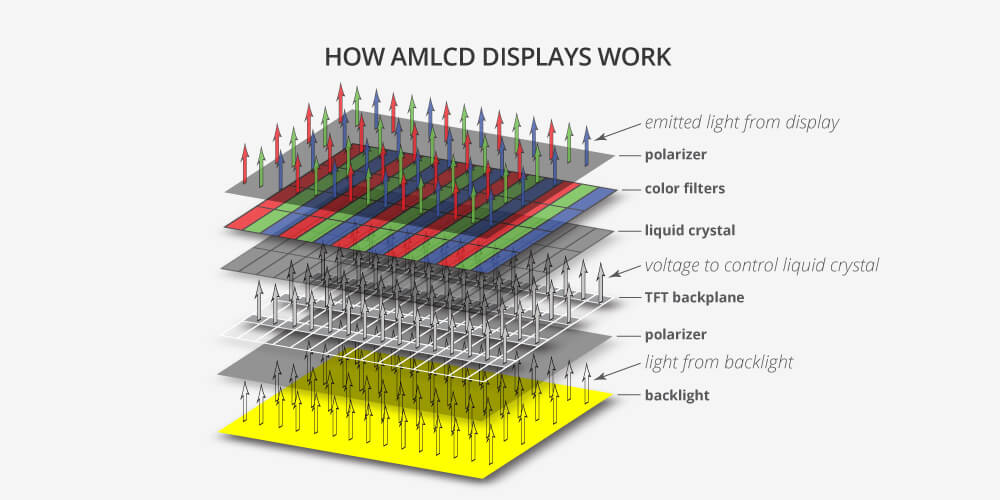
LCD GtG (grey to grey) is per-channel, so there's three grey to greys, and three (historically) independent calculations per pixel.
Grey to grey is an LCD subpixel fading from original intensity to new intensity.
LCD pixels are actually monochrome, they are simply color-filtered. So we use grey-to-grey to describe color transitions in R or G or B...
Now that you understand grey-to-grey terminology:
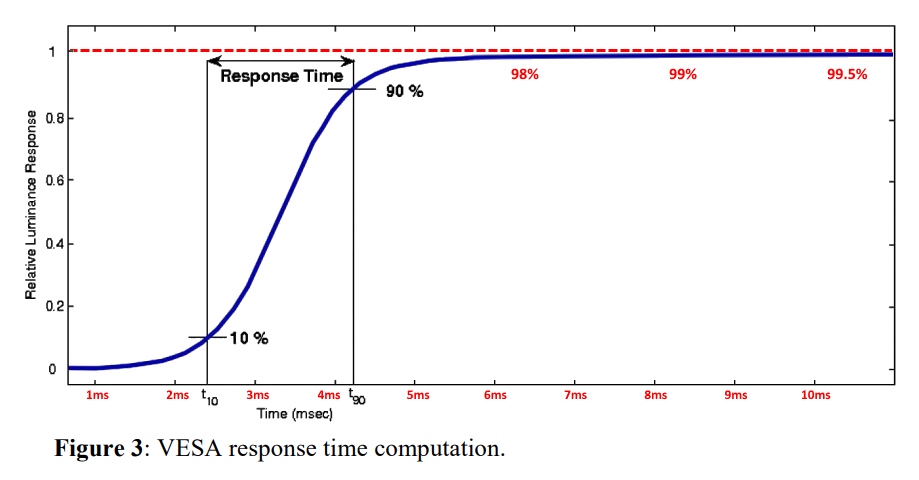
VESA GtG measurements are 10% to 90%:

But GtG takes a long time (And GtG below 10% and above 90% is still visible; e.g. like a very light grey or a very dark grey, e.g. 10% gray or 90% gray). So slow GtG that is a significant percentage of a refresh cycle (or beyond) is still visible.
The thing is that GtG often takes more than one refresh cycle, but you can speed up the momentum of the pixel transition. (make a subpixel fade from one intensity to the next faster) by intentionally overshooting the color. This leads to the next section:
So as you can see, this can become a problem with things like ghosting (afterimages trailing behind motion etc). Bigger problem with VA panels. It's also why 360Hz OLEDs look about 1.5x-2x clearer than 360Hz LCDs, due to the near-zero GtG of OLED. (Since all eye-tracked display motion blur on OLED is almost pure MPRT and no GtG).
Now, understand LCD Overdrive
Overdrive is really just a lookup table for A(B)=C to create an overshoot color C to speed source color A to destination color B.
In this case, color is actually one color channel (red or green or blue shade), so I will refer "color" as "grey".
A = original grey intensity (for one color channel)
B = desired grey intensity (for one color channel)
C = value to send to subpixel for one refresh cycle
For example, to transition color from A=100 to B=200 faster, you could use an overshoot value C=220. Which is brighter than 200. But the way overdrive is calculated, you want the pixel to have fully reached an intensity of 200 by the start of the new refresh cycle.
So the series of refresh cycles for that subpixel would be: 100, 100, 100, 220, 200, 200
(IMPORTANT: Refresh cycle granularity, INDEPENDENT of the underlying framerate.)
C might be bigger or smaller, depends on display/temperature/panel/refresh rate/etc. That's the catch. And you need experimentation (or a photodiode oscilloscope) to model it. Or a generic LCD pixel simulator algebra formula you can run an overdrive simulator on. Etc.
A and B would be the previous/next refresh cycle (adjacent refresh cycles)
So the overdrive lookup table for A=100 and B=100 would result in C=100 (no operation, no change).
And the overdrive lookup table for A=200 and B=200 would result in C=200 (no operation, no change).
But at the transition point (A=100 and B=200), the formula A(B) would have C=220 for that entry.
How are these values calculated? Via a photodiode and an oscilloscope. To determine what is most accurate way to speed up pixel transitions from A to B.
You can do this in the opposite direction, e.g. C=80 for transitioning A=200 towards B=100
These are simply extra voltage overshoot for the LCD subpixels, but you can simply map voltages to RGB values in a GPU shader, and simply do it 100% in software. Using darker shades and brighter shades for temporary overvoltages and undervoltages. The catch is you can't do voltages beyond the range (e.g. for 8bit RGB, you have a range of 0 to 255, so you can't do voltages for colors below 0 or above 255). Which is why overdrive for darkest and brightest colors are very difficult. There's no way to speed up a pixel transition from 200 to 255 by using a value beyond 255.
Now, if you mis-calculate your overdrive lookup table, or a user adjusts overdrive setting too strong -- you can create corona effects:

You have these error margins:
- Panel lottery. Some panels requires slightly more/less overdrive to be accurate
- Refresh rate. Changing refresh rates require a new overdrive setting
- Temperature. Hotter panels (after warm up) will require less overdrive
- User preference. Some users are extremely picky about ghosting or corona artifacts
- Colors. Some pixel colors will be faster than others, creating asymmetries that annoy users (e.g. VA panels and dark games)
- Etc.
Often, most manufactures use a one-size fits all overdrive lookup table, and require the user to adjust overdrive. An end user adjusting overdrive, is simply changing the gain setting (e.g. a mutiplier on the overdrive lookup table). Overdrive Gain is simply a multiplier on the delta between variables B and C. By default that is set to 1.00 (use C unmodified) but can be amplified (bigger overshoot) or attenuated (less overshoot) via adjusting an overdrive gain setting.
End users usually only have access to pre-defined overdrive gain settings such as "Low", "Medium", "High" or similar, but in reality, the overdrive gain can be literally a floating point setting and an adjustable bar (like brightness), as seen on certain brands of monitors that have decided to give users access to the entire Overdrive Gain setting range. This is still very rare though.
Also, most overdrive lookup tables are 17x17 interpolated to 256x256. Except NVIDIA's usually-better overdrive that you can only purchase with a GSYNC premium, sadly.
The upshoot of this is that it's possible to have a GPU shader that does better overdrive than the manufacturer's own built in overdrive of a specific LCD monitor -- but it takes a horrendous amount of effort at the moment.
There can be more advanced overdrive (e.g. using multiple refresh cycles, e.g. three refresh cycles worth of 255 to speed up a transition from 100 to 254 ... since you have very little overdrive headroom). But most manufacturers don't utilize this, except for big-budget companies like NVIDIA.
Now, you know how refresh rate affects overdrive? Yep, another variable (frametime) that affects the overdrive LUT. And now you throw in extras such as multiple-refresh-cycle-depth overdrive. At some stage, a LUT could be bigger than your computer's RAM. So often algebraic/interpolation is added to overdrive formulas to help assist.
Part of the GSYNC premium goes into the astoundingly complex overdrive engineering that goes on in a panel, as the last 10% of better overdrive is 10x-100x more complicated than doing the first 90% of overdrive... Which is why (in a roundabout way), GSYNC native VRR has much better overdrive than generic adaptive-sync panels (generic VRR) without these enhancements. AMD and their implementors does something similar for some of their most advanced FreeSync, but it's not common nor mandatory, so it's a bit less common on that side.
Precedents
ATI Radeon Overdrive did this about twenty years ago, for early LCDs, before LCD desktop monitors implemented overdrive in the monitors. You could go to Control Panel and adjust overdrive on an ATI Radeon card to optimize for your specific LCD display.
PixPerPan software by prad.de was an early motion testing app that could simulate overdrive via software based means. TestUFO is inspired by PixPerAn (but with different graphics).
There is now an open source app called Blurinator to create simulated pursuit camera images (that includes overdrive artifacts):
viewtopic.php?f=7&t=8569
MIT/Apache, so you can play with it and share works back here, if need be. I convinced the author of Blurinator to use a permissive license because this is such a niche algorithm, not of skill by many programmers.
Proprietary codebases for such niche algorithms doesn't do much incubation, and given how fast display industry is moving (e.g. OLEDs), and Blur Busters currently prefers permissive open source licenses for niche stuff that most open source programmers would not be familiar with (We've already released one of TestUFO's refresh rate calculator under Apache 2.0, generic open source refresh rate calculator). If you're a software developer, we encourage you to help make this a bit more widespread if possible.
Indirect Display Driver System
To do this in realtime, while the display and GPU is operating, without slowing down the GPU too much, we need an ultra high performance GPU shader that can do A(B)=C compute every subpixel every refresh cycle.
But not just overdrive shader, but I want it to do generic shader algorithms, so I can also simulate www.testufo.com/blackframes and www.testufo.com/vrr in software, on any application too.
I'm looking for some help in co-authoring an open source refresh-cycle-granularity shader processor, that could do these tasks (amongst others such as BFI and more). Like a refresh-cycle-granularity version of ReShade that runs at maxHz independently of the underlying framerate. This may require integration into a windows indirect display driver, as an example.
Some useful related threads:
viewtopic.php?f=22&t=5625
If any software developer wants to help modifying somebody else's existing open source github (one of the various published), to accomodate such features, let me know. One possible candidate is this open source indirect display driver that is already switched to MIT license under my special request.
Overdrive processors:
Blurinator (released as MIT on my request) on github https://github.com/marianvlcek/blurinator
Refresh cycle processors:
Virtual-Display-RS (relicensed to MIT on my request) on github https://github.com/MolotovCherry/virtual-display-rs
dwm-lut (GPL) on github https://github.com/lauralex/dwm_lut
So the due diligence is already out there, just needs to be rolled together into appropriate projects. I might do it myself once I have a super-pressing need, but at least someone else can do it. I have high three-figures and low four-figures source code bounties (funded by Blur Busters) available. It's one of those things that are "too much work for someone full time employed, but the needs are too niche for a fully funded big-company budget" type of things. But it would move forward so much Blur Busters initatives that still appeals to the hobbyist!
Head of Blur Busters - BlurBusters.com | TestUFO.com | Follow @BlurBusters on: BlueSky | Twitter | Facebook
Forum Rules wrote: 1. Rule #1: Be Nice. This is published forum rule #1. Even To Newbies & People You Disagree With!
2. Please report rule violations If you see a post that violates forum rules, then report the post.
3. ALWAYS respect indie testers here. See how indies are bootstrapping Blur Busters research!