
Hey,
Can i use specific vertical total for the XL2735 on 2K 27“ @120Hz and what is the vertical total number for my Screen?
Best regards
Failix
BenQ/Zowie XL2735 specific vertical total ?
-
Chief Blur Buster

- Site Admin
- Posts: 12288
- Joined: 05 Dec 2013, 15:44
- Location: Toronto / Hamilton, Ontario, Canada
- Contact:
Re: BenQ/Zowie XL2735 specific vertical total ?
The XL2735 uses a totally different scaler chip that is much more intolerant of vertical totals as far as I know.
Some monitors already does the equivalent of internal Large Vertical Totals (via internal scan-rate conversion). I have reason to believe the XL2735 may be doing this whenever DyAc is turned on.
There are two ways to reduce strobe crosstalk via accelerated for the same Hz:
1. User-side GPU-side Large Vertical Totals; or (makes it hard to fiddle).
2. Internal monitor logic via scan rate conversion. (makes toggling blur reduction easier, but can add more strobe lag)
When a monitor is already doing (2), doing optimizations for (1) have far less effect or has no effect.
Non-DyAc blur reduction (XL2720Z) hugely benefits from #1
While NVIDIA ULMB doesn't benefit visually because it's already doing #2 -- strobing comes fully pre-tuned at factory.
<Ultra technical explanation>
The XL2546 does it via internal monitor logic since it panel scans-out mainly at full velocity, so the only purpose of Large Vertical Totals is to reduce frame delivery latency (since Large Vertical Totals can double as a Quick Frame Transport (QFT) mechanism -- deliver individual refresh cycles faster over the video cable -- which can compensate for monitors that does internal scan-rate conversion for lower-Hz signal input via fixed high-scanrate panel refreshing logic). It's simply an art of "cramming the GtG elephane into the VBI" -- trying to hide LCD pixel transitions in the vertical blanking interval between refresh cycles. This only recently became possible only about ten years ago, when pixel response times became a tiny fraction of a refresh cycle. That made the modern CRT-motion-clarity strobe backlight possible. But unfortunately GtG pixel response is not 100% perfect or 100% complete, so that's why strobe crosstalk still exists. Sometimes it's below human-detectable levels, and that's the art of strobe tuning, and why Blur Busters Strobe Utility exists to help users to try to reduce crosstalk even further, with creative user tuning. However, the DyAc brand of blur reduction often comes more pre-tuned at factory and makes Strobe Utility a little less necessary than it was for early models like XL2720Z...
</Ultra technical explanation>
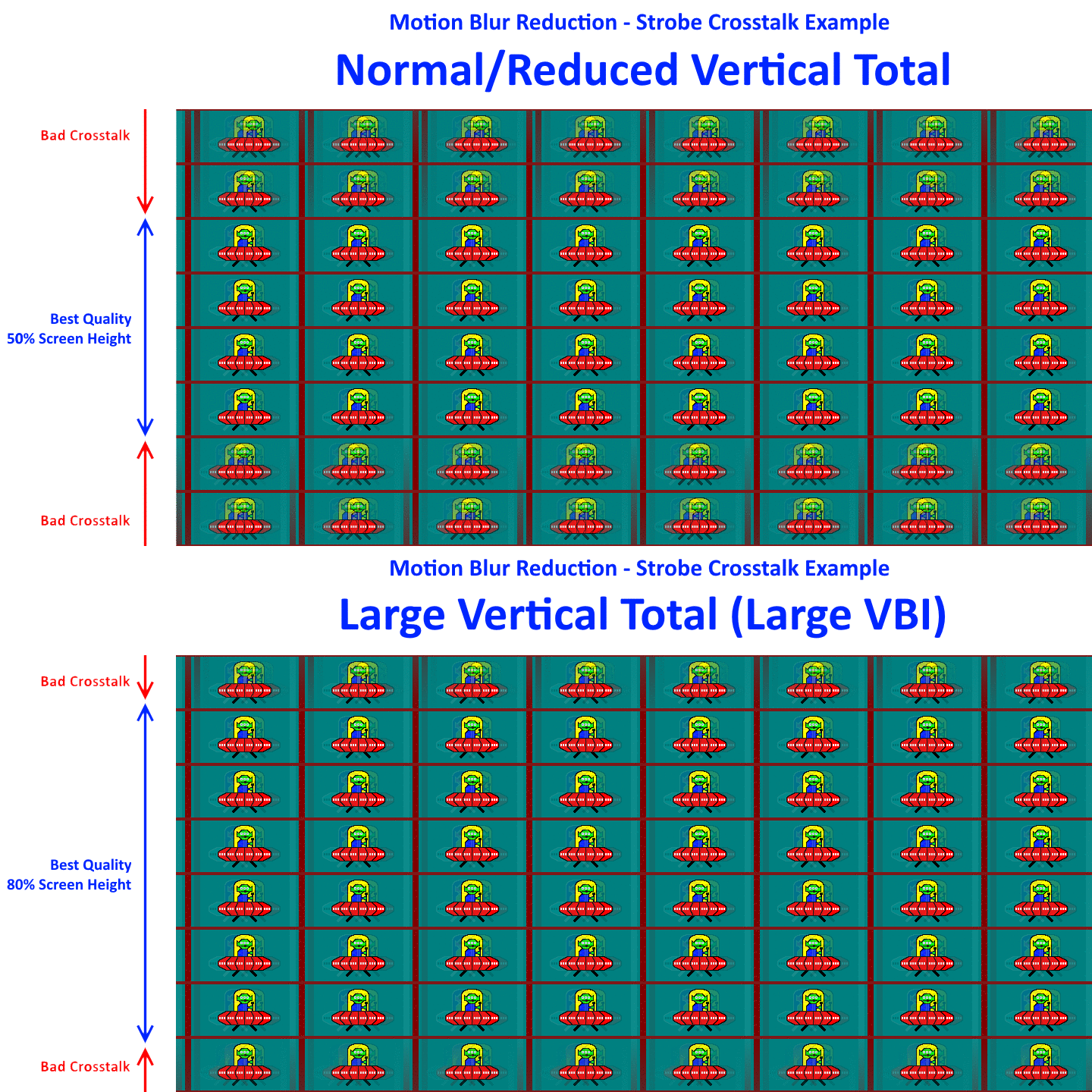
The same effect will often occur when you progressively decrease your refresh rate; the crosstalk-free zone will thicken. But the crosstalk-free zone will thicken even more with a large blanking interval (either via user-created Large Vertical Total, or via monitor internal behaviour).
What you can try to do is simply test progressively lower refresh rate. Does DyAc crosstalk improve massively as you lower Hz? Now add a Large Vertical Total (try using the Appendix A trick at http://www.blurbusters.com/crosstalk ....). Does near-crosstalk-free zone improve? If yes, then it worked. If not, then the monitor is possibly already doing the job and you only simply possibly reduced frame delivery lag (by maybe about 0.5ms-2ms) depending on the delta between original VT and large VT.
See Animations Of Strobe Tuning.
Some monitors already does the equivalent of internal Large Vertical Totals (via internal scan-rate conversion). I have reason to believe the XL2735 may be doing this whenever DyAc is turned on.
There are two ways to reduce strobe crosstalk via accelerated for the same Hz:
1. User-side GPU-side Large Vertical Totals; or (makes it hard to fiddle).
2. Internal monitor logic via scan rate conversion. (makes toggling blur reduction easier, but can add more strobe lag)
When a monitor is already doing (2), doing optimizations for (1) have far less effect or has no effect.
Non-DyAc blur reduction (XL2720Z) hugely benefits from #1
While NVIDIA ULMB doesn't benefit visually because it's already doing #2 -- strobing comes fully pre-tuned at factory.
<Ultra technical explanation>
The XL2546 does it via internal monitor logic since it panel scans-out mainly at full velocity, so the only purpose of Large Vertical Totals is to reduce frame delivery latency (since Large Vertical Totals can double as a Quick Frame Transport (QFT) mechanism -- deliver individual refresh cycles faster over the video cable -- which can compensate for monitors that does internal scan-rate conversion for lower-Hz signal input via fixed high-scanrate panel refreshing logic). It's simply an art of "cramming the GtG elephane into the VBI" -- trying to hide LCD pixel transitions in the vertical blanking interval between refresh cycles. This only recently became possible only about ten years ago, when pixel response times became a tiny fraction of a refresh cycle. That made the modern CRT-motion-clarity strobe backlight possible. But unfortunately GtG pixel response is not 100% perfect or 100% complete, so that's why strobe crosstalk still exists. Sometimes it's below human-detectable levels, and that's the art of strobe tuning, and why Blur Busters Strobe Utility exists to help users to try to reduce crosstalk even further, with creative user tuning. However, the DyAc brand of blur reduction often comes more pre-tuned at factory and makes Strobe Utility a little less necessary than it was for early models like XL2720Z...
</Ultra technical explanation>
The same effect will often occur when you progressively decrease your refresh rate; the crosstalk-free zone will thicken. But the crosstalk-free zone will thicken even more with a large blanking interval (either via user-created Large Vertical Total, or via monitor internal behaviour).
What you can try to do is simply test progressively lower refresh rate. Does DyAc crosstalk improve massively as you lower Hz? Now add a Large Vertical Total (try using the Appendix A trick at http://www.blurbusters.com/crosstalk ....). Does near-crosstalk-free zone improve? If yes, then it worked. If not, then the monitor is possibly already doing the job and you only simply possibly reduced frame delivery lag (by maybe about 0.5ms-2ms) depending on the delta between original VT and large VT.
See Animations Of Strobe Tuning.
Head of Blur Busters - BlurBusters.com | TestUFO.com | Follow @BlurBusters on: BlueSky | Twitter | Facebook

Forum Rules wrote: 1. Rule #1: Be Nice. This is published forum rule #1. Even To Newbies & People You Disagree With!
2. Please report rule violations If you see a post that violates forum rules, then report the post.
3. ALWAYS respect indie testers here. See how indies are bootstrapping Blur Busters research!
-
Falkentyne
- Posts: 2805
- Joined: 26 Mar 2014, 07:23
Re: BenQ/Zowie XL2735 specific vertical total ?
Vega said XL2735 is limited to about VT 1825 at 120 mhz. He (IIRC) managed to get VT 1846 to work by reducing the horizontal total but I think there were issues.Chief Blur Buster wrote:The XL2735 uses a totally different scaler chip that is much more intolerant of vertical totals as far as I know.
Some monitors already does the equivalent of internal Large Vertical Totals (via internal scan-rate conversion). I have reason to believe the XL2735 may be doing this whenever DyAc is turned on.
There are two ways to reduce strobe crosstalk via accelerated for the same Hz:
1. User-side GPU-side Large Vertical Totals; or (makes it hard to fiddle).
2. Internal monitor logic via scan rate conversion. (makes toggling blur reduction easier, but can add more strobe lag)
When a monitor is already doing (2), doing optimizations for (1) have far less effect or has no effect.
Non-DyAc blur reduction (XL2720Z) hugely benefits from #1
While NVIDIA ULMB doesn't benefit visually because it's already doing #2 -- strobing comes fully pre-tuned at factory.
<Ultra technical explanation>
The XL2546 does it via internal monitor logic since it panel scans-out mainly at full velocity, so the only purpose of Large Vertical Totals is to reduce frame delivery latency (since Large Vertical Totals can double as a Quick Frame Transport (QFT) mechanism -- deliver individual refresh cycles faster over the video cable -- which can compensate for monitors that does internal scan-rate conversion for lower-Hz signal input via fixed high-scanrate panel refreshing logic). It's simply an art of "cramming the GtG elephane into the VBI" -- trying to hide LCD pixel transitions in the vertical blanking interval between refresh cycles. This only recently became possible only about ten years ago, when pixel response times became a tiny fraction of a refresh cycle. That made the modern CRT-motion-clarity strobe backlight possible. But unfortunately GtG pixel response is not 100% perfect or 100% complete, so that's why strobe crosstalk still exists. Sometimes it's below human-detectable levels, and that's the art of strobe tuning, and why Blur Busters Strobe Utility exists to help users to try to reduce crosstalk even further, with creative user tuning. However, the DyAc brand of blur reduction often comes more pre-tuned at factory and makes Strobe Utility a little less necessary than it was for early models like XL2720Z...
</Ultra technical explanation>
The same effect will often occur when you progressively decrease your refresh rate; the crosstalk-free zone will thicken. But the crosstalk-free zone will thicken even more with a large blanking interval (either via user-created Large Vertical Total, or via monitor internal behaviour).
What you can try to do is simply test progressively lower refresh rate. Does DyAc crosstalk improve massively as you lower Hz? Now add a Large Vertical Total (try using the Appendix A trick at http://www.blurbusters.com/crosstalk ....). Does near-crosstalk-free zone improve? If yes, then it worked. If not, then the monitor is possibly already doing the job and you only simply possibly reduced frame delivery lag (by maybe about 0.5ms-2ms) depending on the delta between original VT and large VT.
See Animations Of Strobe Tuning.
At 144hz, you can barely go higher than the default vertical total for 144hz, don't remember that value but it's not very high.
-
ne0x
- Posts: 10
- Joined: 28 Mar 2019, 18:12
Re: BenQ/Zowie XL2735 specific vertical total ?
i've been experimenting on my 2735 with custom resolutions.
not even sure i'm doing it correctly, but i have almost no crosstalk with these settings, just a little bit at the very bottom of the screen:
Res: 2560x1440
ActiveH : 2560
ActiveV: 1440
Front Porch: 48 - 3
Sync: 32 - 5
Total pixels H: 2641
Total pixels V: 2192
refresh rate 100
Again, im not even 100% sure what im doing, just adjusted the vt and refreshrate until the crosstalk went off screen at the bottom.
not even sure i'm doing it correctly, but i have almost no crosstalk with these settings, just a little bit at the very bottom of the screen:
Res: 2560x1440
ActiveH : 2560
ActiveV: 1440
Front Porch: 48 - 3
Sync: 32 - 5
Total pixels H: 2641
Total pixels V: 2192
refresh rate 100
Again, im not even 100% sure what im doing, just adjusted the vt and refreshrate until the crosstalk went off screen at the bottom.
-
BLooDS_inc
- Posts: 59
- Joined: 12 Apr 2026, 15:02
Re: BenQ/Zowie XL2735 specific vertical total ?
Posted a reply for kyube in a pulsar theme with some tests of ufo with diff speed and resolutions on my xl2735
In all samples i have persistence 20 out of 25 in strobe utility
In all samples i have persistence 20 out of 25 in strobe utility
- Attachments
-
- 100 2880.jpg (1.68 MiB) Viewed 4559 times
-
- 100 1920.jpg (2.61 MiB) Viewed 4559 times
-
- 100 1440.jpg (1.85 MiB) Viewed 4559 times
-
BLooDS_inc
- Posts: 59
- Joined: 12 Apr 2026, 15:02
Re: BenQ/Zowie XL2735 specific vertical total ?
120 hz samples
- Attachments
-
- 120 2880.jpg (1.64 MiB) Viewed 4559 times
-
- 120 1920.jpg (2.07 MiB) Viewed 4559 times
-
- 120 1440.jpg (1.45 MiB) Viewed 4559 times
-
BLooDS_inc
- Posts: 59
- Joined: 12 Apr 2026, 15:02
Re: BenQ/Zowie XL2735 specific vertical total ?
144 hz samples
- Attachments
-
- 144 2880.jpg (1.5 MiB) Viewed 4559 times
-
- 144 1920.jpg (1.63 MiB) Viewed 4559 times
-
- 144 1440.jpg (1.78 MiB) Viewed 4559 times
-
kyube

- Posts: 1020
- Joined: 29 Jan 2018, 12:03
Re: BenQ/Zowie XL2735 specific vertical total ?
Wonderful data, thank you for providing these great high speed testUFO pursuit photographs!BLooDS_inc wrote: ↑13 Apr 2026, 16:10Posted a reply for kyube in a pulsar theme with some tests of ufo with diff speed and resolutions on my xl2735
The XL2735 backlight strobing implementation definitely seems good in terms of the MPRT / strobe 'on' period it targets.
The UFOs @ 100Hz & 120Hz look amazing. One of the better implementations at this refresh rate in the 1440p display sphere.
I'm curious, do you perhaps have a way to evaluate the brightness when you set the Persistence to 20/25?
Like this, for example:
I have another request, though tracking the UFO might be a challenge
https://testufo.com/ghosting#pps=3840
This, but at 100 & 120 (I don't expect 144Hz to look good, it's typical of max refresh rate strobing)
evaluating xhci controller performance | audio latency discussion thread | "Why is LatencyMon not desirable to objectively measure DPC/ISR driver performance" | AM4 / AM5 system tuning considerations | latency-oriented HW considerations | “xhci hand-off” setting considerations | #1 tip for electricity-related topics | ESPORTS: Latency Perception, Temporal Ventriloquism & Horizon of Simultaneity | good lcd backlight strobing implementation list | display vs gpu scaling