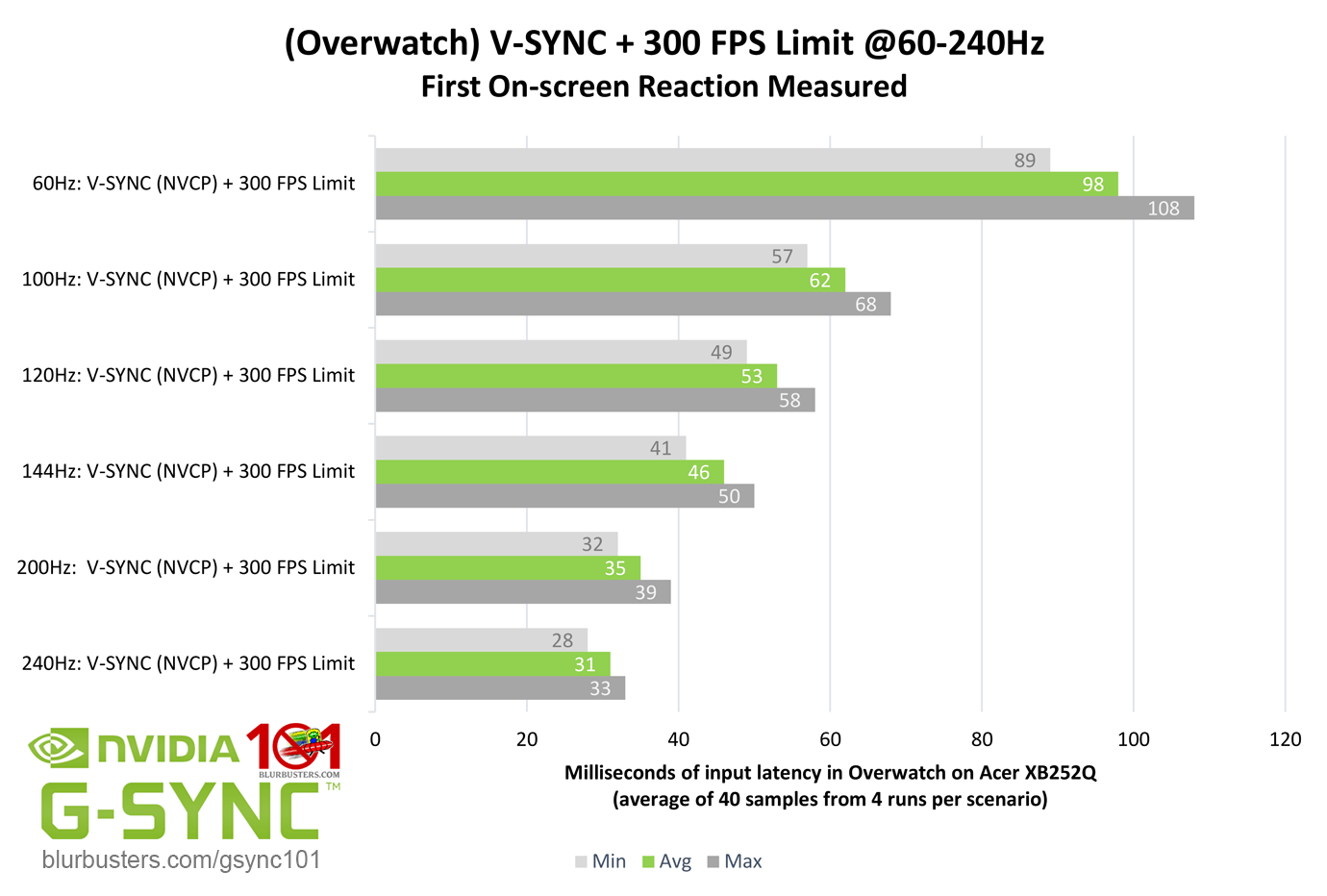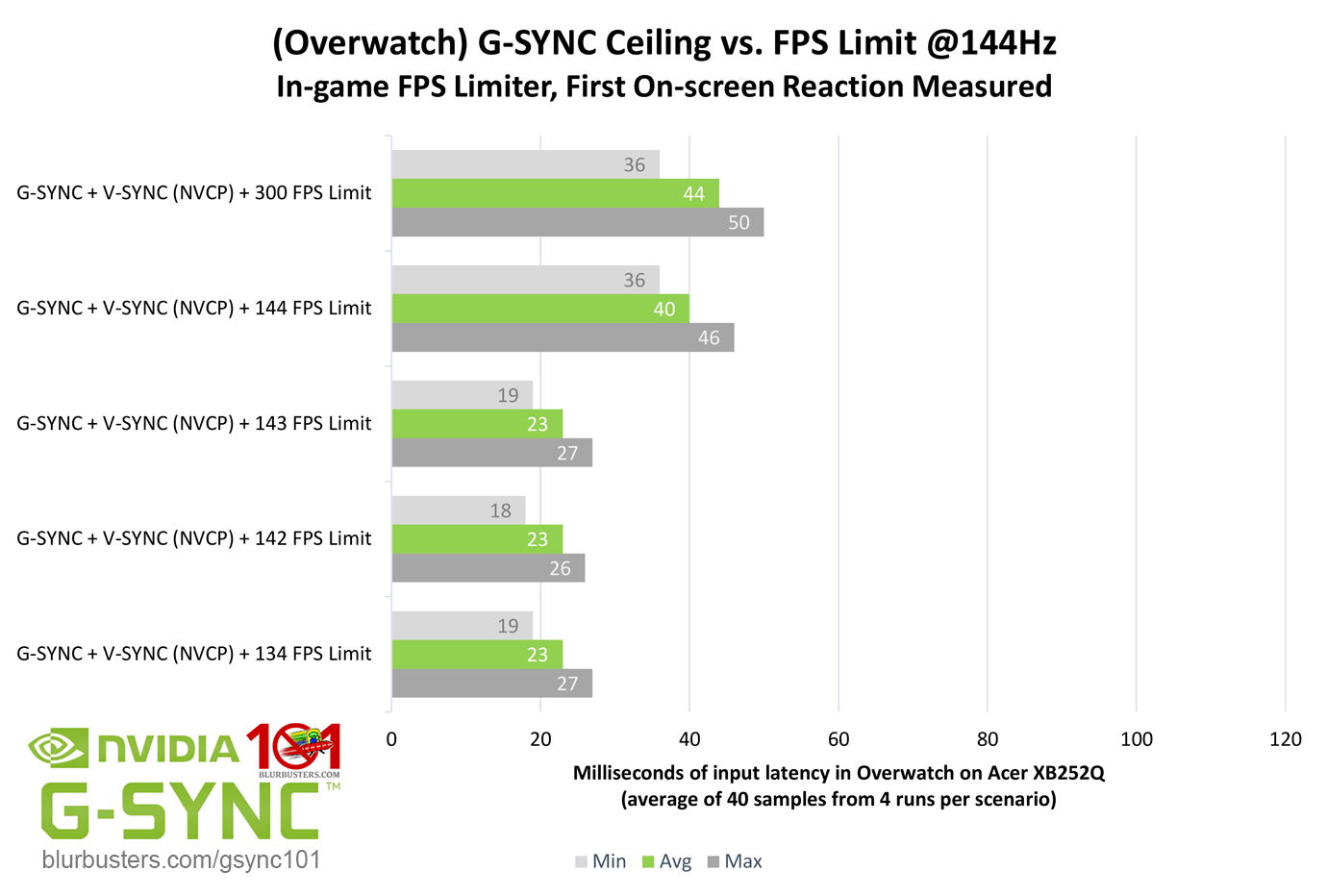

Some time ago, after using a standard 60 Hz IPS 27" 1440p display for years (BenQ GW2765HT), I've upgraded to Acer Predator XB271HU monitor - 27" 1440p IPS panel featuring 165 Hz refresh rate and native G-SYNC support.
Of course, it turned out to be a massive upgrade, I was astonished by fluidity, responsiveness and overall feel of such refresh rate from the very first move of my mouse cursor on the desktop
 I immediately felt it was true what people say, that you can see and feel the difference even on the desktop. My impressions in competitive FPS (I am a former CS 1.6/CS:GO player, currently The Global Elite rank) were just as good, I just happened to set three new personal bests during three first matches I played on the new screen (best score opening and 2x best KD on Deathmatch). Perhaps it was just a coincidence, but since the upgrade, my KD ratio improved overall. It just feels so much better. Switching back to 60 Hz feels like handicapping myself, so choppy and laggy
  Pretty sure it was holding me back a decent amount, although I still managed higher ranks in CS:GO.
Let's get to the point, sorry for long introduction!
My problem is how G-SYNC works, and actually also how V-SYNC works on this new display. I need a clarification from someone with far greater knowledge and experience, I've been searching for answers for a few days, finally decided to register on this forum and write this post.
First of all, most of explanations of V-SYNC I found online state that V-SYNC is supposed to cut FPS down and lock it on a lower threshold when your GPU can't match FPS with the display's refresh rate, so if I have 165 Hz refresh rate and FPS goes lower than that, frames should get locked on 80~, then 60, then 30 FPS... Except with triple buffering enabled, I guess? Though that rarely worked this way for me on the old monitor (on the new monitor it doesn't seem to work like that at all), usually the game would allow FPS to drop below 60 without going down to 30, terrible lag and stuttering would appear then, however. I remember some games actually going down to 30 FPS cap if 60 FPS could not be maintained, but that was a rarity. Why is it like this? Shouldn't that work in a constant manner? Also, going below refresh rate with V-SYNC ON should cause stuttering, shouldn't it? Because it doesn't on my new display... Thing is, on my old 60 Hz display, anything below 60 FPS feels horrible, even 59 frames per second are unplayable to me, with V-SYNC ON frame drops cause stutters and lag, V-SYNC OFF obviously causes tearing and also stuttering with variable frame rate... so why is it perfectly fine when I have frames below 165 on the new 165 Hz display, even when frame rate varies and fluctuates with only standard V-SYNC enabled and G-SYNC OFF?

I know that 60 Hz display has a delay of 16.66 ms to produce each frame, while on 165 Hz display that delay is only 6.06 ms. I figure it matters to the feel of the game and less lag in game controls?
I'm asking all this because on my Acer Predator I truly CANNOT see nor feel ANY difference between G-SYNC+V-SYNC OFF/G-SYNC+V-SYNC ON/V-SYNC+G-SYNC OFF WHATSOEVER. What's more, G-SYNC in one case felt worse than V-SYNC, I'll get back to that. V-SYNC seems to work great, no different to G-SYNC, and it does not cut down to lower FPS values below display refresh rate, I experience no stuttering nor tearing with only V-SYNC enabled, even when FPS vary and fluctuate quite a lot. And I have no idea why. Could that be because of G-SYNC module itself, even when I disable the G-SYNC function?
I've done pretty much testing in a few games:
- "Shadow of the Tomb Raider" showed completely no difference between G-SYNC ON with V-SYNC OFF, G-SYNC+V-SYNC ON and V-SYNC ON with G-SYNC OFF. No difference whatsoever. The game runs on about 45-70~ frames at highest settings in 2560x1440 resolution, I chose a place with lower frames for testing, running about 48-50 FPS, no matter what option I chose, they all looked and felt the same. Less frames in this game also feel incredibly better than on my old 60 Hz display. I did not notice any difference between Nvidia Control Panel and in-game V-SYNC.
- "A Plague Tale: Innocence" showed a different result. On highest settings and 1440p resolution sometimes I'd deep a little below 60 frames. With G-SYNC ON and V-SYNC OFF, the game would stutter... G-SYNC+V-SYNC ON resulted in no stuttering, and... disabling G-SYNC and leaving V-SYNC enabled changed nothing. So, the game worked the same on V-SYNC only, no stuttering, no tearing, deeps below 60 frames basically unnoticeable.
- "DOOM Eternal" showed the very same results as "Shadow of the Tomb Raider". No difference whatsoever. G-SYNC/G-SYNC+V-SYNC/V-SYNC/V-SYNC+TRIPLE BUFFER, all the same, no matter how much frames would fluctuate. Of course it would give me a choppy feel when frames dived too low, but overall, game works good usually between 70-120~ FPS with no problem at all, no stuttering, no tearing, on normal V-SYNC with G-SYNC OFF. What's interesting to me is a fact that the in-game V-SYNC works much better then V-SYNC through Nvidia Control Panel. The latter one would induce significant input lag, clearly noticeable in game, while in-game V-SYNC feels responsive, as much as G-SYNC.
- "CONTROL" was pretty much the same, the only difference was that V-SYNC, for whatever reason, would eat a few frames, so I had lower frame rate with V-SYNC ON and a bit higher frame rate with G-SYNC ON, and that's it. No stuttering, no tearing, G-SYNC pretty much redundant again. Also, this game is horribly bad optimised anyway.
- "Dishonored 2" seems like a broken engine game, and it has a history of terrible optimisation. No matter what I tried, the game would stutter, typically while frames changed a decent amount from higher to lower. Capping frame rate to a constant value, that would not fluctuate, was the only way to stop it. No tearing though, no difference between G-SYNC/G-SYNC+V-SYNC/V-SYNC (disabling in-game V-SYNC and enabling Nvidia Control Panel V-SYNC resulted in no change).
- "Counter-Strike: Global Offensive" does not need G-SYNC and should have it disabled at all times with uncapped FPS, so this technology is completely redundant for e-sports in my honest opinion, as the lowest delays are achieved with no syncs and no frame caps with the highest possible FPS. CS:GO operates on such high frame rates that tearing is unnoticeable anyway (easily 250-400+ FPS on my system).
To sum up:
1) please explain that to me, how is this possible that V-SYNC works so good, that games work well with only normal V-SYNC enabled, even without triple buffering, despite variable, fluctuating frame rates, with no stuttering nor tearing, while G-SYNC appears so useless to me, not making any noticeable difference? Does G-SYNC module work/make a difference somehow, even when G-SYNC function is disabled in Nvidia Control Panel?
2) why V-SYNC once actually cap frames on the lower threshold when constant frame rate cannot be maintained (like from 60 FPS to 30 FPS, actually happened extremely rarely to me), and another time it doesn't, and it allows lower frame rate at the cost of stuttering and lagging (most of the time in my experience) in case of my old display, but it doesn't seem to be the case on the new one, even with G-SYNC disabled?
3) is there a difference in how V-SYNC works between standard and high refresh rate monitors?
4) is there a difference in how standard and high refresh rate monitors handle variable frame rates (excluding sync technologies) ?
5) is less time between frames being produced directly responsible for better feel of game controls (16.66 ms for 60 Hz versus 6.06 ms for 165 Hz) ?
5) could you explain why in "DOOM Eternal" V-SYNC enabled through Nvidia Control Panel (with G-SYNC OFF) induced significant input lag and actual frame cut down cap, while in-game V-SYNC works flawlessly, basically the same as G-SYNC, without such issues?
I stumbled upon many opinions in the Internet, some people seemed to agree with me, saying that for them G-SYNC was completely redundant and they noticed no difference between G-SYNC and V-SYNC, like me. Needless to say how much I am disappointed, especially for the premium price that native G-Sync monitors are sold for. Why would I pay extra if I observe no difference between G-SYNC and V-SYNC? I'm actually going to get some other display, I especially bought this one for native G-SYNC support (as it appeared as the perfect all-rounder for both my competitive and AAA titles' needs), as I have a GTX 980Ti GPU, so I can't use Free-Sync nor G-SYNC Compatible.
I know it's a long read, I will greatly appreciate your help