
Hello, its me again.
I have used this monitor for like half a year now.
The picture has always looked crisp and clear, but I started to notice heavy ghosting and now I can't unsee it.
The picture gets very pixelated /distorted when bright and dark colors meet on the image, and it's pretty heavy and could look like ghosting.
Tried reinstall drivers ddu reset monitor update monitor drivers etc but nothing helps.
If there's too much bright and dark colors that meets each other it gets smeared out and kinds look like a streaming video that gets pixelated.
It only occurs heavily on the colors.
In csgo it happens a lot on de dust map.
View: https://youtu.be/i-2lqk4eYbY
Dark colors stutter down the corridor and gets smeared out or getting static noise around areas like this.
Orig clip for comparison
View: https://youtu.be/KNJGmIcn8UY
Csgo is bar far one of the heavy victims of this. I don't get this at all in Diablo 3. However, I can get a minor feeling of screen tearing of some sort, though it feels minor.
With warframe it seems to be noticeable only on the spaceship and a tiny bit on a specific area.
It is also very minor noticeable in smite, but not as annoying.
I also notice it in doom, like how it's kinda hanging image of the structure in the middle
View: https://youtu.be/JNL1zwEj230
I don't seem to have this issue at all in new world.
I don't know if I have a faulty display, or it is some setting I need to change.
I'm running g sync on v sync in nvcp and tried any OD setting. Graphic drivers up to date etc. I don't really know what else I could change or if the display simply is faulty. Weird thing is it only happens in some games.
I noticed is I lower the details a little in CSGO the graphic error isnt that bad, but if I watch my previous video it still has the problem, making me think its the monitor, and not my GPU.
I talked to Dell, and they said it doesnt sound like a monitor problem, but a hardware problem, which I agree on. But I tried the computer on my GFs computer and the same problem persists there.
darker colors not "refreshing" fast enough on dell s2721dgf?
-
Chief Blur Buster

- Site Admin
- Posts: 12133
- Joined: 05 Dec 2013, 15:44
- Location: Toronto / Hamilton, Ontario, Canada
- Contact:
Re: darker colors not "refreshing" fast enough on dell s2721dgf?
Is your room colder?
This is a NanoIPS panel if I recall right (not VA panel), which will only start to really degrade ghosting when cold. VA LCDs are even worse for dark-color ghosting. LCDs are temperature sensitive and ghost more in colder rooms. Try warming up for 1 hour before using the screen.
If it has noticeably degraded versus a few months ago as temperatures get colder in your region, try retesting at hotter temperatures (raise thermostat) + disable screensaver + keep monitor hot and ready. It’s temporary, not permanent.
If it persists at hotter temperatures and definitely worse than before, then you may have a panel degradation issue, but this needs to be re-tested at hotter ambient temperatures.
Just like how a forgotten watch/phone in a cold car in winter, even a 2 degree temperature differnce can increase the amount of LCD ghosting, creating a seasonal ghosting effect if you let your room become cold during this time of the year in the northern hemisphere.
The pixel response lags more at colder temperatures due to the liquid crystals sandwiched between two panes of glass in the Liquid Crystal Display (LCD) panel. They are actual molecules that rotate (like a valve for light) to block/unblock light, to generate the colors of a display. And the molecules move slower at colder temperatures.
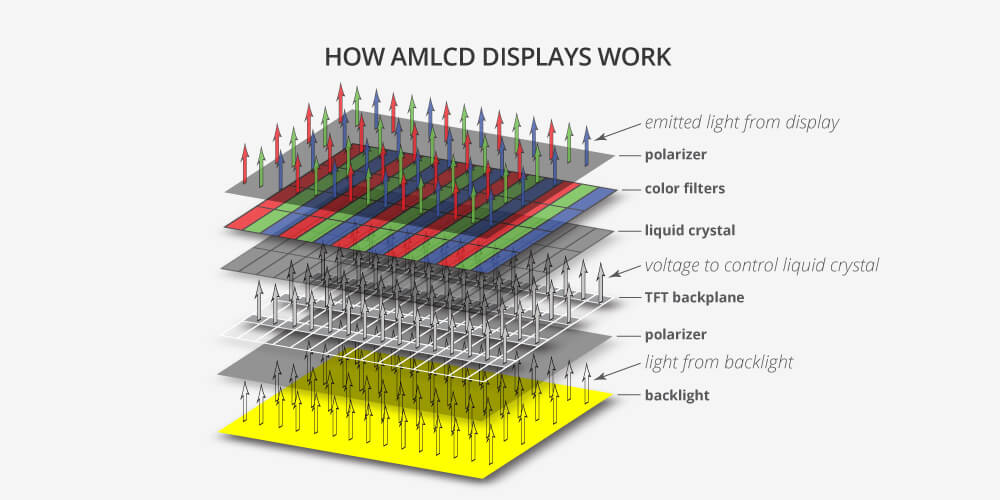
However, sometimes contaminants enter into the liquid in the glass sandwich, or that degraded voltage reaches the pixels, in various rare panel warranty defects. But, usually, the culprit is just a cold computer room when you see ghosting becomes worse than before.
LCDs, plainly put, are just damn temperature sensitive, so you need a warmer room for minimum input lag + faster pixels. Try to run it at the warmest temperatures you used to run the panel at, and see if it behaves more “normally”. (Much more minor ghosting)
Remember to temper your expectations, especially if you see the ghosting on other monitors. The ghosting has always been there, and even a slight worsening just makes it more suddenly obvious, and sometimes hard to unsee even when the ghosting reverts back to its normal ghosting level.
But, pony up the heating bill, or simply disable the screen saver! (Run 24/7 at high brightness to keep panel warm). Or simply pre-warm the panel an hour before any critical gameplay (maximum brightness + black screen such as Dark Mode or a Command Prompt screen = more heating injected onto pixels faster).
Don’t just jump onto a cold room in fall/winter and immediately bootup & play, if you hate amplified ghosting issues.
This is a NanoIPS panel if I recall right (not VA panel), which will only start to really degrade ghosting when cold. VA LCDs are even worse for dark-color ghosting. LCDs are temperature sensitive and ghost more in colder rooms. Try warming up for 1 hour before using the screen.
If it has noticeably degraded versus a few months ago as temperatures get colder in your region, try retesting at hotter temperatures (raise thermostat) + disable screensaver + keep monitor hot and ready. It’s temporary, not permanent.
If it persists at hotter temperatures and definitely worse than before, then you may have a panel degradation issue, but this needs to be re-tested at hotter ambient temperatures.
Just like how a forgotten watch/phone in a cold car in winter, even a 2 degree temperature differnce can increase the amount of LCD ghosting, creating a seasonal ghosting effect if you let your room become cold during this time of the year in the northern hemisphere.
The pixel response lags more at colder temperatures due to the liquid crystals sandwiched between two panes of glass in the Liquid Crystal Display (LCD) panel. They are actual molecules that rotate (like a valve for light) to block/unblock light, to generate the colors of a display. And the molecules move slower at colder temperatures.
However, sometimes contaminants enter into the liquid in the glass sandwich, or that degraded voltage reaches the pixels, in various rare panel warranty defects. But, usually, the culprit is just a cold computer room when you see ghosting becomes worse than before.
LCDs, plainly put, are just damn temperature sensitive, so you need a warmer room for minimum input lag + faster pixels. Try to run it at the warmest temperatures you used to run the panel at, and see if it behaves more “normally”. (Much more minor ghosting)
Remember to temper your expectations, especially if you see the ghosting on other monitors. The ghosting has always been there, and even a slight worsening just makes it more suddenly obvious, and sometimes hard to unsee even when the ghosting reverts back to its normal ghosting level.
But, pony up the heating bill, or simply disable the screen saver! (Run 24/7 at high brightness to keep panel warm). Or simply pre-warm the panel an hour before any critical gameplay (maximum brightness + black screen such as Dark Mode or a Command Prompt screen = more heating injected onto pixels faster).
Don’t just jump onto a cold room in fall/winter and immediately bootup & play, if you hate amplified ghosting issues.
Head of Blur Busters - BlurBusters.com | TestUFO.com | Follow @BlurBusters on: BlueSky | Twitter | Facebook

Forum Rules wrote: 1. Rule #1: Be Nice. This is published forum rule #1. Even To Newbies & People You Disagree With!
2. Please report rule violations If you see a post that violates forum rules, then report the post.
3. ALWAYS respect indie testers here. See how indies are bootstrapping Blur Busters research!