
Adaptive Gsync (Coming soon)
Adaptive Gsync is an evolution of nvidia's Adaptive vsync. When keeping a consistent framerate for more than ten frames at a strobe compatible framerate Adaptive Gsync will switch to ULMB mode which will then create higher motion clarity, and when the framerate fluctuates, Adaptive Gsync will instantaneously enable gsync, this will allow the very best of both worlds, for motion clarity and fluctuating framerates.
How the software works:
In a future driver release, we will be implementing Adaptive Gsync as a selectable option in nvidia control panel next to adaptive vsync, vsync, gsync, and no vsync. When enabled, the framerate will be polled, and when it's within 20fps of a ULMB compatible strobe/refresh cycle, the framerate will be capped to the nearest 20fps of a strobe compatible refresh/framerate. Allowing for ULMB to be active for much of the time, while still retaining the benefits of gsync's screen tearing elimination and input rate improvements. When the framerate dips for any reason traditional gsync will activate until the next compatible and stable ULMB framerate is found. If the framerate significantly drops below all supported ULMB refresh/framerate combinations, gsync will then fully take over until the higher compatible framerate is reached again.
Adaptive Gsync
-
whitespider
- Posts: 38
- Joined: 22 Dec 2013, 07:11
Re: Adaptive Gsync
Yes I clearly made this up, but I think it should happen!
-
GameLifter

- Posts: 104
- Joined: 25 May 2014, 13:47
Re: Adaptive Gsync
Got to admit, that sounds awesome! I have yet to experience either Gsync or ULMB in person but having both still sounds awesome!
-
RealNC

- Site Admin
- Posts: 4635
- Joined: 24 Dec 2013, 18:32
- Contact:
Re: Adaptive Gsync
This would negate the input lag gains from G-Sync. You would then get inconsistent input lag (no lag in G-Sync, lag in ULMB.) That would be extremely annoying and IMO make games virtually unplayable.
Steam • GitHub • Stack Overflow
The views and opinions expressed in my posts are my own and do not necessarily reflect the official policy or position of Blur Busters.
The views and opinions expressed in my posts are my own and do not necessarily reflect the official policy or position of Blur Busters.
-
Q83Ia7ta
- Posts: 761
- Joined: 18 Dec 2013, 09:29
Re: Adaptive Gsync
They will add lag while G-SYNC and problem sovledRealNC wrote:This would negate the input lag gains from G-Sync. You would then get inconsistent input lag (no lag in G-Sync, lag in ULMB.) That would be extremely annoying and IMO make games virtually unplayable.

What about changing brightness?
-
Edmond
Re: Adaptive Gsync
Ulmb comes with flicker (even if you claim to not see it, it tires your eyes anyway).
So the monitor is switching between flicker and no flicker all the time
+ its switching from 8.3ms pixel persistence to 1ms back and forth ... ALL the time. (or 16,6ms to 1ms back and forth if ur on 60hz monitor)
IMO this seems like a horrible idea. I rather have some blur, but everything is consistent (and consistently enabled gsync).
IMFO
The REAL way to get low blur with gsync is to make higher hz flicker free monitos with gsync.
Yes, to get crt levels of blur, u would need 1000hz or 500hz monitors and the bandwidth and framerate required for that is just too unrealistic.
BUT, real 240hz has already been achieved with overclocking and the difference that makes in persistence is sick compared to 120hz.
500hz persistence is hard to distinguish from 240hz one, especially if ur ingame.
However 240hz gives very low blur and comes pretty damn close to crt blur, and variable framerate around that is quite realistic even for 1 year old games with todays hardware.
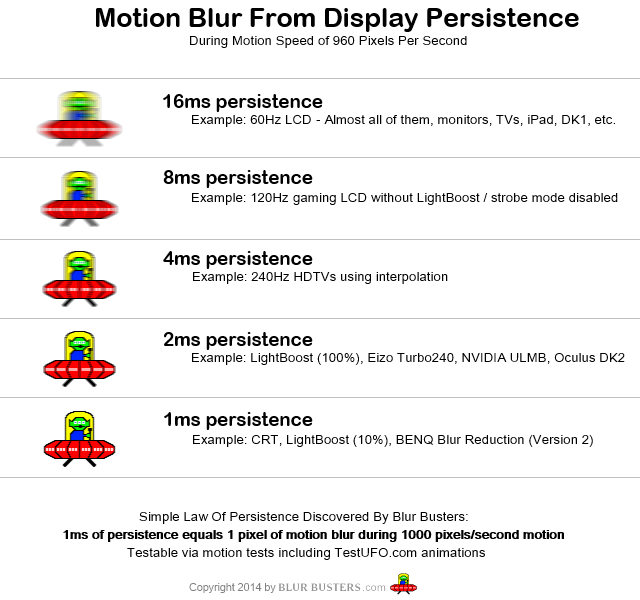
Which one of these do you think is the perfect middleground? If u use variable refresh rates and ur fps = ur hz.
We might start seeing legit 240hz monitors in 3 years or something (so i hear on these forums at least). Thats when you will get low blur with variable framerate.
***Or if OLED takes off for monitors, they would have no probs making a 1000hz oled with gsync; but a new displayport cable would be needed for that (an optical one instead of copper, lol). Also, expect to be gaming 2 years behind with the best hardware and playing games on medium if ur lucky. (if nothing changes in the industry that is)
So the monitor is switching between flicker and no flicker all the time
+ its switching from 8.3ms pixel persistence to 1ms back and forth ... ALL the time. (or 16,6ms to 1ms back and forth if ur on 60hz monitor)
IMO this seems like a horrible idea. I rather have some blur, but everything is consistent (and consistently enabled gsync).
IMFO
The REAL way to get low blur with gsync is to make higher hz flicker free monitos with gsync.
Yes, to get crt levels of blur, u would need 1000hz or 500hz monitors and the bandwidth and framerate required for that is just too unrealistic.
BUT, real 240hz has already been achieved with overclocking and the difference that makes in persistence is sick compared to 120hz.
500hz persistence is hard to distinguish from 240hz one, especially if ur ingame.
However 240hz gives very low blur and comes pretty damn close to crt blur, and variable framerate around that is quite realistic even for 1 year old games with todays hardware.
Which one of these do you think is the perfect middleground? If u use variable refresh rates and ur fps = ur hz.
We might start seeing legit 240hz monitors in 3 years or something (so i hear on these forums at least). Thats when you will get low blur with variable framerate.
***Or if OLED takes off for monitors, they would have no probs making a 1000hz oled with gsync; but a new displayport cable would be needed for that (an optical one instead of copper, lol). Also, expect to be gaming 2 years behind with the best hardware and playing games on medium if ur lucky. (if nothing changes in the industry that is)
-
flood
- Posts: 929
- Joined: 21 Dec 2013, 01:25
Re: Adaptive Gsync
input lag due to ulmb is nowhere close to enough to making games "virtually unplayable".RealNC wrote:This would negate the input lag gains from G-Sync. You would then get inconsistent input lag (no lag in G-Sync, lag in ULMB.) That would be extremely annoying and IMO make games virtually unplayable.
the main issue with the idea in the OP is that switching to ulmb isn't a smooth transition. The gamma gets shifted and the brightness obviously drops. Now having those things change with the fps would make a game unplayable.
-
RealNC
- Site Admin
- Posts: 4635
- Joined: 24 Dec 2013, 18:32
- Contact:
Re: Adaptive Gsync
I meant the change between input lag and no input lag. The variance. One time the controls feel different than another time.flood wrote:input lag due to ulmb is nowhere close to enough to making games "virtually unplayable".RealNC wrote:This would negate the input lag gains from G-Sync. You would then get inconsistent input lag (no lag in G-Sync, lag in ULMB.) That would be extremely annoying and IMO make games virtually unplayable.
Steam • GitHub • Stack Overflow
The views and opinions expressed in my posts are my own and do not necessarily reflect the official policy or position of Blur Busters.
The views and opinions expressed in my posts are my own and do not necessarily reflect the official policy or position of Blur Busters.
-
Edmond
Re: Adaptive Gsync
Either that or the other way would be to have a variable 200hz monitor with gsync working from 1-200 and ulmb+gsync working from 101-200.
Meaning in 1sec, every frame above 100 would come with a pre-strobe, then displayed.
Below 100hz flicker would suck too much ass.
Something like this would be doable only on oled. Cant have the "fast" 1-8ms response times of TN (if u look at all colors, not just GTG).
Need 0.02ms response times for all color shifts of oled.
And if ur game varies around 100fps... ur gona have a bad time.
Either way, triple digit framerates will be needed in the future if you want a low blur gaming xp.
Meaning in 1sec, every frame above 100 would come with a pre-strobe, then displayed.
Below 100hz flicker would suck too much ass.
Something like this would be doable only on oled. Cant have the "fast" 1-8ms response times of TN (if u look at all colors, not just GTG).
Need 0.02ms response times for all color shifts of oled.
And if ur game varies around 100fps... ur gona have a bad time.
Either way, triple digit framerates will be needed in the future if you want a low blur gaming xp.
-
Q83Ia7ta
- Posts: 761
- Joined: 18 Dec 2013, 09:29
Re: Adaptive Gsync
First of all we can't compare or judge that 240Hz mod coz not only refresh rate matters at motion blur. Also overdrive matters a lot. Also input lag can be key factor for some people. If people will make and use this mods we will see new real 240Hz model in near future coz it's big $$$ for Asus and BenQ. The main component of this 240Hz mod is catleap 2b pcb that makes overclock korean 1440p monitors up to 120Hz. And the main problem is lack of people with skills who can create that PCBs and sell for people or share how to modify and install that pcb. I guess XL2411T or XL2411Z is good due low price and fast panel (it's faster than used with 240Hz mod).Edmond wrote:BUT, real 240hz has already been achieved with overclocking and the difference that makes in persistence is sick compared to 120hz.
...
We might start seeing legit 240hz monitors in 3 years or something (so i hear on these forums at least). Thats when you will get low blur with variable framerate.
Looks like OP is just trolling. Just some text without any source.