ViewSonic XG2431 Discussion Thread [Blur Busters Approved XG2431 - 24" 240Hz IPS with Best Strobing]

Everything about displays and monitors. 120Hz, 144Hz, 240Hz, 4K, 1440p, input lag, display shopping, monitor purchase decisions, compare, versus, debate, and more. Questions? Just ask!
Post Reply
User avatar
Chief Blur Buster
Site Admin
Posts: 12266
Joined: 05 Dec 2013, 15:44
Location: Toronto / Hamilton, Ontario, Canada
Contact:

Re: ViewSonic XG2431 Discussion Thread [Blur Busters Approved XG2431 - 24" 240Hz IPS with Best Strobing]

Post by Chief Blur Buster » 12 Dec 2021, 15:16

StarWarsCoffee wrote:
12 Dec 2021, 14:37
Ahh because I was duplicating the displays on both monitors I could only adjust the BenQ and not the XG2431... what a silly mistake... I'll run them extended and adjust and see if I find a setting with the XG2431 that works best. Although PureXP+ Normal, 80 contrast, and black stabilizer 60 looked pretty good.
Good catch.

Yes, mirroring displays can have issues with not working with NVCP picture adjustments. Be warned, the monitor that the adjustments “works” on, is usually the lower “mirroring lag”. Mirroring adds a tiny lag penalty on all monitors.

When mirroring just for purely motion comparison, try to use the same exact Pixel Clock (and decimal digits after refresh rate), if you are comparing artifacts. Otherwise, you may have stutter/lag from different-Hz behavior.

Make the monitor you want the lowest lag on, the primary monitor. And if you use multimonitor, preferably play in full screen exclusive to lock to the refresh rate of the monitor, as Windows is a single-Hz compositor and will lag the secondaries a bit. That isn’t an XG2431 issue, but a Windows quirk when it comes to different-Hz (even 0.001 different) multimonitor.

Head of Blur Busters - BlurBusters.com | TestUFO.com | Follow @BlurBusters on: BlueSky | Twitter | Facebook

Image
Forum Rules wrote:  1. Rule #1: Be Nice. This is published forum rule #1. Even To Newbies & People You Disagree With!
  2. Please report rule violations If you see a post that violates forum rules, then report the post.
  3. ALWAYS respect indie testers here. See how indies are bootstrapping Blur Busters research!

youmirinbrah
Posts: 13
Joined: 24 Nov 2021, 08:15

Re: ViewSonic XG2431 Discussion Thread [Blur Busters Approved XG2431 - 24" 240Hz IPS with Best Strobing]

Post by youmirinbrah » 12 Dec 2021, 15:19

whenever i try to make a custom profile and the third step is adjusting the strobe pulse phase, tbh i can't really tell the difference between the ufos when i change it, is it recommended to just leave it at 50 because I don't know what's a good number to leave it at. Also, for the default purexp modes so light, normal, extreme and ultra. Am I correct in saying that the response time is the same on each mode?

User avatar
Chief Blur Buster
Site Admin
Posts: 12266
Joined: 05 Dec 2013, 15:44
Location: Toronto / Hamilton, Ontario, Canada
Contact:

Re: ViewSonic XG2431 Discussion Thread [Blur Busters Approved XG2431 - 24" 240Hz IPS with Best Strobing]

Post by Chief Blur Buster » 12 Dec 2021, 15:24

youmirinbrah wrote:
12 Dec 2021, 15:19
whenever i try to make a custom profile and the third step is adjusting the strobe pulse phase, tbh i can't really tell the difference between the ufos when i change it, is it recommended to just leave it at 50 because I don't know what's a good number to leave it at. Also, for the default purexp modes so light, normal, extreme and ultra. Am I correct in saying that the response time is the same on each mode?
The strobe tuned response time is linked to refresh rate, so PureXP predefined modes will load the correct factory tuned response time based on the Hz of PureXP. However phase depends on pulse width too.

If hard to see, turn off Strobe Utility’s animation and instead use www.testufo.com/crosstalk at a faster speed (1920 pixels/second) and paying attention only to UFOs that scroll past the middle of the screen.
Head of Blur Busters - BlurBusters.com | TestUFO.com | Follow @BlurBusters on: BlueSky | Twitter | Facebook

Image
Forum Rules wrote:  1. Rule #1: Be Nice. This is published forum rule #1. Even To Newbies & People You Disagree With!
  2. Please report rule violations If you see a post that violates forum rules, then report the post.
  3. ALWAYS respect indie testers here. See how indies are bootstrapping Blur Busters research!

StarWarsCoffee
Posts: 68
Joined: 26 Nov 2021, 08:35

Re: ViewSonic XG2431 Discussion Thread [Blur Busters Approved XG2431 - 24" 240Hz IPS with Best Strobing]

Post by StarWarsCoffee » 12 Dec 2021, 16:01

After adjusting the gamma to 1.2-1.25 in NVCP this monitor really came to life (for me) and resolved the overly dark color problem. It’s becoming a more difficult sell to keep the XL2546K over this XG2431…

AM_acc1q
Posts: 48
Joined: 15 Apr 2021, 01:13

Re: ViewSonic XG2431 Discussion Thread [Blur Busters Approved XG2431 - 24" 240Hz IPS with Best Strobing]

Post by AM_acc1q » 12 Dec 2021, 16:03

Regarding the gamma adjustment discussion: I really hope ViewSonic can add this to the firmware - as a mostly console player, all these extra tools and NVIDA tweaks (excluding Strobe Utility) won't help us.

-------------------------

OK, I am having a really weird issue with this monitor. I've tuned a 120hz custom profile for Xbox Series X. Works decently in all my games.
But now, when I play Warzone I am seeing something that I don't really know how to describe.
Maybe extreme motion blur? It's almost like a combination of the artifacts you get from VSYNC off, (only vertical instead of horizontal in this case) combined with double vision (like two frames are being rendered together and one is offset by a few pixels + slightly transparent). Hopefully I don't sound crazy; maybe that's just what motion blur is :mrgreen:

Anyways...the weird thing is that I assumed it was just my Custom PureXP profile. Then I tried Extreme, Normal, and Light - all had the same issue. It was only until I turned PureXP off that it looked normal.

What is the problem?

StarWarsCoffee
Posts: 68
Joined: 26 Nov 2021, 08:35

Re: ViewSonic XG2431 Discussion Thread [Blur Busters Approved XG2431 - 24" 240Hz IPS with Best Strobing]

Post by StarWarsCoffee » 12 Dec 2021, 16:05

Chief Blur Buster wrote:
12 Dec 2021, 15:24
youmirinbrah wrote:
12 Dec 2021, 15:19
whenever i try to make a custom profile and the third step is adjusting the strobe pulse phase, tbh i can't really tell the difference between the ufos when i change it, is it recommended to just leave it at 50 because I don't know what's a good number to leave it at. Also, for the default purexp modes so light, normal, extreme and ultra. Am I correct in saying that the response time is the same on each mode?
The strobe tuned response time is linked to refresh rate, so PureXP predefined modes will load the correct factory tuned response time based on the Hz of PureXP. However phase depends on pulse width too.

If hard to see, turn off Strobe Utility’s animation and instead use www.testufo.com/crosstalk at a faster speed (1920 pixels/second) and paying attention only to UFOs that scroll past the middle of the screen.
Where can I find the values for each preset profile? I change between the but the numbers do not change in my utility tool, so making a custom profile between two presets feels like a shot in the dark. I mainly want to create a middle ground between Normal and Extreme.

Dumaguy1
Posts: 19
Joined: 12 Dec 2021, 04:25

Re: ViewSonic XG2431 Discussion Thread [Blur Busters Approved XG2431 - 24" 240Hz IPS with Best Strobing]

Post by Dumaguy1 » 12 Dec 2021, 17:05

Chief Blur Buster wrote:
12 Dec 2021, 12:27
Dumaguy1 wrote:
12 Dec 2021, 05:13
After noticing this I switched the Viewsonic to 240 hz and played a few games. To my surprise 240 hz felt way worse, not as clear and it felt like there was increased input lag. This is the opposite of going to 240 on every other monitor I've used.
PureXP ON/OFF?

At 240Hz non-strobed, you may wish to try maximum overdrive or near-maximum overdrive.
On the XG2431 specifically, you need to use a stronger overdrive setting, the higher refresh rate you go.
I was doing all of those test with Purexp off. What's odd is it seems that Overwatch video settings override the nvidia settings. I had the in game settings set to 1080p 240 hz. The nvidia refresh rate set to 60 hz. and that looked and performed better than both set to 240hz with the frame rate locked at 238.

User avatar
Chief Blur Buster
Site Admin
Posts: 12266
Joined: 05 Dec 2013, 15:44
Location: Toronto / Hamilton, Ontario, Canada
Contact:

Re: ViewSonic XG2431 Discussion Thread [Blur Busters Approved XG2431 - 24" 240Hz IPS with Best Strobing]

Post by Chief Blur Buster » 12 Dec 2021, 17:47

AM_acc1q wrote:
12 Dec 2021, 16:03
Maybe extreme motion blur? It's almost like a combination of the artifacts you get from VSYNC off, (only vertical instead of horizontal in this case) combined with double vision (like two frames are being rendered together and one is offset by a few pixels + slightly transparent). Hopefully I don't sound crazy; maybe that's just what motion blur is
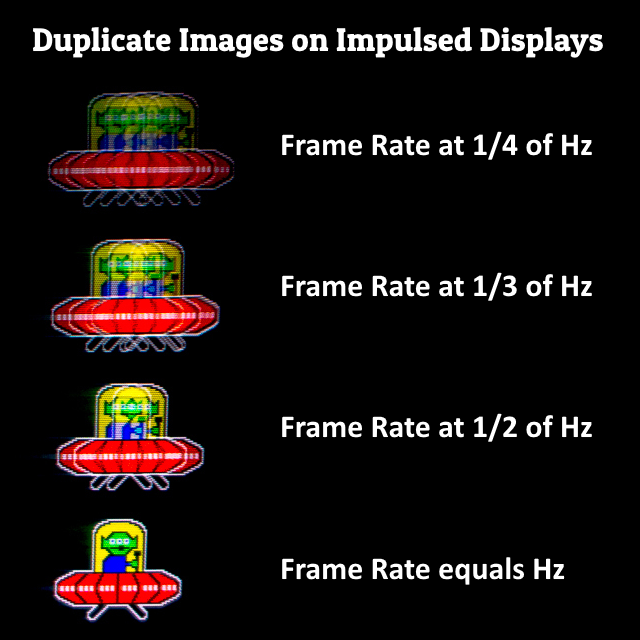
If you hate duplicate images, use framerate=Hz with ANY strobe mode on ANY monitor.
(PureXP, ELMB, DyAc, ULMB, etc)


You need framerate=Hz with strobing to avoid framerate-related duplicate images.

Raise your framerate (adjust the game/GPU) or lower your refresh rate (adjust the refresh rate) until framerate=Hz, and then most duplicate images will disappear (with the only remaining one being strobe crosstalk related).

It's the same problem as CRT 30fps at 60Hz.

If you grew up with a CRT tube or a plasma display, you will remember the duplicate image problem of 30fps on a 60Hz display.

Image

TL;DR: If you hate duplicate images, make sure you use 60Hz PureXP for 60fps games, and make sure you use 120Hz PureXP for 120fps games. If you cannot reliably do framerate=Hz, and you dislike duplicate images, then you may wish to use VRR/GSYNC/FreeSync instead of motion blur reduction.
Head of Blur Busters - BlurBusters.com | TestUFO.com | Follow @BlurBusters on: BlueSky | Twitter | Facebook

Image
Forum Rules wrote:  1. Rule #1: Be Nice. This is published forum rule #1. Even To Newbies & People You Disagree With!
  2. Please report rule violations If you see a post that violates forum rules, then report the post.
  3. ALWAYS respect indie testers here. See how indies are bootstrapping Blur Busters research!

User avatar
Chief Blur Buster
Site Admin
Posts: 12266
Joined: 05 Dec 2013, 15:44
Location: Toronto / Hamilton, Ontario, Canada
Contact:

Re: ViewSonic XG2431 Discussion Thread [Blur Busters Approved XG2431 - 24" 240Hz IPS with Best Strobing]

Post by Chief Blur Buster » 12 Dec 2021, 17:55

StarWarsCoffee wrote:
12 Dec 2021, 16:05
Where can I find the values for each preset profile? I change between the but the numbers do not change in my utility tool, so making a custom profile between two presets feels like a shot in the dark. I mainly want to create a middle ground between Normal and Extreme.
The preset profiles are ViewSonic proprietary, for reasons as mentioned in an earlier post in this thread.

But you definitely have the freedom create in-between settings. It just takes practice.

I can tell you that:
Light = pulse width 40
Normal = pulse width 30
Extreme = pulse width 20
Ultra = pulse width 10

1. Thus, you need pulse width 25 for an in-between setting between "Normal" and "Extreme"
2. Once you do that, you can adjust overdrive and strobe phase until the middle of the screen is clearest.
3. Remember to track your eyes on the moving UFOs while you're adjusting. It takes some practice.
4. Sometimes it's easier to use the keyboard (click on the slider then use left/right arrows) so you don't have to move your eyes to the Strobe Utility (keep eyes on UFOs while adjusting)
Head of Blur Busters - BlurBusters.com | TestUFO.com | Follow @BlurBusters on: BlueSky | Twitter | Facebook

Image
Forum Rules wrote:  1. Rule #1: Be Nice. This is published forum rule #1. Even To Newbies & People You Disagree With!
  2. Please report rule violations If you see a post that violates forum rules, then report the post.
  3. ALWAYS respect indie testers here. See how indies are bootstrapping Blur Busters research!

StarWarsCoffee
Posts: 68
Joined: 26 Nov 2021, 08:35

Re: ViewSonic XG2431 Discussion Thread [Blur Busters Approved XG2431 - 24" 240Hz IPS with Best Strobing]

Post by StarWarsCoffee » 12 Dec 2021, 20:10

Chief Blur Buster wrote:
12 Dec 2021, 17:55
StarWarsCoffee wrote:
12 Dec 2021, 16:05
Where can I find the values for each preset profile? I change between the but the numbers do not change in my utility tool, so making a custom profile between two presets feels like a shot in the dark. I mainly want to create a middle ground between Normal and Extreme.
The preset profiles are ViewSonic proprietary, for reasons as mentioned in an earlier post in this thread.

But you definitely have the freedom create in-between settings. It just takes practice.

I can tell you that:
Light = pulse width 40
Normal = pulse width 30
Extreme = pulse width 20
Ultra = pulse width 10

1. Thus, you need pulse width 25 for an in-between setting between "Normal" and "Extreme"
2. Once you do that, you can adjust overdrive and strobe phase until the middle of the screen is clearest.
3. Remember to track your eyes on the moving UFOs while you're adjusting. It takes some practice.
4. Sometimes it's easier to use the keyboard (click on the slider then use left/right arrows) so you don't have to move your eyes to the Strobe Utility (keep eyes on UFOs while adjusting)
FYI does the tool need to be updated? It says "Strobe Pulse" twice. Is one of these supposed to be the Pulse Width?
Attachments
Capture.PNG
Capture.PNG (99.57 KiB) Viewed 7989 times

Post Reply