
I am a high level (gbmaster king of wellspring) diabotical player (essentially a quote clone)
I replaced my 240hz ROG with this monitor recently and i'm very impressed, everything feels more real time / precise and smooth.
diabotical is the only game i've tested it on - running at 400+fps consitently.
VRB set to extreme with 390hz is the best combo
Acer 390Hz monitor - XV252QF
-
Softhe
- Posts: 14
- Joined: 05 Feb 2021, 04:15
Re: Acer 390Hz monitor - XV252QF
Here are some CSGO settings i think are great
Overdrive Extreme
VRB Extreme
Both of these are fine at normal also
color settings;
r gain; 55
g gain; 50
b gain; 50
r bias; 51
g bias; 49
b bias; 49
r saturate; 100
g saturate; 80
b saturate; 80
y saturate; 55
m saturate; 50
c saturate; 80
Overdrive Extreme
VRB Extreme
Both of these are fine at normal also
color settings;
r gain; 55
g gain; 50
b gain; 50
r bias; 51
g bias; 49
b bias; 49
r saturate; 100
g saturate; 80
b saturate; 80
y saturate; 55
m saturate; 50
c saturate; 80
-
axaro1

- Posts: 628
- Joined: 23 Apr 2020, 12:00
- Location: Italy
Re: Acer 390Hz monitor - XV252QF
Color space? I assume DCI due to wide gamut, is it correct?Softhe wrote: ↑25 Mar 2022, 15:01Here are some CSGO settings i think are great
Overdrive Extreme
VRB Extreme
Both of these are fine at normal also
color settings;
r gain; 55
g gain; 50
b gain; 50
r bias; 51
g bias; 49
b bias; 49
r saturate; 100
g saturate; 80
b saturate; 80
y saturate; 55
m saturate; 50
c saturate; 80
XL2566K* | XV252QF* | LG C1* | HP OMEN X 25 | XL2546K | VG259QM | XG2402 | LS24F350[RIP]
*= currently owned
MONITOR: XL2566K custom VT: https://i.imgur.com/ylYkuLf.png
CPU: 5800x3d 102mhz BCLK
GPU: 3080FE undervolted
RAM: https://i.imgur.com/iwmraZB.png
MOUSE: Endgame Gear OP1 8k
KEYBOARD: Wooting 60he
*= currently owned
MONITOR: XL2566K custom VT: https://i.imgur.com/ylYkuLf.png

CPU: 5800x3d 102mhz BCLK
GPU: 3080FE undervolted
RAM: https://i.imgur.com/iwmraZB.png

MOUSE: Endgame Gear OP1 8k
KEYBOARD: Wooting 60he
-
DAG
- Posts: 1
- Joined: 25 Mar 2022, 16:19
Re: Acer 390Hz monitor - XV252QF
I currently have de Zowie 2411P 144hz monitor, and I only play competitive CSGO (10 faceit), with no intentions of going beyond that.
My GPU is old (GTX 970), but I have a good CPU and can maintain a 300-700 FPS, depending on what's going on ingame. DM drops to a steady 300-400FPS, for example.
By the way, I have no knowledge about monitors and found out about this one on youtube (Optimum Tech) and got interested.
Considering I only play CSGO and basically do nothing else on my PC, what do you guys recommend? Go for the Acer 390Hz monitor, the Zowie 2546K, or wait for a 360 Zowie?
My GPU is old (GTX 970), but I have a good CPU and can maintain a 300-700 FPS, depending on what's going on ingame. DM drops to a steady 300-400FPS, for example.
By the way, I have no knowledge about monitors and found out about this one on youtube (Optimum Tech) and got interested.
Considering I only play CSGO and basically do nothing else on my PC, what do you guys recommend? Go for the Acer 390Hz monitor, the Zowie 2546K, or wait for a 360 Zowie?
-
Softhe
- Posts: 14
- Joined: 05 Feb 2021, 04:15
Re: Acer 390Hz monitor - XV252QF
color temp "user", what do you mean by dci?axaro1 wrote: ↑25 Mar 2022, 15:55Color space? I assume DCI due to wide gamut, is it correct?Softhe wrote: ↑25 Mar 2022, 15:01Here are some CSGO settings i think are great
Overdrive Extreme
VRB Extreme
Both of these are fine at normal also
color settings;
r gain; 55
g gain; 50
b gain; 50
r bias; 51
g bias; 49
b bias; 49
r saturate; 100
g saturate; 80
b saturate; 80
y saturate; 55
m saturate; 50
c saturate; 80
-
Chief Blur Buster

- Site Admin
- Posts: 12296
- Joined: 05 Dec 2013, 15:44
- Location: Toronto / Hamilton, Ontario, Canada
- Contact:
Re: Acer 390Hz monitor - XV252QF
DCI-P3 is a wider color gamut than common sRGB we're used to in gaming monitors.
Some monitor color settings have a "DCI" or "DCI-P3" setting in addition to existing sRGB profiles.
It has usually been the case that only premium monitors (like ASUS/EIZO professional art monitors, either ultra-premium LCD backlights, or OLED monitors) tend to focus on reaching beyond DCI-P3, and none AFAIK are able to reach Rec.2020.
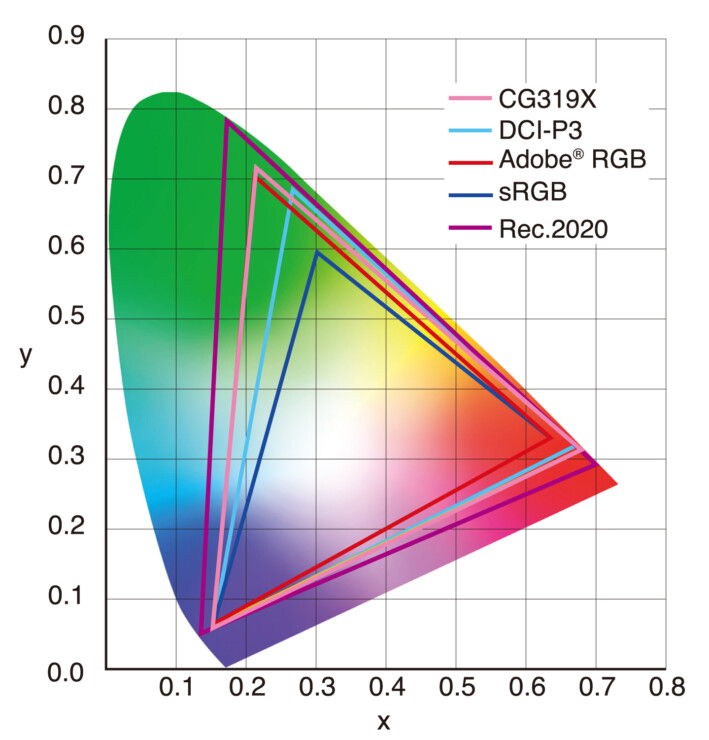
Credit: https://eizo.es/producto/cg319x/
Head of Blur Busters - BlurBusters.com | TestUFO.com | Follow @BlurBusters on: BlueSky | Twitter | Facebook

Forum Rules wrote: 1. Rule #1: Be Nice. This is published forum rule #1. Even To Newbies & People You Disagree With!
2. Please report rule violations If you see a post that violates forum rules, then report the post.
3. ALWAYS respect indie testers here. See how indies are bootstrapping Blur Busters research!
-
Softhe
- Posts: 14
- Joined: 05 Feb 2021, 04:15
Re: Acer 390Hz monitor - XV252QF
I see, btw has any one gotten display scaling working on non native res? I get black bars when using no scaling...Chief Blur Buster wrote: ↑25 Mar 2022, 18:00DCI-P3 is a wider color gamut than common sRGB we're used to in gaming monitors.
Some monitor color settings have a "DCI" or "DCI-P3" setting in addition to existing sRGB profiles.
It has usually been the case that only premium monitors (like ASUS/EIZO professional art monitors, either ultra-premium LCD backlights, or OLED monitors) tend to focus on reaching beyond DCI-P3, and none AFAIK are able to reach Rec.2020.
Credit: https://eizo.es/producto/cg319x/
-
Softhe
- Posts: 14
- Joined: 05 Feb 2021, 04:15
Re: Acer 390Hz monitor - XV252QF
Figured out how to force display scaling here's how my cru looks for anyone want to do it https://i.imgur.com/SoUwyoc.png

-
lyrill

- Posts: 387
- Joined: 06 Oct 2020, 10:37
-
axaro1
- Posts: 628
- Joined: 23 Apr 2020, 12:00
- Location: Italy
Re: Acer 390Hz monitor - XV252QF
I'm sticking to Nvidia Control Panel because I'm failing to change timings even when deleting every resolution (Standard, Established, Detailed), deleting every single hardware block, sticking to DisplayID 1.3 and 2.0 and putting them on top to force priority, I hope that ToastyX will fix this issue in the near future.Softhe wrote: ↑28 Mar 2022, 11:52Figured out how to force display scaling here's how my cru looks for anyone want to do it https://i.imgur.com/SoUwyoc.png
I'm currently using a custom 1920x1080p resolution with 1200VT and 2000HT, I'm wondering if I could get different results with CRU...
XL2566K* | XV252QF* | LG C1* | HP OMEN X 25 | XL2546K | VG259QM | XG2402 | LS24F350[RIP]
*= currently owned
MONITOR: XL2566K custom VT: https://i.imgur.com/ylYkuLf.png
CPU: 5800x3d 102mhz BCLK
GPU: 3080FE undervolted
RAM: https://i.imgur.com/iwmraZB.png
MOUSE: Endgame Gear OP1 8k
KEYBOARD: Wooting 60he
*= currently owned
MONITOR: XL2566K custom VT: https://i.imgur.com/ylYkuLf.png
CPU: 5800x3d 102mhz BCLK
GPU: 3080FE undervolted
RAM: https://i.imgur.com/iwmraZB.png
MOUSE: Endgame Gear OP1 8k
KEYBOARD: Wooting 60he