
Have a question about Freesync Premium on my BenQ XL2540k with an Nvidia card. I am using Vsync (off in game) in the NVCP and either reflex in game or ULLM when not available in the NVCP.
I've seen a lot of research including the amazing guide on this site showing insanely low lag penalty when Gsync is enabled (1-2ms on a 240hz monitor) but does this include Freesync Premium or is there a larger lag impact for Freesync Premium over Gsync? I'm under the assumption they all operate within 1-2ms of each other.
If I have FPS drops in League of Legends or Apex when a fight starts (225 FPS using Ultra low latency for LoL or Reflex On + Boost for Apex auto capping to 225) where I start the fight at 225 FPS but it drops to 100 when action gets heavy, am I suffering a large spike in lag because my refresh is effectively dropping to 100hz, therefore I should be playing with no sync because I cannot sustain a decent average framerate?
I ask because when I enable Freesync Premium something certainly feels way off even after trying to get used to it for months. I tried to do a blind test to make sure it's not just placebo by getting my girlfriend to toggle settings when I'm out of the room but obviously I can tell when Freesync is enabled because of how smooth it gets.
I'd like for someone to confirm I'm just crazy and that there is no perceivable lag on a 240hz monitor with Freesync Premium enabled even with 100FPS because I really like the smoothness but while it's easier on my eyes I play measurably worse unfortunately.
I don't completely understand all the science behind it all so maybe my assumptions here are incorrect. Is 240hz at 100FPS with no sync less laggy than 240hz 100fps with Freesync Premium (Gsync enabled on GPU)?
By playing with 100FPS with Gsync enabled on a 240hz monitor, have I effectively removed the input lag benefits by having a 240hz monitor (giving myself even more lag than a 144hz monitor) because Gsync is giving me 100hz in firefights?
I tried to read the guide on here with lag results, however I cannot find a comparison made between:
1) 240hz Monitor + Gsync + Vsync on FPS limit - 100
2) 240hz Monitor + No sync FPS limit - 100
Freesync Premium Questions

Re: Freesync Premium Questions
Yes, base VRR functionality in this respect is the same across G-SYNC, G-SYNC Compatible (what you're using), FreeSync, adaptive sync, etc.Cryogenetic wrote: ↑19 Jan 2023, 13:58I've seen a lot of research including the amazing guide on this site showing insanely low lag penalty when Gsync is enabled (1-2ms on a 240hz monitor) but does this include Freesync Premium or is there a larger lag impact for Freesync Premium over Gsync?
But to be clear, it does not have a 1-2ms penalty compared to no-sync. No-sync reduces latency further than otherwise possible by tearing, which can allow multiple updates within a single scanout cycle, whereas G-SYNC + V-SYNC allows a single update per scanout.
With framerates below the refresh rate, there is typically only one tearline, which means there can be up to two parts of two frames within a single scanout; one above the tearline (from the previous/current frame), and one below it (from the incoming/next frame). With G-SYNC + V-SYNC, there is a single complete frame per scanout, which is what prevents tearing.
In other words, as already explained in my article, G-SYNC + V-SYNC has the lowest possible tear-free latency; any lower requires tearing at the given physical refresh rate.
The only difference between G-SYNC + V-SYNC and no-sync with framerates within the refresh rate is tearing. Tearing artifacts are your visibly latency reduction, nothing more. But at 100 FPS 240Hz, were talking a difference of well less than 1ms between the two on average.Cryogenetic wrote: ↑19 Jan 2023, 13:58If I have FPS drops in League of Legends or Apex when a fight starts (225 FPS using Ultra low latency for LoL or Reflex On + Boost for Apex auto capping to 225) where I start the fight at 225 FPS but it drops to 100 when action gets heavy, am I suffering a large spike in lag because my refresh is effectively dropping to 100hz, therefore I should be playing with no sync because I cannot sustain a decent average framerate?
Because it prevents tearing, which can begin to feel like microstutter at higher refresh and framerates.Cryogenetic wrote: ↑19 Jan 2023, 13:58I ask because when I enable Freesync Premium something certainly feels way off even after trying to get used to it for months. I tried to do a blind test to make sure it's not just placebo by getting my girlfriend to toggle settings when I'm out of the room but obviously I can tell when Freesync is enabled because of how smooth it gets.
No. 100 FPS G-SYNC + V-SYNC at 240Hz is lower latency than 100 FPS 144Hz no-sync. No-sync will only have slightly lower latency at 100 FPS 240Hz because it tears.Cryogenetic wrote: ↑19 Jan 2023, 13:58By playing with 100FPS with Gsync enabled on a 240hz monitor, have I effectively removed the input lag benefits by having a 240hz monitor (giving myself even more lag than a 144hz monitor) because Gsync is giving me 100hz in firefights?
Again, well less than 1ms difference on average (virtually the same avg/max values at 240Hz in my testing):Cryogenetic wrote: ↑19 Jan 2023, 13:58I tried to read the guide on here with lag results, however I cannot find a comparison made between:
1) 240hz Monitor + Gsync + Vsync on FPS limit - 100
2) 240hz Monitor + No sync FPS limit - 100
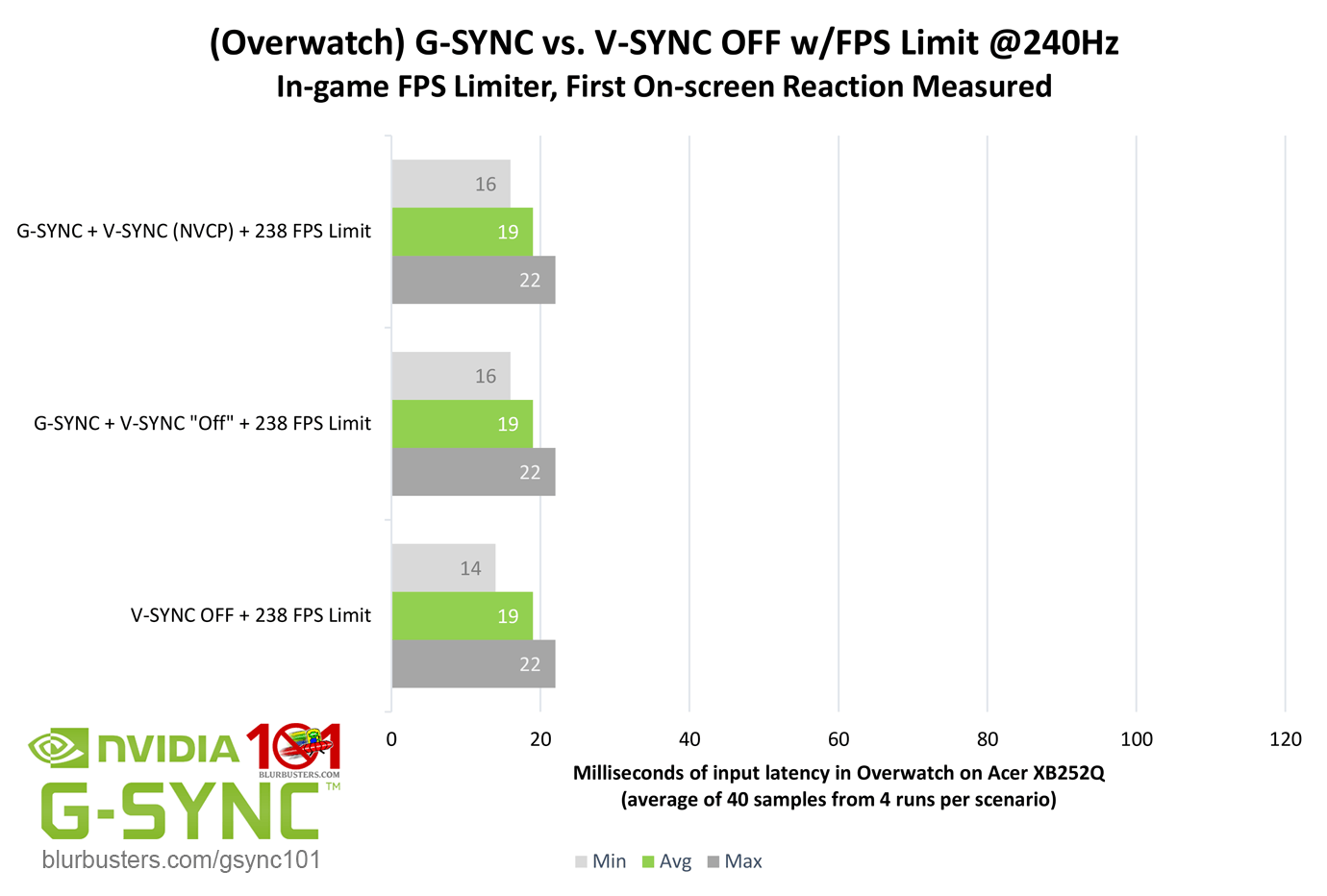
Any latency difference is due to tearing. Tearing is a form of latency reduction, but it can result in the appearance of uneven frame delivery and even micro-stutter at certain refresh/framerate ratios.
No-sync is best with uncapped framerates in excess of 3-5x above the refresh rate to increase the amount of tearlines in a single scanout cycle; the more there are, the more frame updates will be squeezed into a single refresh.
(jorimt: /jor-uhm-tee/)
Author: Blur Busters "G-SYNC 101" Series
Displays: ASUS PG27AQN, LG 48C4 Scaler: RetroTINK 4k Consoles: Dreamcast, PS2, PS3, PS5, Switch 2, Wii, Xbox, Analogue Pocket + Dock VR: Beyond, Quest 3, Reverb G2, Index OS: Windows 11 Pro Case: Fractal Design Torrent PSU: Seasonic PRIME TX-1000 MB: ASUS Z790 Hero CPU: Intel i9-13900k w/Noctua NH-U12A GPU: GIGABYTE RTX 4090 GAMING OC RAM: 32GB G.SKILL Trident Z5 DDR5 6400MHz CL32 SSDs: 2TB WD_BLACK SN850 (OS), 4TB WD_BLACK SN850X (Games) Keyboards: Wooting 60HE, Logitech G915 TKL Mice: Razer Viper Mini SE, Razer Viper 8kHz Sound: Creative Sound Blaster Katana V2 (speakers/amp/DAC), AFUL Performer 8 (IEMs)
Author: Blur Busters "G-SYNC 101" Series
Displays: ASUS PG27AQN, LG 48C4 Scaler: RetroTINK 4k Consoles: Dreamcast, PS2, PS3, PS5, Switch 2, Wii, Xbox, Analogue Pocket + Dock VR: Beyond, Quest 3, Reverb G2, Index OS: Windows 11 Pro Case: Fractal Design Torrent PSU: Seasonic PRIME TX-1000 MB: ASUS Z790 Hero CPU: Intel i9-13900k w/Noctua NH-U12A GPU: GIGABYTE RTX 4090 GAMING OC RAM: 32GB G.SKILL Trident Z5 DDR5 6400MHz CL32 SSDs: 2TB WD_BLACK SN850 (OS), 4TB WD_BLACK SN850X (Games) Keyboards: Wooting 60HE, Logitech G915 TKL Mice: Razer Viper Mini SE, Razer Viper 8kHz Sound: Creative Sound Blaster Katana V2 (speakers/amp/DAC), AFUL Performer 8 (IEMs)
-
Cryogenetic
- Posts: 18
- Joined: 30 Oct 2021, 19:49
Re: Freesync Premium Questions
Thank you for the reply, I love your guide and all the work you've put into it and you're definitely the best person to ask for this.jorimt wrote: ↑19 Jan 2023, 22:59Yes, base VRR functionality in this respect is the same across G-SYNC, G-SYNC Compatible (what you're using), FreeSync, adaptive sync, etc.Cryogenetic wrote: ↑19 Jan 2023, 13:58I've seen a lot of research including the amazing guide on this site showing insanely low lag penalty when Gsync is enabled (1-2ms on a 240hz monitor) but does this include Freesync Premium or is there a larger lag impact for Freesync Premium over Gsync?
But to be clear, it does not have a 1-2ms penalty compared to no-sync. No-sync reduces latency further than otherwise possible by tearing, which can allow multiple updates within a single scanout cycle, whereas G-SYNC + V-SYNC allows a single update per scanout.
With framerates below the refresh rate, there is typically only one tearline, which means there can be up to two parts of two frames within a single scanout; one above the tearline (from the previous/current frame), and one below it (from the incoming/next frame). With G-SYNC + V-SYNC, there is a single complete frame per scanout, which is what prevents tearing.
In other words, as already explained in my article, G-SYNC + V-SYNC has the lowest possible tear-free latency; any lower requires tearing at the given physical refresh rate.
The only difference between G-SYNC + V-SYNC and no-sync with framerates within the refresh rate is tearing. Tearing artifacts are your visibly latency reduction, nothing more. But at 100 FPS 240Hz, were talking a difference of well less than 1ms between the two on average.Cryogenetic wrote: ↑19 Jan 2023, 13:58If I have FPS drops in League of Legends or Apex when a fight starts (225 FPS using Ultra low latency for LoL or Reflex On + Boost for Apex auto capping to 225) where I start the fight at 225 FPS but it drops to 100 when action gets heavy, am I suffering a large spike in lag because my refresh is effectively dropping to 100hz, therefore I should be playing with no sync because I cannot sustain a decent average framerate?
Because it prevents tearing, which can begin to feel like microstutter at higher refresh and framerates.Cryogenetic wrote: ↑19 Jan 2023, 13:58I ask because when I enable Freesync Premium something certainly feels way off even after trying to get used to it for months. I tried to do a blind test to make sure it's not just placebo by getting my girlfriend to toggle settings when I'm out of the room but obviously I can tell when Freesync is enabled because of how smooth it gets.
No. 100 FPS G-SYNC + V-SYNC at 240Hz is lower latency than 100 FPS 144Hz no-sync. No-sync will only have slightly lower latency at 100 FPS 240Hz because it tears.Cryogenetic wrote: ↑19 Jan 2023, 13:58By playing with 100FPS with Gsync enabled on a 240hz monitor, have I effectively removed the input lag benefits by having a 240hz monitor (giving myself even more lag than a 144hz monitor) because Gsync is giving me 100hz in firefights?
Again, well less than 1ms difference on average (virtually the same avg/max values at 240Hz in my testing):Cryogenetic wrote: ↑19 Jan 2023, 13:58I tried to read the guide on here with lag results, however I cannot find a comparison made between:
1) 240hz Monitor + Gsync + Vsync on FPS limit - 100
2) 240hz Monitor + No sync FPS limit - 100
Any latency difference is due to tearing. Tearing is a form of latency reduction, but it can result in the appearance of uneven frame delivery and even micro-stutter at certain refresh/framerate ratios.
No-sync is best with uncapped framerates in excess of 3-5x above the refresh rate to increase the amount of tearlines in a single scanout cycle; the more there are, the more frame updates will be squeezed into a single refresh.
Forgive me I could be completely misinterpreting the way you showcased the graph, but I don't believe that exactly demonstrates what I'm looking for and I don't see what I'm looking for in any of your test results. Specifically I'm looking for FPS values well below max refresh compared at the same frame rate when using VRR and not using VRR. Also perhaps I'm intending to just talk about total delay and improperly using the term input lag, I think as a gamer I'm really just interested in overall delay.
I do see ones where you tested 98fps on a 100hz monitor with Gsync on vs no sync and 238fps on a 240hz monitor with sync and no sync but never seen a test with 240+hz and 100fps cap. If Gsync is altering the refresh rate at 100fps down to effectively 100hz, should the expected lag result not be the same as the scanout lag difference between a 100hz vs 240hz monitor because no sync isn't lowering the refresh rate down to 100hz? I believe it was a battlenonsense video where he said you don't need 240fps to get the benefits of a 240hz monitor, even at 100 FPS you're getting lower lag at 100FPS on a 240hz monitor than a 100hz (could have been chief who said that too I can't remember but will try to find it).
As you go lower fps with VRR enabled on the same refresh rate of monitor, is the delay always the same as no sync? I would have thought there is at least some difference between the two. Every test I've ever seen doesn't limit a high refresh rate monitor at low fps when testing Gsync. It's always at that 2-3 FPS below max refresh rate when that's not always realistic for everyone's setup. The tests do showcase the no sync FPS maxes like 1000fps for comparison, but never more possible 60fps cap on a 240hz with Gsync enabled. I've also seen you do a comparison of 60FPS on a 144hz vs 58FPS on a 60hz but that's still not exactly what I'm looking for, this one is more specifically tied to even Gsync on the same monitor just as you lower the frame rate.
Best way to describe what I'm looking for would be:
240hz monitor:
60 FPS Limit: Gsync+Vsync enabled vs no sync
100FPS Limit: Gsync+Vsync enabled vs no sync
120FPS Limit: Gsync+Vsync enabled vs no sync
144FPS Limit: : Gsync+Vsync enabled vs no sync
238FPS Limit: : Gsync+Vsync enabled vs no sync
I tried my best to get used to Gsync for 6 months but even after a week of going back to no sync I'm feeling significant impacts. In League I'm dodging and hitting way more skillshots, not walking into melee range accidentally, kiting incredibly better, not losing track of my mouse, etc. In Apex I've never really been able to one clip people with the R99 but I've been doing it semi consistently this week and my flicks have been hitting almost 2x more often. I can't imagine this is the difference of 1-2ms but who knows. You would think I would lose track of my mouse in league or eat skillshots because of the tearing, but I'm experiencing the opposite where I certainly notice a difference in delay of some kind with Vsync + Gsync enabled (Vsync Off in game) and my FPS capped using NULL.
I guess a side question would be, are you better off using no sync when your FPS rapidly fluctuates (IE a teamfight where any given second you could have between 60FPS and 200 FPS). I really don't have many games where this doesn't happen.
Re: Freesync Premium Questions
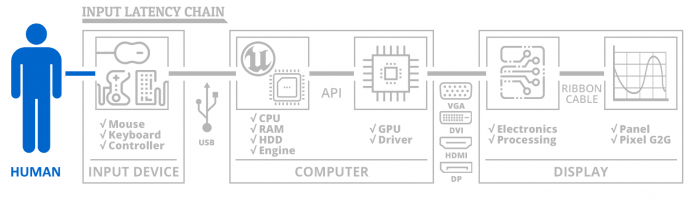
VRR and no-sync only involve "Display" (specifically sync) latency (incurred by how already rendered frames are aligned to the display), not system or peripheral-side latency:Cryogenetic wrote: ↑20 Jan 2023, 01:13Also perhaps I'm intending to just talk about total delay and improperly using the term input lag, I think as a gamer I'm really just interested in overall delay.
The average latency difference between VRR and no-sync won't change in those scenarios compared to the -2 FPS scenarios shown in my previously shared image.Cryogenetic wrote: ↑20 Jan 2023, 01:13Best way to describe what I'm looking for would be:
240hz monitor:
60 FPS Limit: Gsync+Vsync enabled vs no sync
100FPS Limit: Gsync+Vsync enabled vs no sync
120FPS Limit: Gsync+Vsync enabled vs no sync
144FPS Limit: : Gsync+Vsync enabled vs no sync
238FPS Limit: : Gsync+Vsync enabled vs no sync
I tried my best to get used to Gsync for 6 months but even after a week of going back to no sync I'm feeling significant impacts.
With framerates within the refresh rate, no-sync, regardless of the framerate/refresh rate ratio, can have a maximum 1/2 frame latency reduction over tear-free VRR due to the tearline.
If you read my article in full, you would know that the higher the physical refresh rate, the less latency difference there is between VRR and no-sync at any framerate (above or below the refresh rate), since the scanout time decreases the higher the physical refresh rate is, literally leaving less time for the screen to tear per scanout cycle.
At 240Hz, the maximum possible latency reduction no-sync can have over tear-free VRR with framerates within the physical refresh rate is 2.1ms (1/2 frame). Since the tearline in this scenario isn't always in the middle of the screen, and will typically continually roll in a downward direction, the average reduction at this refresh rate is much less than that to the point that VRR and no-sync have virtually equalized average latency at 240Hz, as you see in my graph.
If you're claiming to be experiencing a significant latency difference with no-sync vs VRR with framerates within the physical refresh rate, then 1) you're very sensitive to a lack of tearing artifacts and the difference in delivery between the two methods (which there is; at 60 FPS 240Hz for instance, while both VRR and no-sync will scan frames in at 4.2ms per, VRR will refresh the screen 60 times per second to match the framerate, while no-sync will continue to refresh it 240 times per second) is throwing you off, 2) there's some issue with VRR implementation on your particular display model (possible, but unlikely, and if there was, it would probably be frame skipping, which would occur without VRR enabled as well), and/or 3) you're conflating sync latency with other latency factors.
(jorimt: /jor-uhm-tee/)
Author: Blur Busters "G-SYNC 101" Series
Displays: ASUS PG27AQN, LG 48C4 Scaler: RetroTINK 4k Consoles: Dreamcast, PS2, PS3, PS5, Switch 2, Wii, Xbox, Analogue Pocket + Dock VR: Beyond, Quest 3, Reverb G2, Index OS: Windows 11 Pro Case: Fractal Design Torrent PSU: Seasonic PRIME TX-1000 MB: ASUS Z790 Hero CPU: Intel i9-13900k w/Noctua NH-U12A GPU: GIGABYTE RTX 4090 GAMING OC RAM: 32GB G.SKILL Trident Z5 DDR5 6400MHz CL32 SSDs: 2TB WD_BLACK SN850 (OS), 4TB WD_BLACK SN850X (Games) Keyboards: Wooting 60HE, Logitech G915 TKL Mice: Razer Viper Mini SE, Razer Viper 8kHz Sound: Creative Sound Blaster Katana V2 (speakers/amp/DAC), AFUL Performer 8 (IEMs)
Author: Blur Busters "G-SYNC 101" Series
Displays: ASUS PG27AQN, LG 48C4 Scaler: RetroTINK 4k Consoles: Dreamcast, PS2, PS3, PS5, Switch 2, Wii, Xbox, Analogue Pocket + Dock VR: Beyond, Quest 3, Reverb G2, Index OS: Windows 11 Pro Case: Fractal Design Torrent PSU: Seasonic PRIME TX-1000 MB: ASUS Z790 Hero CPU: Intel i9-13900k w/Noctua NH-U12A GPU: GIGABYTE RTX 4090 GAMING OC RAM: 32GB G.SKILL Trident Z5 DDR5 6400MHz CL32 SSDs: 2TB WD_BLACK SN850 (OS), 4TB WD_BLACK SN850X (Games) Keyboards: Wooting 60HE, Logitech G915 TKL Mice: Razer Viper Mini SE, Razer Viper 8kHz Sound: Creative Sound Blaster Katana V2 (speakers/amp/DAC), AFUL Performer 8 (IEMs)
-
Cryogenetic
- Posts: 18
- Joined: 30 Oct 2021, 19:49
Re: Freesync Premium Questions
Ok thank you, I tried to read it the best I could, there was a lot of excellent information I just never came to that realization when reading it even though I'm sure it's in there.jorimt wrote: ↑20 Jan 2023, 09:45The average latency difference between VRR and no-sync won't change in those scenarios compared to the -2 FPS scenarios shown in my previously shared image.
With framerates within the refresh rate, no-sync, regardless of the framerate/refresh rate ratio, can have a maximum 1/2 frame latency reduction over tear-free VRR due to the tearline.
If you read my article in full, you would know that the higher the physical refresh rate, the less latency difference there is between VRR and no-sync at any framerate (above or below the refresh rate), since the scanout time decreases the higher the physical refresh rate is, literally leaving less time for the screen to tear per scanout cycle.
This is why I tried to give myself many months (roughly 6) to try out Gsync+Vsync, as I'm sure there is a large adjustment but I guess if it's this option I just was never able to become accustomed to it, could it even be something as simple as I'm working on non-VRR monitors at work 8hrs a day so my eyes/brain never truly adjusted? Maybe there is no delay difference at all and what I'm experiencing is just how the pixels appear in different spots at different times doesn't line up with what my brain wants.
I don't believe so but I'm only human, and strange errors do occur all the time. Everything was perfectly smooth, no stutter no skipping at all and I even used nvidia profile inspector to make sure the proper settings were being used. I would doubt this to be the case as well but who knows, I wouldn't rule it out for sure.
What other latency factors would there be? The differences I've changed are turning off freesync premium on my monitor, turning off vsync in NVCP (already off in game) and disabling Gsync entirely (what I found was even if I turned it off in NVCP, nvidia profile inspector was showing it still enabled and causing me MASSIVE stutter so I had to manually change it in NV Profile Inspector to fixed refresh).
Could it be that my specific monitor's freesync premium is not very good? The tests on RTINGS looked great, maybe I have a faulty module? I'd imagine a faulty module would be showing graphical issues though not specifically just latency. Highly doubt this one.
Is there a chance that when I enable NVCP's Vsync, even with Gsync set properly it was still activating full delay Vsync? Even if this was the case though, this would only cause like 4.2ms? I don't know how significant that would be. Maybe it's worth testing out Vsync off everywhere and turning Freesync Premium back on and Gsync back on in NVCP. Your testing though does show it should not increase delay at all so maybe mine really is just faulty despite multiple driver versions and clean installs using DDU.
Thank you for your patience and great answers, I don't mean to come across as trying to refute your work or question anything, just genuinely curious and I love your expertise. Even after reading your guide the best I could I certainly had some misconceptions so I greatly appreciate you clarifying to expand my knowledge, I've been preaching your guide as much as possible and this helps me explain anything people might ask me (but I make sure to refer them to your guide above what I say anyway)
Re: Freesync Premium Questions
Before we delve any deeper, let's try to rule out the simplest possible causes first...Cryogenetic wrote: ↑20 Jan 2023, 12:08This is why I tried to give myself many months (roughly 6) to try out Gsync+Vsync, as I'm sure there is a large adjustment but I guess if it's this option I just was never able to become accustomed to it, could it even be something as simple as I'm working on non-VRR monitors at work 8hrs a day so my eyes/brain never truly adjusted? Maybe there is no delay difference at all and what I'm experiencing is just how the pixels appear in different spots at different times doesn't line up with what my brain wants.
Are you using G-SYNC + NVCP V-SYNC + at least 3 frames within the current physical refresh rate and verifing whether G-SYNC is actual engaged and active in the problem games?
Once that is ensured, do a simple test for me; enable G-SYNC, open a game where the menu can reach/exceed 240 FPS, and then use RTSS to limit the framerate to 30. Now move your mouse around, it should look and feel very sluggish, as the screen is now only refreshing 30 times (or whatever LFC multiple it may be at; many models drop into LFC at different framerate thresholds) per second, and since this is being done physically with G-SYNC, it affects the mouse cursor as well.
Now disable G-SYNC and V-SYNC and repeat the same test. The mouse cursor probably looks and feels more responsive, right? That's because 30 FPS 240Hz with a fixed refresh rate still physically refreshes the screen 240 times per second instead of refreshing it at the current framerate (or a multiple of it whenever LFC kicks in).
While said phenomena will not increase average latency over no-sync, the difference in delivery methods in this respect can give particularly sensitive users the impression it is "worse," even though the average latency is virtually the same at 240Hz.
That's the only thing I can think to explain your reported issue where G-SYNC + V-SYNC vs. no-sync is concerned. Otherwise, short of a serious operational VRR error on your particular monitor unit/model (which, again, is very unlikely), there's nothing else to explain such a noticeable latency difference where the simple lack of tearing at the same framerates within the refresh rate are concerned.
(jorimt: /jor-uhm-tee/)
Author: Blur Busters "G-SYNC 101" Series
Displays: ASUS PG27AQN, LG 48C4 Scaler: RetroTINK 4k Consoles: Dreamcast, PS2, PS3, PS5, Switch 2, Wii, Xbox, Analogue Pocket + Dock VR: Beyond, Quest 3, Reverb G2, Index OS: Windows 11 Pro Case: Fractal Design Torrent PSU: Seasonic PRIME TX-1000 MB: ASUS Z790 Hero CPU: Intel i9-13900k w/Noctua NH-U12A GPU: GIGABYTE RTX 4090 GAMING OC RAM: 32GB G.SKILL Trident Z5 DDR5 6400MHz CL32 SSDs: 2TB WD_BLACK SN850 (OS), 4TB WD_BLACK SN850X (Games) Keyboards: Wooting 60HE, Logitech G915 TKL Mice: Razer Viper Mini SE, Razer Viper 8kHz Sound: Creative Sound Blaster Katana V2 (speakers/amp/DAC), AFUL Performer 8 (IEMs)
Author: Blur Busters "G-SYNC 101" Series
Displays: ASUS PG27AQN, LG 48C4 Scaler: RetroTINK 4k Consoles: Dreamcast, PS2, PS3, PS5, Switch 2, Wii, Xbox, Analogue Pocket + Dock VR: Beyond, Quest 3, Reverb G2, Index OS: Windows 11 Pro Case: Fractal Design Torrent PSU: Seasonic PRIME TX-1000 MB: ASUS Z790 Hero CPU: Intel i9-13900k w/Noctua NH-U12A GPU: GIGABYTE RTX 4090 GAMING OC RAM: 32GB G.SKILL Trident Z5 DDR5 6400MHz CL32 SSDs: 2TB WD_BLACK SN850 (OS), 4TB WD_BLACK SN850X (Games) Keyboards: Wooting 60HE, Logitech G915 TKL Mice: Razer Viper Mini SE, Razer Viper 8kHz Sound: Creative Sound Blaster Katana V2 (speakers/amp/DAC), AFUL Performer 8 (IEMs)
-
Cryogenetic
- Posts: 18
- Joined: 30 Oct 2021, 19:49
Re: Freesync Premium Questions
jorimt wrote: ↑20 Jan 2023, 13:58Before we delve any deeper, let's try to rule out the simplest possible causes first...Cryogenetic wrote: ↑20 Jan 2023, 12:08This is why I tried to give myself many months (roughly 6) to try out Gsync+Vsync, as I'm sure there is a large adjustment but I guess if it's this option I just was never able to become accustomed to it, could it even be something as simple as I'm working on non-VRR monitors at work 8hrs a day so my eyes/brain never truly adjusted? Maybe there is no delay difference at all and what I'm experiencing is just how the pixels appear in different spots at different times doesn't line up with what my brain wants.
Are you using G-SYNC + NVCP V-SYNC + at least 3 frames within the current physical refresh rate and verifing whether G-SYNC is actual engaged and active in the problem games?
Yes but I use Reflex or ULLM where reflex is not available like LoL to cap it for me at 225FPS as I figured that was equal to a manual in game cap. Is using this method causing a 1 frame delay because the FPS cap is using NVCP (similar to RTSS) rather than using the in game engine to cap? Is it even worse than using RTSS or NVCP to cap?
I have done that test and it does feel a lot more sluggish, but wondering if that's because of my faulty setup with using reflex or ULLM. If that's not the case then what do you mean by particularly sensitive? The screen at 30fps with Gsync on looks EXACTLY the same as a 30 FPS monitor, is this normal? Figured this was normal.Once that is ensured, do a simple test for me; enable G-SYNC, open a game where the menu can reach/exceed 240 FPS, and then use RTSS to limit the framerate to 30. Now move your mouse around, it should look and feel very sluggish, as the screen is now only refreshing 30 times (or whatever LFC multiple it may be at; many models drop into LFC at different framerate thresholds) per second, and since this is being done physically with G-SYNC, it affects the mouse cursor as well.
Now disable G-SYNC and V-SYNC and repeat the same test. The mouse cursor probably looks and feels more responsive, right? That's because 30 FPS 240Hz with a fixed refresh rate still physically refreshes the screen 240 times per second instead of refreshing it at the current framerate (or a multiple of it whenever LFC kicks in).
While said phenomena will not increase average latency over no-sync, the difference in delivery methods in this respect can give particularly sensitive users the impression it is "worse," even though the average latency is virtually the same at 240Hz.
That's the only thing I can think to explain your reported issue where G-SYNC + V-SYNC vs. no-sync is concerned. Otherwise, short of a serious operational VRR error on your particular monitor unit/model (which, again, is very unlikely), there's nothing else to explain such a noticeable latency difference where the simple lack of tearing at the same framerates within the refresh rate are concerned.
I wouldn't be surprised if something was with my eyes/brain, certain rooms with what I'm assuming are lower powered lights in my condo when things move show me a trail of upwards of 10-20 pretty distinct objects, almost like they're a mouse refreshing at 10hz (weird to say about IRL motion but it's the best thing I can compare it to) I thought it was normal under those kinds of lights but my family has no idea what I'm talking about. It's always been that way for me though under most but not all lights, I swear that's normal though to an extent, maybe my eyes/brain really are just more sensitive somehow idk but who knows.
Re: Freesync Premium Questions
Other than the automatic FPS limit that's set when G-SYNC + V-SYNC is enabled (to keep the framerate within the G-SYNC range), settings like LLM and Reflex aren't directly related to G-SYNC operation and will not have an effect on sync latency. Instead, they address another form of latency at the render-queue-level that only occurs whenever the GPU usage is maxed, with or without G-SYNC enabled.Cryogenetic wrote: ↑20 Jan 2023, 14:20Yes but I use Reflex or ULLM where reflex is not available like LoL to cap it for me at 225FPS as I figured that was equal to a manual in game cap. Is using this method causing a 1 frame delay because the FPS cap is using NVCP (similar to RTSS) rather than using the in game engine to cap? Is it even worse than using RTSS or NVCP to cap?
As for additional latency incurred by the automatic FPS limits, Reflex is the same as using the in-game limit, as it is at the engine-level, whereas ULLM is the same thing as using Nvidia Max Frame Rate or RTSS.
External limiters typically incur 1/2 to 1 frame additional latency over an in-game limiter, but have steadier frametime performance as a result.
It wouldn't occur due to Reflex or ULLM or a faulty configuration. It's normal for VRR operation. Without it, VRR would effectively revert to traditional V-SYNC behavior.Cryogenetic wrote: ↑20 Jan 2023, 14:20I have done that test and it does feel a lot more sluggish, but wondering if that's because of my faulty setup with using reflex or ULLM.
Cryogenetic wrote: ↑20 Jan 2023, 14:20If that's not the case then what do you mean by particularly sensitive?
VRR changes the way the monitor refreshes, so if it is bothering you this much, simply don't use it. It is, after all, optional.Cryogenetic wrote: ↑20 Jan 2023, 14:20I wouldn't be surprised if something was with my eyes/brain, certain rooms with what I'm assuming are lower powered lights in my condo when things move show me a trail of upwards of 10-20 pretty distinct objects, almost like they're a mouse refreshing at 10hz (weird to say about IRL motion but it's the best thing I can compare it to) I thought it was normal under those kinds of lights but my family has no idea what I'm talking about. It's always been that way for me though under most but not all lights, I swear that's normal though to an extent, maybe my eyes/brain really are just more sensitive somehow idk but who knows.
(jorimt: /jor-uhm-tee/)
Author: Blur Busters "G-SYNC 101" Series
Displays: ASUS PG27AQN, LG 48C4 Scaler: RetroTINK 4k Consoles: Dreamcast, PS2, PS3, PS5, Switch 2, Wii, Xbox, Analogue Pocket + Dock VR: Beyond, Quest 3, Reverb G2, Index OS: Windows 11 Pro Case: Fractal Design Torrent PSU: Seasonic PRIME TX-1000 MB: ASUS Z790 Hero CPU: Intel i9-13900k w/Noctua NH-U12A GPU: GIGABYTE RTX 4090 GAMING OC RAM: 32GB G.SKILL Trident Z5 DDR5 6400MHz CL32 SSDs: 2TB WD_BLACK SN850 (OS), 4TB WD_BLACK SN850X (Games) Keyboards: Wooting 60HE, Logitech G915 TKL Mice: Razer Viper Mini SE, Razer Viper 8kHz Sound: Creative Sound Blaster Katana V2 (speakers/amp/DAC), AFUL Performer 8 (IEMs)
Author: Blur Busters "G-SYNC 101" Series
Displays: ASUS PG27AQN, LG 48C4 Scaler: RetroTINK 4k Consoles: Dreamcast, PS2, PS3, PS5, Switch 2, Wii, Xbox, Analogue Pocket + Dock VR: Beyond, Quest 3, Reverb G2, Index OS: Windows 11 Pro Case: Fractal Design Torrent PSU: Seasonic PRIME TX-1000 MB: ASUS Z790 Hero CPU: Intel i9-13900k w/Noctua NH-U12A GPU: GIGABYTE RTX 4090 GAMING OC RAM: 32GB G.SKILL Trident Z5 DDR5 6400MHz CL32 SSDs: 2TB WD_BLACK SN850 (OS), 4TB WD_BLACK SN850X (Games) Keyboards: Wooting 60HE, Logitech G915 TKL Mice: Razer Viper Mini SE, Razer Viper 8kHz Sound: Creative Sound Blaster Katana V2 (speakers/amp/DAC), AFUL Performer 8 (IEMs)
-
Cryogenetic
- Posts: 18
- Joined: 30 Oct 2021, 19:49
Re: Freesync Premium Questions
That's actually really cool, never would have expected that behavior but it makes sense.As for additional latency incurred by the automatic FPS limits, Reflex is the same as using the in-game limit, as it is at the engine-level, whereas ULLM is the same thing as using Nvidia Max Frame Rate or RTSS.
I guess a quick final follow up then is, is it supposed to at 30fps meant to look exactly like a monitor set to 30hz fixed refresh rate or is that a part of a sensitivity? When I have 30FPS with Gsync and Vsync on, I cannot tell the difference between that and 30hz fixed.It wouldn't occur due to Reflex or ULLM or a faulty configuration. It's normal for VRR operation. Without it, VRR would effectively revert to traditional V-SYNC behavior.
Like it doesn't hurt my eyes, and at 140ish+ FPS it looks incredibly smooth but after dipping lower, or with random fluctuations maybe that really is where I'm picking up perceived latency that doesn't exist.VRR changes the way the monitor refreshes, so if it is bothering you this much, simply don't use it. It is, after all, optional.
You're the GOAT, thank you for your time on this. I guess I'll just stick to no sync even though I do love Gsync and it shouldn't be lagging, something is just wrong with me haha.
Re: Freesync Premium Questions
Yes, current G-SYNC framerate (within current physical refresh rate) effectively = active real-time refresh rate, so 60 FPS VRR will look and feel like fixed physical 60Hz refresh rate, 30 FPS VRR like fixed physical 30Hz refresh rate, and so on, just with the lowest possible tear-free latency.Cryogenetic wrote: ↑20 Jan 2023, 14:53I guess a quick final follow up then is, is it supposed to at 30fps meant to look exactly like a monitor set to 30hz fixed refresh rate or is that a part of a sensitivity? When I have 30FPS with Gsync and Vsync on, I cannot tell the difference between that and 30hz fixed.
(jorimt: /jor-uhm-tee/)
Author: Blur Busters "G-SYNC 101" Series
Displays: ASUS PG27AQN, LG 48C4 Scaler: RetroTINK 4k Consoles: Dreamcast, PS2, PS3, PS5, Switch 2, Wii, Xbox, Analogue Pocket + Dock VR: Beyond, Quest 3, Reverb G2, Index OS: Windows 11 Pro Case: Fractal Design Torrent PSU: Seasonic PRIME TX-1000 MB: ASUS Z790 Hero CPU: Intel i9-13900k w/Noctua NH-U12A GPU: GIGABYTE RTX 4090 GAMING OC RAM: 32GB G.SKILL Trident Z5 DDR5 6400MHz CL32 SSDs: 2TB WD_BLACK SN850 (OS), 4TB WD_BLACK SN850X (Games) Keyboards: Wooting 60HE, Logitech G915 TKL Mice: Razer Viper Mini SE, Razer Viper 8kHz Sound: Creative Sound Blaster Katana V2 (speakers/amp/DAC), AFUL Performer 8 (IEMs)
Author: Blur Busters "G-SYNC 101" Series
Displays: ASUS PG27AQN, LG 48C4 Scaler: RetroTINK 4k Consoles: Dreamcast, PS2, PS3, PS5, Switch 2, Wii, Xbox, Analogue Pocket + Dock VR: Beyond, Quest 3, Reverb G2, Index OS: Windows 11 Pro Case: Fractal Design Torrent PSU: Seasonic PRIME TX-1000 MB: ASUS Z790 Hero CPU: Intel i9-13900k w/Noctua NH-U12A GPU: GIGABYTE RTX 4090 GAMING OC RAM: 32GB G.SKILL Trident Z5 DDR5 6400MHz CL32 SSDs: 2TB WD_BLACK SN850 (OS), 4TB WD_BLACK SN850X (Games) Keyboards: Wooting 60HE, Logitech G915 TKL Mice: Razer Viper Mini SE, Razer Viper 8kHz Sound: Creative Sound Blaster Katana V2 (speakers/amp/DAC), AFUL Performer 8 (IEMs)