newbworld wrote: ↑10 Aug 2023, 23:01
I found
this thread by accident, does it mean the implused OLED won't have any Stroboscopic effect?
Take a look at this, displays look different depending on stationary eye versus moving eyes:
www.testufo.com/eyetracking#speed=-1
Look at the 2nd UFO for 30 seconds. Observe how it stutters at low frame rates, and blurs at high frame rates. But you always see 'stutter' / stroboscopics (of the 2nd UFO) if you stare only at 1st UFO. So the stroboscopic effect appears/disappears depending on what your eyes are doing.
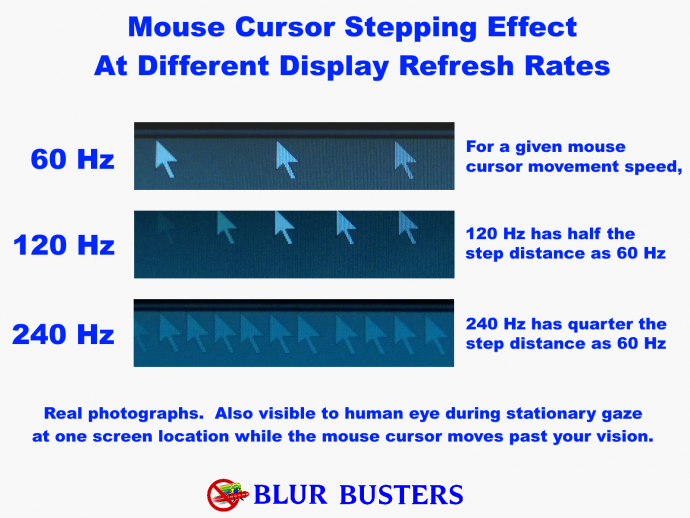

Doesn't matter. Stroboscopic effect is caused by a finite frame rate, no matter what the display settings are.
See this article:
The Stroboscopic Effect of Finite Frame Rates
To solve this,
1. Keep frame rates as high as possible
AND
2. Turn on GPU Motion Blur Effect in your game.
In my experience (with my own eyes), the best stroboscopic-fixer display that stays (relatively) low blur is a
240Hz OLED + RTX 4090 + DLSS3 + GPU Blur Effect.
Much, much better. Still less motion blur than a 144Hz LCD + GPU Blur Effect Disabled. The GPU Blur Effect simulates a slower GtG, but then you get to keep the benefits of OLED and reduced display motion blur.
This is because the 240Hz 240fps is enough brute framrate based motion blur reduction, that re-enabling GPU blur effect (to kill the stroboscopics) still doesn't add back enough blur to worsen it back to a 120-144Hz LCD! So a "partial win-win", as long as you can render enough frame rate and stick to ultra high framerate games that lets you enable the GPU Blur Effect.
"GPU Blur Effect" = Evil but it's an Defacto Ergonomic Accessibility Setting
It REALLY reduces eyestrain for many people -- it's amazing how much stroboscopic-eyestrain it reduces in so many people, that GPU Blur Effect is definitely a Defacto Secret Accessibility Setting much like "Reduce Motion" or other Accessibility Settings.
Turn back "GPU Blur Effect" on if you get stroboscopic-effect headache/motionsickness/nauseas without it.
OLED is temporarily worse than LCD, until you enable GPU Blur Effect,
then suddenly OLED is better than LCD in the package deal of lack of stroboscopics / reduced display blur.
The problem is you:
1. Have to stick to games that spew high frame rates;
2. While letting you enable GPU blur effect.
You'll definitely want the fastest GPU with the best frame generation technology, and may need to enable DLSS3 interpolation (and tolerate its input lag). You can reduce the latency of DLSS3 interpolation via the
two cap technique, and this gives you roughly a halving of display motion blur. While interpolation kind of doesn't work perfectly with GPU Blur Effect.
YMMV, since you're trying to do a few things (A) reduce display motion blur via brute framerate to vastly more than overcome the extra blur via (B) re-enabling the GPU blur effect, in order to (C) have low blur without stroboscopics.
It works. The tech is semi-here today, if you cherrypick your GPU and games. It's slightly more blurry than LightBoost, but surprisingly not by much. The grand total blur is less than 144fps 144Hz LCD (Blur Effect = OFF), and you have no stroboscopics. If you never got headache at 120fps 120Hz LCD but want an 'upgrade', now you know how to 'upgrade'!
Because you need to fix stroboscopics to fix the stroboscopics-related eyestrain/nausea/motionsickness, it won't be as low blur as 360fps 360Hz LCD (GPU Blur Effect = OFF) or 240fps 240Hz OLED (GPU Blur Effect = OFF), but it will be a massive upgrade from 144fps 144Hz LCD as a "My eyes don't get eyestrain from 144fps 144Hz LCD unstrobed" baseline.
There Are Over 100 Causes Of Eyestrain/Motionsickness/Nausea With Displays
Sadly, it is easy to misdiagnose though. It's a very easy wild goose chase.
Now if you're still getting eyestrain even with 200fps+ and GPU Blur Effect enabled -- then something else is happening -- your eyestrain isn't caused by stroboscopics, regardless of what people tell you. Many people accidentally redherring/wild goose away from the over 100+ ergonomic issues a display has (e.g. blue light, too big a display, antiglare texture, etc).
You can also try to RTSS cap to 24fps, and enable GPU Blur Effect. Some people prefer the low-framerate feel on their favourite OLED displays if they cannot do 240fps. 240Hz OLEDs can do any framerates and refresh rates from 24fps to 240fps, so you've got many tweaks while keeping other OLED benefits (e.g. colors, HDR, blacks, etc).
Another Ergonomic Problem Cause: Some people get nausea only in the territory of ~40fps(ish) - 150fps(ish) on an OLED, necessitating ultra low frame rates or ultra high frame rates (+GPU Blur). This does not affect everybody, but some people have a specific "verboten framerate" region pertaining to their specific motionsickness quirk. You can customize frame rates at www.testufo.com/framerates-versus#compare=0 and figure out your motionsickness region (blurs/stroboscopics) and this will help you figure out what frame rates bother you, and what frame rates don't, during GPU Blur Effect = OFF.



