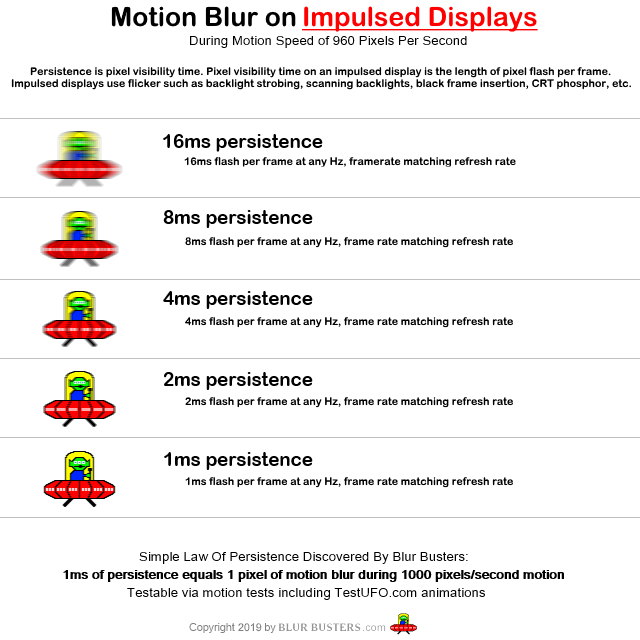
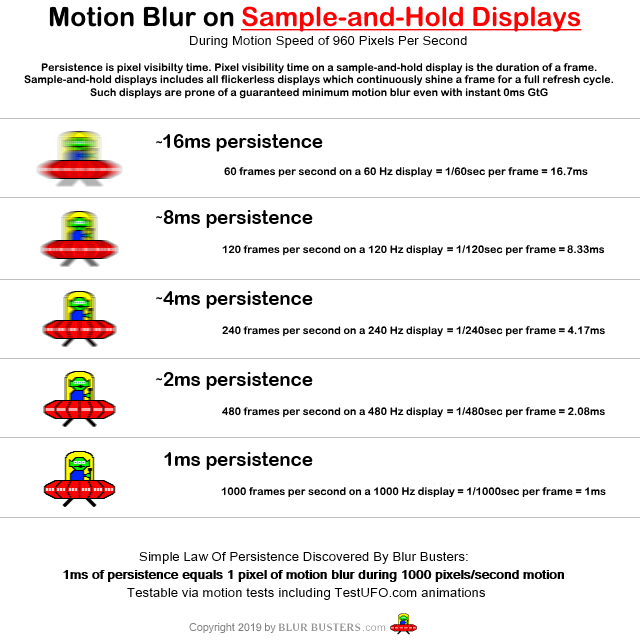
Colonel_Gerdauf wrote: ↑26 May 2022, 09:00
While Strobe Utility is a niche tuning software that can be downloaded much like CPU-Z or f.lux or Special K, from my eyes that is honestly pointless, as I would have expected these customizations to be part of the package with display OSDs or USB interfaces.
Some displays do this already.
I convinced NVIDIA to add "ULMB Pulse Width" to their menus.
But it's a more limited-range adjustment than Strobe Utility.
Colonel_Gerdauf wrote: ↑26 May 2022, 09:00
These kinds of things need to be a standard, and not some optional thing that some lucky-informed person gets to tune on his/her own. Hell, in relation to the second part of my rambles, I still always see BFI strobing measured in Hz, which is about the easiest way to send the BFI tech to the boomer-tech graveyard. Where are the relative times? Where are the ratios?
That's why Blur Busters came up with the Blur Busters Approved Logo Programme (
press release). It's not a very easy advocacy to do behind the scenes, but we're working on this.
Colonel_Gerdauf wrote: ↑26 May 2022, 09:00
I do not subscribe to the "one step at the time" approach in this particular case. You either hit it nail in the head the first time, as with G-Sync/ProMotion, or have the tech go through several revisions and versions that only complicate matters, as with FreeSync and high-polling devices. The former will succeed into a "this is the absolute bare minimum" standard in due time, the latter will be doomed to rot a painful death.
Unfortunately, I must refer to the cat herding image by xkcd:
https://xkcd.com/927/
It's impossible to get the industry to unify behind a standard except via higher refresh rates. The great thing is that 1000fps 1000Hz allows custom BFI patterns to be created via software instead of by the display vendor. The generic sheer refresh rate offloads the responsibility further upstream.
Needless to say, multiple things are done in parallel -- the multiple BFI approaches and the multiple Hz-based approaches. We're only a small company, even if we have had an outsized influence (compared to status quo if Blur Busters never existed)
Colonel_Gerdauf wrote: ↑26 May 2022, 09:00
While the rolling BFI does look nice, and gives a bit of the CRT feel, one thing I am very unhappy with is the fact that >50% of the display is blanked at one instance of time, and it remains large-area. I still feel that to properly limit the stutter and flicker effects, the "off" pixels need to be at most 50% of the total screen, and evenly spread out.
Laws of physics does not allow further blur reductions with your ideas.
It's necessary to have a long contiguous ratio of OFF:ON ratios, whether global or rolling approach.
To reduce motion blur by 75% requires pixels (and near adjacent pixels) to be contiguously off for 75% of the time.
Unfortunately, this common suggest was tested many times and shown to be a guaranteed DOA -- you cannot have cake and eat it too. You can try to spread it out a bit (e.g. phosphor decay or tightly-bunched multi-pulses like plasma) but it's still much more tightly coupled together than your algorithm ideas.
Laws of physics dictate that 75% pure blur reduction (assumes GtG=0) without introducing odd artifacts requires either:
- Global strobe where pixels (and spatially adjacent pixels of the same frame) are visible only 25% contiguously within a refresh cycle (global strobe approach)
- Rolling strobe where pixels (and spatially adjacent pixels of the same frame) are visible only 25% contiguously within a refresh cycle (rolling strobe approach)
- Quadruple frame rate at quadruple refresh rate (sample-and-hold approach)
If you try spread out illumination as you describe, guaranteed artifacts pop up. The more time separation between spatially adjacent pixels, the more motion artifacts pop up. Unfortunately, laws of physics is a hard wall. I can even create custom TestUFO tests to prove my point, there's no solution, and thousands of researchers have tried already -- your idea is already provably nonstarter. It has to be tight time differentials between adjacent pixels. Spreading it worsens the blur, or adds other motion artifacts.
You can use unconventional approaches like longer pixel pulses for brighter pixels and shorter pixel pulses for darker pixels (one contiguous pulse per frame, with the black period contiguous for it as well for all spatially adjacent pixels).
You can do a tight timeoffset (like the time difference between pixel rows, e.g. 1/67000sec at 67KHz horizontal scanrate) and artifacts are minor like just scanskew
www.testufo.com/scanskew ... Any worsening spread-out than adjacent pixel rows (or adjacent pixel columns for sideways scan), is always worse than scanskew. No matter, checkerboard, interlacing (of any form), random dither (of any form), have all produced worse artifacts than contigious illumination followed by contiguous blackness (both spatially and temporally).
If you have a 144Hz-240Hz display, you can also check BFI motion blur physics for yourself at
Custom Configurable Software-Based Black Frame Insertion Demo. Assuming LCD GtG is insignificant (or you're using a high-Hz OLED), motion blur is linearly proportional to the pixel visibility time. Any other BFI pattern is necessarily worse than this.
One of the most simple methods of creating an artifact is double-strobing (like CRT 30fps at 60Hz). The same problem happens for 60fps strobe at 120Hz too, and so on.
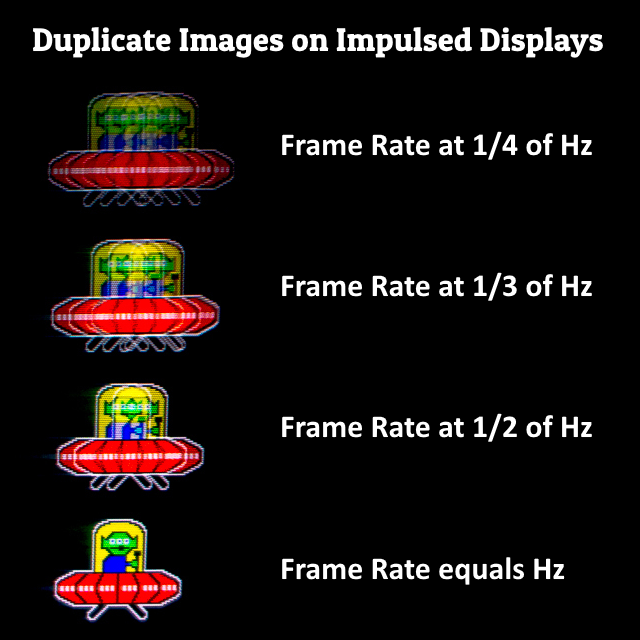
This remains true for 60fps on strobed 120Hz LCD
This remains true for 120fps on strobed 240Hz LCD
Etc.
In fact, I can emulate a CRT 30fps at 60Hz double image effect in software
TestUFO simulation of double impulsing -- check the
second UFO out of three to see the double-image effect. Best tested on a display that is 120Hz and higher (so it stops flickering due to your flicker fusion threshold).
It uses 1/4th the refresh rate to simulate a double strobe (FRAME-OFF-REPEAT-OFF), so to simulate a 30fps at 60Hz CRT, requires a 120Hz at minimum. Otherwise, you only see it at 15fps because this is done in software at refresh-granularity of sample and hold. However, this is an excellent demonstration of how all kinds of multi-impulsing the same frame (hardware or software) creates artifacts.
However, we've done thousands of hardware tests of different BFI patterns, and our findings are consistent with other researchers. You cannot have 75% motion blur reduction without a 75%-contiguous-time black pixel (including adjacent pixels). Only tiny time offsets are possible (e.g. the time difference between pixel rows, like 1 unit of horizontal scan rate) without artifacts.
You can blend it out a bit (e.g. fade-in and fade-out, like simulated phosphor decay) with little penalty on blur -- only a slight worsening of blur with a massive reduction of eyestrain. But once you go very spatially-different phases of pulsings, nasty motion artifacts start to pop up.
Mathematically, there's provably no non-sequential-scanout method that's better than a rolling scan, unfortunately. Necessarily, it's a contiguous PWM-style, due to laws of physics. You can soften the leading and trailing edges and have a fade-strobe or a fade-scan (like CRT phosphor), but you can't change the scan pattern without guaranteed even worse artifacts than phosphor decay.
It's a function of the fact that human eyes are analog. Your eyes are in a different position at the beginning of pixel visibility and end of pixel visibility. That necessarily stamps that flicker in your eyes. If you spread the phase of the flickers of spatially-adjacent pixels too much, it stamps a flicker into your retinas at a much more different position because more time delta has passed since.
So to avoid this, you need contiguous on-time and contiguous off-time on a per-unique-image on a per-pixel basis, including its immediately spatially adjacent pixels. This was scientifically proven mandatory
(In fact sequential scanout is not artifact free due to scan skew. Even that tiny time difference between adjacent pixel rows (1/67000sec) creates a human visible skew artifact at
www.testufo.com/scanskew when viewed on a 60Hz DELL or 60Hz HP monitor). Even sequential scanout (whether sample-and-hold scanout or rolling-scan BFI) produces the same scanskew artifact, but it is the most minor possible display artifact of non-global display refreshing approach. That's why rolling scan is the most artifact-free non-global display refreshing mathematically possible.
(Not to mention, it conveniently fits nicely with the raster display pipeline workflow of serializing 2D image over a 1D cable and onto a row-column addressed display, a workflow that is still occuring on DisplayPort and HDMI cables, even with compressed streams, pixels are delivered left-to-right, top-to-bottom. Converting sequential scanout to a non-sequential necessarily adds input lag, because you have to buffer a slow-scan 1/120sec signal fully before generating DLP subfields or plasma subfields, or any other temporal-dither-color display technology). Even on plasma, they still needed to tightly bunch the bright pulse followed by a long dark period, to properly reduce motion blur on plasmas -- aka long dark time for individual pixels (and spatially adjacent pixels).
Regardless,
It is an amazingly simple universal explainer that catches-all temporal imperfections (interlacing artifacts, color sequential artifacts, double-strobe artifacts, or any other artifacts generated by non-contiguous representation of a pixel on a per-frame basis, etc).
If you're failing to understand this, then you need to study closer on the laws of physics as it pertains to displays, how the analog-moving eyes interacts with the non-moving pixels of a refresh cycle -- at 2000 pixels/sec motion, 1/60sec worth of eye movement spreads over 33 pixels. If you don't bunch your bright pixels temporally
AND spatially tightly, with longer dark periods in between, you fail to reduce motion blur in an artifact-free way.