noxer wrote: ↑12 Sep 2022, 20:27
I play Apex Legends capped at 182 fps through RTSS, (when uncapped it fluctuates between 240 and 180fps), v sync off, I'm looking to shave off every 1ms I can, will it work in this scenario or do you think I should just leave it at stretched 240hz??
There's pros/cons.
Now, remember, latency is a complex chain.
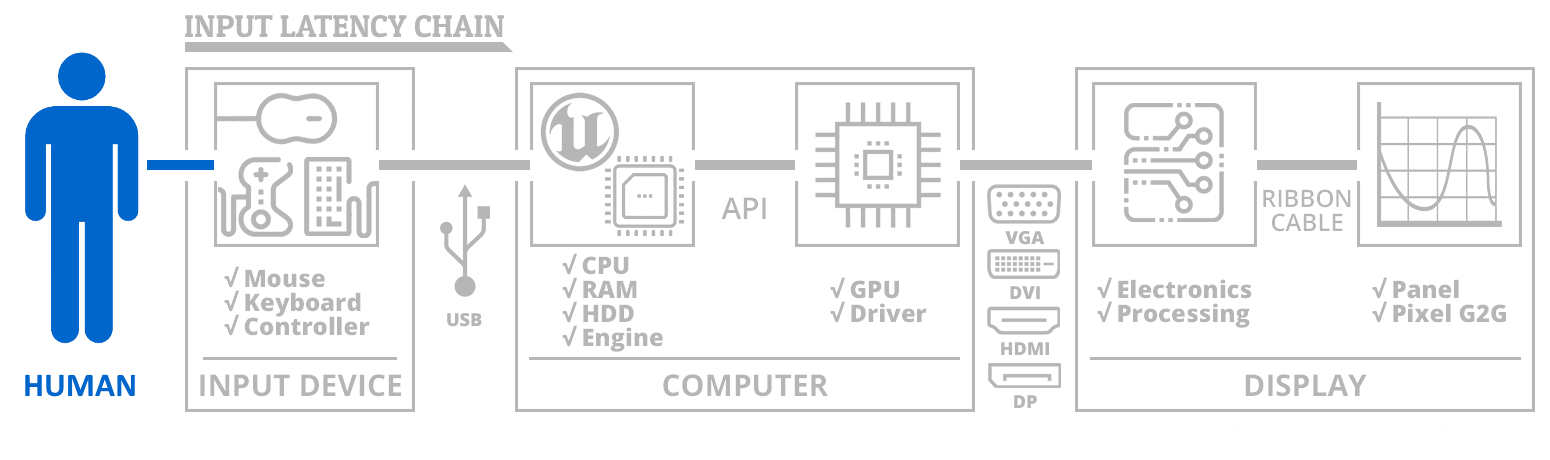
But for now, let's focus only on display latency:
There's many different kinds of latency problems on the display side.
- Absolute latency (aka tape-delay latency caused by display processing)
- Scanout latency (not all pixels refresh at the same time, time interval between first pixel thru last pixel refreshed)
- Variances in latency (jitter/stutter = variable latency = can throw off aiming), mainly caused by unoptimized sync technologies
Latency is about tradeoffs.
Now, strobing adds a minor amount of tape delay lag (to the tune of low single digit milliseconds for modern strobe implementations). But extra motion blur in fast panning can slow down human reaction time. If you can't see bleep during fast panning (if it's important to see things clearly in the middle of a scroll, like in RTS / APEX / DOTA2) -- then your reaction time can slow down, e.g. quick strategical thinking. So if strobing adds 1ms lag but your human reaction time speeds up 10ms, then you win.
Likewise, same for stutter/jitter. You'd rather have a perfect stutterfree absolute 10ms latency than a highly unexpectedly erratic random 5ms-10ms latency whose average latency is different from median latency. You aim, you miss, bad hitreg behaviors or bad mouse-pointer-aiming behaviors. Random latency in networking is a bleep, but random latency can occur in engines and flawed sync technology configuration settings. Especially if average and median diverges significantly, because if average latency and median latency is different, you will have aiming problems (even if it's quickly aiming a mouse arrow to select a character to attack in RTS games -- this doesn't apply to just FPS).
In your situation, you're wanting to use strobing. Strobing can amplify the visibility of stutter/jitter. So it's in your interests to try to make it framerate=Hz. So it's the right call to use RTSS Scanline Sync. It's somewhat of a marriage made in heaven (Strobing + RTSS Scanline Sync) because you've perfectly synchronizing global strobing with global sync technology, keeping latency erratic-free, even if you've added a very very minor amount of tape delay latency. QFT modes will reduce this tape delay latency.
So yes, you should convert your 182 Hz non-QFT mode to a QFT mode. You get the same picture, but with less lag (QFT doesn't always decrease crosstalk on 240Hz BenQs because they already buffer refresh cycles to scan-convert to fast scanout... but that doesn't solve faster delivery of frames over DisplayPort cable. So QFT usually only hits one bird with a stone for 240 Hz BenQs (reduced lag) unlike QFT hitting two birds with a stone (reduced crosstalk & lag).
To create a custom QFT 182 Hz mode, you need to derive from the 240 Hz mode and use Vertical Total Calculator on 240 Hz, and type "182" in the Hz. Now you've got your QFT 182 Hz mode to reduce strobe lag even more. Good move.
QFT + RTSS S-Sync + Strobing = should give you a competitive advantage if you like to pay attention to things mid-panning. If you tune properly (in Strobe Utility) your custom QFT+RTSS+DyAc 182 Hz mode will often beat the other players using 240 Hz VSYNC OFF, to the surprise of other players
in this specific game. Little known esports secret, literally!
Please post your QFT 182 mode for your BenQ -- combined with respective Strobe Utility settings (There are 3 brands of monitors with Strobe Utility now at least for some models) -- others would love to see.


