ManWhoSoldTheWorld wrote: ↑11 Nov 2024, 13:24
Did you ever find a fix for this?
When I run fullscreen borderless (FSB) and fullscreen exclusive (FSE), both run "hardware independent flip".
that should be fine.
though technically you're not actually using FSE there. if you're seeing an independent flip presentation when checking the game's presentation model, then the game is using eFSE/FSO or windowed/borderless with flip model (which is good).
should be the same or at least there shouldn't be a difference due to the presentation model in this case
however, if the game in eFSE/FSO (with its in-game fullscreen option) is forcing something else like vsync a certain way or manually lowering your display's max refresh rate (some games do this with their in-game fullscreen option and not in windowed/borderless...), then that could explain a difference in responsiveness... as it would result in the fullscreen option having higher latency etc
ManWhoSoldTheWorld wrote: ↑11 Nov 2024, 13:24
- Would have been interesting to try "hardware composed: independent flip" in FSE, but I've never been able to get it running.
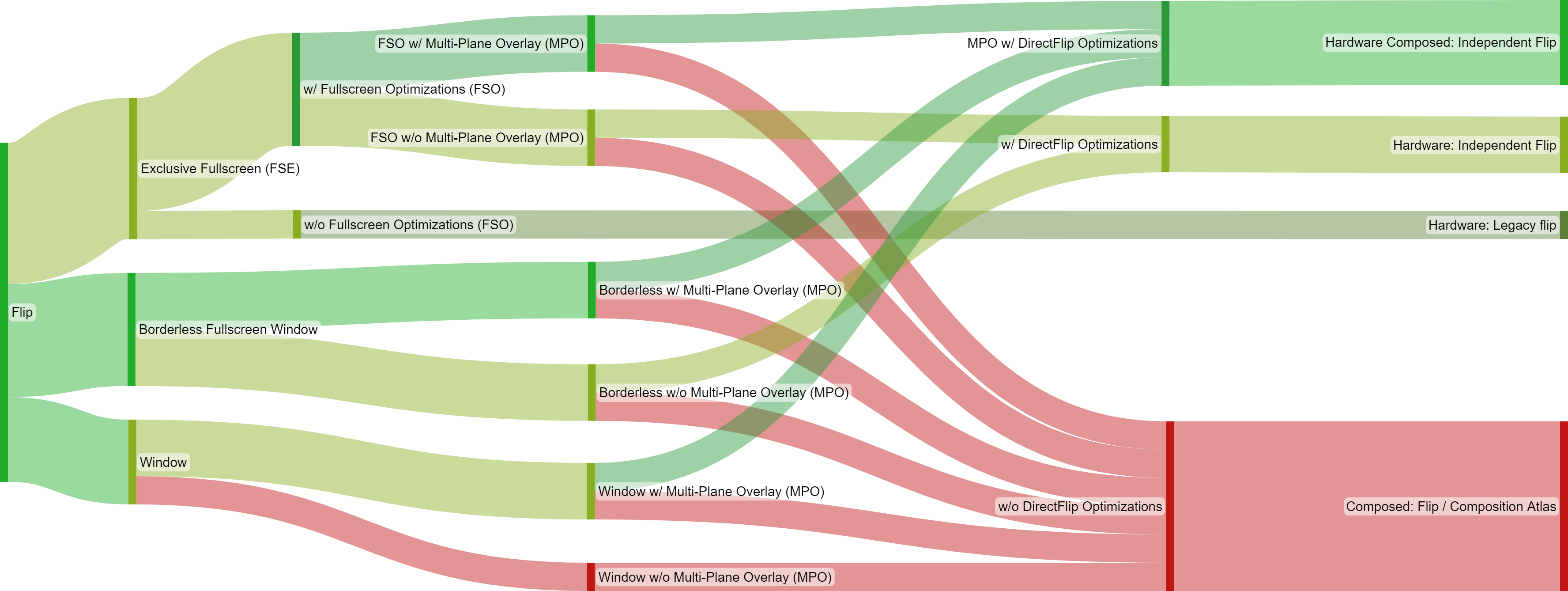
eh i don't think that getting "hardware composed: independent flip" would change anything in this case (with you already getting one of the independent flip presentations).
short version:
"hardware: independent flip" and "hardware composed: independent flip" basically perform the same.
those bypass the desktop window manager for presentation
plus a game that bypasses the dwm/compositor with an independent flip presentation can get more from the cpu/gpu compared to cases where the game is going through the dwm/compositor (such when "composed: flip" or "composed copy with gpu gdi" is being used for presentation. both "composed: flip" and "composed copy with gpu gdi" involve the dwm for composition). microsoft has documented this and can be seen in practice/testing too. apps/games that run through the dwm/compositor for presentation especially may suffer more (in terms of fps and latency) the more you have running in the background or on other displays...
also, games running with an independent flip presentation may use waitable swapchains to reduce latency further in certain scenarios (and waitable swapchains aren't supported in FSE / legacy flip).
--
more regarding the independent flip presentations:
"hardware: independent flip" indicates the game did not take ownership of the screen (either because it was windowed/borderless or because eFSE/FSO was applied), but it is still swapping the displayed surface every frame (via buffer pointer swap/flipping), independently, with the same efficiency as fullscreen exclusive (hardware: legacy flip).
"Hardware Composed: Independent Flip" is the same as the above, but also indicates the app has been granted at least 1 hardware overlay plane (MPO plane).
MPO (multiplane overlay) planes are basically additional hardware scanout planes enabling the gpu to take over composition from the desktop window manager, thus allowing the game to retain independent flip presentation in more scenarios (instead of falling into the subpar "composed: flip" presentation).
and it's normally needed to have at least 2+ MPO planes assigned and available to the display the game is running on if you want MPOs to save you (keep your game using an independent flip presentation in more scenarios... such as when the windows volume overlay is on top of the game or when your game's window doesn't cover the whole screen).
also typically it's "hardware: independent flip" because the game is on plane 0 (but the system could still leverage the MPOs and the game may retain independent flip presentation in certain scenarios if 2+ MPO planes are available...)
and it's typically "hardware composed: independent flip" if the game got on plane 1 or higher (and if it's on plane 1 and there's only 1 MPO plane available, then the game would still fall into the "composed: flip" presentation (which involves dwm composition) if some external window is on top of the game or if there's a resolution mismatch between the game's window and the desktop etc)
plane 0 is also the dwm's plane (the dwm's swapchain); however, even if the game is on plane 0, dwm composition can still be bypassed if the game has engaged directflip/independent flip optimizations (with or without MPOs if certain criteria has been met...)
directflip/independent flip optimizations is, to put it simply, when the game using an independent flip presentation.
and it's not possible to get either "hardware: independent flip" or "hardware composed: independent flip" in FSE.
FSE can be "hardware: legacy flip" or "hardware: legacy copy to front buffer" for presentation.
(the sankey diagram you posted doesn't include the "hardware: legacy copy to front buffer" presentation because it's very rare... but it's a subpar exclusive mode presentation due to the copy operation basically. anyway, you'd have to be very unlucky to get that one in fullscreen or be using windows 7...)
tl;dr:
you could try to see if vsync is set a different way by the game when using the in-game fullscreen option. you could also see if the game is lowering your display's max refresh (could check in windows's display settings after launching the game). you may also want to play while monitoring the game's presentation model for a while and see if it's getting stuck with the subpar "composed: flip" presentation at some point for some reason...
i would generally avoid a game's fullscreen mode anyway because of slower alt-tabbing and display mode changes that can be annoying...
windowed/borderless with an independent flip presentation is the good stuff.