
u so diff. try these commands, there is a difference. The fact that games run on udp means absolutely nothing.ahead wrote: ↑28 Jan 2025, 01:51This relates to the TCP protocol.
Valorant, CS2, Call of Duty, Battlefield, and other FPS games use the UDP protocol to exchange information between servers and clients. The use of UDP for communication in FPS games can easily be found on this forum, other forums, through Google, or even by asking ChatGPT. Based on this, I have a question: Are you retarded? This is a rhetorical question, so please refrain from answering.
netsh int tcp set global autotuninglevel=disable
-
hirecuery
- Posts: 4
- Joined: 27 Jan 2025, 12:13
Re: netsh int tcp set global autotuninglevel=disable
-
Slender

- Posts: 1839
- Joined: 25 Jan 2020, 17:55
-
Future
- Posts: 76
- Joined: 06 Dec 2022, 07:04
Re: netsh int tcp set global autotuninglevel=disable
Means absolutely everything and there is a reason why games use UDP protocol. You can google it and try to comprehend it yourself.hirecuery wrote: ↑28 Jan 2025, 02:35u so diff. try these commands, there is a difference. The fact that games run on udp means absolutely nothing.ahead wrote: ↑28 Jan 2025, 01:51This relates to the TCP protocol.
Valorant, CS2, Call of Duty, Battlefield, and other FPS games use the UDP protocol to exchange information between servers and clients. The use of UDP for communication in FPS games can easily be found on this forum, other forums, through Google, or even by asking ChatGPT. Based on this, I have a question: Are you retarded? This is a rhetorical question, so please refrain from answering.
-
JimCarry
- Posts: 586
- Joined: 24 May 2024, 20:01
- Location: csgo
Re: netsh int tcp set global autotuninglevel=disable
I dont really understand you,but if you want to make ctcp and its not working via cmd / powershell command and you are on win 10 you need reg file executed by power run,i try all cmd powershell command it cant be changed to ctcp,the moment i executed the reg file and restart pc, its ctcp as you see in the screen i provide above.
-
Asesino34
- Posts: 53
- Joined: 30 Jun 2022, 11:47
Re: netsh int tcp set global autotuninglevel=disable

-
Future
- Posts: 76
- Joined: 06 Dec 2022, 07:04
Re: netsh int tcp set global autotuninglevel=disable
Are you all blind or something? Almost all games use UDP protocol, not TCP. The only thing in your game that most likely uses TCP could be the chat, nothing else. The only thing you are going to achieve by changing settings whose meaning you clearly don't understand is to screw your Windows.
-
themagic

- Posts: 463
- Joined: 02 Jul 2024, 08:22
Re: netsh int tcp set global autotuninglevel=disable
I can only full agree with this all...Future wrote: ↑28 Jan 2025, 12:46Are you all blind or something? Almost all games use UDP protocol, not TCP. The only thing in your game that most likely uses TCP could be the chat, nothing else. The only thing you are going to achieve by changing settings whose meaning you clearly don't understand is to screw your Windows.
But there exist already many such people and more on youtube who know everything about HITREG and DESYNC fixes with this useless tweaks...who still tell all the same shit over and over for many years and even in these days too..."how to properly tweak TCP and get better Hitreg in Online Games"...like in this Videos as good example...

(9 years ago)
vs
(2years ago)
But if you all want experiment and waste some of your lifetime....then go and just use auslogics internet omptimizer...there even more options for you all to try than in tcpoptimizer..
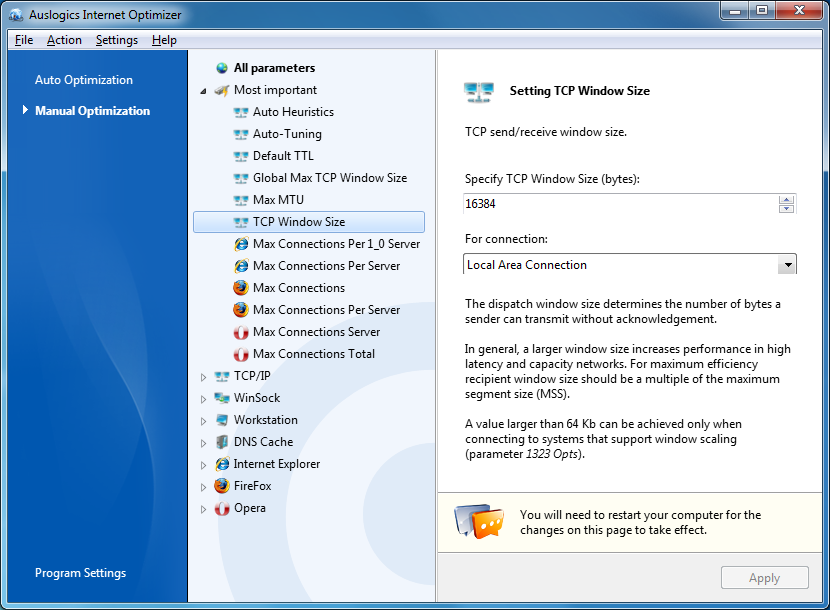
Have fun and good luck with that all...

here more for you guys...in this Forums you can find HIDDEN SECRET REGEDIT tweaks which the WORLD and the PRO TWEAKER SCENE still dont saw and even more better HITREG and INPUT LAG fixes!!!
https://www.speedguide.net/forums/searc ... c810b034ae
https://www.speedguide.net/forums/searc ... =input+lag+
 and here the BEST OF THE BEST ! "All Games Internet Fix
Update 2021" !!!

 ALLINONE!
 https://allgamesinternetfix.wordpress.com/
that dude even figure out how to fix hitreg just by NTP servers..clock, timing, sync...
https://www.youtube.com/watch?v=y6fRA-0AhHM
-
Slender
- Posts: 1839
- Joined: 25 Jan 2020, 17:55
Re: netsh int tcp set global autotuninglevel=disable
windows doesn't have two separate upd tcp stacks, it's one single stack, and you just can't know how it manages only then what tcp says there.
-
Future
- Posts: 76
- Joined: 06 Dec 2022, 07:04
Re: netsh int tcp set global autotuninglevel=disable
Wrong. https://learn.microsoft.com/en-us/windo ... uning-nics
It also has UDP stack. netsh interface udp show global in the command prompt. You can also check it in Resource monitor. UDP is called UDP for a reason, same for the games who use it.
And even if you were right, which you are not, disabling auto-tune completely would make no difference at all. Why? Well, I highly doubt you could reach it's limit when you are playing FPS games, because they barely utilize few mbps of your bandwidth in the worst case scenario. For example in CS 1.6 you can't even reach 0.5 mbps network utilization, how would disabling auto-tune make even the slightest of a difference?
Tweaking the shit out of your Windows is not solving the problem, it can only create it. That applies to the bios tweaking and all sort of tweaking without basic knowledge. And by basic knowledge I mean at least knowing what the option does and what would be the effect of changing it. People here must stop benchmarking the results of their tweaks with "I feel". What you feel is only your perception, what it really is has numbers and explanation.
-
Slender
- Posts: 1839
- Joined: 25 Jan 2020, 17:55
Re: netsh int tcp set global autotuninglevel=disable
you play game or numbers?Future wrote: ↑28 Jan 2025, 18:31Wrong. https://learn.microsoft.com/en-us/windo ... uning-nics
It also has UDP stack. netsh interface udp show global in the command prompt. You can also check it in Resource monitor. UDP is called UDP for a reason, same for the games who use it.
And even if you were right, which you are not, disabling auto-tune completely would make no difference at all. Why? Well, I highly doubt you could reach it's limit when you are playing FPS games, because they barely utilize few mbps of your bandwidth in the worst case scenario. For example in CS 1.6 you can't even reach 0.5 mbps network utilization, how would disabling auto-tune make even the slightest of a difference?
Tweaking the shit out of your Windows is not solving the problem, it can only create it. That applies to the bios tweaking and all sort of tweaking without basic knowledge. And by basic knowledge I mean at least knowing what the option does and what would be the effect of changing it. People here must stop benchmarking the results of their tweaks with "I feel". What you feel is only your perception, what it really is has numbers and explanation.
if numbers, open wireshark and show me your tcp len