
Yeah but it's performant as hell. Menci nagyon.
Linux thread
Re: Linux thread
Re: Linux thread
## Started using evdev instead of libinput
sudo vim /etc/X11/xorg.conf.d/20-evdev.conf
;paste these in, save with :wq
Section "InputClass"
Identifier "Mouse"
MatchIsPointer "on"
Driver "evdev"
Option "AccelerationScheme" "none"
Option "AccelerationProfile" "-1"
Option "VelocityReset" "30000"
EndSection
## Services
set disable_services \
kdeconnect.service \
cups.service \
bluetooth.service \
ModemManager.service \
avahi-daemon.service \
atd.service \
lvm2-monitor.service \
fstrim.timer \
ondemand.service \
thermald.service \
irqbalance.service \
snapd.service \
snapd.socket \
fwupd.service \
colord.service \
PackageKit.service \
tracker-miner-fs.service \
geoclue.service \
upower.service \
cups-browsed.service \
systemd-timesyncd.service \
systemd-oomd.service \
accounts-daemon.service \
wpa_supplicant.service \
smartd.service \
speech-dispatcher.service \
apport.service \
whoopsie.service \
rsyslog.service \
ufw.service \
unattended-upgrades.service
Added iomem=relaxed to the GRUB_CMDLINE_LINUX_DEFAULT config for the next few settings.
sudo pacman -S msr-tools
sudo modprobe msr
sudo wrmsr 0x1a0 0x0
sudo wrmsr 0x610 0x00FFC000
sudo wrmsr 0x638 0x0
sudo wrmsr 0x640 0x0
sudo wrmsr 0x618 0x0
sudo wrmsr 0x48 0x0
sudo wrmsr 0x49 0x0
sudo wrmsr 0x1FC 0x0
sudo wrmsr 0x1AD 0x31313131 (your OC multiplier instead of 31 convertex to hex) 31 hex = 49
## These were the same settings I showed here: https://github.com/Hyyote/In-depth-Windows-tweaking
cd /tmp
vim devmem2.c
;paste in these contents and save with :wq
#include <stdio.h>
#include <stdlib.h>
#include <unistd.h>
#include <string.h>
#include <errno.h>
#include <fcntl.h>
#include <ctype.h>
#include <sys/mman.h>
#define MAP_SIZE 4096UL
#define MAP_MASK (MAP_SIZE - 1)
int main(int argc, char **argv) {
int fd;
void *map_base, *virt_addr;
unsigned long read_result, writeval, target;
int access_type = 'w';
if(argc < 2) {
fprintf(stderr, "Usage: %s {address} [type] [data]\n", argv[0]);
exit(1);
}
target = strtoul(argv[1], 0, 0);
if(argc > 2) access_type = tolower(argv[2][0]);
if((fd = open("/dev/mem", O_RDWR | O_SYNC)) == -1) {
perror("open");
exit(1);
}
map_base = mmap(0, MAP_SIZE, PROT_READ | PROT_WRITE, MAP_SHARED, fd, target & ~MAP_MASK);
if(map_base == (void *) -1) {
perror("mmap");
exit(1);
}
virt_addr = map_base + (target & MAP_MASK);
switch(access_type) {
case 'b':
read_result = *((unsigned char *) virt_addr);
break;
case 'h':
read_result = *((unsigned short *) virt_addr);
break;
case 'w':
read_result = *((unsigned long *) virt_addr);
break;
}
if(argc > 3) {
writeval = strtoul(argv[3], 0, 0);
switch(access_type) {
case 'b':
*((unsigned char *) virt_addr) = writeval;
break;
case 'h':
*((unsigned short *) virt_addr) = writeval;
break;
case 'w':
*((unsigned long *) virt_addr) = writeval;
break;
}
}
munmap(map_base, MAP_SIZE);
close(fd);
return 0;
}
;compile with these below
gcc -o devmem2 devmem2.c
sudo mv devmem2 /usr/local/bin/
sudo chmod +x /usr/local/bin/devmem2
sudo devmem2 0xA0702024 h 0x0
sudo devmem2 0xA0702044 h 0x0
sudo devmem2 0xA0702064 h 0x0
sudo devmem2 0xA0702084 h 0x0
sudo devmem2 0xA07020A4 h 0x0
sudo devmem2 0xA07020C4 h 0x0
sudo devmem2 0xA07020E4 h 0x0
sudo devmem2 0xA0702104 h 0x0
## Startup:
; set affinities on startup as well
sudo sysctl kernel.split_lock_mitigate=0
sudo cpupower frequency-set -g performance
sudo wrmsr 0x1a0 0x0
sudo wrmsr 0x610 0x00FFC000
sudo wrmsr 0x638 0x0
sudo wrmsr 0x640 0x0
sudo wrmsr 0x618 0x0
sudo wrmsr 0x48 0x0
sudo wrmsr 0x49 0x0
sudo wrmsr 0x1FC 0x0
sudo wrmsr 0x1AD 0x31313131 (your OC multiplier instead of 31 convertex to hex) 31 hex = 49
sudo devmem2 0xA0702024 h 0x0
sudo devmem2 0xA0702044 h 0x0
sudo devmem2 0xA0702064 h 0x0
sudo devmem2 0xA0702084 h 0x0
sudo devmem2 0xA07020A4 h 0x0
sudo devmem2 0xA07020C4 h 0x0
sudo devmem2 0xA07020E4 h 0x0
sudo devmem2 0xA0702104 h 0x0
sudo vim /etc/X11/xorg.conf.d/20-evdev.conf
;paste these in, save with :wq
Section "InputClass"
Identifier "Mouse"
MatchIsPointer "on"
Driver "evdev"
Option "AccelerationScheme" "none"
Option "AccelerationProfile" "-1"
Option "VelocityReset" "30000"
EndSection
## Services
set disable_services \
kdeconnect.service \
cups.service \
bluetooth.service \
ModemManager.service \
avahi-daemon.service \
atd.service \
lvm2-monitor.service \
fstrim.timer \
ondemand.service \
thermald.service \
irqbalance.service \
snapd.service \
snapd.socket \
fwupd.service \
colord.service \
PackageKit.service \
tracker-miner-fs.service \
geoclue.service \
upower.service \
cups-browsed.service \
systemd-timesyncd.service \
systemd-oomd.service \
accounts-daemon.service \
wpa_supplicant.service \
smartd.service \
speech-dispatcher.service \
apport.service \
whoopsie.service \
rsyslog.service \
ufw.service \
unattended-upgrades.service
Added iomem=relaxed to the GRUB_CMDLINE_LINUX_DEFAULT config for the next few settings.
sudo pacman -S msr-tools
sudo modprobe msr
sudo wrmsr 0x1a0 0x0
sudo wrmsr 0x610 0x00FFC000
sudo wrmsr 0x638 0x0
sudo wrmsr 0x640 0x0
sudo wrmsr 0x618 0x0
sudo wrmsr 0x48 0x0
sudo wrmsr 0x49 0x0
sudo wrmsr 0x1FC 0x0
sudo wrmsr 0x1AD 0x31313131 (your OC multiplier instead of 31 convertex to hex) 31 hex = 49
## These were the same settings I showed here: https://github.com/Hyyote/In-depth-Windows-tweaking
cd /tmp
vim devmem2.c
;paste in these contents and save with :wq
#include <stdio.h>
#include <stdlib.h>
#include <unistd.h>
#include <string.h>
#include <errno.h>
#include <fcntl.h>
#include <ctype.h>
#include <sys/mman.h>
#define MAP_SIZE 4096UL
#define MAP_MASK (MAP_SIZE - 1)
int main(int argc, char **argv) {
int fd;
void *map_base, *virt_addr;
unsigned long read_result, writeval, target;
int access_type = 'w';
if(argc < 2) {
fprintf(stderr, "Usage: %s {address} [type] [data]\n", argv[0]);
exit(1);
}
target = strtoul(argv[1], 0, 0);
if(argc > 2) access_type = tolower(argv[2][0]);
if((fd = open("/dev/mem", O_RDWR | O_SYNC)) == -1) {
perror("open");
exit(1);
}
map_base = mmap(0, MAP_SIZE, PROT_READ | PROT_WRITE, MAP_SHARED, fd, target & ~MAP_MASK);
if(map_base == (void *) -1) {
perror("mmap");
exit(1);
}
virt_addr = map_base + (target & MAP_MASK);
switch(access_type) {
case 'b':
read_result = *((unsigned char *) virt_addr);
break;
case 'h':
read_result = *((unsigned short *) virt_addr);
break;
case 'w':
read_result = *((unsigned long *) virt_addr);
break;
}
if(argc > 3) {
writeval = strtoul(argv[3], 0, 0);
switch(access_type) {
case 'b':
*((unsigned char *) virt_addr) = writeval;
break;
case 'h':
*((unsigned short *) virt_addr) = writeval;
break;
case 'w':
*((unsigned long *) virt_addr) = writeval;
break;
}
}
munmap(map_base, MAP_SIZE);
close(fd);
return 0;
}
;compile with these below
gcc -o devmem2 devmem2.c
sudo mv devmem2 /usr/local/bin/
sudo chmod +x /usr/local/bin/devmem2
sudo devmem2 0xA0702024 h 0x0
sudo devmem2 0xA0702044 h 0x0
sudo devmem2 0xA0702064 h 0x0
sudo devmem2 0xA0702084 h 0x0
sudo devmem2 0xA07020A4 h 0x0
sudo devmem2 0xA07020C4 h 0x0
sudo devmem2 0xA07020E4 h 0x0
sudo devmem2 0xA0702104 h 0x0
## Startup:
; set affinities on startup as well
sudo sysctl kernel.split_lock_mitigate=0
sudo cpupower frequency-set -g performance
sudo wrmsr 0x1a0 0x0
sudo wrmsr 0x610 0x00FFC000
sudo wrmsr 0x638 0x0
sudo wrmsr 0x640 0x0
sudo wrmsr 0x618 0x0
sudo wrmsr 0x48 0x0
sudo wrmsr 0x49 0x0
sudo wrmsr 0x1FC 0x0
sudo wrmsr 0x1AD 0x31313131 (your OC multiplier instead of 31 convertex to hex) 31 hex = 49
sudo devmem2 0xA0702024 h 0x0
sudo devmem2 0xA0702044 h 0x0
sudo devmem2 0xA0702064 h 0x0
sudo devmem2 0xA0702084 h 0x0
sudo devmem2 0xA07020A4 h 0x0
sudo devmem2 0xA07020C4 h 0x0
sudo devmem2 0xA07020E4 h 0x0
sudo devmem2 0xA0702104 h 0x0
Re: Linux thread
Since I have a fresh experience with CachyOS, Windows 11 24H2 and made 25H2 work with all my tweaks not long ago, the newest Windows clears everything else.
Also I haven't seen anyone talk about this, but now I made my ISO with the Pro for Workstations edition instead of the regular Pro, and it's been going really well so far, too well even. Regarding versions, I remember 23H2 being pretty responsive but still preferred older versions of Windows 10 to it and 24H2 had really weird mouse input. 25H2 tops everything in every aspect and I'd even say it's worthy of replacing Windows 7 even. These are just words of praise, nothing business related.
Also I haven't seen anyone talk about this, but now I made my ISO with the Pro for Workstations edition instead of the regular Pro, and it's been going really well so far, too well even. Regarding versions, I remember 23H2 being pretty responsive but still preferred older versions of Windows 10 to it and 24H2 had really weird mouse input. 25H2 tops everything in every aspect and I'd even say it's worthy of replacing Windows 7 even. These are just words of praise, nothing business related.
-
agendarsky
- Posts: 89
- Joined: 08 Jan 2021, 16:32
Re: Linux thread
Linux is actually a lot better for seeking for solution, especially when it comes to cs2 performance thanks to native vulkan linux build , it perform a lot better and by better i mean a lot more better 1% lows and average fps especially on amd cards , but nvidia works fine too.
Im not gonna take a look on emi / rfi or grounding solutions because i have no problem with electricity in my house and as i said i know exact moment when my cs 1.6 went to and everything else went to sewers almost 15 years ago. Im not even mad about this anymore because it became kind of obsession that i cant simply stop just because of being curious. Yeah so tldr 15 years ago i swithed from agp/pci to pci-e modern build and here i am. I think it lies in architecture complexity changes and that is so much things to cover, things are dynamic are changing runtime. Who ever took a look about ACPI tables and what they say? Did you know that memory has its own scheduler that isn't accessible from any known firmware? FSB and North bridge was replaced by pch that can be a bottleneck.Back in agp era gpu was connected directly to northbridge and memory through agp aperture, that was just simple physical address window handled by northbridge, no packet translation, no layers.
Today everything goes through pch via dmi or cpu pcie root complex and gpu communicates using pci-e BARs (base address registers).
Each bar is basically memory range assigned by bios/uefi and used for mmio (registers or vram access).
So when cpu writes to gpu register it goes as pcie packet through root complex instead of raw address line like before.
In short, old agp was just one timing domain, everything synced together, now there are multiple layers and domains that constantly talk through packet protocols.
So yeah, complexity went up, determinism went down. but im not giving up , everyone from us , occasionally has that state when games suddenly "accelerates" for few moments and goes to sewers quickly after, and that is hope for me that we can find solution why is this pattern happening and we will find a solution.
-
[email protected]
- Posts: 76
- Joined: 22 Dec 2022, 15:50
Re: Linux thread
In CS 1.6 you had stable 100 FPS and stable 100 FPS 1% lows with 100 Hz Monitor and 1000 Hz Mouse polling rate. This was the most fluent expirience. In CS 2 under Windows 11, I can achieve a similarly positive experience with the help of RivaTuner. My system manages 350 FPS in 1% drops at uncapped FPS. When I limit the FPS to 300 with the help of RivaTuner, I occasionally experience drops in the 1% drops to 200 FPS. Most of the time, the 1% drops are near at 300 FPS. With a 300 Hz monitor, the game runs very smoothly.agendarsky wrote: ↑22 Oct 2025, 10:20Linux is actually a lot better for seeking for solution, especially when it comes to cs2 performance thanks to native vulkan linux build , it perform a lot better and by better i mean a lot more better 1% lows and average fps especially on amd cards , but nvidia works fine too.
Im not gonna take a look on emi / rfi or grounding solutions because i have no problem with electricity in my house and as i said i know exact moment when my cs 1.6 went to and everything else went to sewers almost 15 years ago. Im not even mad about this anymore because it became kind of obsession that i cant simply stop just because of being curious. Yeah so tldr 15 years ago i swithed from agp/pci to pci-e modern build and here i am. I think it lies in architecture complexity changes and that is so much things to cover, things are dynamic are changing runtime. Who ever took a look about ACPI tables and what they say? Did you know that memory has its own scheduler that isn't accessible from any known firmware? FSB and North bridge was replaced by pch that can be a bottleneck.Back in agp era gpu was connected directly to northbridge and memory through agp aperture, that was just simple physical address window handled by northbridge, no packet translation, no layers.
Today everything goes through pch via dmi or cpu pcie root complex and gpu communicates using pci-e BARs (base address registers).
Each bar is basically memory range assigned by bios/uefi and used for mmio (registers or vram access).
So when cpu writes to gpu register it goes as pcie packet through root complex instead of raw address line like before.
In short, old agp was just one timing domain, everything synced together, now there are multiple layers and domains that constantly talk through packet protocols.
So yeah, complexity went up, determinism went down. but im not giving up , everyone from us , occasionally has that state when games suddenly "accelerates" for few moments and goes to sewers quickly after, and that is hope for me that we can find solution why is this pattern happening and we will find a solution.
The question that arises for me is, is there a better FPS limiter under CachyOS?
Which works as shown in the picture.

-
agendarsky
- Posts: 89
- Joined: 08 Jan 2021, 16:32
Re: Linux thread
actually at my best peak 1.6 times , i was using unstable 100 fps dropping to 60 with 75 hz monitor and steelseries kinzu 500hz.
But i got something , tested both Linux and Windows and its so fucking flaweless. But i want more people to test.
1. Your bios probably use pcie root ports in "Slot Implemented" mode, thats basically hot-plug implementation , (disabling hot-plug doesnt have any effect ) ,in other words , your bios motherboard treats your gpu like its removable device , it generates acpi general events interrupts in loop basicaly pooling if somethings gets hot-pluged (unpluged in this case). S
use Built-In for every port possible , copy Setup Question and use f3 to find more results (notepad ++ can help )
, it generates acpi general events interrupts in loop basicaly pooling if somethings gets hot-pluged (unpluged in this case). S
use Built-In for every port possible , copy Setup Question and use f3 to find more results (notepad ++ can help )
2. TLP latency, so as you may know, pci-e communicates via tlp which stands for transaction layer packet. basically everything that happens between cpu and gpu, nvme, or any endpoint on the bus travels as one of these. each tlp has a header, a payload, and completion acknowledgement, kind of like a network packet. when gpu sends an interrupt, it’s not a wire pulse anymore, it’s a tiny memory write tlp to cpu address space. when cpu wants to read or write something on gpu, again it builds a tlp, sends it through the fabric, waits for completion.
what decides how fast or “tight” it feels is how many layers those packets pass through before they land. some motherboards have the gpu lanes wired straight into cpu root complex, no middleman. others push them through the pch or some intermediate switch like plx or asm. each hop adds arbitration, routing logic, credit negotiation, every one of them microseconds or tens of nanoseconds. you don’t see it in fps, but it’s there, you feel it in the way motion or aiming settles.
bios settings matter too, because if the root port is marked as “slot implemented”, you’re running through hot-plug logic by default. the os keeps watching presence detect and latch states, sometimes even retrains the link, all that inside the same tlp path. acpi might fire an smi to handle those events, and that short pause is exactly the kind of ghost lag that’s impossible to benchmark but easy to feel.
then there’s msi. message signaled interrupt is literally just another tlp. it’s faster when the board routes it directly to cpu without retranslation, but on some designs where the pcie tree is messy or goes through pch, it can bounce around longer than a legacy irq line. so on clean boards, msi on feels crisp, while on others turning it off gives steadier rhythm. both sides make sense depending on how the traces are laid and how the firmware handles pcie arbitration.
and that’s probably why some boards just “feel” better. same cpu, same gpu, yet one setup responds instantly while another has that heavy unresponsive feel. This will be my next goal, how to actually measure it, i think i will need some standalone device that goes straight into pci-e slot. 100 % convicted this shit is caused by pci-e architecture now.
But i got something , tested both Linux and Windows and its so fucking flaweless. But i want more people to test.
1. Your bios probably use pcie root ports in "Slot Implemented" mode, thats basically hot-plug implementation , (disabling hot-plug doesnt have any effect ) ,in other words , your bios motherboard treats your gpu like its removable device
, it generates acpi general events interrupts in loop basicaly pooling if somethings gets hot-pluged (unpluged in this case). S
Code: Select all
Setup Question = Connection Type Help String = Built-In: a built-in device is connected to this rootport. SlotImplemented bit will be clear. Slot: this rootport connects to user-accessible slot. SlotImplemented bit will be set. Token =D21 // Do NOT change this line Offset =336 Width =01 BIOS Default =[01]Slot Options =[00]Built-in // Move "*" to the desired Option *[01]Slot2. TLP latency, so as you may know, pci-e communicates via tlp which stands for transaction layer packet. basically everything that happens between cpu and gpu, nvme, or any endpoint on the bus travels as one of these. each tlp has a header, a payload, and completion acknowledgement, kind of like a network packet. when gpu sends an interrupt, it’s not a wire pulse anymore, it’s a tiny memory write tlp to cpu address space. when cpu wants to read or write something on gpu, again it builds a tlp, sends it through the fabric, waits for completion.
what decides how fast or “tight” it feels is how many layers those packets pass through before they land. some motherboards have the gpu lanes wired straight into cpu root complex, no middleman. others push them through the pch or some intermediate switch like plx or asm. each hop adds arbitration, routing logic, credit negotiation, every one of them microseconds or tens of nanoseconds. you don’t see it in fps, but it’s there, you feel it in the way motion or aiming settles.
bios settings matter too, because if the root port is marked as “slot implemented”, you’re running through hot-plug logic by default. the os keeps watching presence detect and latch states, sometimes even retrains the link, all that inside the same tlp path. acpi might fire an smi to handle those events, and that short pause is exactly the kind of ghost lag that’s impossible to benchmark but easy to feel.
then there’s msi. message signaled interrupt is literally just another tlp. it’s faster when the board routes it directly to cpu without retranslation, but on some designs where the pcie tree is messy or goes through pch, it can bounce around longer than a legacy irq line. so on clean boards, msi on feels crisp, while on others turning it off gives steadier rhythm. both sides make sense depending on how the traces are laid and how the firmware handles pcie arbitration.
and that’s probably why some boards just “feel” better. same cpu, same gpu, yet one setup responds instantly while another has that heavy unresponsive feel. This will be my next goal, how to actually measure it, i think i will need some standalone device that goes straight into pci-e slot. 100 % convicted this shit is caused by pci-e architecture now.
-
[email protected]
- Posts: 76
- Joined: 22 Dec 2022, 15:50
Re: Linux thread
How this option could be called in UEFI Bios?agendarsky wrote: ↑27 Oct 2025, 17:27
But i got something , tested both Linux and Windows and its so fucking flaweless. But i want more people to test.
1. Your bios probably use pcie root ports in "Slot Implemented" mode
-
agendarsky
- Posts: 89
- Joined: 08 Jan 2021, 16:32
Re: Linux thread
well its in the code .
Setup Question = Connection Type
use scewin to do that
. Setup Question = Connection Type
use scewin to do that
-
agendarsky
- Posts: 89
- Joined: 08 Jan 2021, 16:32
Re: Linux thread
on Linux u can check by using this command "sudo lspci -vvv | grep -EA20 "Root Port"
If it says Slot- you are running in Built in (correct) mode, if it says Slot+ its in hot-plug mode .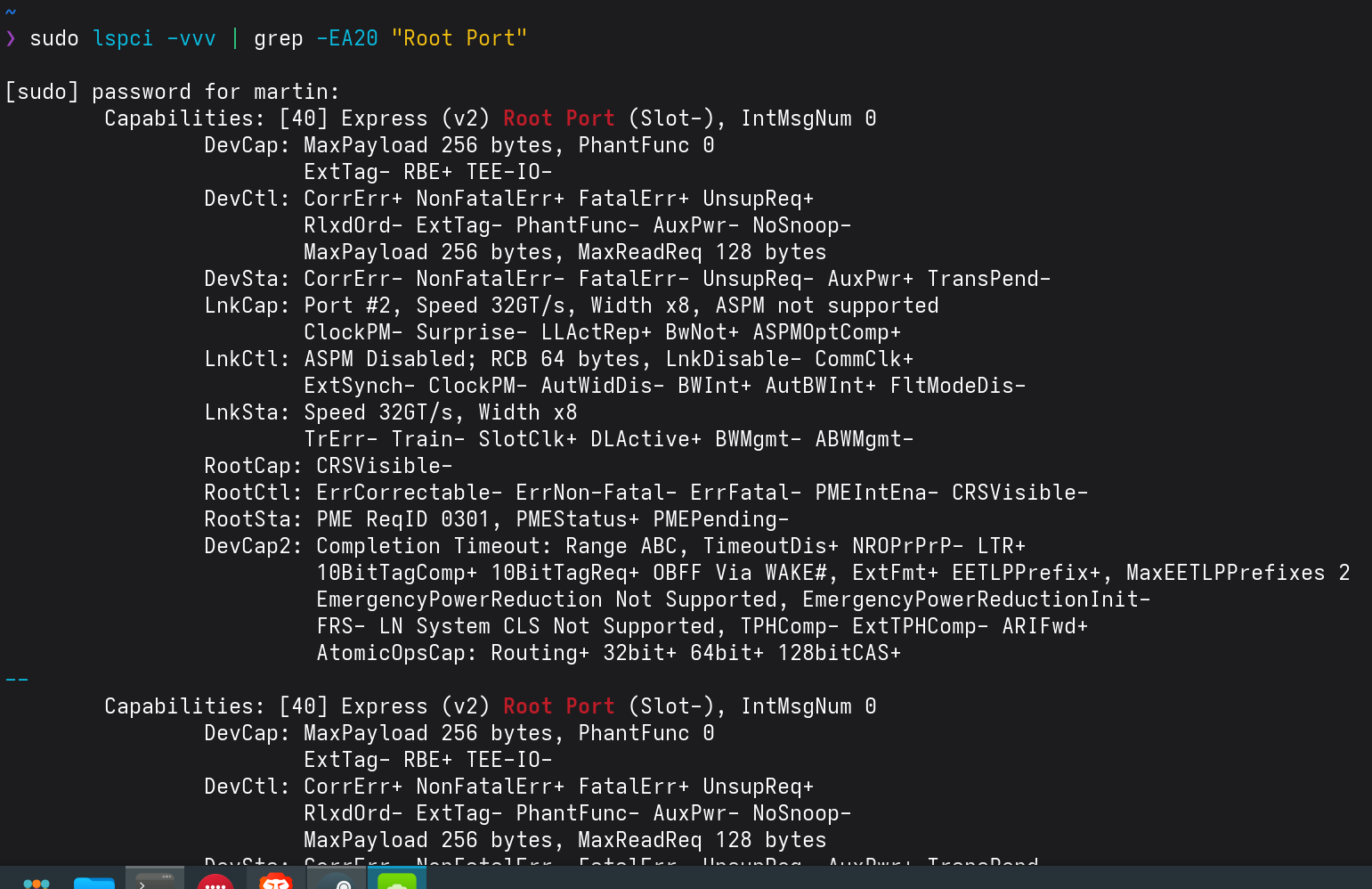
If it says Slot- you are running in Built in (correct) mode, if it says Slot+ its in hot-plug mode .

Re: Linux thread
Be prepared to pay more than for any PC you owned for such pcie analyzer.agendarsky wrote: ↑27 Oct 2025, 17:27actually at my best peak 1.6 times , i was using unstable 100 fps dropping to 60 with 75 hz monitor and steelseries kinzu 500hz.
But i got something , tested both Linux and Windows and its so fucking flaweless. But i want more people to test.
1. Your bios probably use pcie root ports in "Slot Implemented" mode, thats basically hot-plug implementation , (disabling hot-plug doesnt have any effect ) ,in other words , your bios motherboard treats your gpu like its removable deviceuse Built-In for every port possible , copy Setup Question and use f3 to find more results (notepad ++ can help )Code: Select all
Setup Question = Connection Type Help String = Built-In: a built-in device is connected to this rootport. SlotImplemented bit will be clear. Slot: this rootport connects to user-accessible slot. SlotImplemented bit will be set. Token =D21 // Do NOT change this line Offset =336 Width =01 BIOS Default =[01]Slot Options =[00]Built-in // Move "*" to the desired Option *[01]Slot
2. TLP latency, so as you may know, pci-e communicates via tlp which stands for transaction layer packet. basically everything that happens between cpu and gpu, nvme, or any endpoint on the bus travels as one of these. each tlp has a header, a payload, and completion acknowledgement, kind of like a network packet. when gpu sends an interrupt, it’s not a wire pulse anymore, it’s a tiny memory write tlp to cpu address space. when cpu wants to read or write something on gpu, again it builds a tlp, sends it through the fabric, waits for completion.
what decides how fast or “tight” it feels is how many layers those packets pass through before they land. some motherboards have the gpu lanes wired straight into cpu root complex, no middleman. others push them through the pch or some intermediate switch like plx or asm. each hop adds arbitration, routing logic, credit negotiation, every one of them microseconds or tens of nanoseconds. you don’t see it in fps, but it’s there, you feel it in the way motion or aiming settles.
bios settings matter too, because if the root port is marked as “slot implemented”, you’re running through hot-plug logic by default. the os keeps watching presence detect and latch states, sometimes even retrains the link, all that inside the same tlp path. acpi might fire an smi to handle those events, and that short pause is exactly the kind of ghost lag that’s impossible to benchmark but easy to feel.
then there’s msi. message signaled interrupt is literally just another tlp. it’s faster when the board routes it directly to cpu without retranslation, but on some designs where the pcie tree is messy or goes through pch, it can bounce around longer than a legacy irq line. so on clean boards, msi on feels crisp, while on others turning it off gives steadier rhythm. both sides make sense depending on how the traces are laid and how the firmware handles pcie arbitration.
and that’s probably why some boards just “feel” better. same cpu, same gpu, yet one setup responds instantly while another has that heavy unresponsive feel. This will be my next goal, how to actually measure it, i think i will need some standalone device that goes straight into pci-e slot. 100 % convicted this shit is caused by pci-e architecture now.
Ryzen 7950X3D / MSI GeForce RTX 4090 Gaming X Trio / ASUS TUF GAMING X670E-PLUS / 2x16GB DDR5@6000 G.Skill Trident Z5 RGB / Dell Alienware AW3225QF / Logitech G PRO X SUPERLIGHT / SkyPAD Glass 3.0 / Wooting 60HE / DT 700 PRO X || EMI Input lag issue survivor (source removed) 