Re: LG UltraGear 25G590B 25"1080p 1000Hz IPS
Posted: 10 Aug 2026, 05:16
looking forward to a proper review with input lag etc before I make the decision to buy the cha
Who you gonna call? The Blur Busters! For Everything Better Than 60Hz™
https://forums.blurbusters.com/
If this is 2000 px/sec, then we're talking about roughly <2 frames worth of GtG (~<2 ms), which is faster than Pulsar or PG27AQN generation GtG. For LCD, this is bonkers fast!


What's up with reviewers not mentioning panning speed they're using? It's extremely important if you're going to draw conclusions based on ufo test alone. Now that the Sync Track is included, we can at least tell the moving speeds from the ladder density.kyube wrote: ↑12 Aug 2026, 14:19Second review is up!
Third review is up!
Based on previous reviews of this reviewer, I believe this UFO is ~2000 px/s
On ufo test, lower refresh rate OLED looking cleaner than higher refresh rate LCD doesn't mean the OLED is always "better". These tests are designed to demonstrate what the eye sees when tracking moving objects. It doesn't demonstrate what the eye sees when stationary with moving objects or other scenarios. Displays look very different in some of these.Baron of Sun wrote: ↑13 Aug 2026, 14:10540 Hz OLED looks still better so what's the point of higher refresh LCD? Is it the price only?
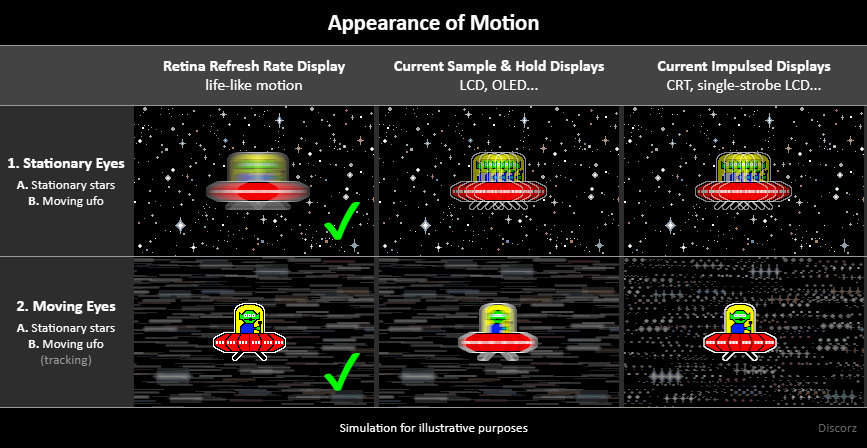
Is the stationary eyes situation really that important for perceived image quality in comparison to the eye tracking in your opinion? I remember the video from someone showing that you need several ten thousands of Hz to get a life like image for every speed of moving objects (was it 20000 Hz or so?). Does that apply to both stationary and tracking eyes?Discorz wrote: ↑13 Aug 2026, 15:35On ufo test, lower refresh rate OLED looking cleaner than higher refresh rate LCD doesn't mean the OLED is always "better". These tests are designed to demonstrate what the eye sees when tracking moving objects. It doesn't demonstrate what the eye sees when stationary with moving objects or other scenarios. Displays look very different in some of these.Baron of Sun wrote: ↑13 Aug 2026, 14:10540 Hz OLED looks still better so what's the point of higher refresh LCD? Is it the price only?
I don't blame you. Not many people are aware of this. Testing of this is yet to come. Almost none of the reviewers are even mentioning. Only recently TFTCentral and Monitors Unboxed started emphasizing it.
However, main benefits of higher refresh rates are well known:
- better motion smoothness/less stutter (more motion blur during eye gazing),
- better motion clarity (less motion blur during eye tracking), maybe not much better in this case with 1000Hz LCD vs 500Hz OLED,
- better latency or responsiveness,
- and more
This is hard to answer. No one ever proved which of the scenario is more important globally, and yet the eye tracking somehow became mainstream way to test displays. Which can be fine if you're mostly eye tracking, but I doubt it. Realistically, we are most likely doing a mix of various eye-movement vs content-movement combinations. So it would be logical to test multiple scenarios, not just one.Baron of Sun wrote: ↑14 Aug 2026, 00:39Is the stationary eyes situation really that important for perceived image quality in comparison to the eye tracking in your opinion? I remember the video from someone showing that you need several ten thousands of Hz to get a life like image for every speed of moving objects (was it 20000 Hz or so?). Does that apply to both stationary and tracking eyes?
One related to strobing:Discorz wrote: ↑04 Jun 2025, 01:26It's difficult to tell what are the exact ratios of eye/content speed vs eye/content direction, as these likely vary between individuals and different types of content. It's currently woefully under-researched territory as Chief says. The data would be very useful in determining the benefits of higher refresh rates and flicker.
There are a bunch of Tobii Eye Tracker videos online tho. I encourage everyone to try and analyse just 10 seconds of footage. Hard for head to wrap around it. But I'd dare to assume the most common case is "scenery scanning" which is quickly moving eyes and pausing onto a moving/static object for focus. A little bit of everything is happening there. 100% eye-tracking or 100% fix-gazing are not the only combination we encounter.
One might wonder then how is it fair to do only the pursuit camera (100% eye tracking simulation) for testing? - It's not. Pursuing an moving object with solid-color background like on testufo tests only for motion clarity. Barely anyone tests for motion blurrity (apart from "faulty" stationary camera tests). There are obviously many combinations, but it would be nice to see just the very basic ones in reviews.
Blur Busters have estimated the approximate thresholds for both scenarios. For motion blur (clarity during tracking) it's roughly 1000Hz, while the stroboscopic effect (blurrity during gazing) is ~10x harder to beat at ~10000Hz. It's multiple factor dependent, but motion speed mainly. Both keep improving beyond the thresholds for more extreme scenarios. So 20+kHz sounds about right.Discorz wrote: ↑13 Aug 2025, 16:32It all comes down to eye movement and content movement correlation. You just need to figure out how factors such as refresh/frame/visibility rate/time, motion speed and its direction affect the visual persistence. Perhaps start with the infographic bellow. The "Retina Refresh Rate" column is reference for life-like motion. For one to know whether they'd benefit from strobing or not, they must start paying attention to how their eyes/content move in relation to each other.
Rule of thumb is that flickering benefits eye tracking specifically. The more you deviate from perfect eye tracking the less benefit you'll notice. You can have as much motion as you want but if eyes don't track/move strobing will have no beneficial effect. I don't want to name exact gaming scenarios because each most likely includes a little bit of everything (and is why brute sample rate improvements are better). But it is true that some require more eye tracking than others, so logically strobing would be beneficial. To figure out the 1/2/A/B ratios, speeds and directions of a scene one would need to analyse some footage (Tobii Eye Tracker or similar) and spit out the data. Then we'd know what's really going on.
And ofcourse this only regards motion performance, there are other factors that play a role such as latency/reaction times.
