
15.625 is exactly windows 11 default timer resolution. Windows 11 has a dynamic timer resolution where each app will wake up to do work at an independent interval. What you might be seeing is background processes waking up every 15.625ms to do work, and that is what's causing that issue.
Enable "GlobalTimerResolutionRequest" in your registry. And see if that interval changes.
CS2 Input Lag Explained - The Monolithic 64 Hz Client Simulation Tick Stalls the Render Thread
-
soul4kills
- Posts: 102
- Joined: 01 Aug 2025, 01:30
-
unconnected
- Posts: 62
- Joined: 08 Oct 2023, 19:52
Re: CS2 Input Lag Explained - The Monolithic 64 Hz Client Simulation Tick Stalls the Render Thread
Thanks for the input, I've tried with global timer resolution request on and it's even more clear now.soul4kills wrote: ↑Yesterday, 14:4115.625 is exactly windows 11 default timer resolution. Windows 11 has a dynamic timer resolution where each app will wake up to do work at an independent interval. What you might be seeing is background processes waking up every 15.625ms to do work, and that is what's causing that issue.
Enable "GlobalTimerResolutionRequest" in your registry. And see if that interval changes.
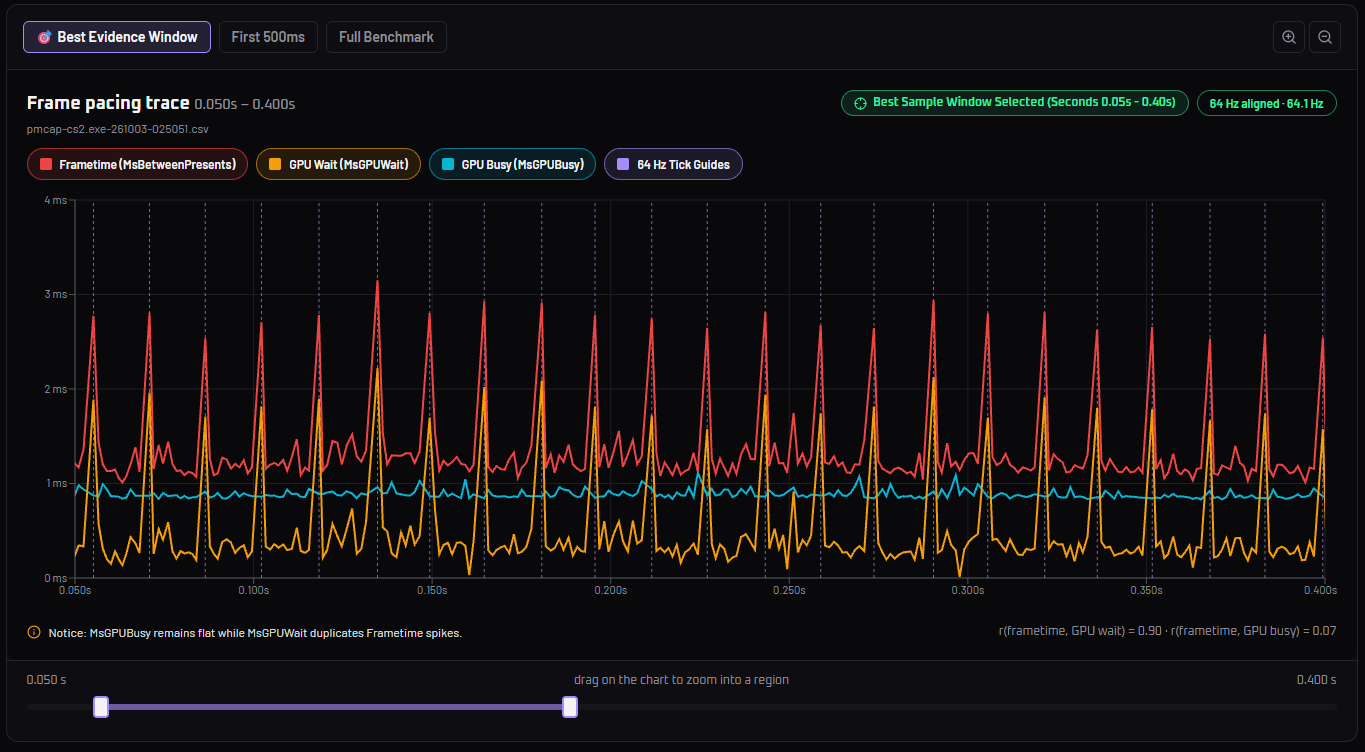
Btw gpu wait spikes proves that the engine locks render pipeline when processing a tick
-
soul4kills
- Posts: 102
- Joined: 01 Aug 2025, 01:30
Re: CS2 Input Lag Explained - The Monolithic 64 Hz Client Simulation Tick Stalls the Render Thread
Looks like your gpu stabilized. GPU busy is when your gpu is drawing out the scene. Doesn't look as erratic as your previous screenshot. It's also running at under 1ms. Before it was running above 1ms.
-
cuaderno
- Posts: 20
- Joined: 02 Feb 2025, 20:26
Re: CS2 Input Lag Explained - The Monolithic 64 Hz Client Simulation Tick Stalls the Render Thread
Assuming this is correct, what should players do regarding settings to minimize the impact? fps_max 400, fps_max 0, gysnc+vsync?
A consideration when testing is that cs2 frame cap works differently depending on wheter you use a number too low or if you are running an offline server.
A consideration when testing is that cs2 frame cap works differently depending on wheter you use a number too low or if you are running an offline server.
-
Moontrance
- Posts: 8
- Joined: 27 Feb 2025, 07:41
Re: CS2 Input Lag Explained - The Monolithic 64 Hz Client Simulation Tick Stalls the Render Thread
Fps max question is valid, seems like you didn't use any limiter cuz normal frame time is around 1ms. Can you redo your test with fps_max 320? Assuming spike is around 3ms, you should have stable 333fps on average. But my guess those spikes just will be higher, cuz limiter is kinda broken in this game. Probably worth another test with external limiters like nvcp or rtss, reflex on/off, etc.unconnected wrote: ↑Yesterday, 19:57Thanks for the input, I've tried with global timer resolution request on and it's even more clear now.