Re: Question: Input Lag Gradient Effects of Top/Center/Botto
Posted: 15 Feb 2018, 07:31
Is real-time scanout a must for VRR mode?Chief Blur Buster wrote: Buffer-and-accelerated-scanout.
Who you gonna call? The Blur Busters! For Everything Better Than 60Hz™
https://forums.blurbusters.com/
Is real-time scanout a must for VRR mode?Chief Blur Buster wrote: Buffer-and-accelerated-scanout.
Not always, but it's very strongly recommended. At least for top-Hz mode.KKNDT wrote:Is real-time scanout a must for VRR mode?
Chief Blur Buster wrote:
Most VRR monitors behave as realtime scanout at their normal high-Hz VRR mode -- basically, 240Hz VRR monitors have 1/240sec scanout, no matter what the current refresh interval is (e.g. 48Hz, 100Hz, etc). The signal is constant scanrate, and constant pixel clock, just that the blanking interval (essentially a variable size Vertical Total -- but being done automatically between the graphics card and monitor) essentially varies in realtime to pad time between refresh cycles.
Some VRR monitors exhibit "partial-buffer-and-accelerated-scanout" behaviour when you use a lower-Hz lower-dotclock VRR signal from a computer (e.g. A 120Hz-max VRR signal instead of a 144Hz-max or 240Hz-max VRR signal). Basically the user might switch to a lower refresh rate, and that becomes the new max Hz.
Other VRR monitors will do realtime scanout (e.g. slow scanout velocity) for lower-max-Hz VRR modes.
I think it really depends on panel's capability and ease of engineering. But for PC eSports will only tolerate realtime scanout (for VSYNC OFF especially) -- otherwise the "feel" is odd. They're very sensitive to aimfeel problems. Fortunately, they will typically only use max-Hz, so many manufacturers can just get away with supporting realtime synchronous scanout (panel scanout fully in sync with signal scanout). And not all eSports enables VRR mode -- but if they do -- it has to be realtime scanout where possible.
Monitor manufacturers find it difficult to reprogram overdrive algorithms for a different panel scanout velocity, also refresh interval can affect the appearance of overdrive, and need adjustments for a different refresh interval (that's why variable-refresh overdrive is so difficult to engineer)
Actully, my job is related to electrical and automation and has nothing to do with what we are talking about.Chief Blur Buster wrote: Question -- Are you a casual gamer, or competition/eSports player, or a student, or a monitor engineer, or? Your questions match the pattern of questions coming from a 60Hz monitor engineer who's beginning to go into gaming monitor design for the first time, and trying to understand the complex needs of eSports game players of the worldwide market. Engineers are certainly welcome here, our forum advice is always free, we believe in "lifting all boats". (expression saying) I'm just curious what brings you to Blur Busters Forums? Cheers!

Thanks for the compliment!KKNDT wrote:Blurblusters is a very famous site in this filed, which is a fact that I know many years ago. But I only used your online test and read your published articles. It's Jorimt's G-SYNC 101 test which brings me to this forums, and its your professtional posts caught my attraction and made me settled down. The real treasure lies in the forums.
Some sites only talk about things by feeling, such as <How do G-SYNC fix stutter?>. Blurblusters have the ability explan almost every things in theory, and can even translate something into mathematical formula. (Blurblusters' LAW)
What I have learnt here in the recent 2 months is almost doubled what I have learnt from other sites in the past 1 year!
Chief Blur Buster wrote:Oh.... and another thing.
I’d like to add an observation that my web statistics show that 9.6% of visitors to TestUFO are from China.
This is unusually big for one country, they are extremely interested in Blur Busters.
It seems Chinese manufacturers seem to use TestUFO for testing their domestically-manufactured gaming monitors.
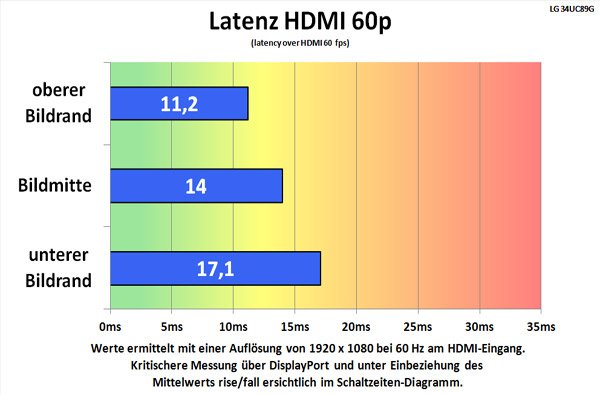
TestUFO has become a standard tool for motion test. A good (but incomplete) attempt.KKNDT wrote:I collect some lag numbers from RTINGS and Display Corner and made some simple calculation to see if the monitor uses asymmetry Scanout