Page 2 of 2
Re: Monitor colors & response time?
Posted: 24 Feb 2023, 12:05
by roz133
Chief Blur Buster wrote: ↑23 Feb 2023, 05:40
roz133 wrote: ↑23 Feb 2023, 04:41
Sorry to necro this thread but will changing these rgb values increase input lag at all? My eyes can handle the screen comfortably for longer when the blue is turned down and the image is a lot more reddish but I want to make sure there is 0 negative effect on input lag or gaming performance (however small the effect may be).
There's no electronic lag change, assuming GtG pixel response of the color channels are the asme.
However, human lag varies from human to human -- you might have slower human reaction time without blue, for example. That, I can't really answer for you -- you will have to test out for yourself.
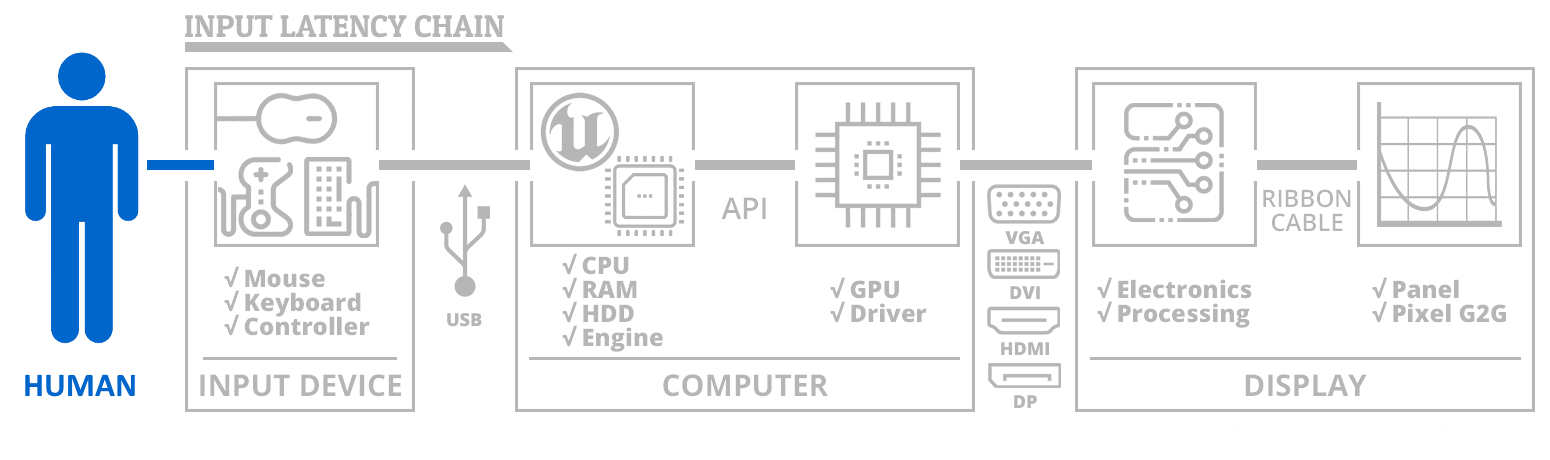
The human is part of the input lag chain.
After further testing I decided not to use a lower blue value in-game as I was slowing down in reacting. I still want to use it for aim training without straining my eyes so I was wondering if you know whether Windows night light has any input lag penalty. Please let me know
Re: Monitor colors & response time?
Posted: 24 Feb 2023, 13:44
by RealNC
roz133 wrote: ↑24 Feb 2023, 12:05
After further testing I decided not to use a lower blue value in-game as I was slowing down in reacting. I still want to use it for aim training without straining my eyes so I was wondering if you know whether Windows night light has any input lag penalty. Please let me know
It does the same exact thing. There's no difference.
Re: Monitor colors & response time?
Posted: 25 Feb 2023, 04:04
by imprecise
roz133 wrote: ↑23 Feb 2023, 07:42
Thanks for the reply. I hadn't actually thought of that and even when I read your post I didn't that was a possibility tbh and when I tested it out a bit it does seem like I react noticeably slower with blue down all the way

A neuroscientist would agree with your assessment, as the blue light from screens has been found to put the brain into a more alert state.
https://www.health.harvard.edu/staying- ... -dark-side
Re: Monitor colors & response time?
Posted: 26 Feb 2023, 08:48
by roz133
RealNC wrote: ↑24 Feb 2023, 13:44
roz133 wrote: ↑24 Feb 2023, 12:05
After further testing I decided not to use a lower blue value in-game as I was slowing down in reacting. I still want to use it for aim training without straining my eyes so I was wondering if you know whether Windows night light has any input lag penalty. Please let me know
It does the same exact thing. There's no difference.
I'm sorry if my question wasn't clear. I understand both will affect my human ability to react. I don't mind that human response delay in aim trainers but it's harder for me to keep swapping between color settings through the monitor controls if I'm going to use two settings for game/training. So I was wondering if I could use windows night light for training alone without an additional os/hardware level input lag penalty. Asking mainly coz when I used f.lux a long time back, that definitely added some input lag.
Re: Monitor colors & response time?
Posted: 12 May 2023, 12:54
by Blacksmith
Chief Blur Buster wrote: ↑23 Feb 2023, 05:40
roz133 wrote: ↑23 Feb 2023, 04:41
Sorry to necro this thread but will changing these rgb values increase input lag at all? My eyes can handle the screen comfortably for longer when the blue is turned down and the image is a lot more reddish but I want to make sure there is 0 negative effect on input lag or gaming performance (however small the effect may be).
There's no electronic lag change, assuming GtG pixel response of the color channels are the asme.
However, human lag varies from human to human -- you might have slower human reaction time without blue, for example. That, I can't really answer for you -- you will have to test out for yourself.
The human is part of the input lag chain.
Does this apply to the blue light filter setting built into the monitor? Or does it add input lag because it is a separate feature ?
Re: Monitor colors & response time?
Posted: 12 May 2023, 16:03
by Chief Blur Buster
Blacksmith wrote: ↑12 May 2023, 12:54
Does this apply to the blue light filter setting built into the monitor? Or does it add input lag because it is a separate feature ?
It's just a digital adjustment that the scaler is already doing in realtime. Adjusting a setting such as "Contrast" also has the same latency as Low Blue Light filter. In other words -- usually no added lag.
The Low Blue Light on Windows theoretically has a bit more lag, but none is observed, probably due to the fact that it's baked into the operating system color processing system (.icc etc)