Page 2 of 2
Re: Does using a 2nd monitor (only for web browsing) affect input lag while gaming?
Posted: 05 Jun 2020, 01:18
by Chief Blur Buster
nursejoy wrote: ↑05 Jun 2020, 01:14
So basically I can have a 2nd monitor with 100 frames of input delay but my main gaming monitor will still run at its lowest lag?
Correct if in FSE mode, due to OS issue, and as long as you're making sure background software isn't sapping your resources (CPU and GPU).
If you do not use FSE for primary, the multimonitor lag is at the OS level (one refresh cyle of the slowest monitor will be your latency jitter / latency error margin range) -- but and not related to the monitor's own respective lags. Lag changes of the 2nd monitor (swapping to less laggy / more laggy) will not change the OS lag in non-FSE.
Bottom line: It's Microsoft Windows fault for adding lag (at the CPU/GPU level) to multimonitor. The OS-created multimonitor lags are are independent of the display lag of the monitors themselves.
Re: Does using a 2nd monitor (only for web browsing) affect input lag while gaming?
Posted: 17 May 2021, 16:16
by hejonar
Hello, I would like to bump this a bit.
Does it matter which monitor is main(1st) one? I wanted to use my big LCD as main monitor and old PVM CRT as secondary monitor. In normal situations I would just use browser and office with either both monitors on or just LCD on. But from time to time I would like to watch old movie(colors) or play older game(colors, input lag, pixel effects) and then I would prefer to use PVM CRT. I could even turn LCD off just for that, but would it matter? I am mainly concerned about input delay on CRT as I would like to have it as low as with just single monitor connected.
On a sidenote, I would also like to ask about one more thing. My GPU has DVI-D, HDMI and DisplayPort output and PVM CRT has just VGA and DVI-A input. Would using converter cause any issues, either with quality of picture or input lag? Which of converters would be best, DVI-D/HDMI/DisplayPort?
Re: Does using a 2nd monitor (only for web browsing) affect input lag while gaming?
Posted: 18 May 2021, 12:05
by JDoe
Just disable second monitor while gaming (win + P). I do so all the time enabling second display only when needed.
Re: Does using a 2nd monitor (only for web browsing) affect input lag while gaming?
Posted: 18 May 2021, 15:43
by hejonar
Thanks, what about adapter/converter? I know there are different ones for different ports(as I said I got DP, HDMI, DVI-DP on GPU) and that there are active and passive ones but I am wondering mainly about input lag here. It's obvious that since it has to be converted from digital to analog then there will be some delay but how big it's going to be and how much would type and quality of converter matter?
Re: Does using a 2nd monitor (only for web browsing) affect input lag while gaming?
Posted: 25 Aug 2021, 06:05
by majnu
Chief Blur Buster wrote: ↑02 Jun 2020, 17:06
Yes for two reasons
(A) Windows compositor doesn't have independent compositors for separate monitors (OS induced)
(B) Screen activity in other apps can slow down the 3D of the main monitor (performance)
See
viewtopic.php?f=10&t=6965
If you want to minimize this problem, use fullscreen exclusive (not borderless) for your 240Hz primary, and make sure that any browser animations have stopped (disable ads). Static pages combined with FSE games, is your best bet. Or just minimize windows until you need to show a walkthrough guide / walkthrough video or such.
Thanks for the explanation. It explains why I had latency issues in game even though I had high FPS whilst watching video content on my second monitor. I noticed this started to happen after I bought an RTX3070 which unfortunately doesn't have a DVI-D output, so I had to use the HDMI output to my Asus VG278H which obviously restricts it to 60Hz.
It's weird because the latency was something I could feel and luckily I could monitor it in Battlefield using it's in-game performance monitor feature.
1) I didn't want to play in Fullscreen/Fullscreen Exclusive mode as I ALT+TAB whilst gaming and I didn't want to have the window minimize all the time. Although this did also fix the problem.
2) Buying the same monitor with matching refresh rate was off the table due to costs.
3) I settled on buying an Active Dual Link DVI-D to Display port cable (Bizlink XT625). It only cost £30 new and I thought it was a good deal compared to others online. This allowed me to connect my monitor to the graphics card's Display Port and select the 120Hz max refresh rate. The latency has much improved although ideally I should use matching monitors unless Windows changes their DWM as you described.
Re: Does using a 2nd monitor (only for web browsing) affect input lag while gaming?
Posted: 25 Aug 2021, 19:56
by Chief Blur Buster
majnu wrote: ↑25 Aug 2021, 06:05
1) I didn't want to play in Fullscreen/Fullscreen Exclusive mode as I ALT+TAB whilst gaming and I didn't want to have the window minimize all the time. Although this did also fix the problem.
2) Buying the same monitor with matching refresh rate was off the table due to costs.
3) I settled on buying an Active Dual Link DVI-D to Display port cable (Bizlink XT625). It only cost £30 new and I thought it was a good deal compared to others online. This allowed me to connect my monitor to the graphics card's Display Port and select the 120Hz max refresh rate. The latency has much improved although ideally I should use matching monitors unless Windows changes their DWM as you described.
Sometimes the EDIDs are slightly different (120.001 Hz versus 120.034 Hz) so overriding the EDIDs with exact numbers would be ideal.
If you use outputs from the exact same GPU, and override the monitor's EDIDs with the exact same numbers in ToastyX CRU or NVIDIA Custom Resolution.
...Then NVIDIA GPU automatically synchronizes both of their outputs to be perfectly synchronous.
And it's essentially a simultaneous VSYNC event for both monitors.
And consequently, the single-Hz Windows compositor doesn't slew out of sync with one of the monitors.
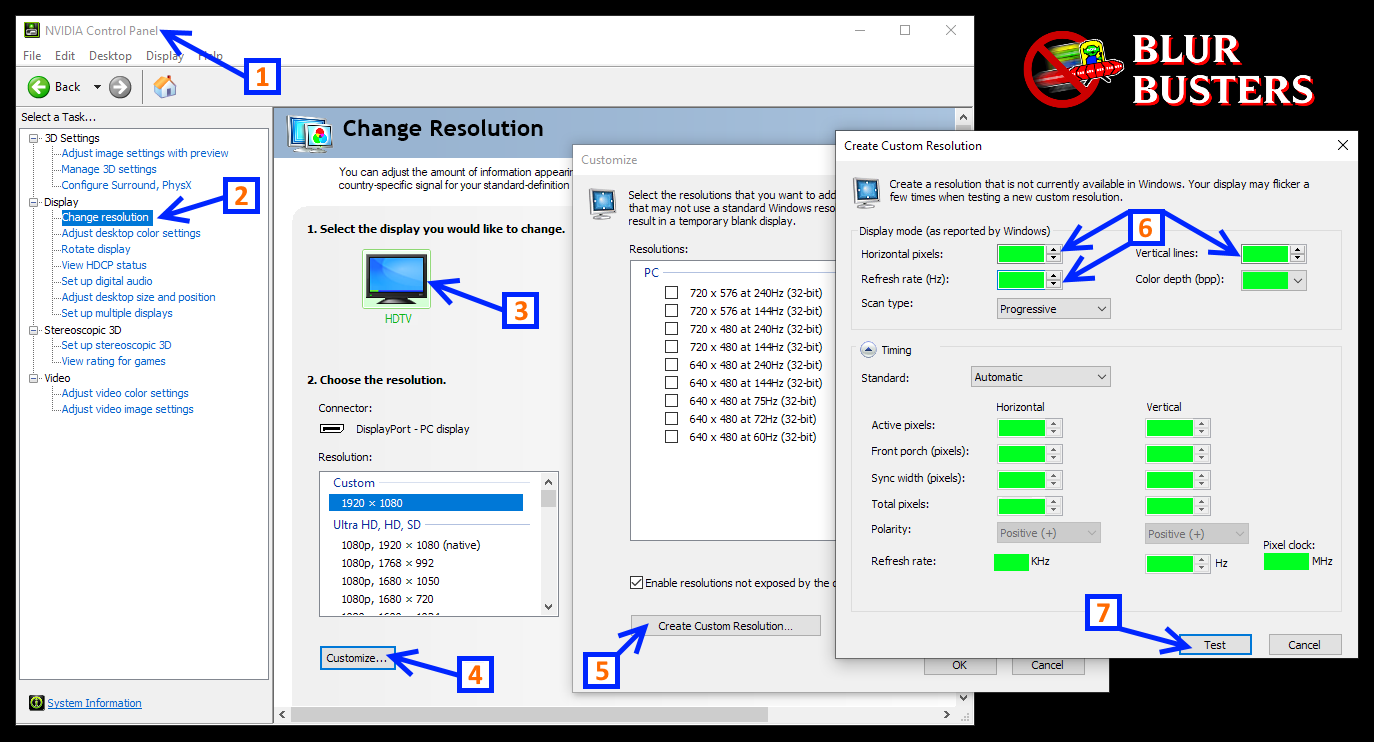
Just edit the "Hz" number while using "Automatic", to EDID-override what the monitor's plug-and-play signalling does, so both monitors are on
exactly the same Pixel Clock, necessary for perfectly synchronous GPU output for multimonitor running in non-FSE.
Re: Does using a 2nd monitor (only for web browsing) affect input lag while gaming?
Posted: 30 Aug 2021, 13:53
by Eonds
Basically no matter what you do, having a 2nd monitor affects input lag. How much, it depends on a lot of factors. Just don't connect two monitors to the same system when playing, or if you're okay with the lag, GREAT.