
I have had experience using rx580 with 390hz. It probably works without problems on older versions of the driver (before April or previously). For 6600xt I had to update the driver and 390hz was gone.
Acer 390Hz monitor - XV252QF
-
pasutazame
- Posts: 3
- Joined: 19 May 2021, 01:10
Re: Acer 390Hz monitor - XV252QF
-
ItwasLuck
- Posts: 57
- Joined: 20 May 2020, 03:59
Re: Acer 390Hz monitor - XV252QF
Looking to pick this up, has the VRB turning off automatically been fixed?
Also, how is the motion clarity VS something like the Alienware AW2521H (Backlight Strobing)
I have mine set at 144Hz @Pulse Width of 55 and the clarity is seriously amazing.
Only interested in performance with ULMB on, what’s the crosstalk like @390Hz BFI? Is the sweet spot still BFI @144Hz or can we go to 240Hz and not have cross talk. This is really what would sell me the monitor.
Also, anyone know if there are any OSD benefits to going with Acer vs the off brand one?
PSA: The Acer 390Hz is being sold for only 350 bucks now.
Also, how is the motion clarity VS something like the Alienware AW2521H (Backlight Strobing)
I have mine set at 144Hz @Pulse Width of 55 and the clarity is seriously amazing.
Only interested in performance with ULMB on, what’s the crosstalk like @390Hz BFI? Is the sweet spot still BFI @144Hz or can we go to 240Hz and not have cross talk. This is really what would sell me the monitor.
Also, anyone know if there are any OSD benefits to going with Acer vs the off brand one?
PSA: The Acer 390Hz is being sold for only 350 bucks now.
-
kameCS
- Posts: 30
- Joined: 28 Oct 2022, 09:21
Re: Acer 390Hz monitor - XV252QF
hi,
i have had this monitor for several weeks mainly to play CSGO. i read several articles and watch a lot of videos to get the best experience possible, i kept 2 settings to get a crisp and responsive game
the first, my favorite, resolution 1920x1440 4:3 stretched, vsync + gsync, fps_max 0, low latency ultra
the second, my PC work hard, résolution 1920x1440 4:3 stretched, fps_max 0
unfortunately I have a problem since this week gsync no longer works with the resolution 1920x1440
I reinstalled steam, several versions of the nvidia driver with DDU and finally a new installation of windows 10 but the framerate of the screen remains stuck on 360
do you have a proposal to help me find gsync under CSGO in 1920x 1440? thank you
i have had this monitor for several weeks mainly to play CSGO. i read several articles and watch a lot of videos to get the best experience possible, i kept 2 settings to get a crisp and responsive game
the first, my favorite, resolution 1920x1440 4:3 stretched, vsync + gsync, fps_max 0, low latency ultra
the second, my PC work hard, résolution 1920x1440 4:3 stretched, fps_max 0
unfortunately I have a problem since this week gsync no longer works with the resolution 1920x1440
I reinstalled steam, several versions of the nvidia driver with DDU and finally a new installation of windows 10 but the framerate of the screen remains stuck on 360
do you have a proposal to help me find gsync under CSGO in 1920x 1440? thank you
Last edited by kameCS on 03 Nov 2022, 10:32, edited 1 time in total.
current: PG27AQN 360Hz
before: AW2524HF | PG248QP | AW2523HF | PG27AQDM | XL2566K | XV252QF | XG27AQM | VG259QM | 34GL750
before: AW2524HF | PG248QP | AW2523HF | PG27AQDM | XL2566K | XV252QF | XG27AQM | VG259QM | 34GL750
-
RealNC

- Site Admin
- Posts: 4654
- Joined: 24 Dec 2013, 18:32
- Contact:
Re: Acer 390Hz monitor - XV252QF
But you said you use "fpx_max 360". Of course the framerate is gonna be 360 then.
Steam • GitHub • Stack Overflow
The views and opinions expressed in my posts are my own and do not necessarily reflect the official policy or position of Blur Busters.
The views and opinions expressed in my posts are my own and do not necessarily reflect the official policy or position of Blur Busters.
-
kameCS
- Posts: 30
- Joined: 28 Oct 2022, 09:21
Re: Acer 390Hz monitor - XV252QF
I cap at 360fps max but the framerate is variable with gsync + fast sync activated, it works perfectly with the other resolutions except in 1920 1440 since 2 days
I made a short video to show you the problem
https://www.youtube.com/watch?v=TfTOT7CKNWE
current: PG27AQN 360Hz
before: AW2524HF | PG248QP | AW2523HF | PG27AQDM | XL2566K | XV252QF | XG27AQM | VG259QM | 34GL750
before: AW2524HF | PG248QP | AW2523HF | PG27AQDM | XL2566K | XV252QF | XG27AQM | VG259QM | 34GL750
-
kameCS
- Posts: 30
- Joined: 28 Oct 2022, 09:21
Re: Acer 390Hz monitor - XV252QF
after trying everything, I found how to solve my problem, I will share the solution, even if few players play in 1920x1440 with gsync + fast synckameCS wrote: ↑28 Oct 2022, 09:34hi,
i have had this monitor for several weeks mainly to play CSGO. i read several articles and watch a lot of videos to get the best experience possible, i kept 2 settings to get a crisp and responsive game
the first, my favorite, resolution 1920x1440 4:3 stretched, vsync + gsync, fps_max 0, low latency ultra
the second, my PC work hard, résolution 1920x1440 4:3 stretched, fps_max 0
unfortunately I have a problem since this week gsync no longer works with the resolution 1920x1440
I reinstalled steam, several versions of the nvidia driver with DDU and finally a new installation of windows 10 but the framerate of the screen remains stuck on 360
do you have a proposal to help me find gsync under CSGO in 1920x 1440? thank you
just go to the csgo folder, csgo.exe > property > compatibility > disable fullscreen optimizations
Last edited by kameCS on 03 Nov 2022, 10:32, edited 1 time in total.
current: PG27AQN 360Hz
before: AW2524HF | PG248QP | AW2523HF | PG27AQDM | XL2566K | XV252QF | XG27AQM | VG259QM | 34GL750
before: AW2524HF | PG248QP | AW2523HF | PG27AQDM | XL2566K | XV252QF | XG27AQM | VG259QM | 34GL750
-
SheerFinesse
- Posts: 9
- Joined: 01 Nov 2022, 01:43
Re: Acer 390Hz monitor - XV252QF
Hello, I’m new to this forum and have a few questions about this monitor.
I mainly play Fortnite and can really only consistently keep 240fps.
Should I have my monitor set at 390hz and cap my game to 240fps? Or should I lower my hz to match my frame rate.
Currently I’m playing on max brightness, max sharpness, OD extreme, VRR off, VRB off, 390hz, while calling my in game fps at 240.
I have thought about maybe even trying to use strobing at 240hz. I understand I can’t strobe at 390hz because I cannot maintain 390fps.
What monitor settings will give me the best advantage?
I mainly play Fortnite and can really only consistently keep 240fps.
Should I have my monitor set at 390hz and cap my game to 240fps? Or should I lower my hz to match my frame rate.
Currently I’m playing on max brightness, max sharpness, OD extreme, VRR off, VRB off, 390hz, while calling my in game fps at 240.
I have thought about maybe even trying to use strobing at 240hz. I understand I can’t strobe at 390hz because I cannot maintain 390fps.
What monitor settings will give me the best advantage?
-
RealNC
- Site Admin
- Posts: 4654
- Joined: 24 Dec 2013, 18:32
- Contact:
Re: Acer 390Hz monitor - XV252QF
For strobing you should use 240Hz. With 390Hz you're better off enabling VRR instead to get rid of tearing for free.SheerFinesse wrote: ↑01 Nov 2022, 01:51Should I have my monitor set at 390hz and cap my game to 240fps? Or should I lower my hz to match my frame rate.
...
I have thought about maybe even trying to use strobing at 240hz. I understand I can’t strobe at 390hz because I cannot maintain 390fps.
Steam • GitHub • Stack Overflow
The views and opinions expressed in my posts are my own and do not necessarily reflect the official policy or position of Blur Busters.
The views and opinions expressed in my posts are my own and do not necessarily reflect the official policy or position of Blur Busters.
-
SheerFinesse
- Posts: 9
- Joined: 01 Nov 2022, 01:43
Re: Acer 390Hz monitor - XV252QF
VRR will add so much input delay right?RealNC wrote: ↑01 Nov 2022, 08:16For strobing you should use 240Hz. With 390Hz you're better off enabling VRR instead to get rid of tearing for free.SheerFinesse wrote: ↑01 Nov 2022, 01:51Should I have my monitor set at 390hz and cap my game to 240fps? Or should I lower my hz to match my frame rate.
...
I have thought about maybe even trying to use strobing at 240hz. I understand I can’t strobe at 390hz because I cannot maintain 390fps.
My question is… is it better to play 390hz at 240fps or to play 240hz at 240fps and possibly strobe?
I want the best input delay and performance to give me the biggest advantage possible
-
Chief Blur Buster

- Site Admin
- Posts: 12291
- Joined: 05 Dec 2013, 15:44
- Location: Toronto / Hamilton, Ontario, Canada
- Contact:
Re: Acer 390Hz monitor - XV252QF
Partial myth.
VRR has very little lag penalty if your VRR range is bigger than framerate range.
The lag complaints of VRR is mainly because of framerate ranges bigger than VRR ranges. Like 300fps CS:GO on 240Hz VRR. But here, we're talking about 390 Hz.
When we're talking about this Acer 390 Hz monitor, your framerate ranges usually are inside the VRR range. The lag penalty virtually disappears. And G-SYNC becomes esports quality.
Do you prefer best absolute latency or lowest latency-variability? Sometimes those are diametrically opposing.SheerFinesse wrote: ↑01 Nov 2022, 16:26I want the best input delay and performance to give me the biggest advantage possible
Sometimes de-stuttering or de-blurring decreases human reaction time bigger than the approximate lag penalty (0.5/390sec = barely over 1ms lag penalty for either strobing technology or VRR technology).
Remember, the latency chain includes the HUMAN.... and the HUMAN has a reaction time latency that can be slowed down by extra display motion blur (fixed by strobing), or by extra stutters (fixed by VRR). Never make the mistake of forgetting about the HUMAN!
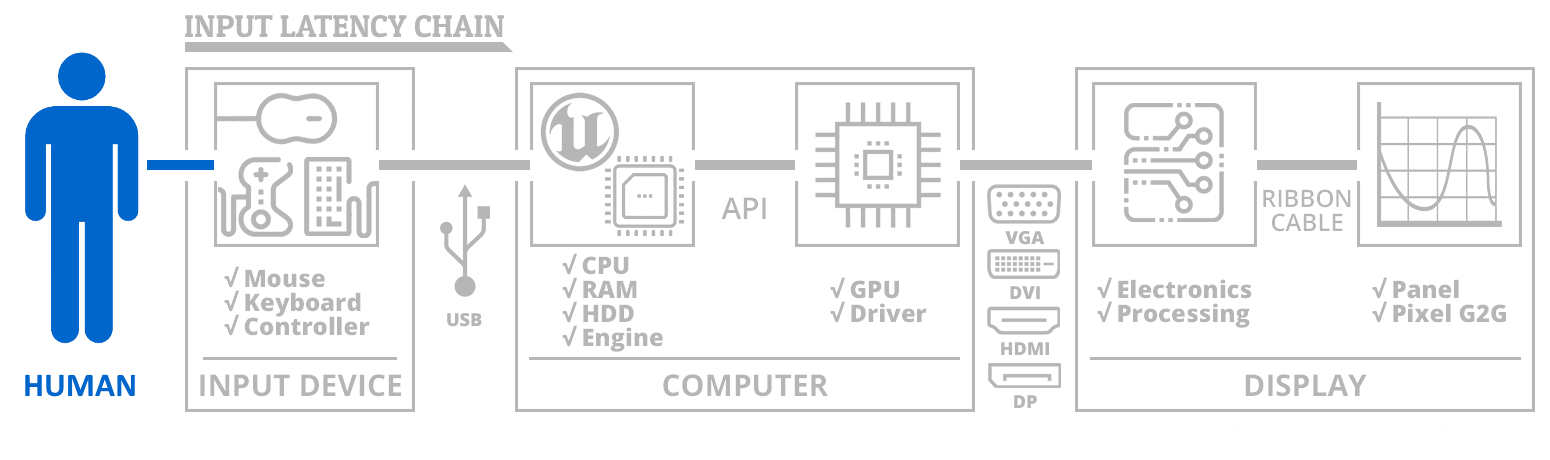
Especially in games without crosshairs -- Rocket League, DOTA2, etc. -- then eye-tracking-based motion blur (www.testufo.com/eyetracking) can be a significant slowdown in human reaction time for certain gaming tactics.
Head of Blur Busters - BlurBusters.com | TestUFO.com | Follow @BlurBusters on: BlueSky | Twitter | Facebook

Forum Rules wrote: 1. Rule #1: Be Nice. This is published forum rule #1. Even To Newbies & People You Disagree With!
2. Please report rule violations If you see a post that violates forum rules, then report the post.
3. ALWAYS respect indie testers here. See how indies are bootstrapping Blur Busters research!