
NVIDIA G-Sync Pulsar monitor - Asus ROG Strix XG27AQNGV
-
passballtotucker
- Posts: 17
- Joined: 09 Feb 2022, 18:40
Re: NVIDIA G-Sync Pulsar monitor - Asus ROG Strix XG27AQNGV
120hz is very good. I can up the pulse width from 20 to 30 and it I think it still looks a little clearer than 20 at 60hz. Plus there's no flickering. I think this is where I'll keep the monitor, using lossless scaling for any games that can't do 120hz.
-
liquidshadowfox
- Posts: 288
- Joined: 05 Nov 2020, 14:03
Re: NVIDIA G-Sync Pulsar monitor - Asus ROG Strix XG27AQNGV
Honestly I think ULMB 2 @ 120 hz proves there's room to improve Gsync pulsar performance. I'm playing wuthering waves with maxed out graphic settings and when I go to a location where the fps is "somewhat" stable I can clearly pan the camera around and everything looks smooth in motion consistently despite the fact that ULMB 2 cannot use compensation pulses and it's really hard to notice any crosstalk.
I know ULMB 2 is clearer because of it's difference in implementation vs gsync pulsar but what I'm arguing is that the Gsync pulsar algorithm that decides whether it should change flicker frequency and use compensation pulses might be too aggressive. If they loosen up how strict gsync pulsar is, they might be able to preserve the x4 boost to clarity they are currently shooting for with gsync pulsar WHILE also not requiring such strict frame time requirements in order for it to be useable.
Currently to make gsync pulsar look consistently in wuwa for example, I have to use riva tuner front edge sync with fps cap set to 120 otherwise compensation pulses fire off randomly in certain actions scenes (because frame rate isn't perfectly holding to 120 fps for example) but using ULMB 2 with fixed 120 hz, disabling riva tuner front edge sync and fps cap I still get fps flucuations but the motion clarity is consistently clear with almost no visual crosstalk to my eye (like my fps with riva tuner overlay frame time graph looks a little jaggy with fps going between 117 - 120 fps). I'll continue to keep testing the behavior between ULMB 2 and pulsar but I think it's fair to say there's room for improvement on how often it compensates to combat flicker. I argue that slowing down the flicker frequency change as frame rate changes in exchange for less compensation pulses trying to combat flicker as the algorithm tries to quickly change the strobe frequency to the EXACT frame rate might be a better user experience. Not sure if anyone here can attest to what I'm saying or possibly disagree with my every word here.
They should add a feature to NVIDIA App to choose between "Strict Flicker Prevention" (current behavior) and "Optimized Clarity" (looser algorithm) to prioritize visual clarity over flicker prevention imo.
IF by some chance what I'm saying makes sense and it is actually better, would that mean the scaler would have less work to do? like it's running these algorithms in real time to make the strobe frequency changes on the fly AS the frames hit the display but if we slow down how quickly it needs to shift these strobe frequency changes in exchange for minor crosstalk (that again I cannot notice in ULMB 2 despite my fps bouncing between 117 - 120 without external frame cap) would that allow them to possibly lower the duty cycle of gsync pulsar to allow x5 or even x6 motion clarity? I think this would be a really nice trade off if it's possible without compromising the experience.
Currently really enjoing the ULMB 120 hz mode, it's the cleanest image I've ever seen in my life imo; My games have never looked so crispy in motion.
I know ULMB 2 is clearer because of it's difference in implementation vs gsync pulsar but what I'm arguing is that the Gsync pulsar algorithm that decides whether it should change flicker frequency and use compensation pulses might be too aggressive. If they loosen up how strict gsync pulsar is, they might be able to preserve the x4 boost to clarity they are currently shooting for with gsync pulsar WHILE also not requiring such strict frame time requirements in order for it to be useable.
Currently to make gsync pulsar look consistently in wuwa for example, I have to use riva tuner front edge sync with fps cap set to 120 otherwise compensation pulses fire off randomly in certain actions scenes (because frame rate isn't perfectly holding to 120 fps for example) but using ULMB 2 with fixed 120 hz, disabling riva tuner front edge sync and fps cap I still get fps flucuations but the motion clarity is consistently clear with almost no visual crosstalk to my eye (like my fps with riva tuner overlay frame time graph looks a little jaggy with fps going between 117 - 120 fps). I'll continue to keep testing the behavior between ULMB 2 and pulsar but I think it's fair to say there's room for improvement on how often it compensates to combat flicker. I argue that slowing down the flicker frequency change as frame rate changes in exchange for less compensation pulses trying to combat flicker as the algorithm tries to quickly change the strobe frequency to the EXACT frame rate might be a better user experience. Not sure if anyone here can attest to what I'm saying or possibly disagree with my every word here.
They should add a feature to NVIDIA App to choose between "Strict Flicker Prevention" (current behavior) and "Optimized Clarity" (looser algorithm) to prioritize visual clarity over flicker prevention imo.
IF by some chance what I'm saying makes sense and it is actually better, would that mean the scaler would have less work to do? like it's running these algorithms in real time to make the strobe frequency changes on the fly AS the frames hit the display but if we slow down how quickly it needs to shift these strobe frequency changes in exchange for minor crosstalk (that again I cannot notice in ULMB 2 despite my fps bouncing between 117 - 120 without external frame cap) would that allow them to possibly lower the duty cycle of gsync pulsar to allow x5 or even x6 motion clarity? I think this would be a really nice trade off if it's possible without compromising the experience.
Currently really enjoing the ULMB 120 hz mode, it's the cleanest image I've ever seen in my life imo; My games have never looked so crispy in motion.
-
brownvim
- Posts: 228
- Joined: 22 Jun 2020, 04:15
Re: NVIDIA G-Sync Pulsar monitor - Asus ROG Strix XG27AQNGV
Displayninja did some pursuit shots of the M27P6 at 4K 120hz 1920 pixels per sec.
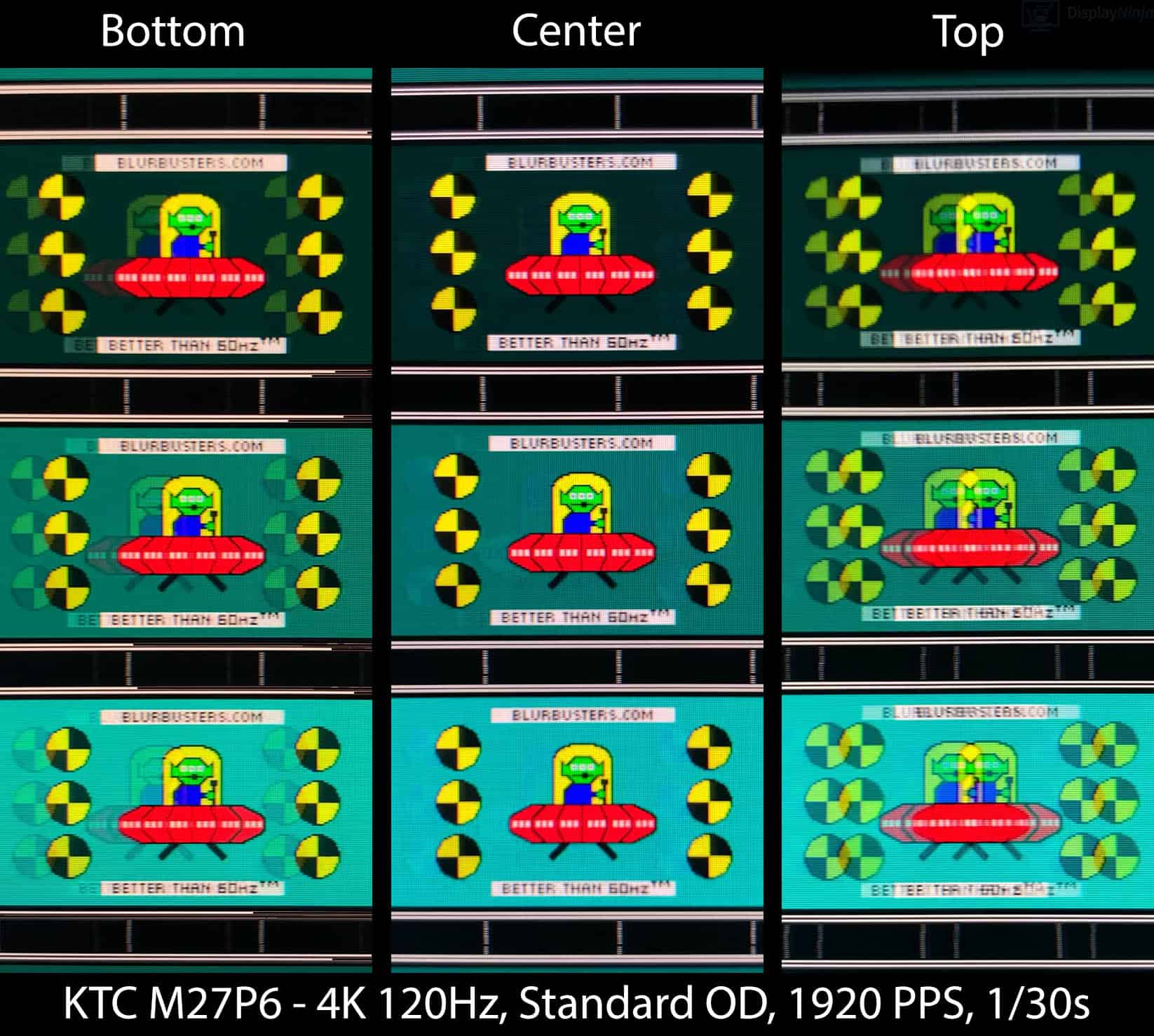
Is this the bar for 4K strobing currently? It seems pretty low with that level of crosstalk. If Nvidia ever end up making a 4K version I'm buying it day 1 going off their quality of 60hz/120hz modes.
5800X3D, RTX 5080 FE, OLED AW3423DW + Acer Pulsar XB273U F5
-
MSIfanboy
- Posts: 183
- Joined: 15 Apr 2022, 13:51
Re: NVIDIA G-Sync Pulsar monitor - Asus ROG Strix XG27AQNGV
120hz ulmb2 at 50 pulse width is better than pg27aqn at 360hz ulmb2, and similar brightness aswell
* i never really rated the pg27aqn, i rarely used it, atleast with zowie the initial image is really clear, and has distinct strobing shadow, but pg27aqn and pulsar mode just has a hazey look, like i have myopia looking at a sign at a distance
but this 120hz ulmb2 mode is incredible
* i never really rated the pg27aqn, i rarely used it, atleast with zowie the initial image is really clear, and has distinct strobing shadow, but pg27aqn and pulsar mode just has a hazey look, like i have myopia looking at a sign at a distance
but this 120hz ulmb2 mode is incredible
-
kyube

- Posts: 1028
- Joined: 29 Jan 2018, 12:03
Re: NVIDIA G-Sync Pulsar monitor - Asus ROG Strix XG27AQNGV
Interesting, I didn't know that DisplayNinja updated their review with 1920px/s UFOs!brownvim wrote: ↑03 Jul 2026, 15:32Displayninja did some pursuit shots of the M27P6 at 4K 120hz 1920 pixels per sec.
--snip--
Is this the bar for 4K strobing currently? It seems pretty low with that level of crosstalk. If Nvidia ever end up making a 4K version I'm buying it day 1 going off their quality of 60hz/120hz modes.
The update was 2 days ago, thanks for sending this!
Yes, the KTC M27P6 is the only 4K model I've seen which combines
• A low duty cycle (≤12%),
• A QD backlight,
• Great brightness (~260cd/m²) that's adjustable
together in a single product.
Majority of models within the 27-32" 4K space are KSF/PFS, which lead to red fringing...
YAG-based WLED (narrow color gamut) 4K +120Hz doesn't exist, hence the only option is going for a QD-based LCD. Which is usually found in MiniLED models.
The only other notable exception, of which there's barely any info about, are the ASUS PG32UQ & ASUS XG32UQ... which likely don't have enough brightness & likely also suffer from crosstalk.
The MSI 4K MiniLED is likely a too high of a duty cycle, as I've mentioned here
There's also the older MSI 274URF-QD (standard WLED backlight, but QD-based)
Other than these 5, I can't think of any other noteworthy model within the space...
The biggest hurdle in achieving no crosstalk is making a great G2G RT panel... which is going to take a while since it's IPS...
The XG27AQNGV's excellent crosstalk handling is precisely due to the fact it's one of the fastest IPS displays on the market, easily achieving the necessary G2G RT < frametime requirement.
That would be a concerning thing if this is true.MSIfanboy wrote: ↑03 Jul 2026, 18:01120hz ulmb2 at 50 pulse width is better than pg27aqn at 360hz ulmb2, and similar brightness aswell
* i never really rated the pg27aqn, i rarely used it, atleast with zowie the initial image is really clear, and has distinct strobing shadow, but pg27aqn and pulsar mode just has a hazey look, like i have myopia looking at a sign at a distance
but this 120hz ulmb2 mode is incredible
Is this due to the red fringing? 360Hz ULMB2 on the PG27AQN should be easy to achieve the same effective motion clarity at relatively good brightness values.
Do you perhaps have some TestUFOs pursuit photographs running at 1920px/s of the PG27AQN @ 360Hz?
evaluating xhci controller performance | audio latency discussion thread | "Why is LatencyMon not desirable to objectively measure DPC/ISR driver performance" | AM4 / AM5 system tuning considerations | latency-oriented HW considerations | “xhci hand-off” setting considerations | #1 tip for electricity-related topics | ESPORTS: Latency Perception, Temporal Ventriloquism & Horizon of Simultaneity | good lcd backlight strobing implementation list | display vs gpu scaling
-
MSIfanboy
- Posts: 183
- Joined: 15 Apr 2022, 13:51
Re: NVIDIA G-Sync Pulsar monitor - Asus ROG Strix XG27AQNGV
im not good at thiskyube wrote: ↑03 Jul 2026, 18:52Interesting, I didn't know that DisplayNinja updated their review with 1920px/s UFOs!brownvim wrote: ↑03 Jul 2026, 15:32Displayninja did some pursuit shots of the M27P6 at 4K 120hz 1920 pixels per sec.
--snip--
Is this the bar for 4K strobing currently? It seems pretty low with that level of crosstalk. If Nvidia ever end up making a 4K version I'm buying it day 1 going off their quality of 60hz/120hz modes.
The update was 2 days ago, thanks for sending this!
Yes, the KTC M27P6 is the only 4K model I've seen which combines
• A low duty cycle (≤12%),
• A QD backlight,
• Great brightness (~260cd/m²) that's adjustable
together in a single product.
Majority of models within the 27-32" 4K space are KSF/PFS, which lead to red fringing...
YAG-based WLED (narrow color gamut) 4K +120Hz doesn't exist, hence the only option is going for a QD-based LCD. Which is usually found in MiniLED models.
The only other notable exception, of which there's barely any info about, are the ASUS PG32UQ & ASUS XG32UQ... which likely don't have enough brightness & likely also suffer from crosstalk.
The MSI 4K MiniLED is likely a too high of a duty cycle, as I've mentioned here
There's also the older MSI 274URF-QD (standard WLED backlight, but QD-based)
Other than these 5, I can't think of any other noteworthy model within the space...
The biggest hurdle in achieving no crosstalk is making a great G2G RT panel... which is going to take a while since it's IPS...
The XG27AQNGV's excellent crosstalk handling is precisely due to the fact it's one of the fastest IPS displays on the market, easily achieving the necessary G2G RT < frametime requirement.
That would be a concerning thing if this is true.MSIfanboy wrote: ↑03 Jul 2026, 18:01120hz ulmb2 at 50 pulse width is better than pg27aqn at 360hz ulmb2, and similar brightness aswell
* i never really rated the pg27aqn, i rarely used it, atleast with zowie the initial image is really clear, and has distinct strobing shadow, but pg27aqn and pulsar mode just has a hazey look, like i have myopia looking at a sign at a distance
but this 120hz ulmb2 mode is incredible
Is this due to the red fringing? 360Hz ULMB2 on the PG27AQN should be easy to achieve the same effective motion clarity at relatively good brightness values.
Do you perhaps have some TestUFOs pursuit photographs running at 1920px/s of the PG27AQN @ 360Hz?
- Attachments
-
- Screenshot 2026-07-05 002132.png (660.65 KiB) Viewed 846 times
-
- Screenshot 2026-07-05 001942.png (570.42 KiB) Viewed 846 times
-
- Screenshot 2026-07-05 002226.png (541.27 KiB) Viewed 846 times
-
kyube
- Posts: 1028
- Joined: 29 Jan 2018, 12:03
Re: NVIDIA G-Sync Pulsar monitor - Asus ROG Strix XG27AQNGV
The shutter speeds aren't set correctly.
For 360 Hz → 1/90
For 120 Hz → 1/30
Use a 3rd party software if you must.
For iOS: DSLRCamera or ProCam
For Android: MotionCam
PG27AQN @ 360Hz clearly has great effective motion clarity (notice the white lines on the UFO & the eyes of the UFO), but the red fringing is very apparent. That might make you think it's not as clear.
XG27AQNGV (or whichever of the Pulsar models you have @ 120 Hz ULMB2 is worse effective motion clarity, but the lack of fringing makes it appear sharper.
evaluating xhci controller performance | audio latency discussion thread | "Why is LatencyMon not desirable to objectively measure DPC/ISR driver performance" | AM4 / AM5 system tuning considerations | latency-oriented HW considerations | “xhci hand-off” setting considerations | #1 tip for electricity-related topics | ESPORTS: Latency Perception, Temporal Ventriloquism & Horizon of Simultaneity | good lcd backlight strobing implementation list | display vs gpu scaling
-
MSIfanboy
- Posts: 183
- Joined: 15 Apr 2022, 13:51
Re: NVIDIA G-Sync Pulsar monitor - Asus ROG Strix XG27AQNGV
i guess its the red fringing thats off putting, 1/30 and 1/90 and one with wrong shutter, but 4k, cant even adjust shutter
its too difficult to get comparison, i need a slider, blur from the camera, and also trying to find a clear image from video
its too difficult to get comparison, i need a slider, blur from the camera, and also trying to find a clear image from video
- Attachments
-
- Screenshot 2026-07-05 021554.png (800.48 KiB) Viewed 817 times
-
- Screenshot 2026-07-05 021613.png (921.74 KiB) Viewed 817 times
-
- Screenshot 2026-07-05 021529.png (895.83 KiB) Viewed 817 times
-
brownvim
- Posts: 228
- Joined: 22 Jun 2020, 04:15
Re: NVIDIA G-Sync Pulsar monitor - Asus ROG Strix XG27AQNGV
It has crosstalk/ghosting/image trailing, which for me makes things look bad in motion.
The 60/120hz ULMB2 modes on a Pulsar display is super clean.
5800X3D, RTX 5080 FE, OLED AW3423DW + Acer Pulsar XB273U F5
-
kyube
- Posts: 1028
- Joined: 29 Jan 2018, 12:03
Re: NVIDIA G-Sync Pulsar monitor - Asus ROG Strix XG27AQNGV
What specific settings did you compare?
As in:
- Which PW setting on each display?
- Which UFO speed on each display?
Native refresh rate strobing will always have these artifacts in the main UFO.
I'm somewhat surprised by the lack of visible red fringing on the native refresh rate setting.
I assume it's more present on the lower refresh rate ones?
It wouldn't be a surprise if ULMB2 240Hz & 360Hz on the XG27AQNGV would perform similar as the PG27AQN, just without the red fringing, if Nvidia were to copy-paste the 60/120Hz modes onto 240&360 Hz
I'd argue that this amount of crosstalk isn't that much of an issue, considering the severe benefits you can get when you run PW<30 on the PG27AQN.
Is the 120Hz ULMB2 mode usable on consoles over HDMI?
evaluating xhci controller performance | audio latency discussion thread | "Why is LatencyMon not desirable to objectively measure DPC/ISR driver performance" | AM4 / AM5 system tuning considerations | latency-oriented HW considerations | “xhci hand-off” setting considerations | #1 tip for electricity-related topics | ESPORTS: Latency Perception, Temporal Ventriloquism & Horizon of Simultaneity | good lcd backlight strobing implementation list | display vs gpu scaling