Everything about displays and monitors. 120Hz, 144Hz, 240Hz, 4K, 1440p, input lag, display shopping, monitor purchase decisions, compare, versus, debate, and more. Questions? Just ask!
-
Chief Blur Buster
- Site Admin
- Posts: 12284
- Joined: 05 Dec 2013, 15:44
- Location: Toronto / Hamilton, Ontario, Canada
-
Contact:
Post
by Chief Blur Buster » 30 Oct 2025, 18:07
purplemelon1 wrote: ↑22 Oct 2025, 18:14
Oh thanks for all of this. To start uhh, i didn't realize there were more pages to your review. On mobile its broken. There is no previous and next button at 100-120% scale. Neither the tab works on either mobile/desktop. Once a user reads or skims all the pages. They will understand what perfect is.
Broken on mobile? Egads. I must address this.
I know, the website is a bit stale. Outdated monitor lists, broken features. I'm getting those addressed in the next few weeks. A lot of things stalled this year (many dominoes involved) but the UFO is now firing up!
Check out my new
TestUFO 3.0 announcement 
-
Pso
- Posts: 1
- Joined: 08 Jan 2026, 08:23
Post
by Pso » 08 Jan 2026, 08:54
Hello everyone, I've owned this monitor for a long time and have been happy with it until now, due to this new issue I don't know how to deal with.
The first time I noticed something was wrong was a few days ago, where during a gaming session I noticed strange pixelization-like artifacts that were mainly visible in gray gradients (e.g. smokes). Yesterday, when I turned on my PC, the graphical issue that you can see in the photos I attached appeared. It, however, only looked like this in the BIOS and on the built-in images (like the 3 parrots logo). In Windows, the issue wasn't there and only had the previously mentioned pixelization issue (it is hard to capture with phone cam).
Firstly, I thought this might be a display port issue, so I swapped the DP cable, but the problem remained. I then changed to HDMI to see if the monitor's DP port was at fault. Unfortunately, over HDMI, the issue is now visible everywhere. No longer just the BIOS but the entire Windows as well.
Warranty is effectively out as an option, since it's been years and even the store I purchased the monitor from was closed when it was acquired by a foreign company.
If there is anything I could do to fix the issue, I would love to know. Otherwise I'll have to look for a new monitor. Thanks for any help!
-
Attachments
-
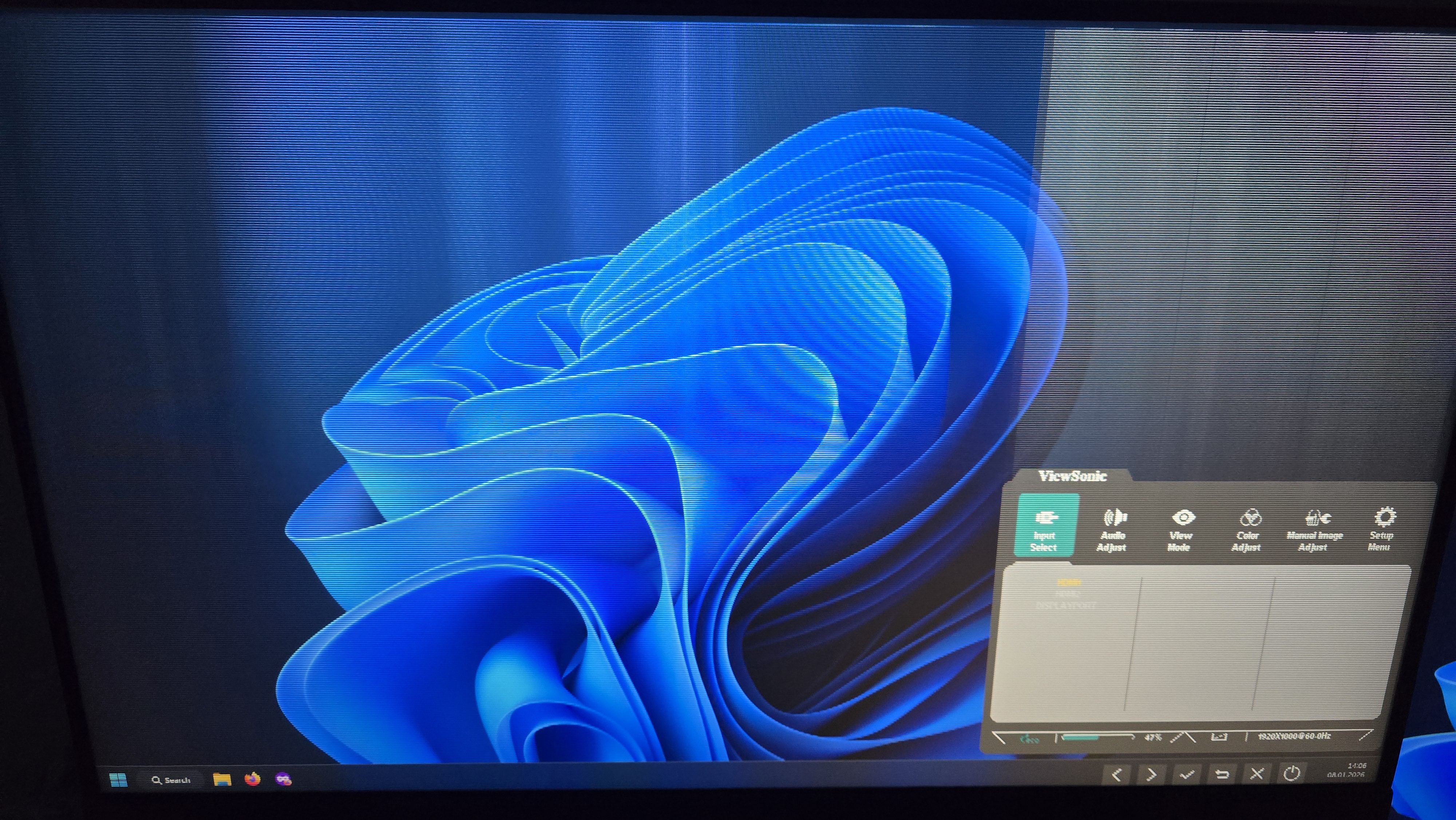
- 20260108_140616.jpg (3.33 MiB) Viewed 2522 times
-
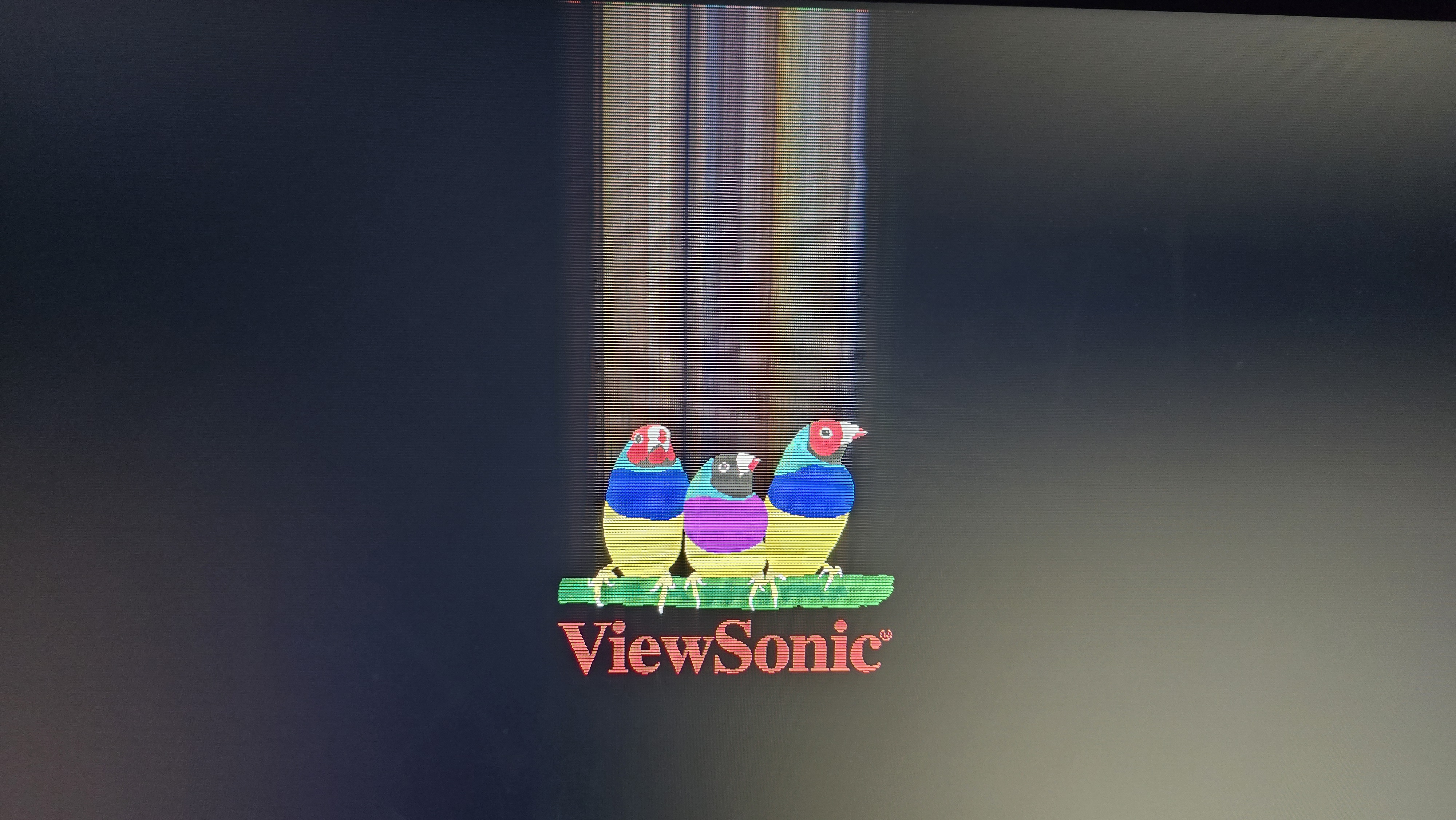
- 20260108_140641.jpg (3.19 MiB) Viewed 2522 times
-
Durgers
- Posts: 3
- Joined: 17 Apr 2023, 23:13
Post
by Durgers » 10 Apr 2026, 18:14
Exact same issue here, luckily it hasn't spread to my desktop yet, and I have not seen anything happening in-game.
My BIOS is absolutely cooked if I try to access it, and the boot logo is doing this (looks exactly like your photo)
Looks like I will be shopping for a new monitor soon, as I believe the panel is just failing.
-
joakir
- Posts: 1
- Joined: 10 Jul 2026, 05:10
Post
by joakir » 10 Jul 2026, 05:56
SaberEdge wrote: ↑18 Feb 2022, 19:15
If people are interested I can share more details about how to carry out this method. I've been meaning to share it with the community for a while now.
Which polishing product and sand paper grit used by you if I may ask?
-
thesteelxeno
- Posts: 2
- Joined: Yesterday, 00:14
Post
by thesteelxeno » Yesterday, 00:21
Pso wrote: ↑08 Jan 2026, 08:54
Hello everyone, I've owned this monitor for a long time and have been happy with it until now, due to this new issue I don't know how to deal with.
The first time I noticed something was wrong was a few days ago, where during a gaming session I noticed strange pixelization-like artifacts that were mainly visible in gray gradients (e.g. smokes). Yesterday, when I turned on my PC, the graphical issue that you can see in the photos I attached appeared. It, however, only looked like this in the BIOS and on the built-in images (like the 3 parrots logo). In Windows, the issue wasn't there and only had the previously mentioned pixelization issue (it is hard to capture with phone cam).
Firstly, I thought this might be a display port issue, so I swapped the DP cable, but the problem remained. I then changed to HDMI to see if the monitor's DP port was at fault. Unfortunately, over HDMI, the issue is now visible everywhere. No longer just the BIOS but the entire Windows as well.
Warranty is effectively out as an option, since it's been years and even the store I purchased the monitor from was closed when it was acquired by a foreign company.
If there is anything I could do to fix the issue, I would love to know. Otherwise I'll have to look for a new monitor. Thanks for any help!
I RMAed my monitor thrice already. 2 times for the buttons somehow getting stuck despite not even fiddling with it much over it's lifespan and once for this issue. I just created this account out of spite to say that my current panel again is having this same issue and my warranty is long over
-
thesteelxeno
- Posts: 2
- Joined: Yesterday, 00:14
Post
by thesteelxeno » Yesterday, 00:26
Pso wrote: ↑08 Jan 2026, 08:54
Hello everyone, I've owned this monitor for a long time and have been happy with it until now, due to this new issue I don't know how to deal with.
The first time I noticed something was wrong was a few days ago, where during a gaming session I noticed strange pixelization-like artifacts that were mainly visible in gray gradients (e.g. smokes). Yesterday, when I turned on my PC, the graphical issue that you can see in the photos I attached appeared. It, however, only looked like this in the BIOS and on the built-in images (like the 3 parrots logo). In Windows, the issue wasn't there and only had the previously mentioned pixelization issue (it is hard to capture with phone cam).
Firstly, I thought this might be a display port issue, so I swapped the DP cable, but the problem remained. I then changed to HDMI to see if the monitor's DP port was at fault. Unfortunately, over HDMI, the issue is now visible everywhere. No longer just the BIOS but the entire Windows as well.
Warranty is effectively out as an option, since it's been years and even the store I purchased the monitor from was closed when it was acquired by a foreign company.
If there is anything I could do to fix the issue, I would love to know. Otherwise I'll have to look for a new monitor. Thanks for any help!
I forget to add during my last reply that the only solution is to run the monitor at the refresh rate where it doesn't show. Which is likely at 240 Hz



