
Hi. If your outlet is grounded, try using an anti-static wristband. You can clip it to your PC case or to the ground pin of a surge protector. Just be careful not to shove it inside the live outlet sockets, you can use protect outlet plugs for safety. The results should surprise you as well.unexpected8 wrote: ↑27 Jun 2026, 04:06The monitor, computer case, and router are connected to solar power, but the problem persists. The issue only disappears late at night or when any metal objects are connected to the case with a wire, and then it returns after fifteen minutes or more, or less. I even tried connecting the device to the air conditioner's power line, since it's a separate line, after disconnecting all the circuit breakers, but the problem remained. Believe me, this is a difficult problem to pinpoint, and it might vary from person to person. I live in the Middle East, which means the problem is widespread.
Honestly, when the problem is on, anyone can kill me in PUBG. When the problem is gone, all shots are recorded, and even the screen color is better and clearer. It's even faster when opening the Ads lens.
UPDATE 2 | Fixed input lag and floaty mouse with UPS
Forum rules
IMPORTANT:
This subforum is for advanced users only. This separate area is for niche or unexpected lag issues such as electromagnetic interference (EMI, EMF, electrical, radiofrequency, etc). Interference of all kinds (wired, wireless, external, internal, environment, bad component) can cause error-correction (ECC) latencies like a bad modem connection, except internally in a circuit. ECC = retransmits = lag. Troubleshooting may require university degree. Your lag issue is likely not EMI.
🠚 You Must Read This First Before Submit Post or Submit Reply
IMPORTANT:
This subforum is for advanced users only. This separate area is for niche or unexpected lag issues such as electromagnetic interference (EMI, EMF, electrical, radiofrequency, etc). Interference of all kinds (wired, wireless, external, internal, environment, bad component) can cause error-correction (ECC) latencies like a bad modem connection, except internally in a circuit. ECC = retransmits = lag. Troubleshooting may require university degree. Your lag issue is likely not EMI.
🠚 You Must Read This First Before Submit Post or Submit Reply
-
TN_fun
- Posts: 241
- Joined: 26 Jun 2019, 11:09
Re: UPDATE 2 | Fixed input lag and floaty mouse with UPS
-
unexpected8
- Posts: 31
- Joined: 24 Jun 2026, 08:23
Re: UPDATE 2 | Fixed input lag and floaty mouse with UPS
Do you mean the problem could be static electricity?
Can I connect the port's grounding wire to the case?
Can I connect the port's grounding wire to the case?
-
TN_fun
- Posts: 241
- Joined: 26 Jun 2019, 11:09
Re: UPDATE 2 | Fixed input lag and floaty mouse with UPS
Yes and yes. You can, provided that your PC case is definitely conductive, your extension cord or surge protector has a ground contact, and there is actual grounding in your wall outlet/house.unexpected8 wrote: ↑28 Jun 2026, 11:43Do you mean the problem could be static electricity?
Can I connect the port's grounding wire to the case?
-
unexpected8
- Posts: 31
- Joined: 24 Jun 2026, 08:23
Re: UPDATE 2 | Fixed input lag and floaty mouse with UPS
I have three wires in the port. The yellow one is the ground. I disconnected it from the port and connected the device without the ground wire. I then connected a wire from the yellow ground wire to the case. The problem disappeared for about an hour, then returned. I will try connecting the device without disconnecting the ground wire and simultaneously connecting another wire from the port to the case, but only to the ground.
(Sorry, I'm using Google Translate.)
(Sorry, I'm using Google Translate.)
-
juligannn
- Posts: 2
- Joined: 16 Jun 2026, 14:19
Re: UPDATE 2 | Fixed input lag and floaty mouse with UPS
Please let me know when you have any updates.
-
unexpected8
- Posts: 31
- Joined: 24 Jun 2026, 08:23
Re: UPDATE 2 | Fixed input lag and floaty mouse with UPS
Incidentally, this problem also affects screen quality. For example, in this image, the performance is new and displayed late at night.
Display resolution 1280×800
https://g.top4top.io/p_3834ym7ss0.jpg
Here, while the problem exists
https://h.top4top.io/p_3834fnznt1.jpg
Display resolution 1280×800
https://g.top4top.io/p_3834ym7ss0.jpg
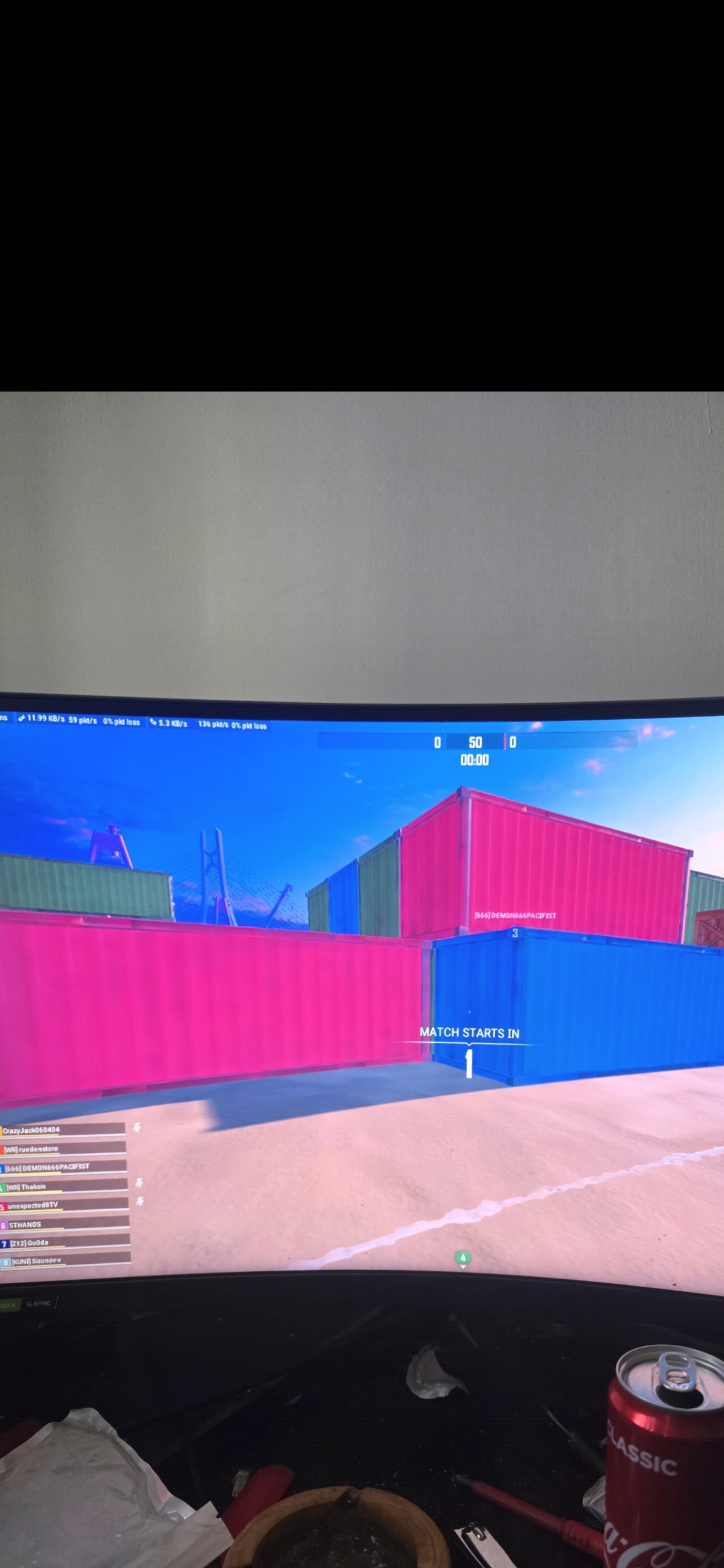
Here, while the problem exists
https://h.top4top.io/p_3834fnznt1.jpg

-
Terrykk
- Posts: 21
- Joined: 19 Jun 2026, 23:11
Re: UPDATE 2 | Fixed input lag and floaty mouse with UPS
Finally someone caught this on picture. Some days my game’s textures look so good, tracking enemies becomes trivial and there isn’t any smearing around moving objects. Then suddenly the next day everything looks washed and blurry, following targets with my eyes becomes impossible. I’ve been playing Overwatch since 2016 consistently and there are days I can barely make out which character I’m trying to shoot during an intense team fight with how low res the textures lookunexpected8 wrote: ↑01 Jul 2026, 06:19Incidentally, this problem also affects screen quality. For example, in this image, the performance is new and displayed late at night.
Display resolution 1280×800
https://g.top4top.io/p_3834ym7ss0.jpg
Here, while the problem exists
https://h.top4top.io/p_3834fnznt1.jpg
-
issawm
- Posts: 52
- Joined: 09 Dec 2023, 08:41
Re: UPDATE 2 | Fixed input lag and floaty mouse with UPS
Ngl for me everything is fine other than the fact I get less fps and the floaty ass mouse man I tried 4 systems 2 laptops and they were all brand new. Rn I got a laptop hooked up to a UPS that does voltage regulation. I even went to my cousins house to factory reset, it helped but we compared our pcs side by side after and mine still wasn’t 1:1.
-
issawm
- Posts: 52
- Joined: 09 Dec 2023, 08:41
Re: UPDATE 2 | Fixed input lag and floaty mouse with UPS
“ Over the years, the same pattern has happened on multiple different PCs, including brand-new ones: the systems are fully capable of feeling normal at first, proving the hardware can provide the mouse feel you’re looking for. Then, after Windows updates or related software changes, the mouse begins to feel floaty again. Because this has repeated across multiple systems, it’s unlikely to be bad hardware or bad luck. The more likely explanation is that a software, driver, firmware, or Windows configuration change is consistently altering how the system behaves after setup. The goal is to identify the specific change that happens between the system feeling normal and it becoming floaty.”
I’ve spent $500 on ChatGPT over the course of 3 years. Yet this is all I got in the end..
I’ve spent $500 on ChatGPT over the course of 3 years. Yet this is all I got in the end..