Re: BenQ Zowie XL2546K 240hz TN
Posted: 19 Dec 2020, 16:46
Who you gonna call? The Blur Busters! For Everything Better Than 60Hz™
https://forums.blurbusters.com/
Considering that I get eyestrains even when watching youtube videos with ELMB enabled compared to getting no issues at all with Dyac I'd say that it's a flicker issue.Chief Blur Buster wrote: ↑19 Dec 2020, 16:46That's interesting data. Why do you think this is caused by -- the flicker -- or the varying artifacts (variable strobe crosstalk)?
Are you sure?
Chief Blur Buster wrote:Strobing Can Be More Eye-Friendly Than PWM Dimming For SOME People
There are two common situations:
1. People who are get discomfort from PWM dimming, but are happy with framerate=Hz backlight strobing
2. 1. People who get discomfort from PWM dimming, and also get discomfort with framerate=Hz backlight strobing
PWM Dimming Has Artifacts That Strobing Can Avoid
A) PWM Dimming Has Artifacts
This can be uncomfortable and a major cause of discomfort (instead of flicker).
B) Strobing Framerate=Hz Can Be Artifact Free
This looks much better, better blur-reduction optimized "PWM" at one flash per frame / per refresh cycle
How To Reduce Discomfort With Strobing
1. Use framerate = refreshrate = stroberate with high quality strobing such as Blur Busters Approved
2. Use a VSYNC ON technology (unless you can run VSYNC OFF frame rates far beyond refresh rate).
3. If you hate lag, use Low-Lag VSYNC HOWTO, or RTSS Scanline Sync, since VSYNC OFF can make strobing sometimes bad/uncomfortable especially when you're not able to do overkill VSYNC OFF frame rates far beyond refresh rate.
4. Lower your refresh rate below your minimum frame rate, 120Hz strobing looks better.
5. Use refresh rate headroom (120Hz strobing on 240Hz panels look better than 120Hz strobing on 144Hz panels)
6. Strobing amplifies jitters/stuttering. Control your stutters if you want to use strobing!
7. Strobing is bad for frame rates far below refresh rates. Raise your frame rate or lower your refresh rate until framerate=Hz. 120Hz can be superior to 240Hz sometimes, if motion blur reduction is your priority.
8. Put mouse into high-DPI operation (1600dpi or 3200dpi if your game supports low-sensitivity well) to smooth-out your slow mouseturns.
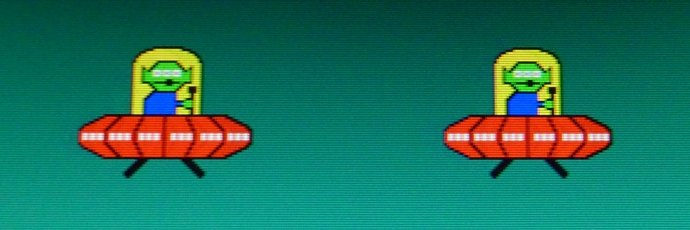
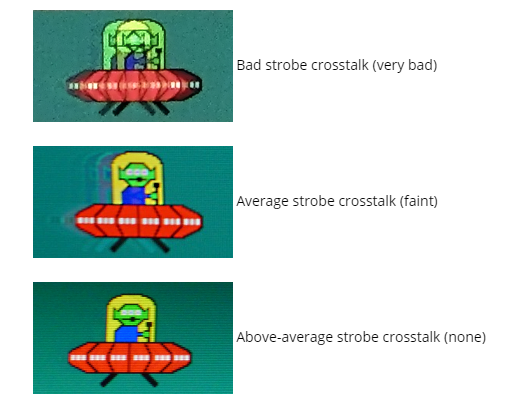
If you strobe at too high a refresh rate, you can get strobe crosstalk -- www.blurbusters.com/crosstalk -- which looks awful and can be just as bad as PWM dimming, especially for frame rates far below Hz!
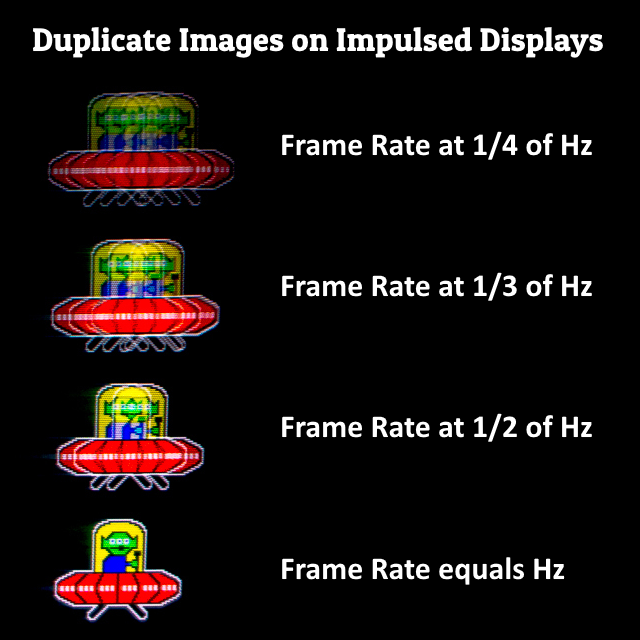
You get duplicate images if your frame rate is far below refresh rate during strobing. This produces duplicate images, like PWM dimming can also do (multi-strobing per refresh cycle).
Some people get more discomfort/nausea from motion blur, so that the "single-pulse-per-Hz-PWM" of strobing can be more eye-pleasing than the alternatives.
How To Avoid discomfort/nausea from duplicate images:
- Stutters will generate random duplicate images, and feel jittery, fix your stutters as much as you can!
- Make sure you guarantee framerate=Hz so don't let framerate go below Hz often. Lower refresh rate can make picture better!
- Easiest is to use VSYNC ON at a refresh rate at or below your game's 0.1%-0.5% worst frametimes. This avoids stutters.
- If you must, must use VSYNC OFF, try to run framerates well beyond refresh rate. Preferably at over 2x margin, but do your best.
- Slow turns on a 400dpi or 800dpi mouse will often strobe duplicate-image at slow mouseturn speeds, use 1600dpi or 3200dpi + low sensitivity with a newer mouse, if you want TestUFO-smooth slowturns. Be noted, older engines such as CS:GO has wonky effects on high DPI + low sensitivity operation, while some newer engines such as Valorant is 3200dpi-friendly + low-sensitivity.
How To Avoid discomfort/nausea by motion blur:
- Enable motion blur reduction (unless you want to use brute refresh rate method, see bottom of post)
How To Avoid discomfort/nausea from strobe crosstalk (LCD GtG too slow):
- If you are still getting duplicate images even with framerate=Hz, it's strobe crosstalk fault, not framerate fault.
- Lower refresh rate to get more GtG headroom between refresh cycles.
- Failing that, upgrade monitor for faster GtG that fits between refresh cycles
- If you're using a VA panel in a cold climate, warm up your monitor as hot as possible and use lots of refresh rate headroom (75Hz strobing on a 165Hz VA panel), VA has really slow dark-grey GtG's that really become slower when panel is cold.
Then properly-optimized strobing can go amazing -- complete with silk-smooth motion, like CRT era 60fps gaming like Super Mario on a Nintendo (NES), Sonic Hedgehog on Sega Master System (SMS), or a Sega Model 3 Arcade Machine (Daytona USA, Virtua Fighter 3, etc), when you get perfect framerate-refreshrate matched motion running ultrasmooth on a Blur Busters Approved display (or similar strobe quality display).
Certainly you will have a smiiiiiidge of extra latency by not using VSYNC OFF, but that is the price you pay for ultrasilk motion like that. For some of us, there's no way to use a computer except with perfectly optimized strobing if you're super-sensitive to motion blur (no headaches with CRT, but massive gaming-motion discomfort with LCDs not traced to other causes such as blue light or other ergonomic issues)
Your mileage will vary (YMMV)
Strobing still flickers, BUT not everyone gets headaches from the flicker.... PWM dimming creates artifacts, and some people are getting discomfort/strain/nausea from the artifacts instead. PWM dimming is not necessarily a 100% reliable predictor of comfort with framerate=Hz strobing. Get familiar with your comfort zone!
For more information, see CRT Nirvana Guide For Disappointed CRT-to-LCD Upgraders. If you hate flicker AND hate motion blur, you have to brute force it. Use extreme frame rate at extreme refresh rates (strobeless blur reduction method). This is why Blur Busters is a huge fan of future 1000 Hz displays.
Enjoy!
Understanding from this, the XL2546K is superior to the VG259QM? I have used the VG259QM (Both of my friends have this monitor) and can definitely notice the "stutter" or rather microstutters happening above 300fps~, but motion clarity is on point with OD 120.. it's really nice.Ogmilkman wrote: ↑20 Dec 2020, 07:21I just realized the stutter problem I had on the VG259QM was caused by running 300 fps on 280hz. At 350 or 280 fps motion is just as smooth as the XL2546K. Even with Dyac vs ELMB I don't see any practical visual difference in smoothness/ghosting. Whatever advantages in response time the Zowie has isn't something I notice in actual use and not something I can justify the extra $240 + TN panel faults for.
Bingo, for strobing technologies, you ideally need framerate=Hz (VSYNC ON) or massive framerate overkill above Hz (VSYNC OFF)Ogmilkman wrote: ↑20 Dec 2020, 07:21I just realized the stutter problem I had on the VG259QM was caused by running 300 fps on 280hz. At 350 or 280 fps motion is just as smooth as the XL2546K. Even with Dyac vs ELMB I don't see any practical visual difference in smoothness/ghosting. Whatever advantages in response time the Zowie has isn't something I notice in actual use and not something I can justify the extra $240 + TN panel faults for.
Are you motion-priority or latency-priority?
Yeah I mention 350 fps because it is similar to what people are used to at 240hz 300fps.Chief Blur Buster wrote: ↑21 Dec 2020, 18:03Bingo, for strobing technologies, you ideally need framerate=Hz (VSYNC ON) or massive framerate overkill above Hz (VSYNC OFF)Ogmilkman wrote: ↑20 Dec 2020, 07:21I just realized the stutter problem I had on the VG259QM was caused by running 300 fps on 280hz. At 350 or 280 fps motion is just as smooth as the XL2546K. Even with Dyac vs ELMB I don't see any practical visual difference in smoothness/ghosting. Whatever advantages in response time the Zowie has isn't something I notice in actual use and not something I can justify the extra $240 + TN panel faults for.
300fps at 280Hz = 20 stutters per second, since stutters are a beat-frequency between framerate & Hz.
Strobing amplifies visibility of microstutters, so you need to fix your microstutters by going framerate=Hz, or via framerate overkill, if you hate stutters.
Mind you, 700fps at 280Hz looks even better than 350fps at 280Hz, since the jitteriness of 350fps is still visible. If you must use VSYNC OFF with strobing, then the more overkill frame rate, the better.
That said, if you are smoothness-priority with strobing, then that requires framerate=refreshrate=stroberate for the perfect CRT tube effect you remember from Super Mario or Sonic Hedgehog or Sega Daytona USA or other ultrasilk zeroblur games of yesteryear.
Are you motion-priority or latency-priority?
One major trick for motion-smoothness nuts is to slightly lower refresh rate and guarantee framerate=Hz via technique of RTSS Scanline Sync. Getting TestUFO-smooth zero-blur mouseturns is easier with refresh rate headroom for most games. But this sometimes requires using a slightly lower refresh rate (on these monitors) and sacrificing VSYNC OFF to get the butter-smooth "Super Mario Brothers" or "Sonic Hedgehog" ultrasmooth zero-blur CRT scrolling.
Creating the zero-stutter butter smooth strobe effect (zero stutter) requires:
- Refresh rate headroom
- Refresh rate at valley of game's framerate range (if game min framerate is 190fps, then use the 182Hz XL2546 trick)
- Try framerate=Hz sync technology (like Low Lag VSYNC ON or the RTSS Scanline Sync)
Some of these elements are taken from CRT Nirvana Guide for Disappointed CRT-to-LCD Upgraders post, but it's worth a read for smoothness-priority (at the cost of a smidge of lag).
This is more useful for solo games where you hate motion blur AND hate stutters (but don't mind a tiny smidge of lag over VSYNC OFF)
There are many causes of low-refreshrate nausea/headaches/discomforts; they can vary from motion blur discomfort, to discomforts from stroboscopic artifacts (www.blurbusters.com/stroboscopics). Not everyone is sensitive to flicker, and gets more discomfort from the motionblur of low refresh rates. However strobing and framerate-refreshrate matching solves a lot of problems that can produce a major compensatory effect that slightly lowers the "minimum refreshrate" threshold.
There are many causes of low-refreshrate nausea/headaches/discomforts; they can vary from motion blur discomfort, to discomforts from stroboscopic artifacts (www.blurbusters.com/stroboscopics). Not everyone is sensitive to flicker, and gets more discomfort from the motionblur of low refresh rates. However strobing and framerate-refreshrate matching solves a lot of problems that can produce a major compensatory effect that slightly lowers the "minimum refreshrate" threshold.