Page 20 of 144

Re: [Blur Busters Approved XG2431 - 24" 240Hz IPS] ViewSonic unveils monitors for 2021 (The new 240Hz 24" king?)

Posted: 25 Jun 2021, 17:12
by Discorz
XG2431 USER MANUAL:

"Response Time: Standard, Advanced, Ultra Fast

1ms mode <MPRT>
Choose whether to activate Moving Picture Response Time (MPRT); default setting is Off.
NOTE: 
1. Make sure Input Timing detection is >100Hz to turn on 1ms Mode from default.
2. If 1ms Mode is set to “On”, when turning on FreeSync, MPRT will automatically turn off.
3. When 1ms Mode is set to “On”, the following functions will be grayed out and disabled: Brightness, Advanced DCR, Eco Mode, sRGB, Response Time, DDC/CI Brightness adjustment.
4.sRGB and 1ms Mode will disable each other.
5. The IC controls Moving Picture Response Time, so the overall Brightness will be dark."

Re: [Blur Busters Approved XG2431 - 24" 240Hz IPS] ViewSonic unveils monitors for 2021 (The new 240Hz 24" king?)

Posted: 25 Jun 2021, 20:54
by elexor
Discorz wrote:
25 Jun 2021, 17:12
Probably just reused that line from a previous monitor and the person making those is unaware of the new strobing features.

Re: [Blur Busters Approved XG2431 - 24" 240Hz IPS] ViewSonic unveils monitors for 2021 (The new 240Hz 24" king?)

Posted: 25 Jun 2021, 23:02
by SaberEdge
Discorz wrote:
25 Jun 2021, 17:12
XG2431 USER MANUAL:

"Response Time: Standard, Advanced, Ultra Fast

1ms mode <MPRT>
Choose whether to activate Moving Picture Response Time (MPRT); default setting is Off.
NOTE: 
1. Make sure Input Timing detection is >100Hz to turn on 1ms Mode from default.
2. If 1ms Mode is set to “On”, when turning on FreeSync, MPRT will automatically turn off.
3. When 1ms Mode is set to “On”, the following functions will be grayed out and disabled: Brightness, Advanced DCR, Eco Mode, sRGB, Response Time, DDC/CI Brightness adjustment.
4.sRGB and 1ms Mode will disable each other.
5. The IC controls Moving Picture Response Time, so the overall Brightness will be dark."
Woah, so how are we supposed to adjust the picture and counteract the effects to color, brightness and gamma of the backlight dimming?

Re: [Blur Busters Approved XG2431 - 24" 240Hz IPS] ViewSonic unveils monitors for 2021 (The new 240Hz 24" king?)

Posted: 26 Jun 2021, 15:10
by AM_acc1q
Matai Shang wrote:
25 Jun 2021, 10:22
AM_acc1q wrote:
24 Jun 2021, 21:46
According to ViewSonic, the monitor should be available in late July.
At the end of July what year? Did they elaborate?
I will let you guess the answer to your question :mrgreen:

Re: [Blur Busters Approved XG2431 - 24" 240Hz IPS] ViewSonic unveils monitors for 2021 (The new 240Hz 24" king?)

Posted: 27 Jun 2021, 12:25
by datspike
https://www.taobao.com/list/item/641213 ... 510amV7iC2
325$ bulk price boys

upd. Possibly even lower, there's a lot of xg2431 lots on taobao

upd. https://www.prad.de/viewsonic-xg271qg-g ... -und-wqhd/
The ViewSonic XG2431, which was last scheduled for March 2021 (at least in the USA), is now also only expected in the 3rd quarter of 2021. Cost point (RRP): the equivalent of around 293 euros.
Seems like a 350 usd / 300 eur MSRP

Re: [Blur Busters Approved XG2431 - 24" 240Hz IPS] ViewSonic unveils monitors for 2021 (The new 240Hz 24" king?)

Posted: 29 Jun 2021, 09:14
by SixelAlexiS
Discorz wrote:
25 Jun 2021, 17:12
XG2431 USER MANUAL:

"Response Time: Standard, Advanced, Ultra Fast

1ms mode <MPRT>
Choose whether to activate Moving Picture Response Time (MPRT); default setting is Off.
NOTE: 
1. Make sure Input Timing detection is >100Hz to turn on 1ms Mode from default.
2. If 1ms Mode is set to “On”, when turning on FreeSync, MPRT will automatically turn off.
3. When 1ms Mode is set to “On”, the following functions will be grayed out and disabled: Brightness, Advanced DCR, Eco Mode, sRGB, Response Time, DDC/CI Brightness adjustment.
4.sRGB and 1ms Mode will disable each other.
5. The IC controls Moving Picture Response Time, so the overall Brightness will be dark."
This is such a bummer, you can't adjust the brightness in the most interesting mode of the monitor... this is basically a deal breaker to me... oh well, I guess I'll stick with my 60HZ for a long time :'(

Re: [Blur Busters Approved XG2431 - 24" 240Hz IPS] ViewSonic unveils monitors for 2021 (The new 240Hz 24" king?)

Posted: 29 Jun 2021, 17:18
by quake3
SixelAlexiS wrote:
29 Jun 2021, 09:14
Discorz wrote:
25 Jun 2021, 17:12
XG2431 USER MANUAL:

"Response Time: Standard, Advanced, Ultra Fast

1ms mode <MPRT>
Choose whether to activate Moving Picture Response Time (MPRT); default setting is Off.
NOTE: 
1. Make sure Input Timing detection is >100Hz to turn on 1ms Mode from default.
2. If 1ms Mode is set to “On”, when turning on FreeSync, MPRT will automatically turn off.
3. When 1ms Mode is set to “On”, the following functions will be grayed out and disabled: Brightness, Advanced DCR, Eco Mode, sRGB, Response Time, DDC/CI Brightness adjustment.
4.sRGB and 1ms Mode will disable each other.
5. The IC controls Moving Picture Response Time, so the overall Brightness will be dark."
This is such a bummer, you can't adjust the brightness in the most interesting mode of the monitor... this is basically a deal breaker to me... oh well, I guess I'll stick with my 60HZ for a long time :'(
Yeah im not sure how this works but it sounds pretty dumb on paper. I only need "1ms mode" when playing Quake basically, I assume the normal mode has enough low latency to play casual games successfully. But it just sounds weird weird how "the screen will be dark" if you have 1ms mode enabled. Maybe I will stick with the XG2401 I already got but then again im tired of how bad this monitor is to watch movies and play darker games due backlight bleed (I think this is the problem).

Re: [Blur Busters Approved XG2431 - 24" 240Hz IPS] ViewSonic unveils monitors for 2021 (The new 240Hz 24" king?)

Posted: 30 Jun 2021, 06:24
by Chief Blur Buster
quake3 wrote:
29 Jun 2021, 17:18
Yeah im not sure how this works but it sounds pretty dumb on paper. I only need "1ms mode" when playing Quake basically, I assume the normal mode has enough low latency to play casual games successfully. But it just sounds weird weird how "the screen will be dark" if you have 1ms mode enabled. Maybe I will stick with the XG2401 I already got but then again im tired of how bad this monitor is to watch movies and play darker games due backlight bleed (I think this is the problem).
SixelAlexiS wrote:
29 Jun 2021, 09:14
This is such a bummer, you can't adjust the brightness in the most interesting mode of the monitor... this is basically a deal breaker to me... oh well, I guess I'll stick with my 60HZ for a long time :'(
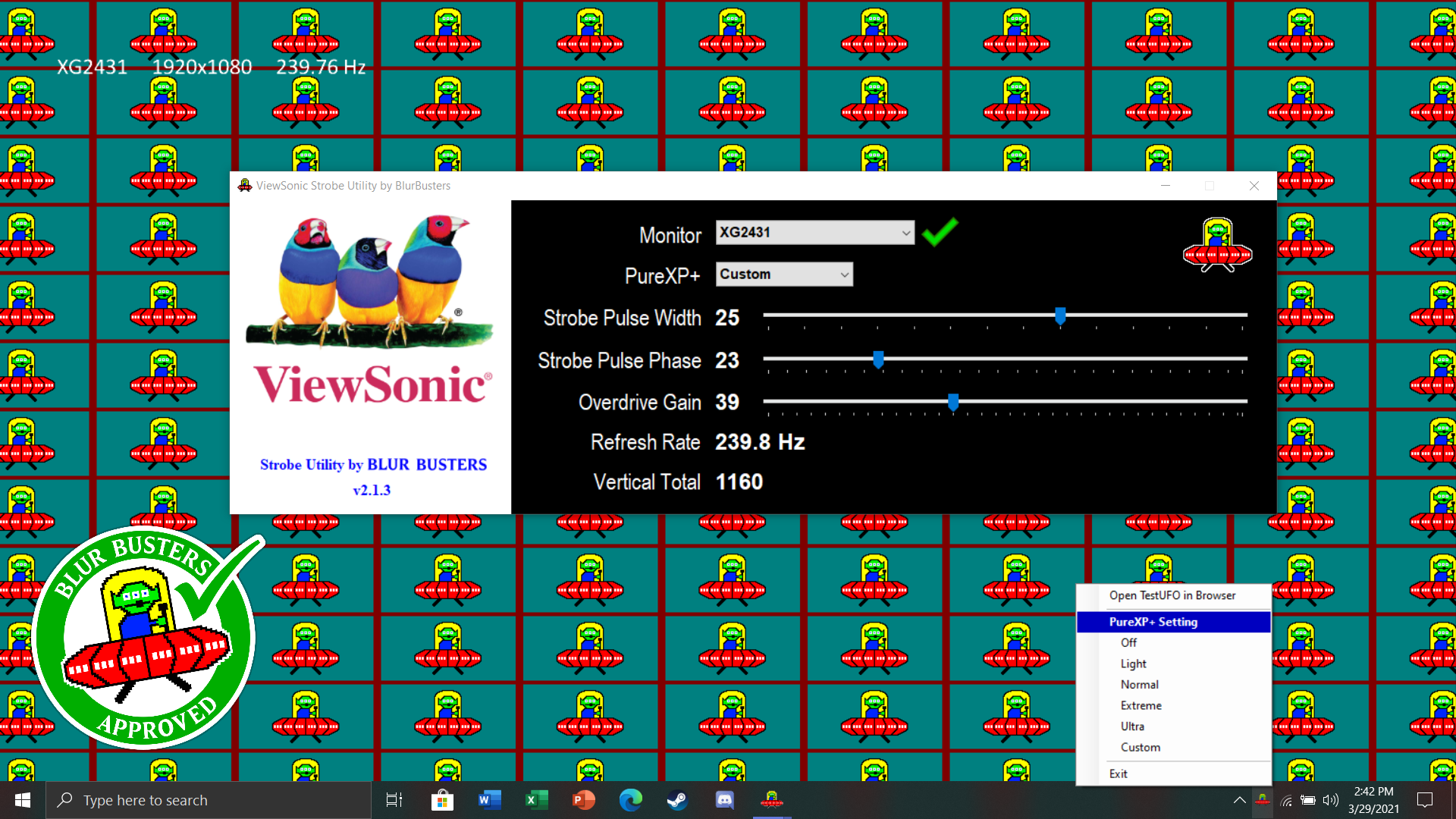
FYI -- You can adjust brightness via ViewSonic Strobe Utility, "Strobe Pulse Width".

The Tradeoff Effect
It's always a brightness-vs-clarity tradeoff on all models of motion blur reduction, no matter the brand (BenQ, ViewSonic, Eve, etc).

Brightness Adjustment Method for ViewSonic PureXP+
Sometimes "Strobe Pulse Width" is aliased as a Brightness setting, but the terminology is not used by ViewSonic's PureXP+ motion blur reduction mode -- for ViewSonic, adjusting brightness is via the PureXP+ levels or via "Strobe Pulse Width"

Image

Adjusting Pulse Width Defacto Adjusts Brightness
When you adjust "Strobe Pulse Width", you are adjusting the brightness of PureXP -- even though the other setting ("Brightness") is grayed out.

Manual Error: The Old "1ms MPRT Mode" is renamed "PureXP+"
Also the terminology "1ms mode" in the manual is outdated, the correct label is "PureXP+ Mode". Also, PureXP+ Custom is adjustable from 1% to 40% refresh cycle persistence in 1% persistence steps -- so that means as little as 1% of 240Hz, aka approximately 0.1ms MPRT (very dim) through about 1.6ms MPRT (brightest) during 240Hz operation. I will send some corrections to ViewSonic for their PDF instruction manual;

Still Can Exceed 200 Nits via PureXP "Light" Setting
While PureXP+ is dimmer than non-PureXP+ Brightness 100%, it is still possible to get to low-to-mid 200s nits range at the longer pulse width settings -- which isn't that bad. Many worn-out 60Hz monitors (used for years) are already dimmer than PureXP+ at the longest pulse-width settings (PureXP+ Light). It's important to understand that motion blur reduction is often a brightness-vs-clarity tradeoff, but users do have the choice to adjust this

Related Precedent
You can also read ApertureGrille's XG270 review for the approximate nits of brightness of the PureXP+ as a rough guideline of what to expect for the XG2431 in terms of PureXP+ brightness.

Re: [Blur Busters Approved XG2431 - 24" 240Hz IPS] ViewSonic unveils monitors for 2021 (The new 240Hz 24" king?)

Posted: 01 Jul 2021, 05:27
by Shing0
Chief Blur Buster wrote:
30 Jun 2021, 06:24
Related Precedent
You can also read ApertureGrille's XG270 review for the approximate nits of brightness of the PureXP+ as a rough guideline of what to expect for the XG2431 in terms of PureXP+ brightness.
Chief XG207 is PureXP v1.0 and XG2431 is V2.0 right ? I was expecting a little bit better brightness at the same motion clarity or better motion clarity and less brightness values. Is that not the case ? Are they really that similar in the PureXP department ? The only upside is 60hz strobing ?

Thanks :roll:

Re: [Blur Busters Approved XG2431 - 24" 240Hz IPS] ViewSonic unveils monitors for 2021 (The new 240Hz 24" king?)

Posted: 01 Jul 2021, 10:37
by Chief Blur Buster
Shing0 wrote:
01 Jul 2021, 05:27
Chief XG207 is PureXP v1.0 and XG2431 is V2.0 right ? I was expecting a little bit better brightness at the same motion clarity or better motion clarity and less brightness values. Is that not the case ? Are they really that similar in the PureXP department ? The only upside is 60hz strobing ?
Yes.

It’s about a similiar brightness “range” as XG270. Reviewers will test this. However, you have 40 strobe levels instead of 4 via Utility. So more choices of brightness levels!
Shing0 wrote:
01 Jul 2021, 05:27
The only upside is 60hz strobing ?
No, there are multiple good strobe upgrades:

…Much better 240Hz strobing (ballpark of TN strobe quality for 240Hz strobe)
…Strobe Utility support for “PureXP Custom” so you can custom tune any Hz.
…No more being stuck at 119Hz or 120Hz sweet spot, you can tune any Hz.
…Adjustable Overdrive Gain (100 levels).
…40 strobe levels (via Utility) instead of 4!
…Responds to Large Vertical Totals (advanced user optimization)

Because of room temperature variances and panel variances of all LCD panels ever made in humankind (the “panel lottery” effect) — Strobe Utility can let you get a bit better than factory strobe tuning, and even better when combined with Large Vertical Total support.