Page 3 of 4

Re: What will a fine PC's latencymon result look like?

Posted: 17 May 2024, 17:59
by Vocaleyes
Don’t forget to change settings so it displays kernel latency.

Re: What will a fine PC's latencymon result look like?

Posted: 07 Feb 2025, 03:46
by Hyote
Vocaleyes wrote:
17 May 2024, 17:59
Don’t forget to change settings so it displays kernel latency.
I remembered this post as I ran a test.

Re: What will a fine PC's latencymon result look like?

Posted: 07 Feb 2025, 14:21
by SeekNDstroy
Hyote wrote:
17 May 2024, 15:54
Always stuck with some settings so some values are not as good as others but here is mine.
Why cpu speed registry shows 360 MHz?

Re: What will a fine PC's latencymon result look like?

Posted: 07 Feb 2025, 15:13
by themagic
SeekNDstroy wrote:
07 Feb 2025, 14:21
Hyote wrote:
17 May 2024, 15:54
Always stuck with some settings so some values are not as good as others but here is mine.
Why cpu speed registry shows 360 MHz?
yes my shows here 2,9ghz and 2,9ghz even if running game while latencymon run in background...

but it should be reported speed 4,1 ghz ?...cause 2,9ghz is stock speed of my cpu and if without cpu boost enabled in bios..but everything enabled and taskmanager shows 4,1ghz when running apps.


i dont get this shit with that reports and why is that... :lol:


what it shows for you in reports ?


ok now i understand why...
_________________________________________________________________________________________________________
Reported CPU speed (WMI): 2901 MHz
Reported CPU speed (registry): 2904 MHz

Note: reported execution times may be calculated based on a fixed reported CPU speed. Disable variable speed settings like Intel Speed Step and AMD Cool N Quiet in the BIOS
setup for more accurate results.


_________________________________________________________________________________________________________


i think this has something with idle and power savings to do too maybe...but 360mhz is strange idle and i only saw 800mhz idle max with processors here...


guys check my kernel time... :lol:

Image


but this shitt trash programm still says that: Your system appears to be suitable for handling real-time audio and other tasks without dropouts.

Re: What will a fine PC's latencymon result look like?

Posted: 07 Feb 2025, 17:58
by Hyote
themagic wrote:
07 Feb 2025, 15:13
SeekNDstroy wrote:
07 Feb 2025, 14:21
Hyote wrote:
17 May 2024, 15:54
Always stuck with some settings so some values are not as good as others but here is mine.
Why cpu speed registry shows 360 MHz?
yes my shows here 2,9ghz and 2,9ghz even if running game while latencymon run in background...

but it should be reported speed 4,1 ghz ?...cause 2,9ghz is stock speed of my cpu and if without cpu boost enabled in bios..but everything enabled and taskmanager shows 4,1ghz when running apps.


i dont get this shit with that reports and why is that... :lol:


what it shows for you in reports ?


ok now i understand why...
_________________________________________________________________________________________________________
Reported CPU speed (WMI): 2901 MHz
Reported CPU speed (registry): 2904 MHz

Note: reported execution times may be calculated based on a fixed reported CPU speed. Disable variable speed settings like Intel Speed Step and AMD Cool N Quiet in the BIOS
setup for more accurate results.


_________________________________________________________________________________________________________


i think this has something with idle and power savings to do too maybe...but 360mhz is strange idle and i only saw 800mhz idle max with processors here...


guys check my kernel time... :lol:

Image


but this shitt trash programm still says that: Your system appears to be suitable for handling real-time audio and other tasks without dropouts.
It's because of the timer resolution. Kernel latency will always be around 500, 1000 or 12000.

Re: What will a fine PC's latencymon result look like?

Posted: 09 Feb 2025, 08:52
by synthMaelstrom
Am I correct in assuming that you guys are obsessing over the tiny portion of the input latency chain, measured in nanoseconds, in the hope of reducing input lag?

Image

Re: What will a fine PC's latencymon result look like?

Posted: 09 Feb 2025, 09:50
by Hyote
synthMaelstrom wrote:
09 Feb 2025, 08:52
Am I correct in assuming that you guys are obsessing over the tiny portion of the input latency chain, measured in nanoseconds, in the hope of reducing input lag?

Image
No, we are simply comparing results. The PC gaming community needs to come to an agreement about what makes sense and what doesn't. The way I see, there are only flawed testing methodologies at the moment and just because it is widely accepted that microseconds of delay is imperceivable doesn't make it true. This is the same thing as self proclaimed geniuses measuring latency with mouse clicks and swearing that better hardware means lower latency and newer software means better compability and performance. Ironically the level-minded people today are those who idealize the most without taking actual possibilities into account.

Re: What will a fine PC's latencymon result look like?

Posted: 10 Feb 2025, 03:17
by synthMaelstrom
Hyote wrote:
09 Feb 2025, 09:50
synthMaelstrom wrote:
09 Feb 2025, 08:52
measured in nanoseconds
The way I see, there are only flawed testing methodologies at the moment and just because it is widely accepted that microseconds of delay is imperceivable doesn't make it true.
Have you tried the Latency Split Test by ApertureGrille? I struggle to perceive a difference starting from 7ms of added latency, anything higher I can pinpoint with >90% accuracy. From what I've seen online some people can accurately tell the difference at as low as 3ms, but microseconds? 400μs = 0.4ms, sure the difference is there since it's measurable, but spending any more time than reasonable on optimising this part of the chain to bring it down to 0.2ms or even 0.1ms seems counterproductive. Look, I'm not bashing the practice, just putting it out there that a tech tinkerer's precious time is much better spent diagnosing the rest of the chain.

Re: What will a fine PC's latencymon result look like?

Posted: 10 Feb 2025, 11:36
by Hyote
synthMaelstrom wrote:
10 Feb 2025, 03:17
Hyote wrote:
09 Feb 2025, 09:50
synthMaelstrom wrote:
09 Feb 2025, 08:52
measured in nanoseconds
The way I see, there are only flawed testing methodologies at the moment and just because it is widely accepted that microseconds of delay is imperceivable doesn't make it true.
Have you tried the Latency Split Test by ApertureGrille? I struggle to perceive a difference starting from 7ms of added latency, anything higher I can pinpoint with >90% accuracy. From what I've seen online some people can accurately tell the difference at as low as 3ms, but microseconds? 400μs = 0.4ms, sure the difference is there since it's measurable, but spending any more time than reasonable on optimising this part of the chain to bring it down to 0.2ms or even 0.1ms seems counterproductive. Look, I'm not bashing the practice, just putting it out there that a tech tinkerer's precious time is much better spent diagnosing the rest of the chain.
I haven't heard of it but seems interesting so I'll check it out sometime.

Re: What will a fine PC's latencymon result look like?

Posted: 10 Feb 2025, 16:59
by kyube
synthMaelstrom wrote:
09 Feb 2025, 08:52
Am I correct in assuming that you guys are obsessing over the tiny portion of the input latency chain, measured in nanoseconds, in the hope of reducing input lag?

Image
People on this subforum are clueless and like to wander in circles, keep this in mind.
All information they spout has to be taken with a huge grain of salt, mine included as I'm not exempt from making mistakes.

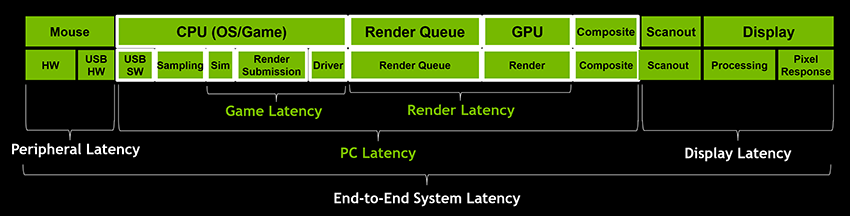
DPC/ISR driver performance is crucial for optimization of the software stack.
In that particular screenshot of NVIDIA above, we're optimizing the "Driver" section which is part of the OS / SW stack.
It is not measured using LatencyMon however, as many people like to do here and in a majority of online communities.
The reason the tooling is so prevalent is because it's a easy to digest GUI and people like ease of use.
The lead dev of LatencyMon has shown to be unreliable explaining what his tool actually measures. LatencyMon's driver also introduces major overhead to the OS, as it schedules severe interrupts thus altering the results.

The proper way to measure DPC/ISR is by using Windows Performance Analyzer. Pavel (& Microsoft) have resources on how it's used.
A good way to look into this topic is also this github: https://github.com/valleyofdoom/PC-Tuning (referred to as “xperf”, search for that in this write-up)
Or take a look at the tool he has made, it functions as a TUI (terminal user interface) for analysing ETW (Event Tracing for Windows) data in a more easy to comprehend fashion: https://github.com/valleyofdoom/xtw

To put into perspective on how fast computers are:
A CPU's cache (a type of primary memory, SRAM) works in <10ns (10^-9 seconds, 1 billionth of a second)
RAM works in the 40–80ns nanoseconds range
Intel Optane works in ~10μs, fast NVMe's SSD's are 4x slower than Optane.
HDD's are in around 40-200ms millisecond range (not exact values ofc)

As you can see and have very likely experienced (HDD to SSD transition) yourself unknowingly, every millisecond matters for communication of hardware components.
To be even more extreme, every microsecond matters.

To best visualize a microsecond, as per Grace Hopper's small anecdote:
Electricity can travel a distance of 30 cm (11.8 in) in a long copper wire, which represent the distance an electrical signal travels in a nanosecond.
Electricity can travel a distance of 300m (~984 ft) in 1μs.

Computers dislike microseconds, let alone miliseconds. Especially if the values are continuous.

DPC/ISR of drivers are scheduled & executed in microseconds (ideally, the least amount possible) and perhaps even seconds, depending on the severity of the activity.

The general goal is to minimise the overhead caused by each driver in the OS.
The main culprits in Windows are usually:
- The USB device drivers (wdf0100.sys)
- The network drivers (ndis.sys)
- The storage drivers (storport.sys)
- The GPU drivers (dxgkrnl.sys)

All of these are default drivers that Windows comes with. Their naming may change depending on controller vendor and Windows version, as seen with the recent 24H2 network stack changes.

To be specific, the goal is to leave more CPU time for the foreground thread (the game / task) and not for driver execution (DPC's & ISR's). As in, keeping DPC's & ISR's as tight as possible (<1μs), while also minimising the count that is scheduled, which can increase exponentially quick when using 8kHz mice. The aforementioned part is part of what makes people with 8kHz mice stutter in games.

The consequence of not optimizing for this is additional overhead that leads to pronounced jitter (macrostutter), due to competing for CPU time.

A side note:
Macrostutter, which can be measured with Presentmon, should not be confused with microstutters.
Microstuttering can also very likely be measured, but most people are too busy dealing with the former that the latter is harder to diagnose. In fact, most “EMI” posts in this sub-forum can very likely be attributed to microstuttering caused by hardware instabilities.

PS: Don't take my explanations and terms used in this write-up above as accurate and finite, there's much more nuance to this and I've very likely misworded something by accident or out of ignorance.

If you'd like to explore this topic a bit deeper with some data behind it, take a look at the Latency And Gaming discord hosted by Calypto. It has quite a bit of data in regards to this topic.

Hope this helps.