Page 3 of 4
Re: CS2 Input Lag Explained - The Monolithic 64 Hz Client Simulation Tick Stalls the Render Thread
Posted: 05 Oct 2026, 14:39
by soul4kills
The reason why the cap smooths out the spikes is because you're not bottlenecking your cpu core that the game is on anymore. Has nothing to do with network spikes. It's all related to the cpu waking up at each interval then being blasted with work because you have uncapped frames.
The reason why you're mistaking it as a network thing is because the uncapped game loop is starving the network driver of compute time. Because the network driver is most likely on the same core as the game. Because the single core bottleneck of uncapped frames.
So if you don't want spikes, then cap your frames. If you want uncapped frames then you have to live with the spikes. Or you could set the affinity for the game to not be on the first 2 cores. And see if that helps.
Re: CS2 Input Lag Explained - The Monolithic 64 Hz Client Simulation Tick Stalls the Render Thread
Posted: 05 Oct 2026, 14:47
by unconnected
soul4kills wrote: ↑05 Oct 2026, 14:39
The reason why [...]
Appreciate the thought, but that doesn't really match what the data shows.
First off, the issue happens identically offline. If you load an empty local map, you get the exact same periodic 15.6ms spikes on GPU Wait, even though the network card is doing basically nothing and there are no incoming packets to process.
Also, looking directly at the engine's internal profiler in VConsole2, the networking nodes sit flat at around 0.09ms. The CPU isn't choking on network drivers or DPCs at all. That entire 4ms spike happens inside Client Rendering while the main thread waits to sync up with the render queue.

Capping the framerate does smooth out the graph, but only because you're forcing the CPU to sleep during the good frames so they match the slow ones. It hides the symptom, but the engine is still choking on that 64Hz loop.
Re: CS2 Input Lag Explained - The Monolithic 64 Hz Client Simulation Tick Stalls the Render Thread
Posted: 05 Oct 2026, 16:12
by Chief Blur Buster
I am watching this thread with great interest.
I'm wondering if Chris (Battle(non)Sense) has a word to say about this.
Re: CS2 Input Lag Explained - The Monolithic 64 Hz Client Simulation Tick Stalls the Render Thread
Posted: 05 Oct 2026, 19:10
by vnb
unconnected wrote: ↑02 Oct 2026, 19:57
soul4kills wrote: ↑02 Oct 2026, 14:41
15.625 is exactly windows 11 default timer resolution. Windows 11 has a dynamic timer resolution where each app will wake up to do work at an independent interval. What you might be seeing is background processes waking up every 15.625ms to do work, and that is what's causing that issue.
Enable "GlobalTimerResolutionRequest" in your registry. And see if that interval changes.
Thanks for the input, I've tried with global timer resolution request on and it's even more clear now.
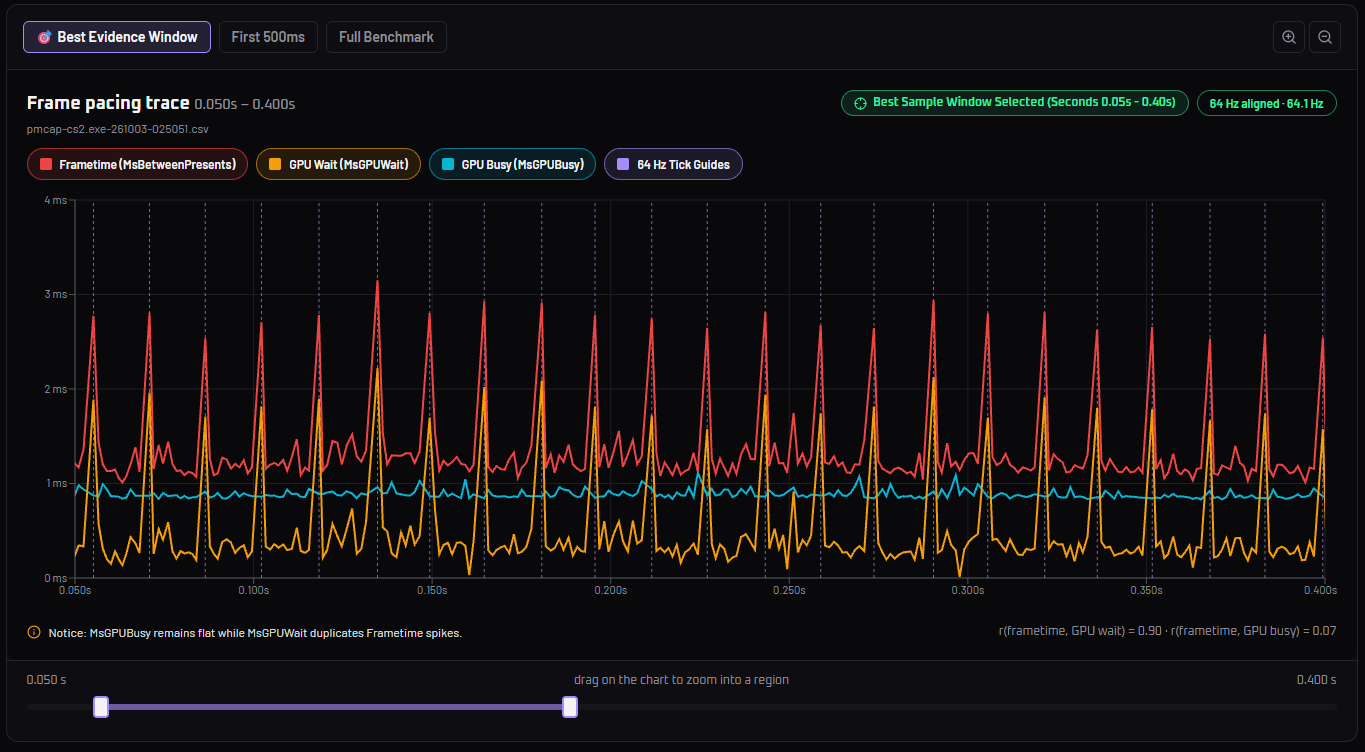
Btw gpu wait spikes proves that the engine locks render pipeline when processing a tick
thank you for doing this.
is it possible to run your test during a Face it game then on a community server (Cybershoke) for example? are those graph done on official Valve servers?
I am convinced that community servers like Cybershoke and others have completely different network settings server wise compared to Valve official servers or Face it, it would be very interesting to compare each visually and individually with your graphs.
Re: CS2 Input Lag Explained - The Monolithic 64 Hz Client Simulation Tick Stalls the Render Thread
Posted: 05 Oct 2026, 19:43
by unconnected
Chief Blur Buster wrote: ↑05 Oct 2026, 16:12
I am watching this thread with great interest.
I'm wondering if Chris (Battle(non)Sense) has a word to say about this.
Thanks for the bump.
I believe Chris moved on with life..
vnb wrote: ↑05 Oct 2026, 19:10
is it possible to run your test...
I hosted the tool on github pages
here,
just do a capture with
presentmon and upload the csv to the tool.
Also share results as I haven't tested how bad it is on lower-end systems
Re: CS2 Input Lag Explained - The Monolithic 64 Hz Client Simulation Tick Stalls the Render Thread
Posted: 06 Oct 2026, 05:11
by vnb
unconnected wrote: ↑05 Oct 2026, 19:43
vnb wrote: ↑05 Oct 2026, 19:10
is it possible to run your test...
I hosted the tool on github pages
here,
just do a capture with
presentmon and upload the csv to the tool.
Also share results as I haven't tested how bad it is on lower-end systems
what do you mean?
i'm on 9800x3d / 5070 Ti definitely not lower end system.
i thought it would be interesting if we could get a comparison FACE IT / Cybershoke / Valve official servers and compare them with the first snapshot you shared.
Re: CS2 Input Lag Explained - The Monolithic 64 Hz Client Simulation Tick Stalls the Render Thread
Posted: 06 Oct 2026, 08:52
by Brutek_Vladimir
OP means YOU can do it, as you have all tools needed.
Re: CS2 Input Lag Explained - The Monolithic 64 Hz Client Simulation Tick Stalls the Render Thread
Posted: 06 Oct 2026, 11:43
by Babluga
In CS2, even on a DM server, my 1% lows are almost always above 500 FPS. However, every now and then, even when I’m standing in an area with little to no activity, it feels like the engine (or the CPU) suddenly stalls, causing the 1% lows to drop to around 200–250 FPS before recovering back to 500+.
I also noticed something interesting in the D2 benchmark: during the smoke tests, there is a significant increase in GPU load, with GPU usage reaching 90%+. At that point, the 1% lows increase dramatically and become much more consistent, with no dips during that load phase.
This makes me wonder whether the issue is related to the CPU/engine occasionally becoming the bottleneck while the GPU isn’t being fully utilized.
It also doesn’t seem to matter whether I cap the FPS at 400, 500, or 600 — the issue can still occur, because there are scenarios where the GPU simply won’t be above 90% utilization. I’m wondering if lowering the GPU clock might actually help in those situations by keeping the GPU more consistently loaded. I’m going to test an underclock and see if it makes any difference.
Re: CS2 Input Lag Explained - The Monolithic 64 Hz Client Simulation Tick Stalls the Render Thread
Posted: 06 Oct 2026, 13:09
by cuaderno
This is on pracc DM server, fps_max 360, 9800x3d, 7900XTX

And this is with fps_max 0

Re: CS2 Input Lag Explained - The Monolithic 64 Hz Client Simulation Tick Stalls the Render Thread
Posted: 06 Oct 2026, 13:52
by unconnected
cuaderno wrote: ↑Yesterday, 13:09
This is on pracc DM server, fps_max 360, 9800x3d, 7900XTX
Thanks for the feedback!
I have some questions:
- Is HAGS on? If not - PresentMon uses legacy kernel scheduler which is not accurate.
- Is Antilag2 on? You might have prerendered frames in the queue which cause input lag but smooth out the graph.
- Are you on vulkan or dx11?