Page 3 of 3
Re: [G-SYNC Kit] WARNING! Be careful with brown clip/blue ri
Posted: 20 Jan 2014, 22:16
by Chief Blur Buster
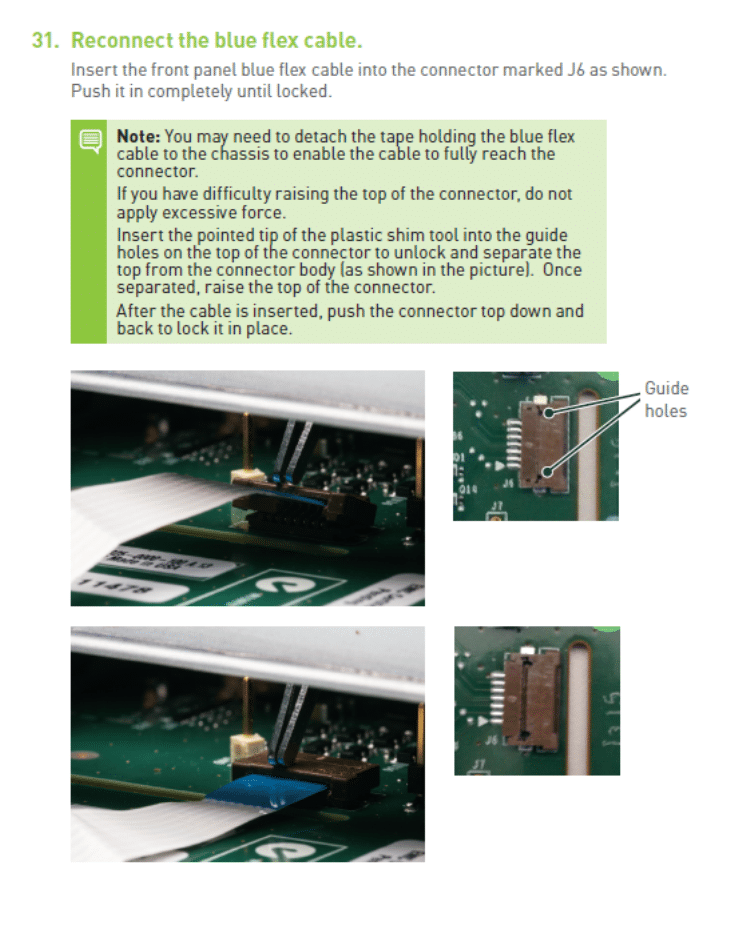
Useful diagram:
Re: [G-SYNC Kit] WARNING! Be careful with brown clip/blue ri
Posted: 21 Jan 2014, 13:51
by fredferrell
I ordered mine yesterday and can take the requested pictures if they are still needed.
Re: [G-SYNC Kit] WARNING! Be careful with brown clip/blue ri
Posted: 21 Jan 2014, 14:09
by Chief Blur Buster
fredferrell wrote:I ordered mine yesterday and can take the requested pictures if they are still needed.
Yes -- so far, they are still needed -- to show the step by step sequence of how the connector looks like before & after sliding, and before & after flipup. The first member(s) to post good sequence photos will save trouble for other forum reader(s) that reads this thread before installing their DIY kit.
Bonus points if certain photos are from the same angle, so I can create a slow time lapse GIF animation.
Re: [G-SYNC Kit] WARNING! Be careful with brown clip/blue ri
Posted: 22 Jan 2014, 14:45
by frankzotynia10
just an update for people who messed up their connector like me. Nvidia is advancing me a new board today. i'm glad to see they are helping me out with my problem.
EDIT: 1/25/13 - nvidia overnighted (not necessary but very appreciated

)me a new board and the install went perfectly with these new instructions. thanks for the help guys.
Re: [G-SYNC Kit] WARNING! Be careful with brown clip/blue ri
Posted: 23 Jan 2014, 17:54
by Karnaj
Thank you for the heads up regarding this connector. I installed my G-Sync upgrade kit today and it was fairly easy unlocking this connector since this info was made available beforehand. Pushing the pointy end of the plastic shim into the guide holes on the brown clip did the trick. The connector then popped up by itself, so no force or hardly any is needed to lift it up.
While I didn't run into any problems here, I actually snapped the tiny locking clasp found on the white power connector. Thankfully, the power cable fits snugly anyway.
I didn't have a camera handy so, regretfully, I couldn't take any pics. I honestly don't think pics are necessary in order to explain this step, though. It's just that Nvidia must update their manual and video guide, stating explicitly that the connector must be unlocked
horizontally before it lifts up. Here's a simple guide I made from Nvidia's provided pics if it might be useful:

Re: [G-SYNC Kit] WARNING! Be careful with brown clip/blue ri
Posted: 25 Jan 2014, 03:09
by fredferrell
I got my card earlier today and will be installing it tomorrow. I will make sure to get the pics.
Re: [G-SYNC Kit] WARNING! Be careful with brown clip/blue ri
Posted: 02 Feb 2014, 14:42
by Ch0b0
I'm thinking I should probably get a replacement with my board if you are having good luck with their support staff. Here's a pic of what my connector looks like now.
http://imgur.com/TqWEcNb It still works, but it is discomforting. I noticed that the metallic tape is already starting to come off.

UPDATE: I got a replacement board overnight as well. One thing that helped me the second time around was unlatching the connector before placing the board into the metal cage.
Re: [G-SYNC Kit] WARNING! Be careful with brown clip/blue ri
Posted: 06 Feb 2014, 12:48
by ZmillA
I was able to slide in the cable without lifting up the terminal. I'm not convinced the terminal on my board even lifts up. The terminal in the youtube walkthrough looks different than mine
Re: [G-SYNC Kit] WARNING! Be careful with brown clip/blue ri
Posted: 18 Feb 2014, 17:18
by GhostOrange
As an EE, I can tell you this is a terrible connector to have chosen for this design. There are other ribbon connections available that serve the same purpose and would not be nearly as fragile. There is a similar type with a metal snap-down as well as a vertical connector.
Alternatively, they could have supplied a clip-on connector for the ribbon itself that would pop on to pins on the board. This would be the best option, IMO.
Cost would be the only reason to use the brown connector.
Re: [G-SYNC Kit] WARNING! Be careful with brown clip/blue ri
Posted: 18 Feb 2014, 20:08
by annisman
I can't believe they don't instruct you to unlatch it before you insert the new PCB, the hard part isn't putting the cable back in, but releasing the brown clip first.