Page 3 of 7
Re: 240hz on 60FPS games
Posted: 02 Mar 2018, 14:38
by crossjeremiah
Thank you again for your insight. Yes I believe him, I believe 240hz at 60fps with gsync is super fast
I did not doubt him. I was explaining the buffers we use in netplay to get identical to crt timings. I'm saying you can use the faster melee client standalone(without buffers) offline and it will literally be faster than a console setup.
I'm glad youre relaying this information to me I really do. I myself own BenQ XL2430t and BenQ RL2460ht. The difference between them are noticable. I'm thinking of selling both of them and spend a little extra on a 240hz gsync monitor, probably have to get 1080ti too since I only have a Geforce 960.
I'd imagine 240hz at 60fps w/ GSYNC - would be GODLIKE. I love learning about input lag I really do, I don't have anything in my life going on right now due to some mental issues. But learning more about this just gives me a breath of fresh air. Thank you again for your quick responses.
Re: 240hz on 60FPS games
Posted: 02 Mar 2018, 14:58
by RealNC
240Hz for 60FPS gaming is a waste. The difference in latency is minimal (2.8ms difference to 144Hz, which is virtually nothing.)
Re: 240hz on 60FPS games
Posted: 02 Mar 2018, 18:24
by crossjeremiah
Understandable. paying $1200 for the equipment for a 2ms difference, sounds like a poor decision.
Re: 240hz on 60FPS games
Posted: 02 Mar 2018, 19:54
by RealNC
Actually it's even smaller. It's 2.8ms only at the very bottom of the screen. The average input lag is only 1.4ms lower.

Re: 240hz on 60FPS games
Posted: 02 Mar 2018, 21:02
by lexlazootin
I'm not sure why you could need to upgrade your GPU, unless you want to play other games Dolphin will work 100% fine with a 960.
Re: 240hz on 60FPS games
Posted: 02 Mar 2018, 21:24
by crossjeremiah
Will a 240hz work on a 960? I read recommended was at least 980.
Re: 240hz on 60FPS games
Posted: 02 Mar 2018, 22:45
by lexlazootin
It will physically work, it supports DisplayPort2.0 and the display isn't "hard" to run, 60fps Dolphin can run on pretty low-end hardware. but it's not like you need to upgrade GPU just to use a monitor, you could plug a 240hz into a laptop and it will run just fine.
You will maybe need to upgrade your GPU if you intend to run at 240FPS but simply running at 240hz is not a issue.
Re: 240hz on 60FPS games
Posted: 03 Mar 2018, 02:04
by xwidghet
Chief Blur Buster wrote:
And since console games are VSYNC ON, you're essentially bypassing VSYNC ON input lag by using a variable refresh rate display. There's no waiting intermediate buffers needed for GSYNC or FreeSync. Once the buffer goes front buffer instead of back buffer, that's the immediate begin of a refresh cycle. Your software just triggered a brand new refresh cycle immediately, and since NVIDIA was able to make GSYNC monitors are scanline-buffered-processing -- you've often got only ~3ms of lag between what's in the GPU framebuffer, and the first pixels beginning to appear at the top edge of the screen.
There was actually a quirk in dolphin's XFB Disabled setting that allowed it to present frames before the game was ready, producing lower latency than the actual console. In newer versions this is reproduced with the Immediately Present XFB setting.
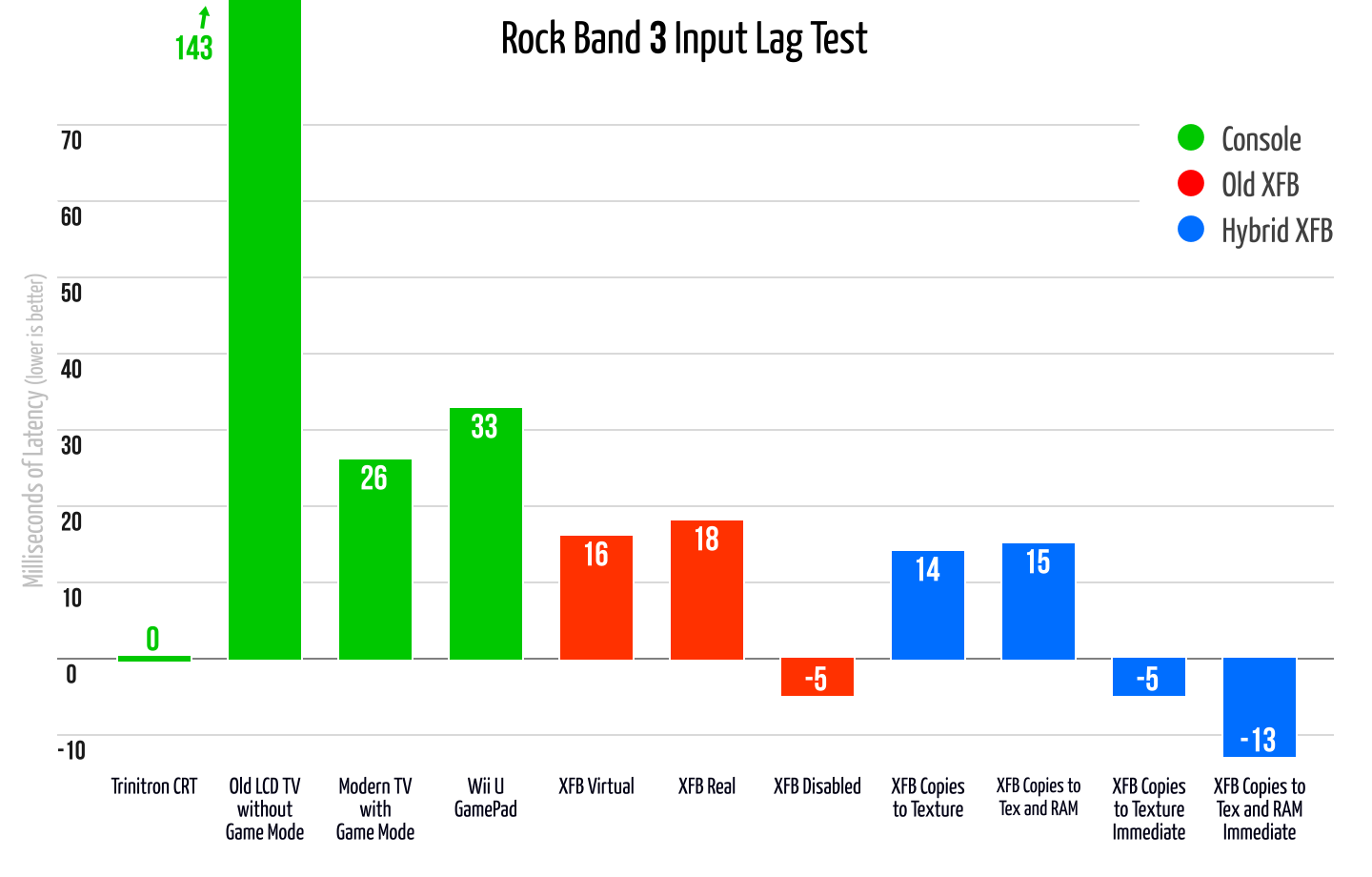
Link to full blog post the image is from:
https://dolphin-emu.org/blog/2017/11/19 ... resent-xfb
Re: 240hz on 60FPS games
Posted: 03 Mar 2018, 08:33
by KKNDT
Chief Blur Buster wrote:
CRTs cannot bypass scanout lag (e.g. slow-scanning 60Hz video signal).
While their absolute lag is practically zero, there's a mandatory cable scanout lag.
What is the standard defination of "absolute lag"?
Re: 240hz on 60FPS games
Posted: 03 Mar 2018, 09:04
by Chief Blur Buster
RealNC wrote:With vsync off, triple buffering is useless.
With vsync on, triple buffering will increase input lag by 1 frame. Many games actually offer a choice between "double buffered vsync" and "triple buffered vsync." Games that don't offer the choice might be using double or tripple buffer and there's no way to actually know what they actually use.
In any event, the effect of frame capping with tripple buffering is not clear. I don't think anyone tested this.
One terminology clarification (as I'm oldschool) is that today's NVIDIA Fast Sync and AMD Enhanced Sync used to be called "triple buffering" back in the 3Dfx Interactive days.
So, the phrase "triple buffering" can either mean the classical version (now named Fast Sync / Enhanced Sync today), or today's laggy framebuffer queue.