Page 29 of 44
Re: flood's input lag measurements
Posted: 10 Apr 2015, 15:36
by Sparky
stirner wrote:
Is that transition really optimal? Because in the bright state you have 1/3 of the bottom darker. Depending on timing of input initial output could begin at the bottom of the screen and then you don't get a crass brightness change.
It's fine for v-sync testing, because it all starts at the top. For v-sync off, I can turn left/right instead of up/down, but I don't think it's really necessary, because there aren't a lot of questions about how v-sync off works. Mostly I was trying to find out if any of the external frame limiters can match CPU frame limiting, but they can't(rivatuner is 1 frame slower, and RadeonPro is 2 frames slower).
Re: flood's input lag measurements
Posted: 10 Apr 2015, 15:47
by stirner
oh true, for vsync it doesn't matter
external limiters provide better frametimes though, so less microstuttering as well, but valve actually looked at fps_max behaviour and improved frametimes (and mailed me back about it).
any theories as to where external limiters add lag? As I said earlier in the thread, I think it's either engine-independent points of waits in the rendering process or that external limiters use primarily buffer swap for framerate control.
Re: flood's input lag measurements
Posted: 10 Apr 2015, 16:11
by Sparky
RadeonPro might be blocking a buffer swap after the GPU finishes rendering that frame. Rivatuner might be preventing the GPU from starting to work on a frame.
This is all still speculation, and there might be a step in the middle I'm missing.
Re: flood's input lag measurements
Posted: 11 Apr 2015, 02:10
by Sparky
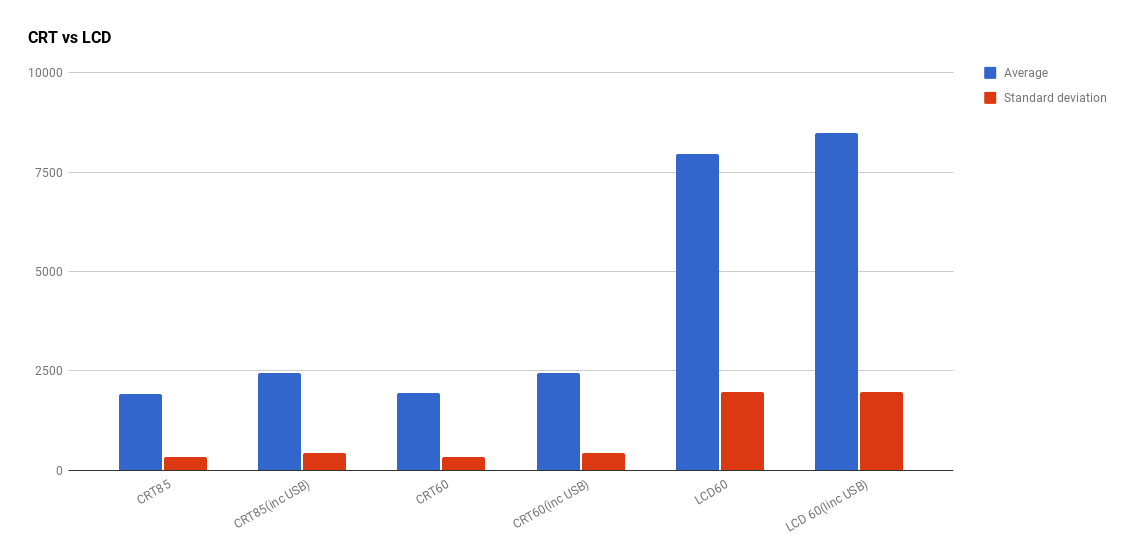
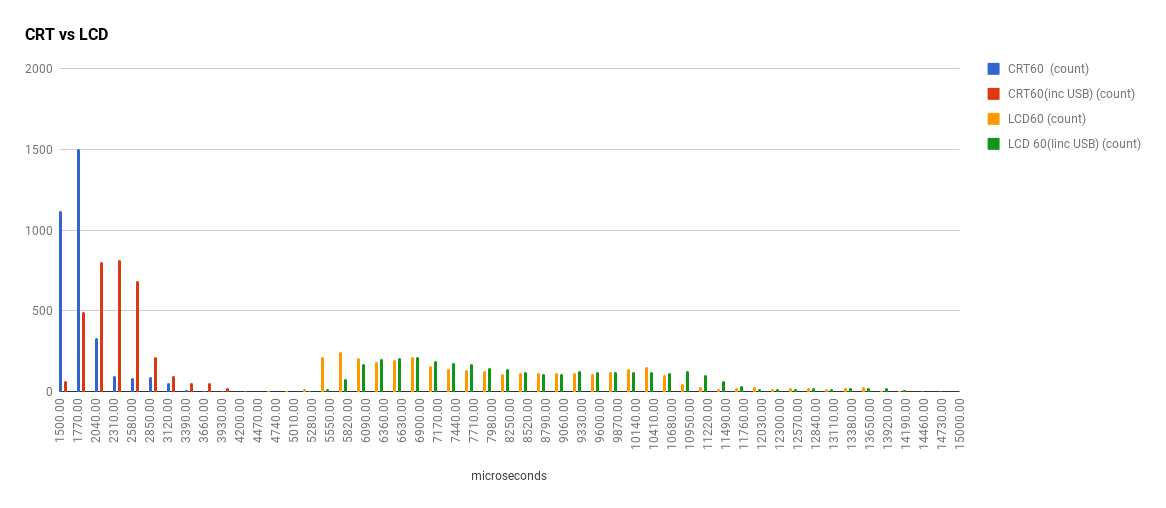
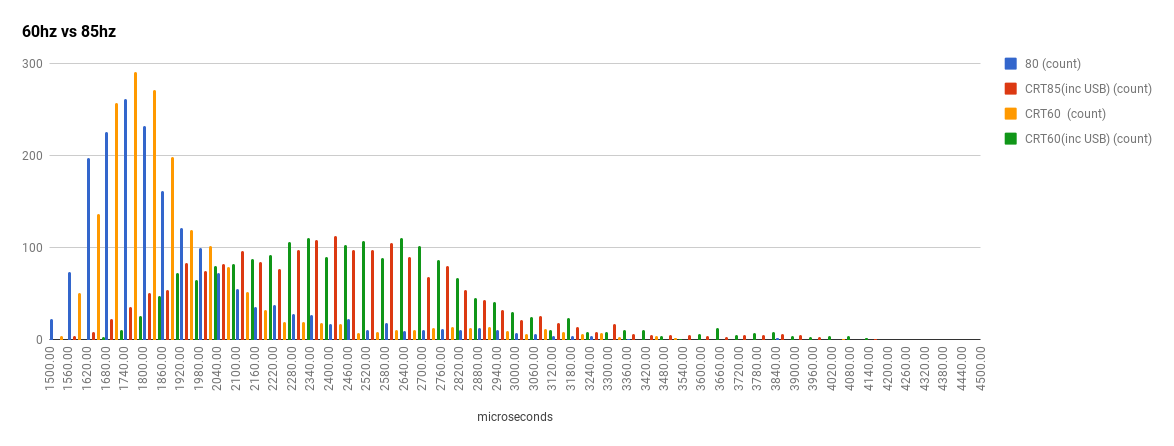
Redid the CRT vs LCD tests, kinda wish I had a high speed camera to verify.
CRT: Mitsubishi diamond pro 930SB at 1280x1024 85,60hz
LCD: Samsung syncmaster p2370 at 1080p, 60hz
Re: flood's input lag measurements
Posted: 11 Apr 2015, 09:46
by lexlazootin
flood wrote:game renders more slowly?
How slow do you want? I'm assuming you want to be a gpu bottleneck.
Re: flood's input lag measurements
Posted: 11 Apr 2015, 09:54
by Sparky
I'd be interested in a framerate cap that sets a fixed delay instead of chasing a specific frame rate, so I can illustrate below-refresh v-sync cases more accurately. As in, I don't want the framerate cap to speed the game back up in order to maintain 50fps with double buffered v-sync, I want it to drop to half my refresh rate as would happen in a normal gaming scenario.
Re: flood's input lag measurements
Posted: 11 Apr 2015, 11:58
by lexlazootin
 https://www.youtube.com/watch?v=3FO2cpGcOWo
http://www.mediafire.com/download/4yzrr ... detail.zip
https://www.youtube.com/watch?v=3FO2cpGcOWo
http://www.mediafire.com/download/4yzrr ... detail.zip
I'm not quite sure if this will lower your frame rate enough for what you want. Not too sure if you wanted fps levels a "real" map would give you or something crushingly low. If you want something more specific give me a toot.

Re: flood's input lag measurements
Posted: 11 Apr 2015, 12:17
by Sparky
hmm, I'm still well over 200fps in that map with all the settings cranked up on a 6870. What framerates were you getting on it? It might be easier to find a slow game than to make CS:GO slow. Too bad I tend to avoid those games.
Re: flood's input lag measurements
Posted: 11 Apr 2015, 20:24
by flood
from my understanding (based on staring at +showbudget) csgo is usually not gpu bottlenecked
most of the time is spent calculating interpolation when there are many players in the server. when you're alone in a server, the time is spent calculating what to draw and what not to draw. for instance if you stare at a wall with lots of stuff behind it, you'd get much lower fps than if you stare at a wall with stuff behind it
maybe the easiest way would be to havr the black/white box in the middle of a default 5v5 map
ideally the framerate would be the same on either side though im not really sure how to acheive that short of mirroring the map on either side
Re: flood's input lag measurements
Posted: 12 Apr 2015, 04:34
by lexlazootin
https://youtu.be/9ty1arbqepU
http://www.mediafire.com/download/kkrav ... o_dust.zip
It's about the same as the fps you would get on dust2.
I would just edit dust2 and place a bunch of these boxs around the place but rendering the whole map would probably take a full day, i might look into writing a sourcemod plugin to do it.