Yes, Retrotink 4K will let you do any custom BFI rate, while also having adjustable BFI persistence!
The great thing about Retrotink 4K is that you can add BFI to any display that doesn't support BFI, as long as you have enough refresh rate headroom!
It supports custom ModeLines on an SD card, you just create a new refresh rate 2x, 3x or 4x the retro Hz.
For 53.20Hz, you'd create modelines
- (2 x 53.20Hz) for 50% BFI blur reduction options
- (3 x 53.20Hz) for 33% and 66% BFI blur reduction options
- (4 x 53.20Hz) for 25%, 50%, 75% BFI blur reduction options
You have to multiply the number fully exactly, including decimal refresh rate, so (2 x 53.20) = 106.40. Use your calculator to multiply by 2, 3, or 4, and create appropriate ModeLine, depending on how much BFI adjustability you want.
For a demo of variable-persistence BFI, see
www.testufo.com/blackframes#count=4&bonusufo=1 (view at 240Hz for 60fps), you will realize that the duty cycle ratio of visible:black, dictates the final amount of motion blur. If you want to get more closer and closer to a CRT tube, then you need a larger-ratio input:output Hz, to allow the extra blur removal.
More refresh rate = more BFI duty cycle adjustability. (duty cycle = blur vs brightness tradeoff). You notice you can get 25% blur reduction, or 50% blur reduction, or 75% blur reduction based on ratio of visible frames to black frames! So more input:output ratio is better, so get 240Hz if you plan to use Retrotink 4K BFI, and I currently recommend 240Hz OLEDs, not 240Hz LCDs.
More Hz the merrier, for improved BFI adjustability.
I highly recommend 240Hz+ OLEDs when used with Retrotink 4K, which can output 1080p/240 (same bandwidth as 4K/60). Modern 240Hz OLEDs will do any fixed-Hz refresh rate within their VRR range, so pick any custom decimal Hz 48-240Hz and use it as a fixed-Hz for your MiSTeR.
With a floor of 4ms MPRT, it won't be as low blur as a ViewSonic XG2431 (capable of <1ms MPRT), but most retro resolutions don't need less than 2-4ms MPRT, and it's only with ultrafast scrollers like Sonic Hedgehog, that you really feel the true need for 2ms MPRT. Low MPRT is more important when you need higher resolutions, so getting down to ~4ms MPRT at 60Hz on an OLED, will already get you literally plasma-quality motion right out of the gate, and you can use the HDR-nits-booster to brighten your SDR BFI, to fight against the BFI brightness loss.
Overall, the best Retrotink 4K BFI results have been currently on 240Hz+ OLEDs, since software BFI requires fast GtG to perform well. I strongly suggest you consider OLED instead of LCD when purchasing a retro-BFI display for your Retrotink 4K.
Also another advantage is less 60Hz flicker. Software BFI tends to produce a rolling-scan BFI because the sample and hold displays are rolling-out the refresh cycles, ala high speed videos at
www.blurbusters.com/scanout -- this is less harsh than global-flash strobe backlights.
Output has enough bandwidth to support 1440p 50%-blur-reduced BFI, or 1080p 25/50/75%-blur-reduced BFI. Also, depending on the OLED you buy, it may be possible to use 2560x720 output (vertically stretched, untested) to get 240Hz, and use an aperturegrille mask to hide the limited vertical resolution, and gain the 25/50/75 adjustability.
With the linked display, you won't have enough bandwidth for 4K at (2 x 60Hz) or (2 x 53.20Hz = 106.40), so you might as well lower your resolution to get the desired BFI capabilities.
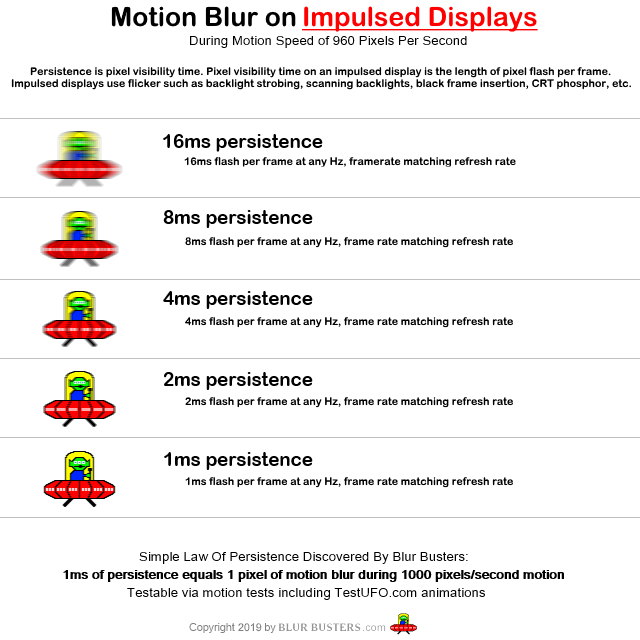
Science: Motion Blur Is Pixel Visibility Time
Adding software-based BFI (including box-in-middle products) turns a sample-and-hold display into an impulsed display, but your blur physics is dicated by the pulse width which can never be less than refreshtime. So 120Hz = 8ms MPRT minimum for ~60fps software BFI, while 240Hz = 4ms MPRT minimum for ~60fps software BFI
Hardware-based strobe backlights on LCD can outperform software based BFI (on both LCD and OLED), but there are other disadvantages at play, including increased 60Hz flicker.