Page 4 of 5
Re: About my settings for computer optimization
Posted: 15 Jan 2025, 09:45
by alp15eren
JimCarry wrote: ↑15 Jan 2025, 09:17
alp15eren wrote: ↑15 Jan 2025, 05:18
That code briefly shows how many CPUs the Ethernet can work on. I made that value 1 so that it only works on CPU3. If the original value was 4, it would also work on even-numbered CPUs. I chose CPU3, so the even numbers after that.
Like CPU3, CPU4, CPU6 and CPU8.
If I had left the Ethernet in its original state instead of CPU3,
It would work on CPU0, CPU2, CPU4 and CPU 6.
ok thnaks i subscribed to your youtube,so i have ryzen 5 7600x and in your opinion wich one should i choose ?
If you haven't assigned Ethernet to a different core, i.e. it's on CPU 0 by default, it would be better to choose 4 queues. Putting all the load on CPU0 can cause problems.
Re: About my settings for computer optimization
Posted: 15 Jan 2025, 16:31
by alp15eren
I played Elden Ring at maximum settings including CPU 0. It gives a stable 60fps. It doesn't stutter. I think the settings I made fixed this too. Normally, as far as I know, there would be a lot of stuttering problems without removing the CPU 0 option.
Re: About my settings for computer optimization
Posted: 16 Jan 2025, 06:54
by JimCarry
alp15eren wrote: ↑15 Jan 2025, 09:45
JimCarry wrote: ↑15 Jan 2025, 09:17
alp15eren wrote: ↑15 Jan 2025, 05:18
That code briefly shows how many CPUs the Ethernet can work on. I made that value 1 so that it only works on CPU3. If the original value was 4, it would also work on even-numbered CPUs. I chose CPU3, so the even numbers after that.
Like CPU3, CPU4, CPU6 and CPU8.
If I had left the Ethernet in its original state instead of CPU3,
It would work on CPU0, CPU2, CPU4 and CPU 6.
ok thnaks i subscribed to your youtube,so i have ryzen 5 7600x and in your opinion wich one should i choose ?
If you haven't assigned Ethernet to a different core, i.e. it's on CPU 0 by default, it would be better to choose 4 queues. Putting all the load on CPU0 can cause problems.
yep i did not use gointerupt program to asing any cores for anything,so thanks i will keep it at 4,also last question you know

,i change in msi_utility msg limit from 16 to 32 is it good,and also for cs2 should i enald or disable receive side scaling because anything else i disable?
Re: About my settings for computer optimization
Posted: 16 Jan 2025, 06:56
by JimCarry
alp15eren wrote: ↑15 Jan 2025, 16:31
I played Elden Ring at maximum settings including CPU 0. It gives a stable 60fps. It doesn't stutter. I think the settings I made fixed this too. Normally, as far as I know, there would be a lot of stuttering problems without removing the CPU 0 option.
I think its not on cpu 0 because when i change msg limit from 16 to 32 it increase the number of "IRQ".
Re: About my settings for computer optimization
Posted: 16 Jan 2025, 08:25
by alp15eren
JimCarry wrote: ↑16 Jan 2025, 06:54
alp15eren wrote: ↑15 Jan 2025, 09:45
JimCarry wrote: ↑15 Jan 2025, 09:17
alp15eren wrote: ↑15 Jan 2025, 05:18
That code briefly shows how many CPUs the Ethernet can work on. I made that value 1 so that it only works on CPU3. If the original value was 4, it would also work on even-numbered CPUs. I chose CPU3, so the even numbers after that.
Like CPU3, CPU4, CPU6 and CPU8.
If I had left the Ethernet in its original state instead of CPU3,
It would work on CPU0, CPU2, CPU4 and CPU 6.
ok thnaks i subscribed to your youtube,so i have ryzen 5 7600x and in your opinion wich one should i choose ?
If you haven't assigned Ethernet to a different core, i.e. it's on CPU 0 by default, it would be better to choose 4 queues. Putting all the load on CPU0 can cause problems.
yep i did not use gointerupt program to asing any cores for anything,so thanks i will keep it at 4,also last question you know
,i change in msi_utility msg limit from 16 to 32 is it good,and also for cs2 should i enald or disable receive side scaling because anything else i disable?
I left these limits as they are. I think increasing them would distribute the load across more cores, I'm not sure. I had previously distributed the GPU, Ethernet, and USB (mouse only) across all cores. This resulted in a slight performance and latency improvement, but assigning the GPU and Ethernet to a single core gave better results.
The reason I gave the elden ring example is because the elden ring only overloads the CPU0 core. This would cause the game to stutter if CPU0 was not disabled.
This is probably because I lightened the load on CPU0 with these settings. Naturally, my system runs much smoother in all the games I play.
Re: About my settings for computer optimization
Posted: 16 Jan 2025, 08:28
by alp15eren
https://www.youtube.com/watch?v=76Wl4KKmEs8
Even if I don't do this setting, I can play very smoothly. It gives a fixed 60fps at maximum settings. Almost everyone is experiencing the problem in the video I shared. I think the GPU, Ethernet Affinity and Timer Resolution settings help.
Re: About my settings for computer optimization
Posted: 16 Jan 2025, 10:47
by JimCarry
alp15eren wrote: ↑16 Jan 2025, 08:28
https://www.youtube.com/watch?v=76Wl4KKmEs8
Even if I don't do this setting, I can play very smoothly. It gives a fixed 60fps at maximum settings. Almost everyone is experiencing the problem in the video I shared. I think the GPU, Ethernet Affinity and Timer Resolution settings help.
can you tell me in your opinion on what core shoud i put my gpu and ethernet.
Re: About my settings for computer optimization
Posted: 16 Jan 2025, 11:40
by alp15eren
JimCarry wrote: ↑16 Jan 2025, 10:47
alp15eren wrote: ↑16 Jan 2025, 08:28
https://www.youtube.com/watch?v=76Wl4KKmEs8
Even if I don't do this setting, I can play very smoothly. It gives a fixed 60fps at maximum settings. Almost everyone is experiencing the problem in the video I shared. I think the GPU, Ethernet Affinity and Timer Resolution settings help.
can you tell me in your opinion on what core shoud i put my gpu and ethernet.
Play a game with high fps, move your mouse as much as you can and download any files in the background. (For example Valorant. Enter the training area but do not enable bots.
While doing this, go to the CPUs page in the Latencymon program. Select the cores with the lowest 2 interrupt cycle times as GPU and Ethernet respectively.
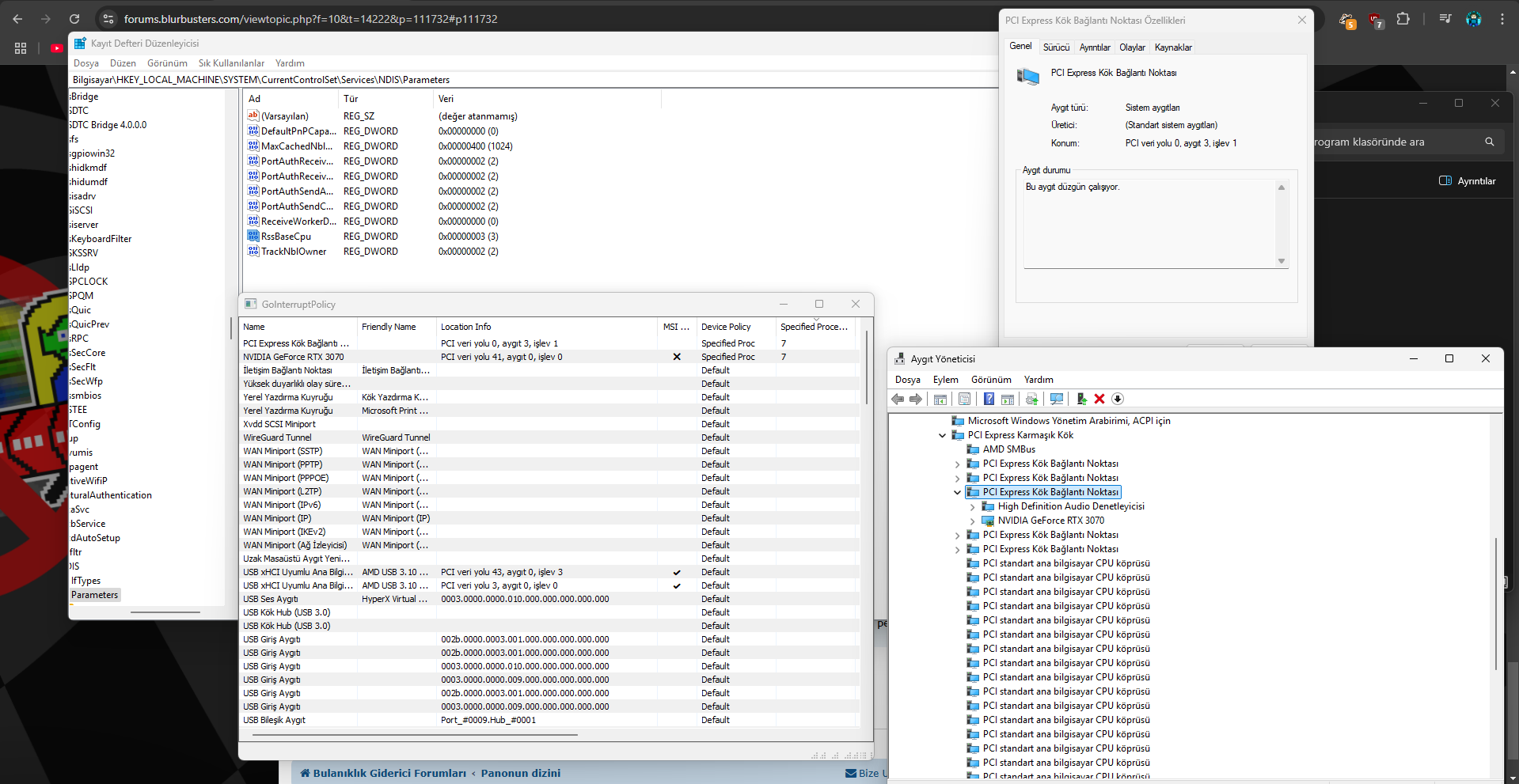
Change the Go Interrupt Policy value for GPU and the RssBaseCpu value for Ethernet.
HKEY_LOCAL_MACHINE\SYSTEM\CurrentControlSet\Services\Ndis\Parameters
Create a new dword (32 bit) RssBaseCpu and enter the number of cores.
Re: About my settings for computer optimization
Posted: 16 Jan 2025, 19:19
by JimCarry
alp15eren wrote: ↑16 Jan 2025, 11:40
JimCarry wrote: ↑16 Jan 2025, 10:47
alp15eren wrote: ↑16 Jan 2025, 08:28
https://www.youtube.com/watch?v=76Wl4KKmEs8
Even if I don't do this setting, I can play very smoothly. It gives a fixed 60fps at maximum settings. Almost everyone is experiencing the problem in the video I shared. I think the GPU, Ethernet Affinity and Timer Resolution settings help.
can you tell me in your opinion on what core shoud i put my gpu and ethernet.
Play a game with high fps, move your mouse as much as you can and download any files in the background. (For example Valorant. Enter the training area but do not enable bots.
While doing this, go to the CPUs page in the Latencymon program. Select the cores with the lowest 2 interrupt cycle times as GPU and Ethernet respectively.
Change the Go Interrupt Policy value for GPU and the RssBaseCpu value for Ethernet.
HKEY_LOCAL_MACHINE\SYSTEM\CurrentControlSet\Services\Ndis\Parameters
Create a new dword (32 bit) RssBaseCpu and enter the number of cores.
thanks there is many videos on how to set afinities.i will try it.
Re: About my settings for computer optimization
Posted: 17 Jan 2025, 06:49
by alp15eren
JimCarry wrote: ↑16 Jan 2025, 19:19
alp15eren wrote: ↑16 Jan 2025, 11:40
JimCarry wrote: ↑16 Jan 2025, 10:47
alp15eren wrote: ↑16 Jan 2025, 08:28
https://www.youtube.com/watch?v=76Wl4KKmEs8
Even if I don't do this setting, I can play very smoothly. It gives a fixed 60fps at maximum settings. Almost everyone is experiencing the problem in the video I shared. I think the GPU, Ethernet Affinity and Timer Resolution settings help.
can you tell me in your opinion on what core shoud i put my gpu and ethernet.
Play a game with high fps, move your mouse as much as you can and download any files in the background. (For example Valorant. Enter the training area but do not enable bots.
While doing this, go to the CPUs page in the Latencymon program. Select the cores with the lowest 2 interrupt cycle times as GPU and Ethernet respectively.
Change the Go Interrupt Policy value for GPU and the RssBaseCpu value for Ethernet.
HKEY_LOCAL_MACHINE\SYSTEM\CurrentControlSet\Services\Ndis\Parameters
Create a new dword (32 bit) RssBaseCpu and enter the number of cores.
thanks there is many videos on how to set afinities.i will try it.
The ones in the Youtube videos are incomplete or give wrong information. GPU + Change the PCI EXPRESS port that the GPU is connected to. Leave the Ethernet as default and change it with RssBaseCpu via regedit.
If you do not change the PCI EXPRESS port to which the GPU is connected, you will get worse performance.
- Ekran görüntüsü 2025-01-17 145111.png (252.57 KiB) Viewed 2028 times