Page 4 of 6

Re: AMD Radeon AntiLag

Posted: 16 Jun 2019, 12:13
by 1000WATT
masneb wrote: If they're streamlining and improving the GPU stack including their drivers and a game becomes CPU bound, there isn't much AMD (graphics) can do to improve that. In a complete Ryzen system that means AMD COULD potentially tackle this from the USB port all the way through your GPU. Obviously this technology is still in its infancy and we may eventually see a whole OS implementation or specialized input stack eventually derived for peripherals with ways for games to address it exclusively in the long run.
even if you cross out all the words amd. I immediately understand what company you are talking about. :mrgreen:

Re: AMD Radeon AntiLag

Posted: 16 Jun 2019, 12:35
by jorimt
masneb wrote:Obviously this technology is still in its infancy
According to the rep in the video, if that's all this new "Anti-Lag" feature is, it isn't in it's infancy though, it's been around forever. He states in that video:
So anti-lag is a software optimization. What we're doing is we're making sure that the CPU work where your input is registered doesn't really get too far ahead of the GPU work where you're drawing the frame, so that you don't have too much lag between click mouse, when you press key, and when you hit the response out on the screen.
What he's describing is literally the pre-rendered frames queue, which (I think) is already available to control via AMD reg edits, and is an existing entry in the Nvidia control panel.

The only difference I see (unless they're holding a lot back here) is possibly automatic and/or more reliable global override of the existing in-game frames ahead queue value at the driver level.

If you have an Nvidia GPU, you can do this now (for the games that accept the override; not all do, usually for engine-specific, or raw performance reasons), just set the below option to "1":
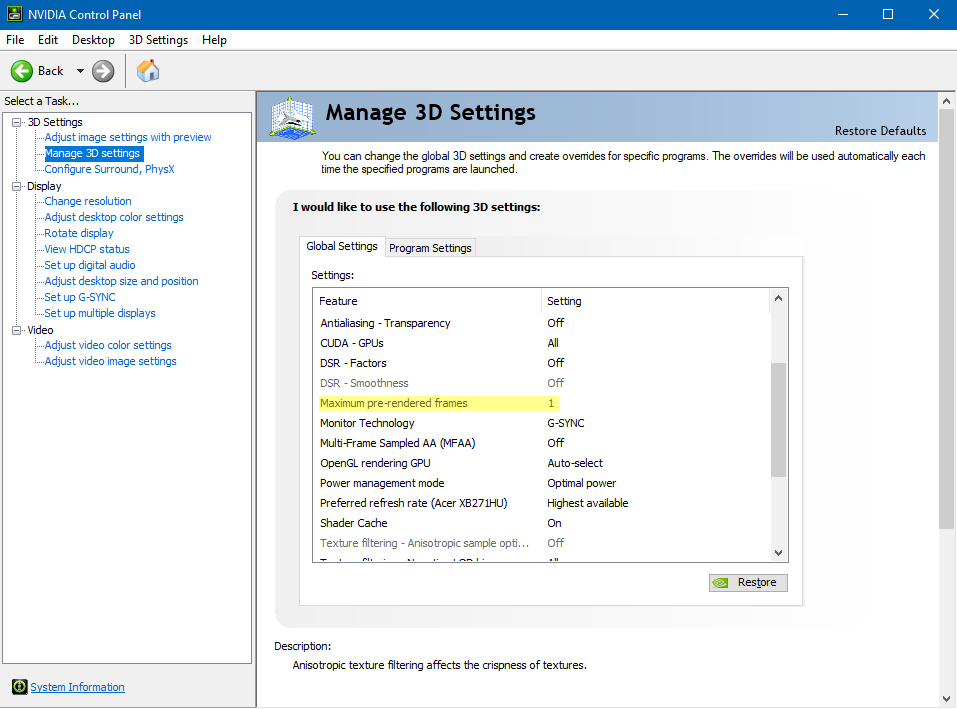
Image

I have a description of this setting in my G-SYNC 101 article's "Closing FAQ" as well:
https://www.blurbusters.com/gsync/gsync ... ttings/15/

Some games also offer an engine-level equivalent of this setting, like Overwatch, which labels it "Reduced Buffering."

Finally, regarding the input lag difference between AMD/Nvidia on the test setups in that video, that can easily be explained; Nvidia's max pre-rendered frames entry is set to "Use the 3D application setting" at the driver level at default (an equivalent of "2" or "3" pre-rendered frames), so if they left it at that, and enabled their own "Anti-Lag" feature on the AMD setup (probably an equivalent of "1" pre-rendered frame), then you'd get the difference we're seeing there (at 60 FPS, each frame is worth 16.6ms, and the difference is about 15ms in the video).

So far, this just sounds like very clever marketing and re-framing of an existing setting for an audience that is less familiar with this than we are. Which isn't a bad or disappointing thing though, at least from my perspective (if it ends up being the case); it would be great to have a more clearly/correctly labeled and guaranteed pre-rendered frames queue override for virtually every game it's applied to (something that doesn't seem to be the case with the Nvidia setting currently).

Re: AMD Radeon AntiLag

Posted: 16 Jun 2019, 13:36
by 1000WATT
jorimt wrote: Finally, regarding the input lag difference between AMD/Nvidia on the test setups in that video, that can easily be explained; Nvidia's max pre-rendered frames entry is set to "Use the 3D application setting" at the driver level at default (an equivalent of "2" or "3" pre-rendered frames), so if they left it at that, and enabled their own "Anti-Lag" feature on the AMD setup (probably an equivalent of "1" pre-rendered frame), then you'd get the difference we're seeing there (at 60 FPS, each frame is worth 16.6ms, and the difference is about 15ms in the video).
If this is true.
And if this marketing is aimed at selling top-end video cards, it is reasonable to assume that in new drivers for new cards this parameter will become 1. And this will be very ugly.

Re: AMD Radeon AntiLag

Posted: 16 Jun 2019, 14:14
by jorimt
1000WATT wrote:it is reasonable to assume that in new drivers for new cards this parameter will become 1. And this will be very ugly.
Oh, who knows, it could end up being "2" ;P

All we know from that video, is the test is (presumably) showing up to one frame less than at the (apparent) default MPRF values from both AMD/Nvidia (which seems to be "3").

Re: AMD Radeon AntiLag

Posted: 16 Jun 2019, 16:50
by Notty_PT
I've been researching now. So it is the equivalent of Nvidia max pre rendered frames It seems.

I use "1" on all my games, it's the first thing I do once the system is installed.

Re: AMD Radeon AntiLag

Posted: 21 Jun 2019, 11:59
by Simon95
Is this the same marketing stunt like a few years ago by nvidia?
https://www.hardwarezone.com.my/feature ... te-figures

Re: AMD Radeon AntiLag

Posted: 21 Jun 2019, 12:17
by Litzner
The way the AMD Anti-Lag tech sounded to me is that it worked in a similar fashion to what we are already doing with Scanline Sync, but probably without the accurate frame time of SSync, so you would really want to pair it with FreeSync. But we will have to wait for the feature to come out and be thoroughly tested.

Re: AMD Radeon AntiLag

Posted: 21 Jun 2019, 12:23
by Litzner
Notty_PT wrote:I've been researching now. So it is the equivalent of Nvidia max pre rendered frames It seems.

I use "1" on all my games, it's the first thing I do once the system is installed.
I personally stopped setting pre-rendered frames to 1, when I had Nvidia last anyways. In testing that setting has little to no effect on input latency, but can noticeably increase hitching\make frame times more erratic in some titles. It seems to be best to be left on default\application controlled and let the game engine decide. I think BattleNonSense did a pretty extensive test on this setting once, but it may have been someone else.

Re: AMD Radeon AntiLag

Posted: 22 Jun 2019, 08:34
by Simon95
Litzner wrote:
Notty_PT wrote:I've been researching now. So it is the equivalent of Nvidia max pre rendered frames It seems.

I use "1" on all my games, it's the first thing I do once the system is installed.
I personally stopped setting pre-rendered frames to 1, when I had Nvidia last anyways. In testing that setting has little to no effect on input latency, but can noticeably increase hitching\make frame times more erratic in some titles. It seems to be best to be left on default\application controlled and let the game engine decide. I think BattleNonSense did a pretty extensive test on this setting once, but it may have been someone else.
This reddit post explains the pro and cons of a one frame prerender limit.
In Battlefield 5 they call it FutureFrameRendering.
https://www.reddit.com/r/BattlefieldV/c ... planation/

Re: AMD Radeon AntiLag

Posted: 22 Jun 2019, 14:27
by Q83Ia7ta
As I see many don't understand that a game engine can overwrite or use own value and ignore pre-rendering setting at the nvidia control panel. That's sad.
About that' AMD Radeon AntiLag. Looks like AMD do it every year just to remind games that they care of gamers.
2017 - https://www.pcgamer.com/amds-radeon-sof ... n-latency/
2018 - https://www.anandtech.com/show/13654/am ... -edition/2 https://community.amd.com/community/gam ... oject-resx
And that World War Z game uses Vulkan and is tuned by AMD for sure.