NVIDIA G-Sync Pulsar monitor - Asus ROG Strix XG27AQNGV

Ask about motion blur reduction in gaming monitors. Includes ULMB (Ultra Low Motion Blur), NVIDIA LightBoost, ASUS ELMB, BenQ/Zowie DyAc, ToastyX, black frame insertion (BFI), and now framerate-based motion blur reduction (framegen / LSS / etc).
Post Reply
brownvim
Posts: 197
Joined: 22 Jun 2020, 04:15

Re: NVIDIA G-Sync Pulsar monitor - Asus ROG Strix XG27AQNGV

Post by brownvim » 19 Feb 2026, 15:53

Chief Blur Buster wrote:
19 Feb 2026, 15:04
brownvim wrote:
18 Feb 2026, 18:19
Chief Blur Buster wrote:
18 Feb 2026, 18:04
I am still waiting for my updated sample & firmware.

Thank you for bringing the Pulsar discussion back on topic!
John from Digital Foundry mentioned that Nvidia have been finding it more challenging that they thought it would be but its coming soon.

source: https://www.youtube.com/watch?v=MnCHHSwa7R4&t=4536s
I'm aware too. I'd rather NVIDIA do the time to get the firmware right.

This is why Blur Busters and multiple content creators (especially Digital Foundry) have put a bit of pressure on NVIDIA to release a good 60fps 60Hz capable firmware upgrade.
I really appreciate all the work you do pushing motion clarity forward.

Given the years of effort NVIDIA has put into Pulsar (coordinating with monitor vendors, custom MediaTek chips, rolling-zone strobing backlights, etc.), I’ve been wondering about something:

Would it have been significantly easier for them to implement an advanced ShaderBeam-style solution directly at the GPU/driver level, rather than the current monitor-side hardware approach?

It seems like that could have been a simpler ecosystem-wide solution, and all we’d really need are very bright panels. Or am I missing some major technical hurdles that make the Pulsar hardware route the better choice?

5800X3D, RTX 5080 FE, OLED AW3423DW + Acer Pulsar XB273U F5

olain
Posts: 23
Joined: 06 Dec 2022, 07:10

Re: NVIDIA G-Sync Pulsar monitor - Asus ROG Strix XG27AQNGV

Post by olain » 19 Feb 2026, 16:04

brownvim wrote:
17 Feb 2026, 10:20
olain wrote:
17 Feb 2026, 06:12
I have this monitor, but I am close to sending it back. I have been having a support case with ASUS, but it seems I am getting nowhere with that...

However, before I send it back, can anyone who also has this monitor do a quick test for me?
Its simply to load up any old FPS shooter that can deliver 240+ FPS

With Pulsar Disabled:
Lock FPS to 120, and pan the mouse quickly, notice the "low fps blur"
Remove FPS lock, so you have 240+ FPS, and pan the mouse quickly, notice the "low fps blur" is gone.

Close game and enable Pulsar

With Pulsar enabled, now do the same test at 120 and 240+ FPS.
Tell me if you see low fps blur (like I do) at 120 fps.

If this is the intended behavior of this monitor, then I have misunderstood all current reviews of this monitor, that praise how well it looks at low fps, as it is just as blurry as with pulsar disabled, or compared to any other monitor at low fps.
120hz isn't clear because there's mild ghosting or its a stroboscopic effect. 144hz and above is fine and its night a day difference with pulsar on or off for me.
I'm not sure what you meant by that. Man it's so difficult to explain in terms we can all agree on means the same thing to all of us. So what I am seeing at 120 fps, isn't what I would describe as "mild ghosting" or a strobostopic effect. However, if you were next to me and saw what I see, perhaps those are terms you would use. I can't really know.
I think I am learning that the terms we and reviewers use to describe the world are more and more important. Anecdotally I would get annoyed in the past when friends of mine said their game was "lagging" when they really were just having very poor 1% lows and heavy spikes, and I preserved "lag" to describe network problems.

Anyhow, I know see that perhaps I had the wrong ideas about Pulsar tech. I thought it would eliminate what is experienced as "blur" when I fast-pan my mouse in a FPS game and just look at the display panel. I particularly thought it would help at low fps like 120-180. It does not. And ASUS support agrees with me. This idea came to me because this was relayed through enthusiastic reviewers on youtube.
What it might do really well, is this:
An object moves quickly on the screen, but your FOV maintains more or less the same, you are not panning, but something is moving across your monitor, normally one might see blur if the object was moving fast enough. To me, that scenario though, is not very interesting, but I guess I could understand why some would say that this sort of "blur" is gone with pulsar.
It seemingly also is very good for strategy games where you move the map around quickly and observe from the top. Also, not interesting for me, but again I can see why reviewers would say this was great.

btw: I also had ASUS confirm that it is normal for their pulsar monitor to make a high frequency pitch when the brightness is high and pulsar is enabled. So my monitor is not faulty.
I Will return it though, as my 300 hz acer IPS has just as good/bad "motion clarity / blur" whatever in the scenarios I care about, which is moving my FOV quickly.
To sort that, I truly do think I need 1000 FPS and hz.

User avatar
kyube
Posts: 896
Joined: 29 Jan 2018, 12:03

Re: NVIDIA G-Sync Pulsar monitor - Asus ROG Strix XG27AQNGV

Post by kyube » 19 Feb 2026, 16:14

olain wrote:
19 Feb 2026, 16:04
To sort that, I truly do think I need 1000 FPS and hz.
You just need a proper ≤0,5ms MPRT display, which Pulsar isn't anywhere close to.
Ideally, a non-buggy ULMB2 would work wonders as well :)
brownvim wrote:
19 Feb 2026, 15:53
Given the years of effort NVIDIA has put into Pulsar (coordinating with monitor vendors, custom MediaTek chips, rolling-zone strobing backlights, etc.), I’ve been wondering about something:
"Years of effort" for a scaler IC that's available on the market for 2-3 years now (across multiple different models) and nerfing the bandwidth to HDMI 2.0 TMDS artificially is surely such grand effort? Forcing a GPU vendor lock-in is also surely a mandatory thing. :D
(Discrete) rolling scan backlight strobing is also nothing new, it's present for quite some time now. First model being the 86X in 2023.
I wouldn't be surprised if there's a preset firmware, which pushes such backlight strobing endeavours with ease, as all manifacturers started adopting the 20 steps OD slider & rolling scan around the same time frame.
brownvim wrote:
19 Feb 2026, 15:53
Would it have been significantly easier for them to implement an advanced ShaderBeam-style solution directly at the GPU/driver level, rather than the current monitor-side hardware approach?
It seems like that could have been a simpler ecosystem-wide solution, and all we’d really need are very bright panels. Or am I missing some major technical hurdles that make the Pulsar hardware route the better choice?
Anything software-based requires the computation to be done somewhere.
No, you don't want your GPU to be doing anything.
Marien wrote:
19 Feb 2026, 12:12
In the end it just comes down to use case: competitive esports, cinematic single-player, retro feel, or pure motion clarity. Different tools for different goals.
Funnily enough, these Pulsar models don't solve a single one of those you've mentioned, all of which are governed by time (latency) :)
Sample & hold path (no frame rate limitation) → +500Hz QD-OLED or waiting on RGB stripe models (so you skip the vertical banding fiasco)
Impulsed path (frame rate limitation or wanting more clarity than current OLED topdog) → Fixed refresh rate models with Blurbusters Utility support
Let's hope the firmware update to the current Pulsar models change the situation.
I've also seen Simon from TFTCentral claim that they're planning on incorporating a MiniLED backlight for the upcoming 32" 5K 165Hz models & putting Pulsar on them. I don't expect this to come out in 2026 though.

brownvim
Posts: 197
Joined: 22 Jun 2020, 04:15

Re: NVIDIA G-Sync Pulsar monitor - Asus ROG Strix XG27AQNGV

Post by brownvim » 19 Feb 2026, 16:33

olain wrote:
19 Feb 2026, 16:04
brownvim wrote:
17 Feb 2026, 10:20
olain wrote:
17 Feb 2026, 06:12
I have this monitor, but I am close to sending it back. I have been having a support case with ASUS, but it seems I am getting nowhere with that...

However, before I send it back, can anyone who also has this monitor do a quick test for me?
Its simply to load up any old FPS shooter that can deliver 240+ FPS

With Pulsar Disabled:
Lock FPS to 120, and pan the mouse quickly, notice the "low fps blur"
Remove FPS lock, so you have 240+ FPS, and pan the mouse quickly, notice the "low fps blur" is gone.

Close game and enable Pulsar

With Pulsar enabled, now do the same test at 120 and 240+ FPS.
Tell me if you see low fps blur (like I do) at 120 fps.

If this is the intended behavior of this monitor, then I have misunderstood all current reviews of this monitor, that praise how well it looks at low fps, as it is just as blurry as with pulsar disabled, or compared to any other monitor at low fps.
120hz isn't clear because there's mild ghosting or its a stroboscopic effect. 144hz and above is fine and its night a day difference with pulsar on or off for me.
I'm not sure what you meant by that. Man it's so difficult to explain in terms we can all agree on means the same thing to all of us. So what I am seeing at 120 fps, isn't what I would describe as "mild ghosting" or a strobostopic effect. However, if you were next to me and saw what I see, perhaps those are terms you would use. I can't really know.
I think I am learning that the terms we and reviewers use to describe the world are more and more important. Anecdotally I would get annoyed in the past when friends of mine said their game was "lagging" when they really were just having very poor 1% lows and heavy spikes, and I preserved "lag" to describe network problems.

Anyhow, I know see that perhaps I had the wrong ideas about Pulsar tech. I thought it would eliminate what is experienced as "blur" when I fast-pan my mouse in a FPS game and just look at the display panel. I particularly thought it would help at low fps like 120-180. It does not. And ASUS support agrees with me. This idea came to me because this was relayed through enthusiastic reviewers on youtube.
What it might do really well, is this:
An object moves quickly on the screen, but your FOV maintains more or less the same, you are not panning, but something is moving across your monitor, normally one might see blur if the object was moving fast enough. To me, that scenario though, is not very interesting, but I guess I could understand why some would say that this sort of "blur" is gone with pulsar.
It seemingly also is very good for strategy games where you move the map around quickly and observe from the top. Also, not interesting for me, but again I can see why reviewers would say this was great.

btw: I also had ASUS confirm that it is normal for their pulsar monitor to make a high frequency pitch when the brightness is high and pulsar is enabled. So my monitor is not faulty.
I Will return it though, as my 300 hz acer IPS has just as good/bad "motion clarity / blur" whatever in the scenarios I care about, which is moving my FOV quickly.
To sort that, I truly do think I need 1000 FPS and hz.
I think I know exactly what you mean, and I’ve noticed something very similar.

I’m currently playing High on Life 2, and I find the blur reduction with Pulsar is actually less noticeable during really fast mouse movements/flicks (the kind you do a lot in shooters). But it becomes much more obvious and beneficial during steady to slightly fast panning — exactly the kind of movement you do when you’re actually taking in the environment in single-player games.

In pure fast-paced shooters you’re rarely slowly looking around the world, so the benefit feels smaller. Whereas in something like Black Myth: Wukong or side-scrollers, where you pan across the environment at a more normal speed, the difference is really clear.

In my opinion, anything below 144 Hz feels kinda broken right now because I see a clear double-image artefact that ruins the motion clarity for me. I’m not sure if that’s exactly what you’re seeing, but for me 120 Hz just isn’t good at the moment. Hopefully the upcoming firmware that extends proper Pulsar support down to 60 Hz will fix or greatly improve this.

My Acer Pulsar is silent with pulsar on or off so maybe thats an Asus specific issue.

What games are you playing, because I think in something like Overwatch where you have to do a lot of tracking it would be good. Competitive shooters are not really my thing though.
5800X3D, RTX 5080 FE, OLED AW3423DW + Acer Pulsar XB273U F5

User avatar
rexbinary
Posts: 9
Joined: 21 Jan 2026, 00:55

Re: NVIDIA G-Sync Pulsar monitor - Asus ROG Strix XG27AQNGV

Post by rexbinary » 19 Feb 2026, 16:37

Chief Blur Buster wrote:
18 Feb 2026, 18:04
I am still waiting for my updated sample & firmware.

Thank you for bringing the Pulsar discussion back on topic!
Any idea what will be updated on the sample? Me being an early adopter I don't believe ASUS is going to send me an updated sample. :lol:
EDIT: I seldom post without an edit.

hamza_tm
Posts: 22
Joined: 10 Jan 2026, 05:15

Re: NVIDIA G-Sync Pulsar monitor - Asus ROG Strix XG27AQNGV

Post by hamza_tm » 19 Feb 2026, 17:07

olain wrote:
19 Feb 2026, 16:04
brownvim wrote:
17 Feb 2026, 10:20
olain wrote:
17 Feb 2026, 06:12
I have this monitor, but I am close to sending it back. I have been having a support case with ASUS, but it seems I am getting nowhere with that...

However, before I send it back, can anyone who also has this monitor do a quick test for me?
Its simply to load up any old FPS shooter that can deliver 240+ FPS

With Pulsar Disabled:
Lock FPS to 120, and pan the mouse quickly, notice the "low fps blur"
Remove FPS lock, so you have 240+ FPS, and pan the mouse quickly, notice the "low fps blur" is gone.

Close game and enable Pulsar

With Pulsar enabled, now do the same test at 120 and 240+ FPS.
Tell me if you see low fps blur (like I do) at 120 fps.

If this is the intended behavior of this monitor, then I have misunderstood all current reviews of this monitor, that praise how well it looks at low fps, as it is just as blurry as with pulsar disabled, or compared to any other monitor at low fps.
120hz isn't clear because there's mild ghosting or its a stroboscopic effect. 144hz and above is fine and its night a day difference with pulsar on or off for me.
I'm not sure what you meant by that. Man it's so difficult to explain in terms we can all agree on means the same thing to all of us. So what I am seeing at 120 fps, isn't what I would describe as "mild ghosting" or a strobostopic effect. However, if you were next to me and saw what I see, perhaps those are terms you would use. I can't really know.
I think I am learning that the terms we and reviewers use to describe the world are more and more important. Anecdotally I would get annoyed in the past when friends of mine said their game was "lagging" when they really were just having very poor 1% lows and heavy spikes, and I preserved "lag" to describe network problems.

Anyhow, I know see that perhaps I had the wrong ideas about Pulsar tech. I thought it would eliminate what is experienced as "blur" when I fast-pan my mouse in a FPS game and just look at the display panel. I particularly thought it would help at low fps like 120-180. It does not. And ASUS support agrees with me. This idea came to me because this was relayed through enthusiastic reviewers on youtube.
What it might do really well, is this:
An object moves quickly on the screen, but your FOV maintains more or less the same, you are not panning, but something is moving across your monitor, normally one might see blur if the object was moving fast enough. To me, that scenario though, is not very interesting, but I guess I could understand why some would say that this sort of "blur" is gone with pulsar.
It seemingly also is very good for strategy games where you move the map around quickly and observe from the top. Also, not interesting for me, but again I can see why reviewers would say this was great.

btw: I also had ASUS confirm that it is normal for their pulsar monitor to make a high frequency pitch when the brightness is high and pulsar is enabled. So my monitor is not faulty.
I Will return it though, as my 300 hz acer IPS has just as good/bad "motion clarity / blur" whatever in the scenarios I care about, which is moving my FOV quickly.
To sort that, I truly do think I need 1000 FPS and hz.
Are you saying that the kind of blur you’re interested in reducing is when you’re doing the “fixed gaze at crosshairs” play style?

User avatar
Chief Blur Buster
Site Admin
Posts: 12265
Joined: 05 Dec 2013, 15:44
Location: Toronto / Hamilton, Ontario, Canada
Contact:

Re: NVIDIA G-Sync Pulsar monitor - Asus ROG Strix XG27AQNGV

Post by Chief Blur Buster » 19 Feb 2026, 17:30

hamza_tm wrote:
19 Feb 2026, 17:07
Are you saying that the kind of blur you’re interested in reducing is when you’re doing the “fixed gaze at crosshairs” play style?
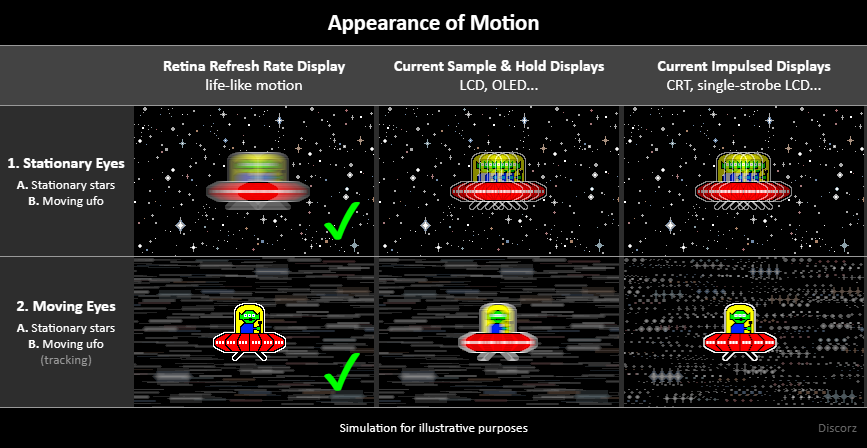
Stationary gaze vs moving eyes doesn't show motionblur the same way:

Image

Discorz has the best image.

Example TestUFO animations that look different whether eye is stationary vs moving.
www.testufo.com/eyetracking
www.testufo.com/persistence
Head of Blur Busters - BlurBusters.com | TestUFO.com | Follow @BlurBusters on: BlueSky | Twitter | Facebook

Image
Forum Rules wrote:  1. Rule #1: Be Nice. This is published forum rule #1. Even To Newbies & People You Disagree With!
  2. Please report rule violations If you see a post that violates forum rules, then report the post.
  3. ALWAYS respect indie testers here. See how indies are bootstrapping Blur Busters research!

mcnabb05
Posts: 6
Joined: 18 Feb 2026, 16:37

Re: NVIDIA G-Sync Pulsar monitor - Asus ROG Strix XG27AQNGV

Post by mcnabb05 » 19 Feb 2026, 17:57

I bought the pulsar monitor, but thinking about returning it since i don't really notice a difference between pulsar on vs off in competitive games. Is OLED a big upgrade to this thing when it comes to competitive games? I never had an OLED before and i really don't want to have to worry about burn-in and deal with warranty replacement etc. Does anyone have both this and a high refresh rate OLED that can help? I play marvel rivals/overwatch/the finals, is there a big difference in those kinds of games compared to the pulsar monitor? Is the latency noticeably lower in games? Thnx

brownvim
Posts: 197
Joined: 22 Jun 2020, 04:15

Re: NVIDIA G-Sync Pulsar monitor - Asus ROG Strix XG27AQNGV

Post by brownvim » 19 Feb 2026, 18:20

brownvim wrote:
19 Feb 2026, 15:53
Given the years of effort NVIDIA has put into Pulsar (coordinating with monitor vendors, custom MediaTek chips, rolling-zone strobing backlights, etc.), I’ve been wondering about something:
"Years of effort" for a scaler IC that's available on the market for 2-3 years now (across multiple different models) and nerfing the bandwidth to HDMI 2.0 TMDS artificially is surely such grand effort? Forcing a GPU vendor lock-in is also surely a mandatory thing. :D
(Discrete) rolling scan backlight strobing is also nothing new, it's present for quite some time now. First model being the 86X in 2023.
I wouldn't be surprised if there's a preset firmware, which pushes such backlight strobing endeavours with ease, as all manifacturers started adopting the 20 steps OD slider & rolling scan around the same time frame.
brownvim wrote:
19 Feb 2026, 15:53
Would it have been significantly easier for them to implement an advanced ShaderBeam-style solution directly at the GPU/driver level, rather than the current monitor-side hardware approach?
It seems like that could have been a simpler ecosystem-wide solution, and all we’d really need are very bright panels. Or am I missing some major technical hurdles that make the Pulsar hardware route the better choice?
Anything software-based requires the computation to be done somewhere.
No, you don't want your GPU to be doing anything.
I think we’re talking past each other a bit.

I wasn’t claiming rolling scan strobing or the scaler IC is brand new.

I was referring to the full integration effort NVIDIA put in: making VRR work seamlessly with adaptive rolling-zone strobing, low crosstalk, and proper G-Sync compatibility across a wide FPS range. That part clearly took real coordination with multiple monitor makers and custom MediaTek work. The Gsync modules have always been better at doing VRR than "Gsync Compatible". For example VRR flicker on OLEDs, don't really see it on my AW3423DW with a Gsync module.

On the software side, I have to disagree with the idea that you don't want the GPU doing anything at all. Modern ShaderBeam-style solutions already run with extremely low overhead. When you compare it to NVIDIA Frame Generation, which does way more heavy processing and is still widely used, a shader for proper VRR-synchronized strobing would be a very small compute cost for the benefit.

@Chief Blur Buster — I was mainly hoping to hear your take on this. Do you think a well-implemented GPU/driver-level ShaderBeam-style solution could have delivered similar (or better) results than the current monitor-hardware Pulsar approach, without needing all that vendor coordination?

Genuinely curious.
5800X3D, RTX 5080 FE, OLED AW3423DW + Acer Pulsar XB273U F5

User avatar
Chief Blur Buster
Site Admin
Posts: 12265
Joined: 05 Dec 2013, 15:44
Location: Toronto / Hamilton, Ontario, Canada
Contact:

Re: NVIDIA G-Sync Pulsar monitor - Asus ROG Strix XG27AQNGV

Post by Chief Blur Buster » 19 Feb 2026, 19:05

brownvim wrote:
19 Feb 2026, 18:20
@Chief Blur Buster — I was mainly hoping to hear your take on this. Do you think a well-implemented GPU/driver-level ShaderBeam-style solution could have delivered similar (or better) results than the current monitor-hardware Pulsar approach, without needing all that vendor coordination?
TLDR:
For reliability: Pulsar outperforms by a wide margin. You need a lot of optimizing in ShaderBeam
For crosstalk: CRT currently outperforms.
For 50Hz PAL and 60Hz NTSC support: CRT currently outperforms (until firmware upgrade).
For blur: CRT already outperforms the fixed-Hz feature of Pulsar for some refresh rates. CRT can go sub-10% persistence for 60fps on 720Hz OLED today, while Pulsar pulsewidth is not adjustable.
For lag: Currently much worse. The dealkiller for esports.

Lag can be reduced later. This question is already answered halfway down at www.blurbusters.com/open-source-display
The software CRT has to be at a different location than ShaderBeam (enforced due to arbitrary stuff), but it can perform close to hardware if it's a beamraced box-in-middle implementation.

Also, motion blur is throttled by MaxHz, so I'd need 2000 Hz OLED to get 1/2000sec 0.5ms MPRT (+ 0.25ms softening for temporal blending effects) for 40-700fps range. I'd need 3:1 margin above MaxHz.

For 360Hz Pulsar to get similar results at fixed Hz at 25% persistence, you'd need 360 * 4 = 1440Hz. But I need a higher MaxHz for reliable temporal blending.

CRT doesn't have to be done at the computer level. It can be done on a GPU-chip level (if NVIDIA adds native lagless refresh cycle shader support later). It can be done in a box-in-middle level like a Retrotink 4K. It can be done in a display firmware.

- Operating Systems (e.g. Valve SteamOS, Microsoft Windows, Apple MacOS/iOS, Linux);
- GPU driver vendors (e.g. NVIDIA, AMD, Intel, Qualcomm);
- Display manufacturers (the whole industry);
- Video Processor Vendors and Video Capture Vendors (e.g. Retrotink, Elecard);
- Independent Software Vendors (e.g. ShaderBeam, RetroArch, Reshade, games, virtual display drivers)
Head of Blur Busters - BlurBusters.com | TestUFO.com | Follow @BlurBusters on: BlueSky | Twitter | Facebook

Image
Forum Rules wrote:  1. Rule #1: Be Nice. This is published forum rule #1. Even To Newbies & People You Disagree With!
  2. Please report rule violations If you see a post that violates forum rules, then report the post.
  3. ALWAYS respect indie testers here. See how indies are bootstrapping Blur Busters research!

Post Reply